
InFocus IN126x
InFocus Projector User Manual
Model: IN126x (F321717)
Sarrera
This manual provides comprehensive instructions for the setup, operation, and maintenance of your InFocus IN126x WXGA Network Projector. Designed for both business presentations and home cinema, this projector delivers 4200 lumens and excellent image quality with high contrast and BrilliantColor technology. Its compact and lightweight design ensures portability while maintaining powerful performance.

Figure 1: InFocus IN126x Projector Front View
This image displays the InFocus IN126x projector from a front-right angle, highlighting its main lens and the sleek black casing. The top panel features control buttons and the InFocus logo.
Segurtasun informazio garrantzitsua
Please read all safety instructions carefully before operating the projector. Failure to follow these instructions may result in fire, electric shock, or other injuries.
- Energia iturria: Use only the power adapter supplied with the projector. Ensure the power outlet matches the voltage eskakizunak.
- Aireztapena: Ez blokeatu aireztapen-irekidurak. Aire-fluxu egokia ezinbestekoa da gehiegi berotzea saihesteko.
- Beroa: Proiektorea lamp and surrounding areas can become very hot during operation. Avoid touching these areas.
- Lamp Abisua: Lamp contains mercury. Dispose of lamps according to local regulations. Do not open the lamp compartment until the projector has cooled down.
- Likidoaren esposizioa: Ez jarri proiektorea euriaren, hezetasunaren edo beste likido batzuen eraginpean.
- Zerbitzua: Ez saiatu produktu hau zuk zeuk ematen. Bidali zerbitzu guztiak zerbitzu kualifikatuko langileengana.

Figure 2: Projector Bottom Panel with Warning Labels
This image shows the underside of the InFocus IN126x projector, displaying various regulatory and safety labels. Notable warnings include information about mercury in the lamp and instructions for lamp replacement, emphasizing the need to allow the unit to cool down before servicing.
Konfigurazio Gida
1. Desontziratzea eta kokatzea
Carefully remove the projector and all accessories from the packaging. Place the projector on a stable, flat surface or mount it securely. Ensure there is adequate space around the projector for proper ventilation.

Figure 3: Projector Dimensions
This image illustrates the physical dimensions of the InFocus IN126x projector. The measurements are approximately 29.2 cm (length), 22.1 cm (width), and 9.8 cm (height), providing a clear understanding of its compact size for placement considerations.
2. Potentzia konektatzea
Connect the power cord to the projector's power inlet and then plug the other end into a grounded electrical outlet.
3. Sarrera iturriak konektatzea
The InFocus IN126x projector supports various input sources. Connect your device (e.g., laptop, Blu-ray player) to the appropriate port on the projector's rear panel.
- HDMI: Definizio handiko bideo eta audio digitalarentzat.
- VGA (Computer 1/2): Ordenagailu analogikoko bideo sarrerarako.
- S-Bideoa/Bideoa: Definizio estandarreko bideoetarako.
- Audio In (Audio 1/2): Audio sarrera analogikorako.
- USB-A/USB-B: For service or specific data transfer.
- LAN: Sarearen konexiorako.
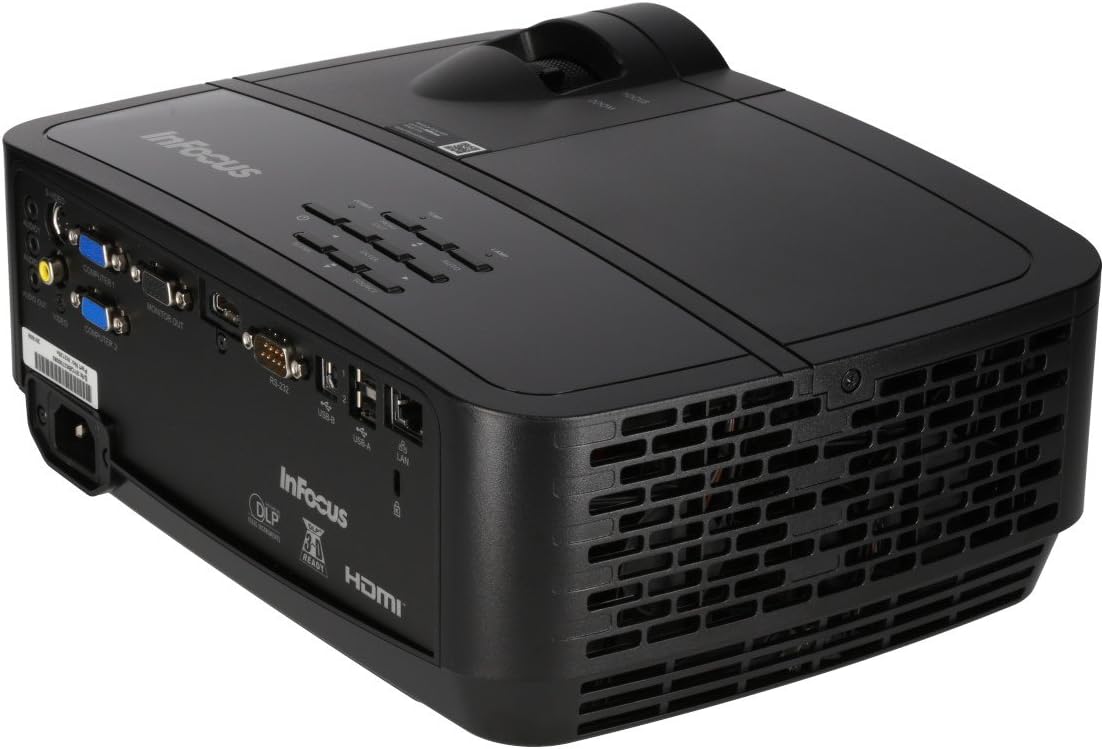
Figure 4: Projector Rear Panel Connectivity
Irudi honek xehetasunak eskaintzen ditu view of the rear panel of the InFocus IN126x projector, clearly showing all available input and output ports. These include HDMI, VGA (Computer 1 and 2), S-Video, Video, Audio In (Audio 1 and 2), Monitor Out, RS-232, USB-B, USB-A, and LAN ports, facilitating diverse connectivity options.
4. Initial Power On and Adjustment
Press the power button on the projector or remote control. The projector will power on and display the input source. Use the focus and zoom rings on the lens to adjust the image clarity and size to your desired projection area.

Figure 5: Projector Top Panel Controls
This image shows the top surface of the InFocus IN126x projector, highlighting the control panel with various buttons for navigation and settings adjustment. The focus and zoom rings on the lens are also visible, used for fine-tuning the projected image.
Funtzionamendu-argibideak
Oinarrizko Kontrolak
Proiektorea unitatearen goiko aldean dagoen kontrol-panela edo barneko urrutiko agintea erabiliz erabil daiteke.
- Pizteko botoia: Proiektorea pizten edo itzaltzen du.
- Iturriaren botoia: Cycles through available input sources (HDMI, VGA, etc.).
- Menuko botoia: Pantailan bistaratzeko (OSD) menua irekitzen du.
- Nabigazio botoiak: Used to navigate through menu options and adjust settings.
- Sartu botoia: Menuko hautaketak berresten ditu.
Menuen nabigazioa eta ezarpenak
Press the Menu button to access the OSD. Use the navigation buttons to select categories such as Picture, Display, Setup, and Advanced. Within each category, you can adjust settings like:
- Distira eta kontrastea: Optimize image visibility.
- Color & Tint: Fine-tune color accuracy.
- Aspektu-erlazioa: Select between 4:3, 16:9, or other ratios to match your content.
- Keystone zuzenketa: Adjust image shape if the projector is not perfectly perpendicular to the screen.
- BrilliantColor Technology: Enhance color vibrancy and detail.
Ezaugarri aurreratuak
The IN126x supports a superior viewing experience, including 3D home cinema (3D Glasses sold separately). For enhanced connectivity, the projector can easily connect to your phone or iPad with a LightCast Key (sold separately).
Mantentzea
Lamp Ordezkoa
Proiektorea lamp has a lifespan of over 5,000 hours. When the lamp reaches the end of its life, a warning message may appear, or the lamp indicator light may illuminate. Always allow the projector to cool down completely (at least 60 minutes) before attempting to replace the lamp. Refer to the safety information on the bottom of the projector for specific warnings regarding mercury content and replacement procedures.
Garbiketa
- Lentea: Erabili lente optikoetarako bereziki diseinatutako zapi leun eta lint-gabea. Ez erabili garbitzaile urratzailerik.
- C proiektoreaasing: Garbitu leun batekin, damp oihal. Saihestu produktu kimiko gogorrak.
- Aire irteerak: Regularly check and clean the air vents to ensure proper airflow and prevent overheating. Use a soft brush or compressed air to remove dust.

Figure 6: Projector Side Ventilation
This image displays the side of the InFocus IN126x projector, prominently featuring the ventilation grilles. These grilles are crucial for dissipating heat generated during operation, and keeping them clear of obstructions is vital for the projector's longevity and performance.
Arazoak konpontzea
| Arazoa | Kausa posiblea | Irtenbidea |
|---|---|---|
| Ez dago irudirik pantailan |
|
|
| Image is dim or poor quality |
|
|
| Soinurik ez |
|
|
Zehaztapenak
| Ezaugarri | Xehetasuna |
|---|---|
| Marka | Infocus |
| Modelo zenbakia | F321717 (IN126x) |
| Produktuaren neurriak | 18.58 x 20.67 x 7.44 hazbete |
| Elementuaren pisua | 5.5 kilo |
| Bistaratzeko ebazpena | 1280 x 800 (WXGA) |
| Konektibitate Teknologia | HDMI, VGA, S-Video, USB, LAN |
| Lamp Bizitza | 5,000 ordu baino gehiago |
| Ezaugarri Berezia | Eramangarria |
| Eskuragarri dagoen lehen data | 7ko abuztuaren 2016a |
Bermearen informazioa
The InFocus IN126x Projector comes with a 2 urteko bermea. InFocus stands behind its products and provides customer service for any issues you may encounter. Please retain your proof of purchase for warranty claims.
Bezeroarentzako Arreta
For technical assistance, troubleshooting beyond this manual, or warranty inquiries, please contact InFocus customer support. Visit the official InFocus website for the most up-to-date contact information, including phone numbers and online support resources.
You can also refer to the official InFocus website for additional resources and FAQs: www.infocus.com
Erlazionatutako dokumentuak - IN126x
 |
InFocus Quantum Laser Nemesis I eta II erabiltzailearen gida InFocus Quantum Laser Nemesis I (P141) eta Nemesis II (P127, P128) proiektoreen erabiltzailearen gida osoa. Laser teknologia, 4K euskarria, instalazio malgua eta funtzionamendua bezalako ezaugarriak jorratzen ditu. |
 |
InFocus IN122a/IN124a/IN126a Projector User Manual & Guide Comprehensive user guide for InFocus IN122a, IN124a, and IN126a projectors, covering setup, operation, connectivity, image adjustment, maintenance, and troubleshooting. |
 |
InFocus LightPro Projector User Guide: Vista II, Genesis III, IV, Orbital Series This user guide provides comprehensive instructions and specifications for the InFocus LightPro projector series, including the Vista II, Genesis III, Genesis IV, and Orbital models. It covers setup, operation, features, troubleshooting, and technical specifications. |
 |
InFocus LP225 Quick Start Guide Get started quickly with the InFocus LP225 multimedia projector. This guide provides essential setup, connection, safety, and usage information for optimal performance. |
 |
InFocus Quantum LED Apex Master IN3058SL erabiltzailearen eskuliburua InFocus Quantum LED Apex Master IN3058SL proiektorearen erabiltzailearen eskuliburu osoa, konfigurazioa, funtzionamendua, urrutiko agintearen funtzioak eta produktuaren xehetasunak azaltzen dituena.view, konexio-atakak, zehaztapenak, arazoak konpontzea eta araudi-betetzea. |
 |
InFocus Quantum Laser Erabiltzailearen Gida Sinplifikatua InFocus Quantum Laser proiektoreentzako erabiltzailearen gida sinplifikatua, segurtasun-argibide funtsezkoak, zehaztapen teknikoak eta oinarrizko funtzionamendu-informazioa eskaintzen dituena. |
Ask a question about this manual
Ask about setup, troubleshooting, compatibility, parts, safety, or missing instructions. Manuals+ will review the question and use this page’s manual context to help answer it.