1. Sarrera
The Comfast CF-WU720N is a compact 150Mbps Wireless USB Adapter designed to provide high-speed wireless connectivity for your desktop or notebook computer. It allows you to connect to a wireless network and access the internet, share files, and enjoy online gaming at speeds up to 150Mbps. This adapter is compliant with IEEE 802.11b/g/n standards and supports USB 2.0 for efficient data transfer.
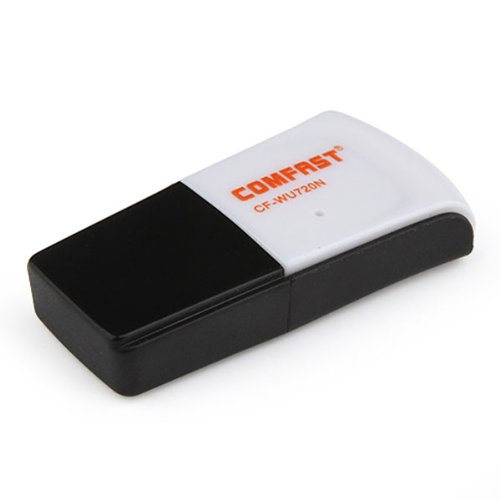
Image 1.1: The Comfast CF-WU720N Wireless USB Adapter, a compact device for wireless connectivity.
2. Produktuaren ezaugarriak
- Meets IEEE 802.11b/g/n wireless standards.
- Supports USB 2.0 interface for broad compatibility.
- Utilizes Realtek 8191 SU chipset for reliable performance.
- Achieves wireless connection rates up to 150Mbps.
- Supports wireless roaming technology for seamless connectivity.
- Strong compatibility with various popular operating systems.
- Compact size: approximately 39 x 12 x 7mm (1.5 x 0.7 x 0.3 inches).
- Lightweight design: approximately 5g.
3. Paketearen edukia
Mesedez, egiaztatu elementu guztiak paketean daudela:
- 1 x Comfast CF-WU720N Wireless USB Adapter
- 1 x Instalazio Azkarreko Gida
- 1 x CD-ROM Driver
- 1 x Berme Txartela

Image 3.1: The retail packaging for the Comfast CF-WU720N, showing the adapter inside.
4. Konfigurazioa eta instalazioa
4.1. Gidariaren instalazioa
Before connecting the USB adapter, it is recommended to install the necessary drivers from the provided CD-ROM. This ensures proper functionality and compatibility with your operating system.
- Insert the driver CD-ROM into your computer's optical drive.
- If the installer does not launch automatically, navigate to "My Computer" or "This PC," open the CD-ROM drive, and run the setup executable (e.g., "setup.exe" or "autorun.exe").
- Jarraitu pantailan agertzen diren argibideei kontrolatzailearen instalazioa osatzeko. Baliteke instalazioa amaitu ondoren ordenagailua berrabiarazteko eskatzea.
- Oharra: If your computer does not have an optical drive, you may need to download the latest drivers from the manufacturer's official webgunea.
4.2. USB egokitzailea konektatzea
Once the drivers are installed, you can connect the Comfast CF-WU720N Wireless USB Adapter to your computer.
- Locate an available USB 2.0 or 3.0 port on your desktop or laptop computer.
- Carefully insert the Comfast CF-WU720N adapter into the USB port. Ensure it is fully seated.
- The operating system should automatically detect the adapter and configure it using the installed drivers. A small LED indicator on the adapter may light up or blink, indicating activity.
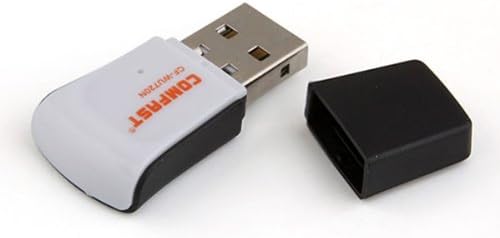
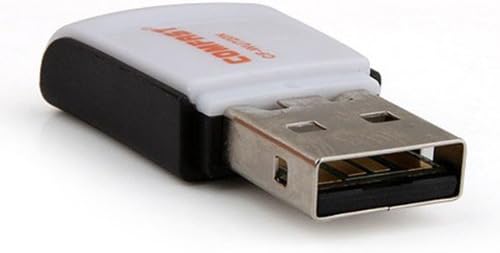
Image 4.1: The Comfast CF-WU720N adapter with its protective cap removed, revealing the USB connector. Image 4.2: A side view of the adapter, highlighting its compact design and USB interface.
5. Funtzionamendu-argibideak
After successful driver installation and adapter connection, you can now connect to a wireless network.
- Sareko ezarpenetara sartzeko:
- Windows: Click the wireless network icon in the system tray (usually bottom-right corner).
- MacOS: Click the Wi-Fi icon in the menu bar (usually top-right corner).
- Linux: Access network settings through your desktop environment's network manager.
- Aukeratu zure sarea: A list of available wireless networks (SSIDs) will appear. Select the name of your desired network.
- Konektatu: Click "Connect" or "Join." If the network is secured, you will be prompted to enter the network security key (password).
- Berretsi konexioa: Once connected, the network icon will typically change to indicate a successful connection, and you should be able to access the internet.
6. Mantentzea
To ensure optimal performance and longevity of your Comfast CF-WU720N Wireless USB Adapter, follow these simple maintenance guidelines:
- Mantendu garbi: Garbitu egokitzailea astiro-astiro zapi leun eta lehor batekin hautsa kentzeko. Saihestu garbitzaile likidoak edo disolbatzaileak erabiltzea.
- Babestu USB konektorea: When not in use, keep the protective cap on the USB connector to prevent dust and damage.
- Saihestu muturreko baldintzak: Ez jarri egokitzailea tenperatura altuen, hezetasunaren edo eguzki-argiaren eraginpean.
- Kontuz maneiatu: Saihestu egokitzailea erortzea edo kolpe gogorren eraginpean jartzea.
- Gidarien eguneraketak: Aldian-aldian egiaztatu fabrikatzailearen webgunea eguneratutako kontrolatzaileen bila, errendimendu eta bateragarritasun onena bermatzeko.
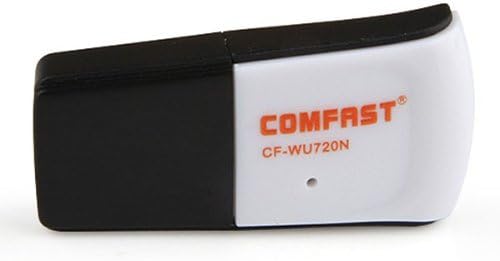
Image 6.1: The Comfast CF-WU720N adapter with its protective cap in place, ready for storage or transport.
7. Arazoak
If you encounter issues with your Comfast CF-WU720N Wireless USB Adapter, refer to the following common solutions:
| Arazoa | Irtenbide posiblea |
|---|---|
| Adapter not detected / No Wi-Fi networks visible. |
|
| Ezin da Wi-Fi sare zehatz batera konektatu. |
|
| Slow connection speed or frequent disconnections. |
|
8. Zehaztapenak
| Ezaugarri | Xehetasuna |
|---|---|
| Eredua | CF-WU720N |
| Haririk gabeko estandarrak | IEEE 802.11b/g/n |
| Interfazea | USB 2.0 |
| Chipset | Realtek 8191 SU |
| Haririk gabeko Abiadura | Gehienez 150 Mbps |
| Maiztasun barrutia | 2.4 GHz |
| Segurtasun Ezaugarriak | WPA/WPA2, WPA-PSK/WPA2-PSK, 64/128-bit WEP |
| Sistema Eragileak | Windows XP/Vista/7/8/10, macOS, Linux (driver dependent) |
| Neurriak (L x W x H) | Gutxi gorabehera 39 x 12 x 7 mm (1.5 x 0.7 x 0.3 hazbete) |
| Pisua | Gutxi gorabehera. 5 g |
9. Bermea eta Laguntza
This product comes with a warranty as specified on the included Warranty Card. Please refer to the card for details regarding warranty period, terms, and conditions.
For technical support, driver updates, or further assistance, please visit the official Comfast webwebgunean edo jarri harremanetan bezeroarentzako arreta-zerbitzuarekin. Harremanetarako informazioa normalean produktuaren ontzian edo fabrikatzailearen eskuliburuan aurki daiteke. webgunea.
Gorde erosketa-agiria bermearen ondorioetarako.