
1. Sarrera eta Overview
This manual provides essential instructions for the safe and efficient use of your Pioneer AVH-X7550BT LCD Touchscreen DVD Player. The AVH-X7550BT features a 17.8cm VGA touch panel display with LED backlight, offering versatile media playback and connectivity options for an enhanced in-car entertainment experience.
Ezaugarri nagusiak hauek dira:
- MIXTRAX (MIXTRAX EZ for Quick Non-Stop MIX Play)
- DivX/MPEG-1, -2, -4/MP3/WMA/iTunes AAC/WAV Playback from USB Device
- Built-in Bluetooth Wireless Technology for hands-free calling and wireless audio streaming
- Android MTP - Direct Control for certain Android phones
- Color Customization (5-Display Colors and 112-Key Colors)
- DVD/CD Player with DVD Video Playback
- Ready for MirrorLink
- 8-Bandeko EQ grafikoa
- Back-Up Camera Ready
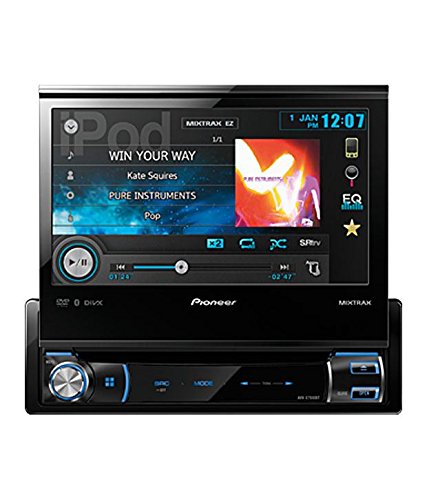
1. irudia: Aurrealdea view of the Pioneer AVH-X7550BT with the screen extended, displaying media playback information.
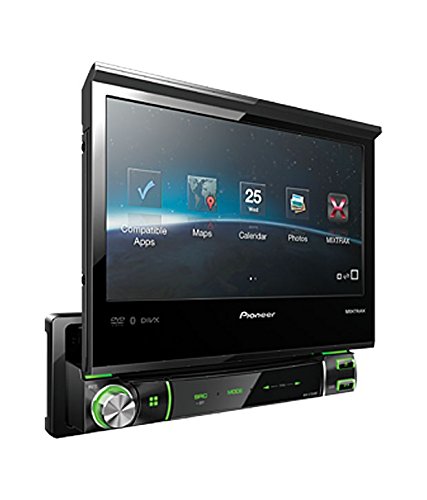
2. irudia: Angeludun view of the Pioneer AVH-X7550BT with the screen extended, showing various application icons.
2. Konfigurazioa eta instalazioa
Proper installation is crucial for optimal performance and safety. It is highly recommended that this unit be installed by a qualified professional car audio technician.
2.1 Hasierako piztea
- Instalatu ondoren, ziurtatu konexio guztiak seguru daudela.
- Turn on your vehicle's ignition to power the unit.
- Follow on-screen prompts for initial setup, which may include language selection and clock setting.
2.2 Kableatuari buruzko gogoetak
Refer to the detailed wiring diagram provided with your product packaging for specific connections. Ensure correct power, ground, speaker, and accessory wire connections to prevent damage to the unit or vehicle electrical system.
3. Funtzionamendu-argibideak
3.1 Oinarrizko Eragiketak
- Piztu/Itzali: Sakatu [SRC/OFF] botoia unitatea pizteko. Sakatu eta eutsi itzaltzeko.
- Bolumen kontrola: Use the rotary knob or on-screen controls to adjust the volume level.
- Iturburuaren hautaketa: Sakatu [SRC] button to cycle through available audio/video sources (e.g., Tuner, DVD, USB, Bluetooth Audio).
3.2 Ukipen-paneleko pantaila
The 17.8cm VGA touch panel allows intuitive control of the unit's functions. Tap icons or swipe to navigate menus and settings.
3.3 Multimedia erreprodukzioa
- DVD/CD: Insert a disc into the disc slot. Playback will begin automatically. Use on-screen controls for navigation (play, pause, skip).
- USB gailua: Connect a USB storage device to the USB port. The unit supports MP3, WMA, iTunes AAC, WAV, DivX, MPEG-1, -2, and -4 files. Select 'USB' as the source.
- MIXTRAX EZ: Activate MIXTRAX EZ for a non-stop mix play experience with various DJ-style effects.
3.4 Bluetooth funtzioak
- Parekatzea: Enable Bluetooth on your mobile phone and search for the AVH-X7550BT. Follow the pairing instructions on both devices.
- Esku libreko deiak: Behin parekatuta, deiak egin eta jaso ditzakezu zuzenean unitatearen bidez.
- Haririk gabeko audioa: Stream music from your Bluetooth-enabled device to the AVH-X7550BT.
3.5 Android MTP and MirrorLink
- Android MTP: Connect certain Android phones via USB for direct control and media playback.
- Ispilu-esteka: The unit is ready for MirrorLink, allowing compatible smartphones to display their interface on the unit's screen. Additional adapters or software may be required.
3.6 Audio and Display Customization
- 8 bandako ekualizazio grafikoa: Access the equalizer settings to fine-tune the audio output to your preference.
- Kolore pertsonalizazioa: Personalize the display with 5 different display colors and 112 key colors.
4. Mantentzea
Regular maintenance helps ensure the longevity and performance of your AVH-X7550BT.
- Pantaila garbitzea: Erabili zapi leun eta lehor bat ukipen-pantaila astiro-astiro garbitzeko. Orban egoskorrak badaude, garbitu apur batampGarbitu zapi bat urarekin edo pantailarako segurua den garbitzaile batekin. Saihestu produktu kimiko gogorrak.
- Diskoak zaintzea: Diskoak ertzetik heldu. Garbi eta marradurarik gabe mantendu. Diskoak beren zorroetan gorde erabiltzen ez dituzunean.
- Arreta orokorra: Saihestu unitatea tenperatura altuen, eguzki-argiaren eraginpean denbora luzez edo hezetasun gehiegizkoaren eraginpean jartzea.
5. Arazoak
Zure unitatearekin arazoak badituzu, jarraitu arazoak konpontzeko ohiko urrats hauek:
- Potentziarik gabe: Egiaztatu konexio elektriko guztiak eta ibilgailuaren fusible-kutxa. Ziurtatu piztea piztuta dagoela.
- Soinurik ez: Verify speaker connections. Check volume levels and ensure the mute function is not active. Confirm the correct audio source is selected.
- Diskoa ez da erreproduzitzen: Ensure the disc is inserted correctly and is clean and free of damage. Check if the disc format is supported.
- Bluetooth konexio-arazoak: Ensure Bluetooth is enabled on both the unit and your mobile device. Try unpairing and re-pairing the devices.
- Ukipen-pantailak ez du erantzuten: Try resetting the unit (refer to your product's specific reset procedure, often a small button requiring a pointed object).
If problems persist, contact Pioneer customer support or a qualified service technician.
6. Zehaztapenak
| Ezaugarri | Zehaztapena |
|---|---|
| Marka | Aitzindaria |
| Eredua | AVH X7550BT |
| Bistaratzeko mota | LCDa |
| Pantailaren tamaina | 17.8 zentimetro |
| Media mota | CD, DVD |
| Gailu bateragarriak | Telefono mugikorra |
| Ezaugarri bereziak | Bluetooth Tethering, MP3, Primary Camera, Touchscreen, USB, Video Playback |
| Konektore mota | Bluetootha |
| Sistema eragilea | Android (gailu bateragarrietarako) |
| Forma-faktorea | Ukipen-pantaila |
7. Bermea eta Laguntza
For warranty information, please refer to the warranty card included with your product packaging or visit the official Pioneer website. For technical support, service, or inquiries, please contact Pioneer customer service through their official channels.
Informazio gehiago eta laguntza baliabideak aurki ditzakezu bisitatuz Pioneer denda Amazonen.