
1. Sarrera
This manual provides essential information for the safe and efficient operation, installation, and maintenance of your Carrier Durakool Plus 42KGL-024D+51MSG-024RD Split Air Conditioner. Please read this manual thoroughly before using your AC unit and retain it for future reference. Proper use and maintenance will ensure optimal performance and longevity of your appliance.
2. Segurtasun informazioa
Segurtasun-argibide garrantzitsuak: Jarraitu beti oinarrizko segurtasun neurriak sute, deskarga elektriko edo lesio arriskua murrizteko.
- Installation must be performed by qualified personnel in accordance with all applicable national wiring standards.
- Ziurtatu elikadura hornidura bolumenarekin bat datorrelatage specified on the unit's nameplate.
- Do not operate the AC unit with wet hands or when standing on a wet surface.
- Mantendu haurrak unitatetik eta urrutiko agintetik urrun.
- Ez sartu objekturik aire-irteeran edo sarreran.
- Itzali korrontea garbitu edo mantentze-lanak egin aurretik.
- In case of abnormal operation (e.g., burning smell), immediately turn off the unit and disconnect the power supply. Contact a qualified service technician.
3. Produktua amaitu daview
The Carrier Durakool Plus 42KGL-024D+51MSG-024RD is a 2 Ton, 2 Star rated split air conditioner designed for residential use. It features a robust rotary compressor and an anti-bacterial filter for improved air quality.
Ezaugarri nagusiak:
- 2 Ton Capacity, 2 Star Energy Rating
- Rotary Compressor for efficient cooling
- Anti Bacterial Filter and Electrostatic Dust Filter for cleaner air
- Sleep Mode and Auto Restart functions
- LCD Remote Control and LED Panel Display
- Auto Fan Speed, Auto Swing, Real Time Clock, Auto Mode, Turbo Mode
Dakarten osagaiak:
- 1 x Main Unit (Indoor Unit)
- 1 x Outdoor Unit (Required, not explicitly listed in "whats_in_the_box" but implied by "Split AC" and "Is Outdoor Unit Required: Yes")
- 1 x Urruneko kontrola
- 1 x Berme Txartela
- Erabiltzailearen eskuliburua (dokumentu hau)
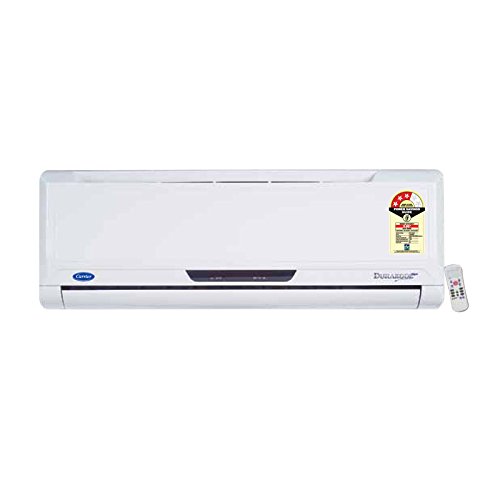
Figure 3.1: Carrier Durakool Plus Split AC Indoor Unit. This image shows the white indoor unit of the air conditioner, typically mounted on a wall.
4. Konfigurazioa
The Carrier Durakool Plus is a split system air conditioner, requiring both an indoor and an outdoor unit. Professional installation is mandatory to ensure proper functioning, safety, and warranty validity.
4.1 Instalazio profesionala
Due to the complexity of refrigerant handling, electrical connections, and structural mounting, installation must be carried out by a certified HVAC technician. Attempting self-installation may void your warranty and pose significant safety risks.
4.2 Gunearen hautaketa
- Barruko Unitatea: Aukeratu gela osoan airea modu uniformean banatzeko aukera ematen duen kokapen bat, eguzki-argitik edo bero-iturrietatik urrun. Ziurtatu unitatearen inguruan nahikoa leku dagoela mantentze-lanetarako.
- Kanpoko unitatea: Choose a well-ventilated area, free from obstructions, and away from direct sunlight or excessive dust. Ensure the unit is placed on a stable, level surface. The outdoor unit should be easily accessible for maintenance.
4.3 Konexio elektrikoa
The unit requires a dedicated power circuit. The electrical wiring must comply with local and national electrical codes. Ensure the power source is properly grounded. Refer to the wiring diagram provided with the outdoor unit for specific connection details.
5. Funtzionamendu-argibideak
Your Carrier Durakool Plus AC unit is controlled via an LCD remote control. Familiarize yourself with the remote's functions for optimal use.
5.1 Urruneko kontrolaren funtzioak
The remote control allows you to adjust temperature, fan speed, operating mode, and set timers. An LED display on the indoor unit will show current settings. Refer to the remote control's specific user guide for detailed button functions and display indicators.
- Pizteko botoia: Unitatea pizten edo itzaltzen du.
- Modu botoia: Funtzionamendu moduen artean txandakatzen da: Automatikoa, Hoztea, Lehortzea, Haizagailua, Berotzea (aplikagarria bada).
- Tenperatura botoiak (▲/▼): Nahi duzun giro-tenperatura doitzen du.
- Fan abiadura botoia: Haizagailuaren abiadura hautatzen du (Automatikoa, Baxua, Ertaina, Altua).
- Swing botoia: Activates or deactivates the automatic vertical air swing.
- Lo egiteko modua: Tenperatura eta haizagailuaren abiadura optimizatzen ditu lo erosoa eta energia aurrezteko.
- Tenporizadorea PIZTU/ITZALTZEA: Sets a specific time for the unit to turn ON or OFF.
- Turbo modua: Provides rapid cooling by operating at maximum fan speed and cooling capacity.
- Berrabiarazte automatikoa: If power is interrupted, the unit will automatically restart with previous settings once power is restored.
6. Mantentzea
Mantentze-lan erregularrak aire girotuaren funtzionamendu eraginkorra bermatzen du eta bizitza luzatzen du. Deskonektatu beti korrontea edozein mantentze-lan egin aurretik.
6.1 Aire-iragazkiaren garbiketa
The unit is equipped with an electrostatic dust filter and an active carbon filter. Clean these filters regularly (every 2-4 weeks, depending on usage and air quality) to maintain cooling efficiency and air quality.
- Itzali korronte alternoko unitatea eta deskonektatu korronte-iturria.
- Ireki barruko unitatearen aurrealdeko panela.
- Kontu handiz kendu aire-iragazkiak.
- Garbitu iragazkiak xurgagailu batekin edo garbitu ur epelarekin eta detergente leun batekin. Ondo garbitu.
- Utzi iragazkiak guztiz lehortzen itzalpean dagoen leku batean berriro sartu aurretik.
- Itxi aurrealdeko panela eta berrezarri energia.
6.2 Garbiketa orokorra
- Garbitu barneko unitatearen kanpoaldea oihal leun eta lehor batekinamp oihal. Ez erabili produktu kimiko gogorrak edo garbitzaile urratzaileak.
- Ensure the outdoor unit's coils are free from debris, leaves, and dirt. Use a soft brush or vacuum to clean the fins.
6.3 Urtaroen mantentze-lanak
It is recommended to have your AC unit professionally serviced annually, especially before the cooling season, to check refrigerant levels, electrical connections, and overall system performance.
7. Arazoak
Zerbitzuarekin harremanetan jarri aurretik, egiaztatu ohiko arazo hauek:
| Arazoa | Kausa posiblea | Irtenbidea |
|---|---|---|
| Unitatea ez da martxan jartzen | No power supply; Remote control batteries depleted; Circuit breaker tripped. | Egiaztatu konexioa; Ordeztu urrutiko agintearen bateriak; Berrezarri etengailua. |
| Hozte nahikoa | Dirty air filters; Doors/windows open; Temperature setting too high; Outdoor unit obstructed. | Clean air filters; Close doors/windows; Lower temperature setting; Clear obstructions from outdoor unit. |
| Ezohiko zarata | Pieza solteak; Unitatea ez dago maila berean; Hondakinak haizagailuan. | Ensure unit is securely mounted; Check for and remove debris. If noise persists, contact service. |
| Barruko unitatetik ur-ihesa | Hustubide-hodi itxita; Instalazio desegokia. | Clear drain pipe obstruction; Contact professional for inspection. |
If the problem persists after attempting these solutions, please contact Carrier customer support or a qualified service technician.
8. Zehaztapenak
| Ezaugarri | Xehetasuna |
|---|---|
| Marka | Garraiolari |
| Ereduaren izena | Durakool Plus 42KGL-024D+51MSG-024RD |
| Edukiera | 2 tona |
| Hozte Potentzia | 6741 Watt |
| Energia Eraginkortasuna | 2 izarreko BEE balorazioa |
| Ezaugarri bereziak | Anti Bacterial Filter, Electrostatic Dust Filter, Sleep Mode, Auto Restart, Auto Swing, Turbo Mode |
| Kolorea | Zuria |
| Zarata maila (barrualdean) | 47 dezibelio |
| Inbertsore mota | Inbertsorerik ez |
| Instalazio mota | Zatiketa Sistema |
| Konpresore mota | Rotary Scroll |
| Oinarrizko materiala | Kobrea |
| Energia iturria | Kable elektrikoa |
| Gomendatutako solairu-azalera | 180 Oin Karratu |
| Kontrol-metodoa | Urruneko Kontrola |
9. Bermea eta Laguntza
9.1 Bermearen informazioa
Your Carrier Durakool Plus AC unit comes with a limited warranty:
- 1 urteko bermea produktuaren gainean.
- 5 urteko bermea konpresorean.
Please retain your purchase receipt and warranty card for any warranty claims. The warranty terms and conditions are detailed on the warranty card included with your product.
9.2 Bezeroarentzako laguntza
For technical assistance, service requests, or further inquiries, please contact Carrier customer support. Refer to your warranty card or the official Carrier website for up-to-date contact information.
You can also visit the official Carrier store for more information: Carrier Store on Amazon.in