
1. Sarrera
This manual provides essential information for the safe and effective use of your WORX WG509 12 Amp Trivac 3-in-1 Electric Leaf Blower, Vacuum, and Mulcher. Please read these instructions carefully before operating the tool and retain them for future reference. Proper understanding of this manual will ensure optimal performance and extend the lifespan of your product.

Image 1.1: The WORX WG509 3-in-1 Electric Leaf Blower, Vacuum, and Mulcher. This image displays the main unit of the tool, showcasing its ergonomic design and the included collection bag, ready for assembly and use.
2. Segurtasun informazioa
Always observe basic safety precautions to reduce the risk of fire, electric shock, and personal injury. Familiarize yourself with all controls and proper use of the appliance.
- Erabili babes pertsonaleko ekipamendu egokia, begien babesa, entzumenaren babesa eta eskularruak barne.
- Ensure the power cord is in good condition and avoid cutting or damaging it.
- Do not operate the tool in wet conditions or near water.
- Mantendu haurrak eta ingurukoak operazio-eremutik urrun.
- Before performing any maintenance or cleaning, always disconnect the tool from the power supply.
- Inspect the work area for objects like rocks, sticks, or debris that could be ejected or damage the impeller.
3. Konfigurazioa eta Muntaketa
The WORX WG509 is designed for straightforward assembly. No special tools are required.
- Despaketatzea: Carefully remove all components from the packaging. Verify that all included items are present: the main blower/vac/mulcher unit and the debris collection bag.
- Haizagailuaren hodia lotzea: Align the blower tube with the outlet on the main unit and secure it firmly.
- Attaching the Collection Bag (for Vacuum/Mulcher mode): For vacuuming and mulching, attach the collection bag to the designated port on the main unit. Ensure the quick-release mechanism is securely fastened.

Image 3.1: Included components of the WORX WG509. This image illustrates the main unit of the 3-in-1 tool and the 1.2-bushel leaf collection bag, highlighting what is provided in the package for initial setup.

Image 3.2: Detail of the collection bag attachment. This close-up shows how the collection bag connects to the main unit, emphasizing the quick-release mechanism for secure and easy fastening.
4. Funtzionamendu-argibideak
The WORX WG509 offers three primary functions: blowing, vacuuming, and mulching. Switching between modes is quick and intuitive.
4.1 Aldaketa moduak
To switch between blower and vacuum/mulcher modes, locate the large knob or lever on the side of the unit. Rotate or slide it to the desired setting. Ensure the mechanism clicks into place before operation.

Image 4.1: Illustration of the mode switch. This image highlights the orange lever used to switch between the blower and vacuum/mulcher functions, indicating its rotational movement for mode selection.
4.2 Puzgailuaren funtzionamendua
In blower mode, the tool delivers up to 350 CFM (Cubic Feet Per Minute) of air volume and 210 MPH (Miles Per Hour) air speed. Use this mode to clear leaves and debris from hard surfaces or to gather them into piles.
- Direct the nozzle towards the debris you wish to move.
- Utilize the variable speed control to adjust airflow for different tasks, from light sweeping to heavy debris removal.

Image 4.2: User operating the WORX WG509 in blower mode. A person is shown using the tool to clear leaves from a lawn, demonstrating its effectiveness in gathering debris.
4.3 Vacuum and Mulcher Operation
In vacuum mode, the tool collects leaves and debris, which are then mulched by the metal impeller at an efficient 18:1 ratio before being deposited into the collection bag. This significantly reduces the volume of yard waste.
- Ensure the collection bag is securely attached.
- Guide the vacuum nozzle over the leaves and debris.
- The tool can reach into narrow spaces, such as under patio furniture, for thorough cleaning.
- The design allows for comfortable one-handed operation.

Image 4.3: User operating the WORX WG509 in vacuum mode. A person is shown using the tool to vacuum leaves from a lawn, with the collection bag attached and worn over the shoulder.
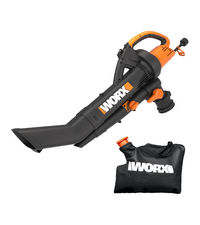
Image 4.4: The WORX WG509 reaching under furniture. This image demonstrates the tool's ability to access tight areas, such as beneath a lounge chair, for effective leaf removal.

Image 4.5: User demonstrating one-handed operation. A person is shown comfortably holding and operating the WORX WG509 with one hand while vacuuming leaves, highlighting its lightweight design.
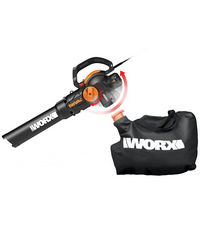
Image 4.6: Visual representation of the 18:1 mulch ratio. This graphic illustrates how 18 bags of unmulched leaves are reduced to the volume of just one bag after processing by the mulcher.
4.7 irudia: Barnekoa view of the metal impeller. This image provides a cutaway view of the tool, showing the metal impeller blades actively mulching leaves inside the housing.
5. Mantentzea
Regular maintenance ensures the longevity and efficient operation of your WORX WG509.
- Garbiketa: After each use, disconnect the power and clean the exterior of the tool with a damp cloth. Ensure all air vents are free from debris.
- Inpultsatzailearen ikuskapena: Periodically inspect the metal impeller for any damage or obstructions. Remove any lodged debris, such as twigs or small rocks, to prevent damage and maintain mulching efficiency.
- Bilketa poltsa: Empty the collection bag regularly. The quick-release design facilitates easy removal and reattachment for disposal or composting. Clean the bag as needed to prevent buildup.
- Biltegiratzea: Gorde tresna leku lehor eta seguru batean, haurren eskura ez dagoen lekuan.
6. Arazoak
This section addresses common issues you might encounter with your WORX WG509.
| Arazoa | Kausa posiblea | Irtenbidea |
|---|---|---|
| Tresna ez da martxan jartzen | Ez dago energia-iturririk; kablea hondatuta; etengailu akastuna. | Check power outlet and cord connection. Inspect cord for damage. If issues persist, contact customer support. |
| Reduced blowing/vacuuming power | Clogged nozzle/tube; full collection bag; impeller obstruction. | Disconnect power. Clear any blockages from the nozzle or tubes. Empty the collection bag. Inspect and clear the impeller area. |
| Gehiegizko dardara edo zarata | Impeller damage; foreign object in impeller. | Disconnect power. Inspect impeller for damage or lodged objects. Remove any foreign material. If damage is severe, seek professional service. |
| Mulcher not effective | Impeller worn or damaged; incorrect material being mulched. | Avoid mulching large sticks, rocks, or wet, heavy debris. Inspect impeller for wear. |
If you encounter problems not listed here or if solutions do not resolve the issue, please contact WORX customer support.
7. Zehaztapenak
| Ezaugarri | Zehaztapena |
|---|---|
| Marka | WORX |
| Modelo zenbakia | WG509 |
| Energia iturria | Kable elektrikoa |
| liburukiatage | 120 voltio (AC) |
| Motorra Amparoa | 12 Amp |
| Aire Fluxuaren Ahalmena | 350 oin kubiko minutuko (CFM) |
| Airearen Gehienezko Abiadura | 210 milia orduko (MPH) |
| Mulch-erlazioa | 18:1 |
| Elementuaren pisua | 9.3 kilo |
| Produktuaren neurriak | 14.1"L x 3.2"Z x 6.3"A |
| Materiala | Akrilonitrilo Butadieno Estirenoa (ABS) |
| Dakarten osagaiak | (1) Blower/Vac/Mulcher, (1) Debris Collection Bag |
| Ezaugarri bereziak | Adjustable Speed, Electric, Leaf Mulcher, Leaf Vacuum, Lightweight |
| UPC | 845534012361 |
8. Bermearen informazioa
The WORX WG509 tool is covered by a 3 urteko berme mugatuaBerme honek materialen eta fabrikazioaren akatsak estaltzen ditu erabilera normalaren pean. Gorde erosketaren egiaztagiria bermearen erreklamazioak egiteko.

Image 8.1: WORX 3-Year Limited Warranty for Tool. This graphic indicates the warranty period for the tool, emphasizing the 3-year coverage.
9. Laguntza
For further assistance, technical support, or to inquire about replacement parts, please contact WORX customer support. You can also refer to the official user manual PDF for additional details: