
Sarrera
The Canon EOS 7D Mark II is a high-performance Digital SLR Camera designed for photographers who demand speed, precision, and durability. Featuring a 20.2 MP CMOS sensor and an ISO range of 100-16000, it excels in various lighting conditions. Its advanced autofocus system and high-speed continuous shooting capabilities make it ideal for capturing fast-moving subjects.
Ezaugarri nagusiak:
- 20.2 MP CMOS sensor and ISO 100-16000
- High speed continuous shooting up to 10.0 fps
- 65-point all cross-type AF system
- Stunning Full HD video with Custom Movie Servo AF (speed and sensitivity)
- Dual Pixel CMOS AF enables you to shoot video like a camcorder
Kutxan dagoena
Upon unboxing your Canon EOS 7D Mark II, please ensure all the following components are present:
- Kameraren gorputza bakarrik
- Kable Babeslea
- USB Interface Cable IFC-150U II
- Bateria LP-E6N
- Bateria kargagailua LC-E6
- EOS Digital Solution Disc
- Wide Neck Strap EW-EOS7DMARKII

Aurrealdea view of the Canon EOS 7D Mark II camera body.
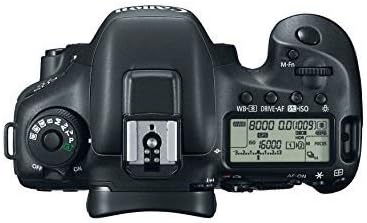
Goiena view of the Canon EOS 7D Mark II camera, showing the mode dial and top LCD panel.
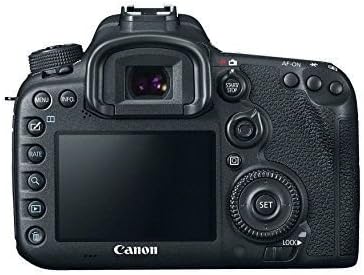
Atzekoa view of the Canon EOS 7D Mark II camera, displaying the LCD screen and control buttons.
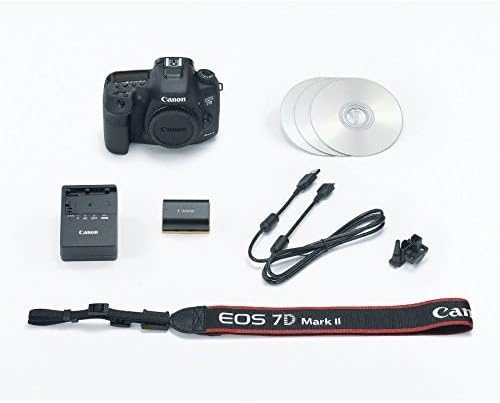
Contents of the Canon EOS 7D Mark II camera box, including the camera body, battery, charger, cables, and strap.
Konfigurazioa
1. Bateria kargatzea
Insert the provided LP-E6N battery pack into the LC-E6 battery charger. Plug the charger into a power outlet. The charging indicator light will show the charging status and turn off when charging is complete. Ensure the battery is fully charged before first use.
2. Lente bat jartzea
Align the red dot on the lens with the red dot on the camera body's lens mount. Rotate the lens clockwise until it clicks into place. To detach, press the lens release button and rotate the lens counter-clockwise.
3. Memoria txartelak sartzea
The EOS 7D Mark II supports both CompactFlash (CF) and SD memory cards. Open the card slot cover. Insert the CF card with the correct orientation into Slot 1 and the SD card into Slot 2 until they click. Close the cover securely.
Kamera erabiltzea
Filmatzeko moduak
Rotate the mode dial on the top left of the camera to select your desired shooting mode (e.g., Program AE, Shutter-priority AE, Aperture-priority AE, Manual, Custom modes). Each mode offers different levels of control over exposure settings.
Autofokatze Sistema
The camera features a sophisticated 65-point all cross-type AF system. You can select AF points manually or use automatic selection. Various AF Area Selection modes are available to suit different shooting scenarios, including Single-point AF, Zone AF, Large Zone AF, and 65-point automatic selection AF.
Etengabeko filmaketa
The EOS 7D Mark II offers high-speed continuous shooting at up to 10 frames per second (fps), making it excellent for capturing action sequences. Set the drive mode to high-speed continuous shooting (H) via the drive mode button on the top panel.
Bideo Grabaketa
To record Full HD video, switch the Live View shooting/Movie shooting switch to the movie shooting icon. Press the START/STOP button to begin and end recording. The Dual Pixel CMOS AF system provides smooth and continuous autofocus during video recording, similar to a camcorder.
Mantentzea
Garbiketa
Regularly clean the camera body with a soft, dry cloth. For the lens and sensor, use specialized cleaning kits and follow manufacturer guidelines to avoid damage. Avoid using harsh chemicals or abrasive materials.
Biltegiratzea
When not in use, store the camera in a cool, dry place away from direct sunlight and extreme temperatures. Use a camera bag or case to protect it from dust and physical impact. Remove the battery if storing for extended periods.
Arazoak konpontzea
Kamerarekin arazoak badituzu, saiatu arazoak konpontzeko oinarrizko urrats hauekin:
- Kamera ez da pizten: Ziurtatu bateria guztiz kargatuta eta behar bezala sartuta dagoela.
- Irudiak lausoak dira: Check focus settings, ensure sufficient light, and consider using a tripod.
- Memoria txartelaren errorea: Sartu berriro txartela, saiatu beste txartel batekin edo formateatu txartela (oharra: formateatzeak datu guztiak ezabatzen ditu).
- No image on LCD: Check if Live View is enabled or if the display is turned off.
For more detailed troubleshooting or complex issues, please refer to the official Canon EOS 7D Mark II User Manual PDF or contact Canon customer support.
Zehaztapenak
| Zehaztapena | Xehetasuna |
|---|---|
| Produktuaren neurriak | 5.87 x 3.07 x 4.41 hazbete |
| Elementuaren pisua | 2 kilo |
| ASIN | B00NEWZDRG |
| Elementuaren modelo-zenbakia | 9128B002 |
| Pilak | Lithium Metal batteries required. (included) |
| Muntaketa bateragarriak | Canon EF |
| Aspektu-erlazioa | 3:2 |
| Argazki sentsoreen teknologia | CMOS |
| Onartua File Formatua | JPEG (EXIF v2.3, DCF v2.0) |
| Irudi Egonkortzea | Ez |
| Zoom optikoa | 7.5 x |
| Gehieneko irekiera | 3.5 milimetro |
| ISO gutxieneko hedatua | 100 |
| Neurketaren deskribapena | Multi, Center-weighted, Spot, Partial |
| Marka | Kanona |
Bermea eta Laguntza
The Canon EOS 7D Mark II comes with a manufacturer's warranty. Please refer to the warranty card included in your product packaging for specific terms and conditions. For technical support, service, or additional information, please visit the official Canon webwebgunean edo jarri harremanetan bere bezeroarentzako zerbitzuarekin.
An official User Manual (PDF) is available for detailed instructions and advanced features:
Deskargatu Erabiltzailearen Eskuliburu Ofiziala (PDF)
Era berean, bisitatu dezakezu Canon Store on Amazon produktu eta laguntza-baliabide gehiago lortzeko.