
Rii Mini i7
Rii Mini i7 Wireless Gyro Mouse Remote Control User Manual
Model: Mini i7 (RT-MWK07)
1. Sarrera
Thank you for choosing the Rii Mini i7 Wireless Gyro Mouse Remote Control. This device combines the functionality of a traditional remote control with a precise gyro mouse, offering versatile control for a wide range of devices. It is designed for use with Smart TVs, game consoles (Xbox 360, Xbox ONE), PCs (Windows, Mac, Linux), Mini PCs, and Android Tablets, providing an intuitive and efficient user experience.

Figure 1: Rii Mini i7 Wireless Gyro Mouse Remote Control, front view.
2. Paketearen edukia
- 1 x Rii Mini i7 Wireless Gyro Mouse Remote Control
- 1 x USB hargailua
- Erabiltzailearen eskuliburua (dokumentu hau)
Note: 2 AAA batteries are required and are not included in the package.
3. Produktua amaitu daview
Familiarize yourself with the layout and functions of your Rii Mini i7 remote control.
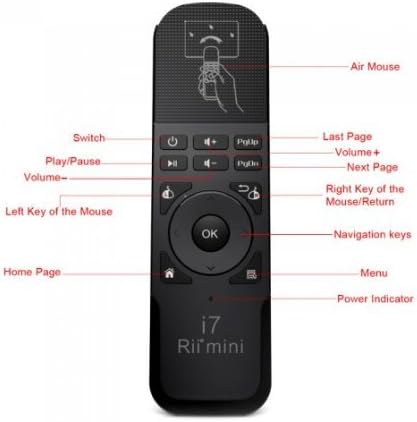
2. irudia: Aurrealdea view of the Rii Mini i7 remote control with labeled buttons.
- Pizteko botoia: Turns the connected device on/off or puts it into standby.
- +/- bolumena: Bolumena doitzen du.
- Erreproduzitu/Pausatu: Multimedia erreprodukzioa kontrolatzen du.
- PgUp/PgDn: Page Up/Page Down functionality.
- Left Mouse Key: Ezkerreko klik baten moduan funtzionatzen du.
- Right Mouse Key/Return: Functions as a right-click or back/return button.
- Ados botoia: Hautaketak berresten ditu.
- Nabigazio teklak: Up, Down, Left, Right for menu navigation.
- Hasierako orrialdearen botoia: Hasierako pantailara itzultzen da.
- Menuko botoia: Testuinguru-menuak irekitzen ditu.
- Potentzia adierazlea: Energia-egoera adierazten duen LED argia.
- Air Mouse: Activates/deactivates the gyro mouse function.

3. irudia: Atzealdea view of the Rii Mini i7 remote control, showing the battery compartment and USB receiver storage.
4. Konfiguratzeko argibideak
4.1. Pilak instalatzea
- Kokatu bateriaren konpartimendua urrutiko agintearen atzealdean.
- Irristatu bateriaren estalkia.
- Insert two (2) AAA alkaline batteries, ensuring correct polarity (+/-).
- Itxi bateriaren estalkia ongi.

Figure 4: Open battery compartment showing placement for AAA batteries and the USB receiver.
4.2. USB hargailua konektatzea
- The USB receiver is stored inside the battery compartment for convenience. Carefully remove it.
- Plug the USB receiver into an available USB port on your Smart TV, PC, game console, Mini PC, or Android Tablet.
- The device should automatically detect and install the necessary drivers. This may take a few moments.
- Once the drivers are installed, the remote control is ready for use.
5. Funtzionamendu-argibideak
5.1. Basic Remote Functions
Most buttons on the Rii Mini i7 function similarly to a standard remote control. Press the corresponding button for power, volume adjustment, media playback (play/pause), and navigation within menus.
5.2. Using the Gyro Mouse (Air Mouse)
- To activate the gyro mouse function, press the dedicated Air Mouse button (often indicated by a hand icon or mouse cursor icon).
- Once activated, move the remote control in the air to control the on-screen cursor. The cursor will follow your hand movements.
- Sakatu Left Mouse Key to click on items.
- Sakatu Right Mouse Key for right-click functionality or to go back in some applications.
- To deactivate the gyro mouse and return to standard button navigation, press the Air Mouse botoia berriro.
5.3. Bateragarritasuna
The Rii Mini i7 is compatible with various operating systems and devices. For optimal performance, ensure your device's software is up to date. While generally plug-and-play, some advanced functions may vary depending on the specific device and application.
6. Mantentzea
6.1. Bateria ordezkatzea
When the remote control's performance degrades or the power indicator light does not illuminate, it is time to replace the batteries. Follow the steps in Section 4.1 to replace the two AAA batteries.
6.2. Garbiketa
Urrutiko agintea garbitzeko, erabili zapi leun eta lehor bat. Zikinkeria egoskorra bada, garbitu zapi pixka bat.amp oihal bat erabil daiteke, baina ziurtatu hezetasunik ez sartzen gailuan. Ez erabili produktu kimiko gogorrik edo garbitzaile urratzailerik.
7. Arazoak
- Urrunekoek ez dute erantzuten:
- Egiaztatu bateriak behar bezala sartuta dauden eta nahikoa kargatuta dauden. Beharrezkoa bada, ordezkatu itzazu.
- Ensure the USB receiver is securely plugged into the device's USB port.
- Verify that the remote control is within the operating range (up to 10 meters) and there are no significant obstructions between the remote and the receiver.
- Try plugging the USB receiver into a different USB port on your device.
- Gyro mouse cursor is erratic or not moving smoothly:
- Ensure the remote is held steady when activating the gyro mouse.
- Try recalibrating the gyro mouse by placing the remote on a flat surface for a few seconds, then picking it up and moving it.
- Egiaztatu beste haririk gabeko gailu batzuek interferentziarik izan dezaketen.
- Botoi espezifikoak ez dira funtzionatzen:
- Some buttons may have different functionalities or may not be supported by all applications or operating systems. Refer to your device's software settings.
- Ensure the remote is not in a significant distance from the receiver.
8. Zehaztapenak
| Ezaugarri | Xehetasuna |
|---|---|
| Ereduaren izena | Mini i7 |
| Modelo zenbakia | RT-MWK07 |
| Marka | Rii (Riitek) |
| Konektibitate Teknologia | Radiofrequency (Wireless) |
| Eragiketa-eremua | Gehienez 10 metro |
| Gailu bateragarriak | Smart TV, Game Consoles (Xbox 360, Xbox ONE), PC (Windows, Mac, Linux), Mini PC, Android Tablet |
| Botoi kopurua | 10 |
| Kontrolagailu mota | Button Control, Gyro Mouse |
| Beharrezko bateriak | 2 x AAA pila alkalinoak |
| Produktuaren neurriak | 13.2 x 2.2 x 4 cm |
| Pisua | 65 gramo |
9. Bermea eta Laguntza
For warranty information and technical support, please refer to the documentation provided with your purchase or contact your retailer. You may also visit the official Riitek weblaguntza gehiago jasotzeko gunea.
Erlazionatutako dokumentuak - Mini i7
 |
Rii K12+ Multifunction Slim Mini Wireless Keyboard User Manual Comprehensive user manual for the Rii K12+ (Model RT-MWK12) wireless keyboard with integrated touchpad. Includes setup, pairing, troubleshooting, and specifications. |
 |
Rii i8+ Mini Haririk gabeko Teklatu Ukipen-panel Konbinazioa: Instalazioa eta Erabiltzaile Eskuliburua Lortu Rii i8+ Mini Haririk gabeko Teklatu eta Ukipen-paneleko Konbinazioaren argibide eta zehaztapen zehatzak. Gida honek konfigurazioa, sistemaren eskakizunak, auto-loa, hatz anitzeko ukipen-panela, atzeko LED argiztapena eta ordenagailuekin, telebista adimendunekin eta beste hainbatekin konexio ezin hobea lortzeko arazoak konpontzea jorratzen ditu. |
 |
Rii K12+ Multifunction Slim Mini Wireless Keyboard User Manual User manual for the Rii K12+ Multifunction Slim Mini Wireless Keyboard with Touchpad, covering setup, features, specifications, and troubleshooting. |
 |
Rii RK200 2.4G Haririk gabeko Teklatu eta Sagu Konbinazioa - Erabiltzailearen Eskuliburua Rii RK200 2.4G Haririk gabeko Teklatu eta Sagu Konbinazioaren eskuliburu ofiziala, ezaugarriak, zehaztapenak, paketearen edukia eta FCCren betetzeari buruzko informazioa zehaztuz. |
 |
Rii Wireless Keyboard and Mouse User Manual (Model RK211) User manual and specifications for the Rii Wireless Keyboard and Mouse (Model RK211). Includes setup instructions, troubleshooting, and technical specifications. |
 |
Rii Mini RT-MWK01 [2.4GHz] Erabiltzailearen eskuliburua Rii Mini RT-MWK01 2.4 GHz-ko haririk gabeko teklatuaren erabiltzailearen eskuliburua, QWERTY diseinua, 27 LED atzeko argiztapena, ukipen-panela eta laser erakuslea dituena. Segurtasun neurriak, funtzionamendu argibideak, mantentze-lanak eta arazoak konpontzea barne hartzen ditu. |
Ask a question about this manual
Ask about setup, troubleshooting, compatibility, parts, safety, or missing instructions. Manuals+ will review the question and use this page’s manual context to help answer it.