
1. Sarrera
Eskerrik asko erosketagatik.asing the Neewer NW910/MK910 i-TTL HSS Speedlite Flash Kit. This comprehensive kit is designed to provide professional lighting solutions for Nikon DSLR cameras, offering advanced features such as i-TTL automatic flash, high-speed sync, master/slave capabilities, and a powerful guide number. The kit includes the NW910/MK910 Speedlite, a 2.4GHz wireless flash transceiver, a set of 35 color gel filters, and a portable softbox, enabling versatile lighting control for various photographic scenarios.
2. Segurtasun informazioa
- Do not expose the flash unit to rain or moisture.
- Do not disassemble or attempt to repair the unit yourself. Refer to qualified service personnel.
- Mantendu haurren eskura.
- Use only specified batteries (AA alkaline or Ni-MH for flash, AAA alkaline for transceiver).
- Avoid direct eye exposure to the flash, especially at close range, as it can impair vision.
- Ensure proper ventilation when using the flash for extended periods to prevent overheating.
- This product is not compatible with Nikon D50, DX1, or DX2 cameras.
3. Paketearen edukia
The Neewer NW910/MK910 i-TTL HSS Speedlite Flash Kit includes the following items:
- (1) Neewer NW910/MK910 i-TTL HSS Speedlite Flash Unit
- (1) 2.4GHz Wireless Flash Transceiver (16 Channels)
- (1) Set of 35 Color Gel Filters
- (1) 6x8 inch (20x15 cm) P-Model Softbox
- (1) Deluxe Flash Case
- (2) Sync Cables (N1-Cord + N3-Cord)

Figure 3.1: All components included in the Neewer NW910/MK910 Speedlite Flash Kit. This image displays the flash unit, wireless trigger, softbox, color filters, and cables.
4. Produktua amaitu daview
4.1 Neewer NW910/MK910 Speedlite Flash
The NW910/MK910 is a powerful i-TTL compatible speedlite with a guide number of 60 (ISO 100, 180mm). It features a rotatable and tiltable flash head, an LCD screen for settings, and supports various flash modes including TTL, Manual, Multi (RPT), High-Speed Sync (HSS), Master, Slave (S1/S2). It also includes features like front-curtain sync, rear-curtain sync, FEB, FE-L, AF assist beam, custom function settings, power saving, and overheat protection.
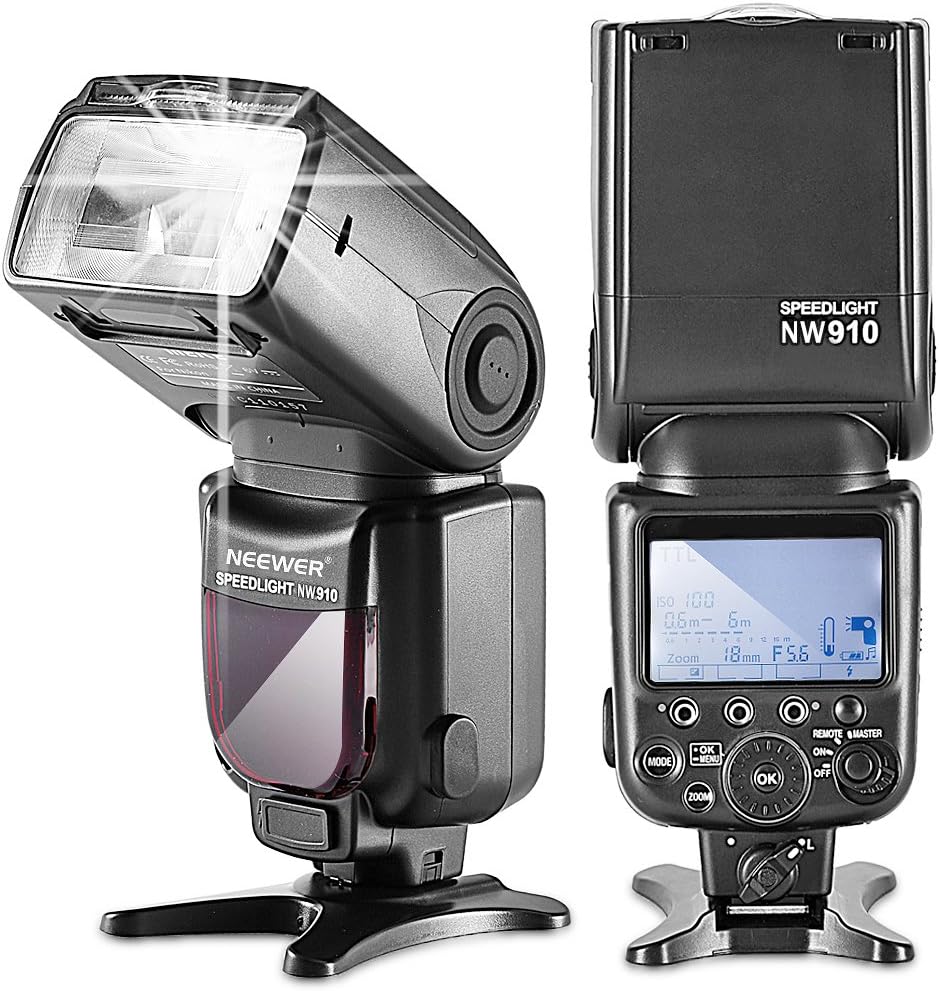
4.1. irudia: Aurrealdea eta alboa views of the Neewer NW910/MK910 Speedlite, highlighting its design and LCD display.
4.2 2.4GHz Wireless Flash Transceiver
This 3-in-1 wireless remote control operates at 2.4GHz and can be used for camera shutter release, speedlite triggering, and studio flash triggering. It offers 16 channels and has an operating distance of up to 100 meters, providing flexible off-camera flash control.
4.3 35-Piece Color Gel Filter Set
The kit includes 35 color gel filters designed for lighting effects and color correction. These filters can be combined to achieve various color temperatures and creative lighting effects, allowing for greater control over your photographic output.
4.4 P-Model Softbox (6x8 inch)
The portable softbox diffuses the flash light to create a softer, more even illumination. This helps to eliminate harsh reflections and shadows, resulting in more flattering and professional-looking images. It is designed for quick setup and portability.
5. Konfigurazioa
5.1 Bateriak instalatzea
For the NW910/MK910 Speedlite: Insert four (4) AA alkaline or Ni-MH batteries into the battery compartment located on the back of the flash unit. Ensure correct polarity.
For the 2.4GHz Wireless Flash Transceiver: Insert two (2) AAA alkaline batteries into the battery compartment. Ensure correct polarity.
5.2 Attaching the Speedlite to your Camera
- Slide the flash unit's hot shoe onto your camera's hot shoe mount.
- Tighten the locking knob on the flash unit to secure it firmly to the camera.

Figure 5.1: The Neewer NW910/MK910 Speedlite securely attached to a Nikon DSLR camera's hot shoe.
5.3 Connecting the Wireless Flash Transceiver
The transceiver can be used in two primary ways: as a wireless trigger or as a wired shutter release.
- Haririk gabeko abiarazlea: Mount one transceiver onto your camera's hot shoe. Set the flash unit to Slave mode (S1 or S2) or Master mode if using multiple flashes. Ensure both the transceiver and flash are set to the same channel.
- Wired Shutter Release: Connect the appropriate sync cable (N1-Cord or N3-Cord) from the transceiver to your camera's remote port. This allows for remote shutter control.

Figure 5.2: The Neewer NW910/MK910 Speedlite and the wireless trigger mounted on a Nikon DSLR camera for wireless flash operation.

Figure 5.3: A Nikon camera connected to the wireless transceiver via a sync cable for wired remote shutter release functionality.
5.4 Attaching the Softbox
The softbox attaches to the flash head using a hook-and-loop fastening system. Simply wrap the softbox around the flash head and secure it firmly. Ensure the diffusing surface faces forward.

5.4. irudia: Xehetasuna view of how the softbox attaches to the flash head using its integrated hook-and-loop fasteners.
5.5 Using Color Gel Filters
The color gel filters can be placed over the flash head to alter the color temperature or add creative color effects to your lighting. They are typically held in place by a small holder or by the softbox's elastic band.

Figure 5.5: The Neewer Speedlite with a color gel filter applied to its flash head, demonstrating how the filters are used.
6. Funtzionamendu-argibideak
6.1 flash moduak
The NW910/MK910 Speedlite supports several flash modes, selectable via the 'MODE' button on the control panel:
- TTL (Lentetik Zehar): Automatic flash exposure control where the camera measures the light through the lens to determine the appropriate flash output.
- M (Eskuzkoa): Allows you to manually set the flash output power from 1/1 (full power) to 1/128 in 1/3 stop increments.
- RPT (Multi/Repetitive Flash): Fires a series of rapid flashes during a single exposure, useful for capturing multiple images of a moving subject in one frame. You can set the flash frequency, number of flashes, and output.
- HSS (Abiadura Handiko Sinkronizazioa): Enables flash synchronization at shutter speeds faster than the camera's normal sync speed (up to 1/8000s), useful for freezing fast motion or using flash in bright ambient light.
- Maisua: The flash unit acts as a master controller to trigger other compatible slave flash units wirelessly.
- Slave (S1/S2): The flash unit acts as a slave, triggered by another flash. S1 mode triggers when it detects the first flash. S2 mode ignores the pre-flash of a TTL system and triggers on the main flash.

Figure 6.1: The LCD screen of the Speedlite displaying various flash modes such as S1 (Slave 1), RPT (Repetitive Flash), and TTL (Through-The-Lens).
6.2 Zoom Adjustment
The flash head's zoom coverage can be adjusted manually or automatically. In auto zoom mode, the flash adjusts its coverage to match the focal length of your lens. In manual zoom, you can set the coverage from 18mm to 180mm to concentrate or spread the light.
6.3 Flash Head Rotation
The flash head can be rotated horizontally 0-360 degrees and tilted vertically from -7 to 90 degrees. This allows for bounce flash photography, where the light is directed off a ceiling or wall for softer, more natural illumination.
6.4 Wireless Trigger Operation
To use the 2.4GHz wireless trigger, ensure both the transmitter (on camera) and receiver (connected to flash or studio light) are powered on and set to the same channel. The trigger can fire the flash remotely up to 100 meters away. For optimal performance, ensure a clear line of sight between the transmitter and receiver.
6.5 Using the Softbox
Attach the softbox to the flash head as described in Section 5.4. The softbox will diffuse the light, creating a larger, softer light source that reduces harsh shadows and specular highlights, ideal for portraits and product photography.
6.6 Using Color Filters
Select the desired color gel filter and attach it to the front of the flash head. These filters can be used to match the flash's color temperature to ambient light, correct color casts, or add creative color effects to your images. Experiment with different colors and combinations to achieve desired results.
7. Mantentzea
- Garbiketa: Use a soft, dry cloth to clean the flash unit and accessories. For stubborn dirt, a slightly damp Oihal bat erabil daiteke, eta berehala lehortu ondoren. Ez erabili disolbatzailerik edo garbitzaile urratzailerik.
- Biltegiratzea: When not in use for extended periods, remove batteries from both the flash unit and the transceiver to prevent leakage. Store the kit in a cool, dry place, away from direct sunlight and extreme temperatures. Use the provided deluxe flash case for protection during storage and transport.
- Bateria zaintzea: Replace batteries when the low battery indicator appears. Dispose of used batteries responsibly according to local regulations.
8. Arazoak
| Arazoa | Kausa posiblea | Irtenbidea |
|---|---|---|
| Flasha ez da pizten. | Low battery, incorrect mode, flash not securely mounted, trigger not synced. | Replace batteries, check flash mode (TTL/M/Slave), ensure flash is properly seated on hot shoe, verify trigger channel settings. |
| Flasharen irteera ilunegia/argiegia da. | Incorrect exposure compensation, manual power setting too low/high, subject too far/close. | Adjust flash exposure compensation (FEC), change manual power setting, adjust distance to subject. |
| Flasha gehiegi berotzen da. | Gehiegizko etengabeko jaurtiketa. | Allow the flash to cool down. Reduce the frequency of flashes. |
| Haririk gabeko abiarazlea ez dabil. | Batteries low, incorrect channel, out of range, interference. | Replace batteries, ensure transmitter and receiver are on the same channel, reduce distance, avoid obstacles. |
| Flasha ez da kamerarekin bateragarria. | Camera model not supported. | Note that NW910/MK910 is not compatible with Nikon D50, DX1, DX2. Check camera compatibility before use. |
9. Zehaztapenak
9.1 Neewer NW910/MK910 Speedlite Flash
| Ezaugarri | Zehaztapena |
|---|---|
| Zirkuitu Diseinua | Insulated Gate Bipolar Transistor (IGBT) |
| Gida Zenbakia | 60 (ISO 100, 180mm) |
| Flash Estaldura | 18-180mm (Manual, Auto Zoom) |
| Flash moduak | TTL / M / RPT / HSS / Master / Slave (S1/S2) |
| Abiadura Handiko Sinkronizazioa | 1/8000s arte |
| Errotazio angelu bertikala | -7 eta 90 gradu artean |
| Errotazio-angelua horizontala | 0 eta 360 gradu artean |
| Haririk gabeko abiarazte distantzia | 12-15m (indoors), 8-10m (outdoors) |
| Kanalak | 4 |
| Esklabo Talde kontrolagarriak | 3 (A, B, C) |
| Argiztapen Orduak | 100-1500 times (with AA alkaline cells) |
| Birziklatu Denbora | Gutxi gorabehera. 3 segundo |
| Kolore Tenperatura | 5600K |
| Flash iraupena | Normal: 1.2ms or shorter; Quick: 2.3ms or shorter |
| Interfaze periferikoa | Hot shoe, PC mount, external charge port |
| Energia iturria | 4 x AA alkaline or AA Ni-MH batteries (not included) |
| Kanpoko Potentzia | CP-E4 battery pack (not included) |
9.2 2.4GHz Wireless Flash Transceiver
| Ezaugarri | Zehaztapena |
|---|---|
| Funtzioa | 3-in-1 wireless remote for camera, speedlite, and studio flash |
| Maiztasuna | 2.4 GHz |
| Distantzia eragilea | 100m arte |
| Kanalak | 16 |
| Sinkronizazio abiadura | 1/250 segundo |
| Energia iturria | 2 x AAA bateria alkalinoak (ez daude barne) |
10. Bermea eta Laguntza
Neewer products are designed for reliability and performance. For specific warranty information, please refer to the warranty card included with your purchase or visit the official Neewer website. For technical support, troubleshooting assistance, or service inquiries, please contact Neewer customer support through their official channels. Keep your purchase receipt as proof of purchase for any warranty claims.