
1. Sarrera
The Argox AS8520 is a high-performance cordless imager designed for efficient barcode scanning. It features advanced wireless communication technology, allowing for a data transmission range of up to 100 meters. Equipped with a long-lasting Li-ion battery and an IP42 sealing level, the AS8520 is built for durability and mobility across various environments, including offices, supermarkets, warehouses, and manufacturing facilities.
2. Produktua amaitu daview
The AS8520 barcode scanner is designed for comfortable handling and robust performance. Key components include the scanning window, trigger button, and ergonomic grip.
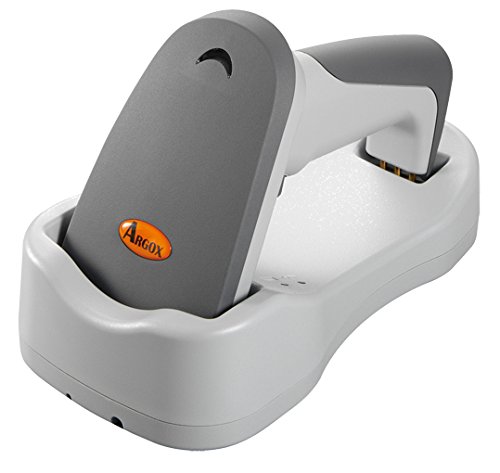
2.1. irudia: Aldea view of the Argox AS8520 Barcode Scanner, showing the ergonomic handle and trigger button.
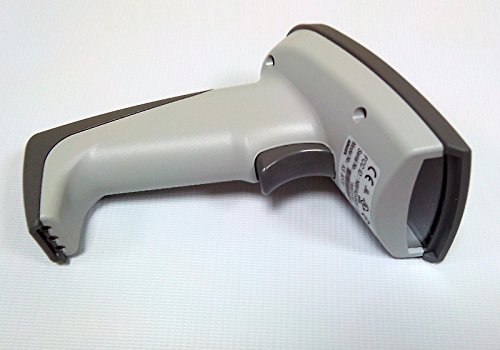
2.2. irudia: Aurrealdea view of the Argox AS8520 Barcode Scanner, highlighting the scanning window and product labels.
3. Konfigurazio gida
3.1. Bateria instalatzea eta kargatzea
- Ensure the scanner is powered off before installing or removing the battery.
- Locate the battery compartment on the scanner handle.
- Insert the Li-ion battery pack, ensuring correct polarity.
- Itxi bateriaren konpartimendua ongi.
- Connect the scanner to its charging base or power adapter using the provided cable. Allow the battery to fully charge before first use.
3.2. Connecting to a Host Device
The Argox AS8520 can connect wirelessly to various host devices, including desktops, laptops, and smartphones. Refer to the separate quick start guide for specific pairing instructions for your operating system or device type.
4. Funtzionamendu-argibideak
4.1. Oinarrizko eskaneatzea
- Ensure the scanner is powered on and successfully paired with your host device.
- Point the scanning window towards the barcode you wish to scan.
- Press and hold the trigger button. A red LED light source (630nm Visible Red LED) will illuminate the barcode.
- Position the scanner at an appropriate distance (the AS8520 offers superior depth of field up to 40 inches on 40-mil codes) until the barcode is successfully read. A successful scan is typically indicated by an audible beep and/or a visual indicator.
- Askatu abiarazteko botoia.
4.2. Eskaneatze Ezaugarri Aurreratuak
- Rapid Scan Rate: The AS8520 provides a rapid scan rate of 450 scans/sec for efficient data capture.
- Barcode Symbology Support: Supports GS1 Databar (RSS) and CS (Composite Symbology) barcodes.
- Eguzki-argiaren irakurgarritasuna: Designed to be readable under direct sunlight conditions.
5. Mantentzea
5.1. Eskanerra garbitzea
- Ziurtatu eskanerra itzalita dagoela garbitu aurretik.
- Erabili lipurrik gabeko zapi leun bat dampened with water or a mild cleaning solution to wipe the exterior of the scanner.
- For the scanning window, use a lens cleaning cloth to avoid scratches.
- Do not use abrasive cleaners, solvents, or immerse the scanner in liquid. The IP42 sealing level protects against dust and light water splashes, but not full immersion.
5.2. Bateria zaintzea
- To maximize battery life, avoid fully discharging the Li-ion battery frequently.
- Gorde eskanerra leku fresko eta lehor batean denbora luzez erabiltzen ez duzunean.
- If the battery performance degrades significantly, consider replacing it with an authorized Argox replacement battery.
6. Arazoak
| Arazoa | Kausa posiblea | Irtenbidea |
|---|---|---|
| Eskanerra ez da pizten. | Bateria deskargatuta dago edo ez dago behar bezala instalatuta. | Kargatu bateria. Ziurtatu bateria bere konpartimentuan behar bezala sartuta dagoela. |
| Eskanerrak ez ditu barra-kodeak irakurtzen. | Barcode is damaged, scanner is too far/close, or incorrect symbology settings. | Ensure the barcode is clear. Adjust scanning distance. Check scanner programming for supported barcode types. |
| Ez da daturik transmititu ostalari gailura. | Scanner not paired or out of range. | Re-pair the scanner with the host device. Ensure the scanner is within the 100-meter transmission range. |
| Scanner is unresponsive. | Softwarearen aldi baterako akatsa. | Perform a soft reset by powering off and then on the scanner. If issues persist, consult the manufacturer's support. |
7. Zehaztapen Teknikoak
| Ezaugarri | Zehaztapena |
|---|---|
| Eredua | AS8520 |
| Eskaneatu tasa | 450 eskaneatu/seg |
| Argi iturria | 630nm Visible Red LED |
| Eskaneatzeko errendimendua | Starting at 0.1mm (4 mil) |
| Eremu sakonera | Up to 40 inches on 40-mil codes |
| Datuen transmisioaren barrutia | 100 meters (wireless) |
| Gailu bateragarriak | Mahaigaina, ordenagailu eramangarria, telefono adimenduna |
| Energia iturria | Battery Powered (Li-ion battery pack) |
| Funtzionamendu-tenperatura | 0°C eta 50°C (32°F eta 122°F) |
| Biltegiratze Tenperatura | -20 °C eta 70 °C (-4 °F eta 158 °F) |
| Hezetasuna | % 10 eta % 90 arteko hezetasun erlatiboa, kondentsaziorik gabekoa |
| Argi Maila | Gehienez 70,000 lux |
| Current - Operating | 225 mA @ 4.2 VCC |
| Current - Standby | 32 mA @ 4.2 VCC |
| Power - Operating | 900 mW |
| Power - Standby | 150 mW |
| Reliability (Trigger) | 1,000,000 aldiz |
| Reliability (Cable) | 320,000 times (90° bend) |
| Drop zehaztapena | 1.5 metro |
| Sealing Level | IP42 |
| Elementuaren pisua | 1.3 kg |
| GTIN/UPC | 702563636336 |
8. Bermea eta Laguntza
For detailed warranty information, please refer to the warranty card included with your product or visit the official Argox website. For technical support, service, or replacement parts, please contact your authorized Argox reseller or Argox customer service directly.