
1. Konfigurazioa
1.1 Desontziratzea eta edukia
Kontu handiz atera telebista eta osagarri guztiak paketetik. Ziurtatu osagai guztiak daudela:
- Sharp LC-40LE653U 40-Inch Smart LED TV
- Urruneko Kontrola
- 2 AA bateria
1.2 Standaren instalazioa
If placing the TV on a table, attach the included stand. Refer to the diagram below for proper assembly. Ensure all screws are securely fastened.
1.3 Kanpoko gailuak konektatzea
Connect your external devices such as cable boxes, Blu-ray players, or gaming consoles to the TV's input ports. The TV features multiple connectivity options.


Eskuragarri dauden portuen artean daude:
- HDMI: 2 ports for high-definition audio and video. One HDMI port supports MHL (Mobile High-Definition Link).
- USBa: 1 port for media playback or connecting a USB device.
- Ethernet: Kable bidezko sare konexiorako.
- Component/Video: For older video devices.
- DTV/TV (Antenna): Antena edo kable bidezko telebistarako konexioa egiteko.
- Audio irteera: Optical for digital audio, and RCA for analog audio.
1.4 Energia-konexioa
After connecting all necessary devices, plug the TV's power cord into a wall outlet.
1.5 Hasierako konfigurazioa
Upon first power-on, the TV will guide you through an initial setup process. This includes language selection, time zone, and network configuration. For Wi-Fi setup, select your network and enter the password.
2. Funtzionamendu-argibideak
2.1 Urruneko kontrolaren funtzioak
Urrutiko aginteari esker, telebistaren funtzio guztietarako sarbidea izango duzu. Sartu bi AA pilak urrutiko agintean, polaritate zuzena ziurtatuz.

- Pizteko botoia (botoi gorria): Telebista pizten edo itzaltzen du.
- Sarrera: Selects the input source (HDMI, TV, USB, etc.).
- VOL +/-: Bolumen-maila doitzen du.
- CH +/-: Telebistako kateak aldatzen ditu.
- Nabigazio botoiak (Gora/Behera/Ezkerra/Eskuina/Sartu): Menuetan nabigatzeko eta aukerak hautatzeko erabiltzen da.
- ADIMENA: Accesses the Smart Central Apps menu.
- MENUA: Opens the main TV menu for settings adjustments.
- NETFLIX: Direct access button for the Netflix application.
2.2 Smart TV Features (Smart Central Apps)
The Sharp LC-40LE653U features Smart Central Apps, providing access to various online services and a web browser. Ensure your TV is connected to the internet via Wi-Fi or Ethernet.

- Aplikazioetara sartzea: Press the 'SMART' button on your remote to open the Smart Central Apps menu.
- Onartutako zerbitzuak: Includes Hulu Plus, Netflix, Pandora, Vudu, and YouTube.
- Web Arakatzailea: Erabili integratua web browser for general internet browsing. Navigation is done via the remote control.
2.3 Wallpaper Mode
When the TV is turned off, Wallpaper Mode can display virtually any image. To use this feature, connect a USB drive containing your desired images to the TV's USB port. Navigate to the Wallpaper Mode settings in the TV menu to select and configure your images.
3. Mantentzea
3.1 Telebista garbitzea
Pantaila garbitzeko, astiro-astiro zapi leun, lehor eta pelusik gabeko batekin garbitu. Orban egoskorrak izanez gero, apur bat garbitu.ampen the cloth with water or a specialized screen cleaner. Avoid using harsh chemicals, abrasive cleaners, or direct spraying of liquids onto the screen or cabinet.
Clean the TV cabinet with a soft, dry cloth. Ensure the TV is unplugged before cleaning.
3.2 Software eguneraketak
Periodically check for software updates through the TV's settings menu to ensure optimal performance and access to the latest features. Updates can be performed via the internet connection.
4. Arazoak
If you encounter issues with your Sharp LC-40LE653U TV, refer to the following common solutions:
- Potentziarik gabe: Ensure the power cord is securely plugged into both the TV and a working wall outlet. Check if the power indicator light on the TV is on.
- Irudi/soinurik ez: Verify the correct input source is selected using the 'Input' button on the remote. Check all cable connections (HDMI, component, etc.) are secure.
- Irudiaren kalitate eskasa: Doitu irudiaren ezarpenak (distira, kontrastea, zorroztasuna) telebistako menuan. Ziurtatu sarrerako iturriak kalitate handiko seinalea ematen duela.
- Ez dago Interneteko konexiorik: Check your Wi-Fi router or Ethernet cable connection. Re-enter your Wi-Fi password in the TV's network settings. Restarting your router may resolve connectivity issues.
- Urruneko kontrola ez dabil: Ordeztu urrutiko agintearen pilak. Ziurtatu ez dagoela oztoporik urrutiko agintearen eta telebistaren IR sentsorearen artean.
For more detailed troubleshooting steps, consult the full online manual or contact customer support.
5. Zehaztapenak
Key technical specifications for the Sharp LC-40LE653U 40-Inch Smart LED TV:
| Ezaugarri | Zehaztapena |
|---|---|
| Modelo zenbakia | LC-40LE653U |
| Pantailaren tamaina | 39.5 hazbete (40 hazbeteko klasea) |
| Bistaratzeko Teknologia | LCDa |
| Ebazpena | 1080p (HD osoa) |
| Freskatze tasa | 60 Hz |
| Aspektu-erlazioa | 16:9 |
| Konektibitate Teknologia | Wi-Fi |
| Hardware interfazea | Ethernet, HDMI, USB |
| Total Number of HDMI Ports | 2 (one with MHL support) |
| USB portuak guztira | 1 |
| Audio Sarrera | HDMI, Optical, USB |
| Bozgorailuaren irteera-potentzia maximoa | 20 Watt |
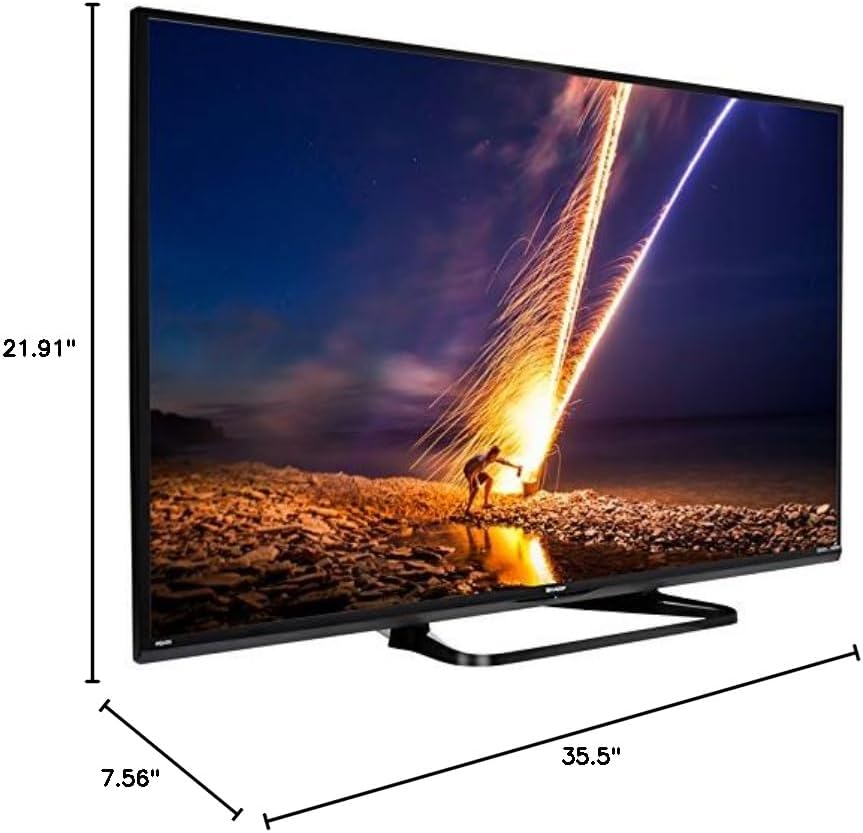
| Produktuaren neurriak (L x W x H) | 7.56" x 35.5" x 21.91" |
| Elementuaren pisua | 16.3 kilo |
| Muntatze Mota | Mahai-muntaia |
| Onartutako Interneteko zerbitzuak | Hulu Plus, Netflix, Pandora, Vudu, YouTube |
| Energy Star Ziurtagiria | Bai |
6. Bermea eta Laguntza
6.1 Produktuaren bermea
This Sharp LC-40LE653U TV comes with a 1 urteko berme mugatuaGorde erosketaren egiaztagiria bermearen erreklamazioetarako. Bermeak erabilera-baldintza normaletan fabrikazio-akatsak estaltzen ditu.
6.2 Bezeroarentzako laguntza
For technical assistance, troubleshooting beyond this manual, or warranty service, please contact Sharp customer support. Refer to the official Sharp webwebgunean edo zure produktuaren erregistro-txartelean kontaktu-informazio eguneratuena lortzeko.