
Sarrera
This manual provides detailed instructions for the Inateck Bluetooth 4.1 Sport Headset, Model P20 (BH1001). Please read this guide thoroughly before using the product to ensure proper operation and to maximize your listening experience. This headset is designed for active lifestyles, offering wireless audio with a secure fit and integrated microphone.
1. Konfigurazioa
1.1 Paketearen edukia
Egiaztatu elementu guztiak paketean daudela:
- Inateck Bluetooth Sport Headset (P20 / BH1001)
- USB kargatzeko kablea
- Multiple pairs of silicone ear tips (various sizes)
- Eramateko poltsa
- Erabiltzailearen eskuliburua (dokumentu hau)
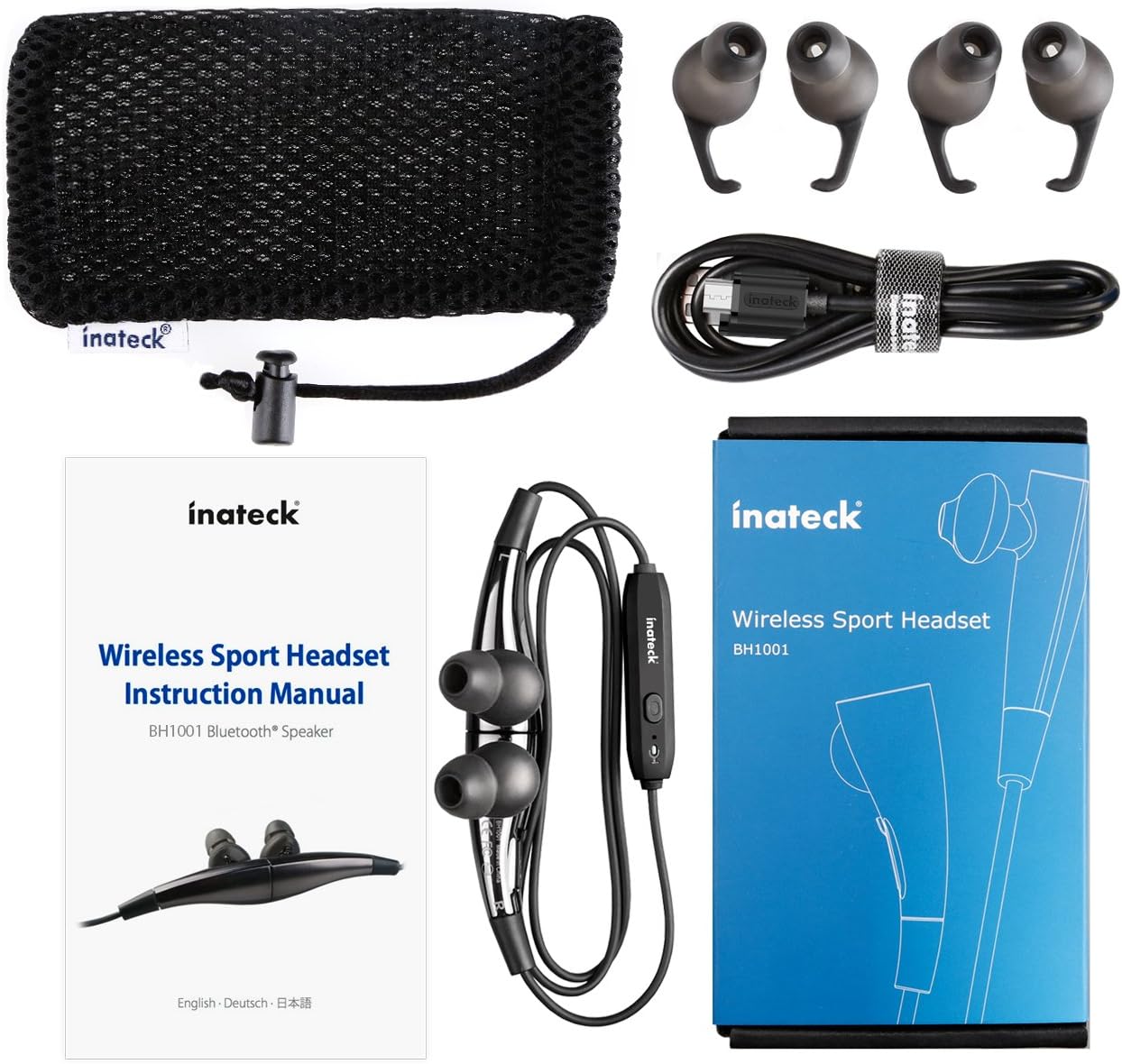
1.1. irudia: Contents of the Inateck Bluetooth Sport Headset package.
1.2 Entzungailuak kargatzea
Before first use, fully charge the headset. A full charge takes approximately 3 hours and provides at least 8 hours of music playback.
- Locate the Micro USB charging port on the headset.
- Connect the small end of the provided USB charging cable to the headset's Micro USB port.
- Konektatu USB kablearen mutur handiena USB elikatze-iturri batera (adibidez, ordenagailuko USB ataka, USB hormako egokitzailea).
- The status indicator light will illuminate during charging. It will change color or turn off once charging is complete.

1.2. irudia: Charging the Inateck Bluetooth Sport Headset via Micro USB.
1.3 Bluetooth gailu batekin parekatzea
To connect your headset to a smartphone or other Bluetooth-enabled device:
- Ziurtatu entzungailuak itzalita daudela.
- Press and hold the Multifunction Key (MFB) on the inline control unit for approximately 5-7 seconds until the status indicator light flashes red and blue alternately. This indicates pairing mode.
- Zure Bluetooth gailuan, gaitu Bluetooth eta bilatu gailu berriak.
- Select "Inateck BH1001" or "Inateck P20" from the list of available devices.
- Once paired, the status indicator light on the headset will flash blue slowly, and you may hear an audible confirmation.
- The headset will automatically attempt to reconnect to the last paired device when turned on.

1.3. irudia: Inateck Headset paired with a mobile device for music playback.
2. Funtzionamendu-argibideak
2.1 Entzungailuen kontrolak
The inline control unit provides easy access to various functions:

2.1. irudia: Amaituview of the Inateck Headset control unit.
- Multifunction Key (MFB):
- Press and hold (5-7s): Power On/Off, Enter Pairing Mode
- Sakatu laburra: Musika erreproduzitu/pausatu, Deia erantzun/amaitu
- Long press (during incoming call): Reject call
- Bolumena igo (+) / Hurrengo abestia:
- Sakatu laburra: bolumena handitu
- Luze sakatu: hurrengo pistara joateko
- Bolumena jaitsi (-) / Aurreko abestia:
- Sakatu laburra: gutxitu bolumena
- Long press: Go to previous track
- Mikro USB ataka: Entzungailua kargatzeko.
- Egoera adierazlea: Energia, parekatzea eta kargatze egoera erakusten ditu.
- Mikrofonoa: Esku libreko deiak egiteko.
2.2 Entzungailuak janztea
Select the ear tips that provide the most comfortable and secure fit for your ears. The headset is designed to be worn with the cable behind your neck, ensuring stability during physical activity.

2.2. irudia: Proper wearing of the Inateck Sport Headset for active use.
2.3 Magnetic Earbuds Feature
The earbuds feature integrated magnets. When not in use, you can connect the two earbuds together, forming a necklace around your neck. This action automatically pauses music playback and prevents the headset from falling off.

2.3. irudia: Magnetic earbuds feature for secure wearing around the neck.

2.4. irudia: Headset worn as a necklace using the magnetic feature.
3. Mantentzea
- Garbiketa: Wipe the headset with a soft, dry cloth. Do not use abrasive cleaners or solvents.
- Belarrietarako aholkuak: Regularly remove and clean the silicone ear tips with mild soap and water. Ensure they are completely dry before reattaching.
- Biltegiratzea: When not in use, store the headset in the provided carrying pouch to protect it from dust and damage. Avoid extreme temperatures.
- Uraren erresistentzia: The headset is designed to be water-resistant for sports and exercise (e.g., sweat, light rain). Do not submerge it in water or expose it to heavy rain.
4. Arazoak
4.1 Ezin da piztu
Ensure the headset is fully charged. Connect it to a power source using the USB cable and allow it to charge for at least 30 minutes before attempting to power on again.
4.2 Ezin da gailuarekin parekatu
- Ensure the headset is in pairing mode (status indicator flashing red and blue alternately).
- Make sure Bluetooth is enabled on your device and it is within range (typically 10 meters or 33 feet).
- Turn off and on the Bluetooth function on your device.
- If previously paired, try "forgetting" or "unpairing" the headset from your device's Bluetooth settings and then re-pair.
- Ziurtatu beste Bluetooth gailuek ez dutela konexioa oztopatzen.
4.3 Soinurik ez edo soinu kalitate eskasa
- Egiaztatu entzungailuen eta konektatutako gailuaren bolumen-maila.
- Ensure the headset is properly paired and connected to your device.
- Move closer to your device to reduce potential interference or range issues.
- Ensure the ear tips are correctly seated in your ears for optimal sound delivery.
- Reboot both the headset and your connected device.
4.4 Konexio etengabea
- Ensure there are no physical obstructions between the headset and your device.
- Avoid placing your device in areas where the signal might be blocked (e.g., deep pockets, behind thick walls).
- Gutxitu beste haririk gabeko gailuen (Wi-Fi bideratzaileak, beste Bluetooth gailuak) interferentziak.
- Keep the headset and your device within the recommended Bluetooth range.
5. Zehaztapenak
| Marka | Inateck |
| Ereduaren izena | P20 |
| Modelo zenbakia | BH1001 |
| Konektibitate Teknologia | Bluetooth 4.1 |
| Forma-faktorea | Belarri barnean |
| Belarrien Kokatzea | Intra-aural |
| Aurikularretarako Jack | USB (kargatzeko) |
| Uraren Erresistentzia Maila | Waterproof (suitable for sweat/light rain) |
| Ezaugarri bereziak | Sports and exercise, integrated microphone, magnetic earbuds |
| Elementuaren pisua | 78 gramo |
| Kontrol mota | Bolumenaren kontrola, funtzio anitzeko botoia |
| Materiala | Plastikoa |
6. Bermearen informazioa
Inateck products typically come with a limited warranty. For specific warranty terms and conditions applicable to your Inateck Bluetooth Sport Headset, please refer to the warranty card included in your product packaging or visit the official Inateck webgunea. Gorde erosketaren egiaztagiria bermearen erreklamazioetarako.
7. Bezeroarentzako arreta
If you encounter any issues not covered in this manual or require further assistance, please contact Inateck customer support. You can usually find contact information, FAQs, and additional resources on the official Inateck webgunea:
Webgunea: www.inateck.com
Please have your product model (P20 / BH1001) and purchase details ready when contacting support.