
Sarrera
The myTouchSmart Plug-In Indoor/Outdoor Digital Timer is designed to simplify the automation of your lighting and appliances. This weather-resistant timer features two grounded outlets, offering versatile control for landscape, patio, and seasonal lighting. It provides both customizable "My On/Off Time" settings and convenient daily preset options, along with a 24-hour countdown feature. The large LCD screen and blue LED indicators ensure easy programming and monitoring of active programs. Compatible with various light sources including CFL, LED, incandescent, and halogen, this UL listed product is built for convenience and energy efficiency.
Produktuaren Ezaugarriak
- Easy-to-set digital timer with two grounded outlets for landscape, patio, and seasonal lights and appliances.
- Features simple daily preset options, fully customizable "My On/Off Time" settings, and a custom, up to 24-hour countdown feature.
- Weather resistant for both outdoor and indoor use. Includes an attached bracket for easy mounting and installation.
- Compatible with CFL, LED, incandescent, and halogen light sources.
- Large LCD screen and blue LED indicators to show active programs.
- Electrical Rating: 125V/60Hz, 15A/1875W General purpose/resistive.
- CSA listed for safety.

Figure 1: Control outdoor or indoor lights with the myTouchSmart timer.

Figure 2: The timer is weather resistant and suitable for outdoor use.
Konfigurazio Argibideak
- Hasierako piztea: Plug the timer into a standard 125V AC outlet. The LCD screen will illuminate. If the screen is blank or not reading, plug it in for at least one hour to charge the internal battery.
- Ezarri uneko ordua:
- Sakatu ERLOIA botoia.
- Erabili GORA (▲) eta BEHERA (▼) arrows to adjust the hour.
- Sakatu ERLOIA again to move to minutes, then use the arrows to adjust.
- Sakatu ERLOIA a third time to confirm and exit time setting.
- Muntaketa: Use the integrated mounting bracket to securely attach the timer near your desired outlet. Ensure the timer is positioned to prevent water accumulation.

Figure 3: Simple setup involves setting the current time and custom ON/OFF times.
Video 1: An instructional video demonstrating how to set the current time and program ON/OFF times on the myTouchSmart timer.
Funtzionamendu-argibideak
Setting Custom ON/OFF Times ("My On/Off Time")
- Ezarri pizteko ordua:
- Sakatu MY ON TIME button. The display will show the current ON time setting.
- Erabili GORA (▲) eta BEHERA (▼) arrows to adjust the desired ON hour.
- Sakatu MY ON TIME again to move to minutes, then use the arrows to adjust.
- Sakatu MY ON TIME a third time to confirm and save the ON time. The blue LED indicator next to "my on time" will illuminate when active.
- ITZALTZEKO ordua ezarri:
- Sakatu MY OFF TIME button. The display will show the current OFF time setting.
- Erabili GORA (▲) eta BEHERA (▼) arrows to adjust the desired OFF hour.
- Sakatu MY OFF TIME again to move to minutes, then use the arrows to adjust.
- Sakatu MY OFF TIME a third time to confirm and save the OFF time. The blue LED indicator next to "my off time" will illuminate when active.
Using Preset Schedules
The timer offers three convenient preset schedules:
- Evening (5pm-12am): Sakatu ARRATSALDEA botoia.
- Morning (5am-8am): Sakatu GOIZ botoia.
- All Night (6pm-6am): Sakatu ALL NIGHT botoia.
To activate a preset, simply press the corresponding button. The blue LED indicator next to the selected preset will light up.
24-Hour Countdown
To use the countdown feature:
- Sakatu MY COUNTDOWN botoia.
- Erabili GORA (▲) eta BEHERA (▼) arrows to set the desired countdown duration (up to 24 hours).
- Sakatu MY COUNTDOWN again to start the countdown. The timer will turn ON for the set duration and then turn OFF.

Figure 4: Program custom ON/OFF times or select from convenient preset schedules.
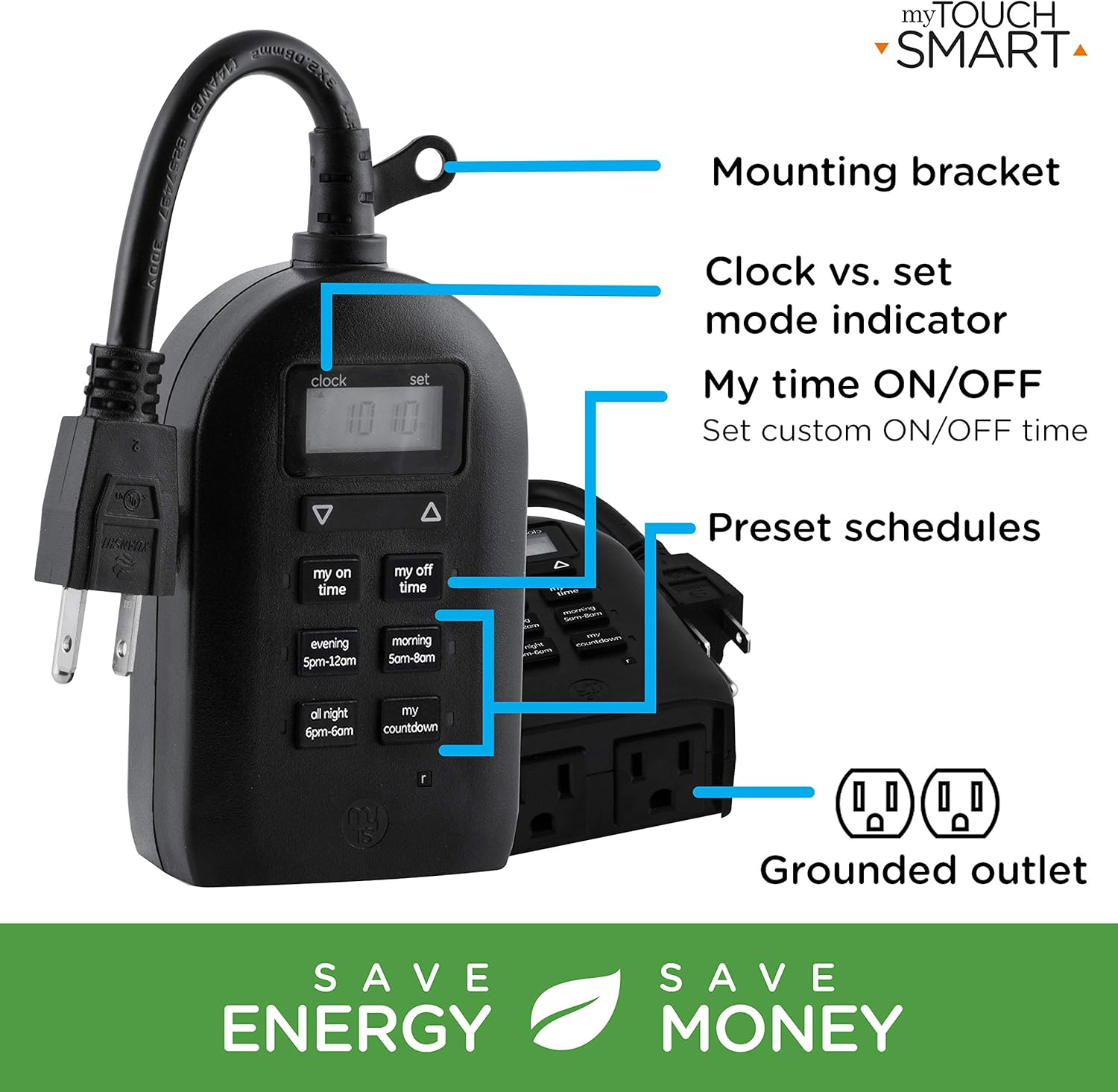
Figure 5: Key features and controls of the myTouchSmart timer.
Mantentzea
- Garbiketa: Disconnect the timer from the power outlet before cleaning. Wipe the exterior with a soft, damp oihal. Ez erabili produktu kimiko gogorrak edo garbitzaile urratzaileak.
- Biltegiratzea: Denbora luzez erabiltzen ez baduzu, gorde tenporizadorea leku fresko eta lehor batean, eguzki-argitik eta muturreko tenperaturetatik babestuta.
- Barne bateria: The timer contains an internal battery to maintain settings during power outages. If the display is dim or blank, plug the timer into an outlet for at least one hour to recharge the battery.
Arazoak konpontzea
| Arazoa | Kausa posiblea | Irtenbidea |
|---|---|---|
| Tenporizadorearen pantaila hutsik edo ilun dago. | Barneko bateria baxua edo agortuta dago. | Plug the timer into a live outlet for at least one hour to charge the internal battery. |
| Connected device does not turn ON/OFF. |
|
|
| Tenporizadoreak ez du erantzuten botoi sakatzeari. | Softwarearen aldi baterako akatsa edo bateria baxua. | Unplug the timer from the outlet for a few minutes, then plug it back in. Allow the internal battery to charge if the display was dim. |
Zehaztapenak
| Ezaugarri | Xehetasuna |
|---|---|
| Modelo zenbakia | 26898-P1 |
| Balorazio elektrikoa | 125V AC, 60Hz, 15A, 1875W (General Purpose/Resistive) |
| Saltokiak | 2 Lurratutako Saltokia |
| Neurriak | 3.2"S x 7"Z x 7.5"A (gutxi gorabehera) |
| Elementuaren pisua | 9.92 ontza |
| Bistaratzeko mota | LCDa |
| Muntatze Mota | Plug-in Muntaia |
| Ziurtagiriak | UL Listed, CSA Listed |
| Barne Bateria | Yes (for settings retention) |

Figure 6: Product dimensions for the myTouchSmart timer.
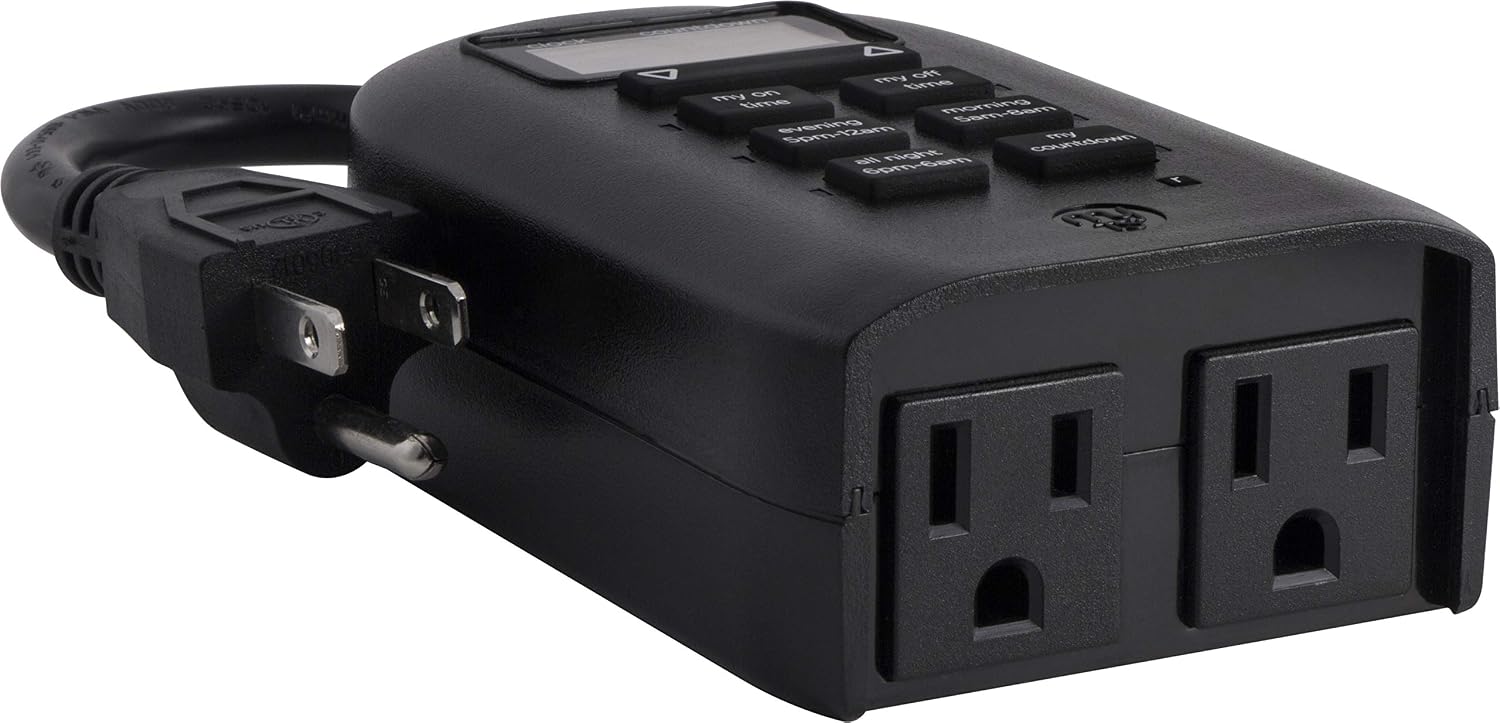
Figure 7: Dual grounded outlets for connecting devices.
Bermea eta Laguntza
This myTouchSmart timer is backed by a urtebeteko berme mugatua from the date of purchase. For warranty claims or technical support, please refer to the contact information provided with your product packaging or visit the official myTouchSmart webgunea.
Baliabide gehiago lortzeko, webgune ofizialera ere jo dezakezu Erabiltzailearen eskuliburua (PDF) or Instalazio eskuliburua (PDF) sarean eskuragarri.