
1. Sarrera
This document provides essential information for the activation and utilization of your Fortinet FortiGate-70D-POE License, specifically the 1-year 24x7 FortiCare service (FC-10-070DP-247-02-12). This license is designed to enhance the security and operational efficiency of your FortiGate-70D-POE network security appliance by providing comprehensive support and access to advanced threat intelligence services.
2. Lizentziaren aktibazioa
To begin utilizing the FortiCare services and security subscriptions, your license must be activated. This process typically involves registering the license key with your Fortinet account and associating it with your FortiGate-70D-POE device.
Aktibazio urratsak:
- Locate Your License Certificate: Your license key is provided on the license certificate, often included with your purchase or delivered electronically.
- Access the FortiCare Support Portal: Navigate to the official FortiCare support portal (support.fortinet.com) using a web arakatzailea.
- Log In or Create an Account: If you do not have a Fortinet account, create one. Otherwise, log in with your existing credentials.
- Erregistratu zure produktua: Within the portal, locate the "Product Registration" or "Register Your Product" section.
- Enter License Information: Input the license key and any other required details as prompted. Ensure the FortiGate-70D-POE serial number is correctly associated.
- Berretsi aktibazioa: Follow the on-screen instructions to complete the activation. A confirmation will typically be sent to your registered email address.

Image: The Fortinet FortiGate-70D-POE License activation key box, indicating the physical or digital delivery of the license. This box contains the necessary information for license registration and activation.
For detailed, step-by-step instructions, refer to the official Fortinet documentation available on the FortiCare support portal.
3. FortiCare Support Services Overview
Your FortiCare license provides access to various levels of technical support and advanced replacement services, ensuring the continuous operation and security of your FortiGate-70D-POE device.
Available FortiCare Services:
- FortiCare 8x5 Service: Provides access to technical support via the web portal, online chat system, and telephone during business hours (8 hours a day, 5 days a week). Includes return and replace for hardware failures.
- FortiCare 24x7 Service: Offers round-the-clock access to mission-critical support services, 365 days a year, 24 hours a day. This includes technical support and advanced replacement service for hardware failures. Your FC-10-070DP-247-02-12 license includes this service.
- FortiCare 360 Service: An advanced service combining Fortinet's cloud-based analytics with premium support. It enables proactive approaches to rapid detection and remediation of current and potential security and performance issues, helping to avoid breaches and downtime.

Irudia: Gehiagoview illustrating the different FortiCare Support Services: 8x5, 24x7, and 360, each represented by an icon on a laptop screen, highlighting their respective coverage levels.
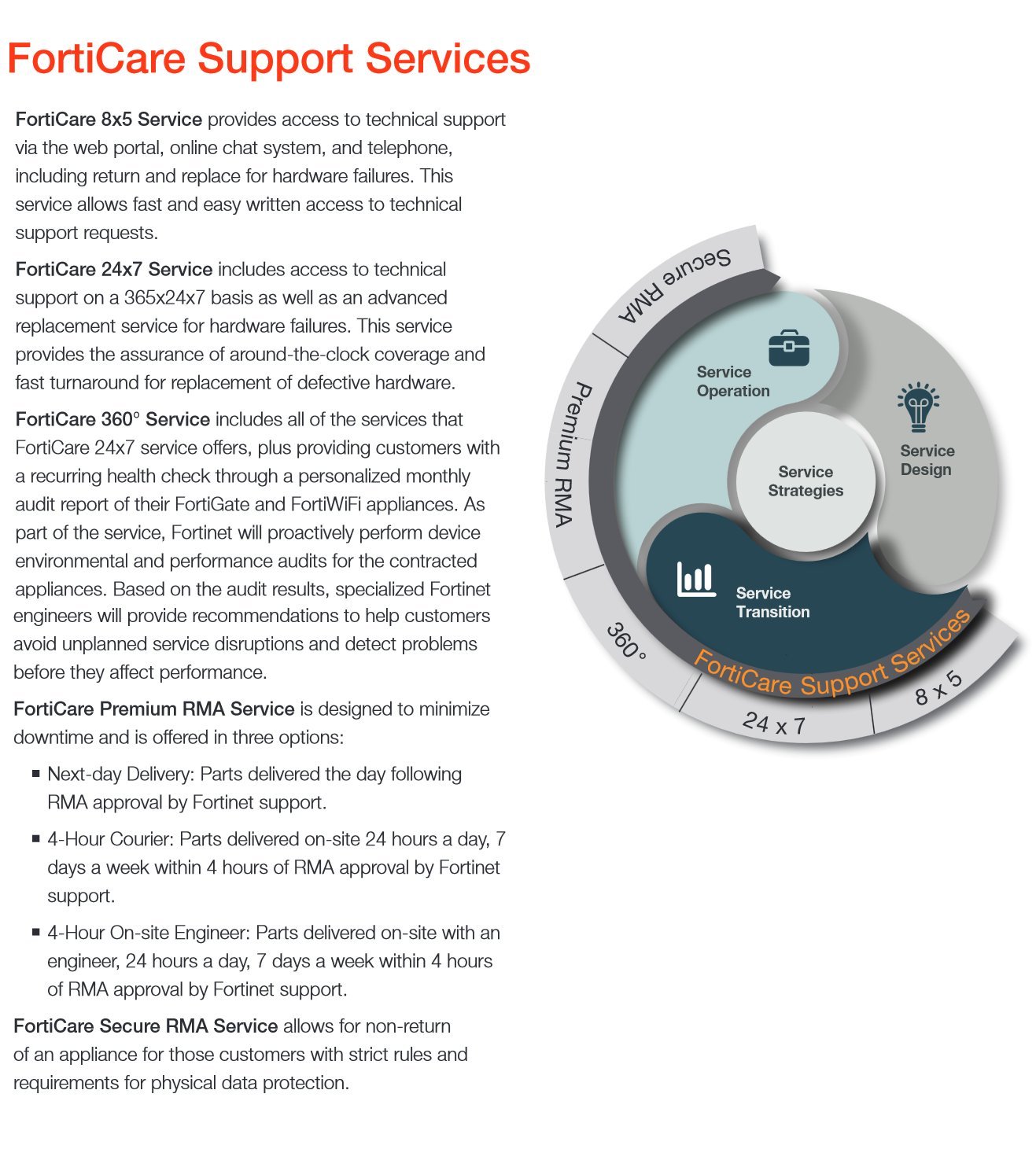
Image: A detailed diagram outlining the components of FortiCare Support Services, including Service Operation, Service Strategies, Service Design, and Service Transition, with emphasis on 24x7, 8x5, and 360 support levels and Premium RMA.
4. FortiGuard Security Subscriptions
Beyond technical support, your FortiCare license grants access to FortiGuard security subscriptions, which provide real-time threat intelligence and comprehensive protection against evolving cyber threats.
Key Security Subscriptions Included:
- Hurrengo Belaunaldiko Aplikazioen Kontrola eta IPS: Application control and intrusion prevention (IPS) are foundational security technologies for your FortiGate. FortiGuard IPS signatures are continuously updated to defend against new threats.
- Web Iragazkia: Categorizes and filters over 160 million websites, providing granular control over web access and protecting against malicious sites.
- Birusen aurkakoa: FortiGuard Labs identifies and neutralizes malware programs, including traditional malware, and advanced persistent threats.
- Web Application Security Service: Provides automated updates to protect your sensitive data and content from the latest application-layer threats, including SQL injection and cross-site scripting.
- Spamaren aurkakoa: Offers highly effective antispam solutions to protect against unsolicited and often malicious email.
- Ahultasunen eskaneatzea: Helps identify and manage the latest software vulnerabilities on endpoint devices and in your organization's network.
- Botnet IP eta Domeinuaren Ospea: Blocks approximately 32,000 botnet command & control communication attempts daily, preventing compromised devices from participating in botnet activities.
- Database Security Control: Offers centrally managed, enterprise-scale database protection that covers known exploits, configuration weaknesses, OS issues, and regulatory compliance.
- Segurtasun Zerbitzu Mugikorra: Protects your organization against attacks targeting mobile platforms, providing effective protection against the latest threats.
- Mehatxuen aurkako Babes Aurreratua (FortiSandbox Cloud): Integrates with FortiSandbox for advanced threat detection, analyzing suspicious files and links in a secure environment to identify zero-day threats.

Irudia: Gehiagoview of Fortinet's Security Subscriptions, highlighting key benefits such as up-to-the-minute threat intelligence and top-rated effectiveness.

Image: A detailed visual representation of various FortiGuard Subscription Options, including Next Generation Application Control and IPS, Web Filtering, Antivirus, Web Application Security Service, Antispam, Vulnerability Scan, Botnet IP and Domain Reputation, Database Security Control, Mobile Security Service, and Advanced Threat Protection (FortiSandbox Cloud).
5. Service Management and Maintenance
Effective management of your FortiCare license and associated services is crucial for maintaining optimal security and performance of your FortiGate-70D-POE device.
Key Management Activities:
- FortiCare Portal Access: Regularly log into the FortiCare support portal to monitor your license status, view service entitlements, and manage registered devices.
- Firmware eguneraketak: Ensure your FortiGate-70D-POE device is running the latest firmware versions. FortiCare services often include access to critical security updates and patches.
- Security Content Updates: FortiGuard subscriptions automatically deliver real-time updates for antivirus definitions, IPS signatures, web filtering categories, and other security content. Verify that these updates are being applied successfully.
- Service Renewal: Keep track of your license expiration date to ensure continuous protection. Renew your FortiCare license before it expires to avoid any service interruptions.
6. Arazoak eta laguntza
Should you encounter any issues with your FortiGate-70D-POE device or the FortiCare services, Fortinet provides comprehensive support channels.
Laguntzara sartzea:
- FortiCare Support Portal: The primary point of contact for technical support. You can open support tickets, access knowledge base articles, and find documentation.
- Telefono-laguntza: For urgent issues, utilize the 24x7 telephone support provided with your license. Contact numbers are available on the FortiCare portal.
- Lineako txata: For quick queries, the online chat system is available during specified service hours.
- Komunitate foroak: Fortinet's community forums can be a valuable resource for peer-to-peer support and solutions to common issues.
When contacting support, be prepared to provide your FortiGate-70D-POE serial number, your FortiCare license key, and a detailed description of the issue you are experiencing.
7. Zehaztapenak
Key specifications related to the Fortinet FortiGate-70D-POE License (FC-10-070DP-247-02-12):
| Atributua | Xehetasuna |
|---|---|
| Modelo zenbakia | FC-10-070DP-247-02-12 |
| Marka | FORTINET |
| Zerbitzu Mota | FortiCare 24x7 Support and Security Subscriptions |
| Zerbitzuaren Iraupena | 1 Urte |
| Produktu elkartua | FortiGate-70D-POE |
| Elementuaren pisua | 1 Pounds (for packaging/documentation) |
| Eskuragarri dagoen lehen data | 21ko urriaren 2015a |
| Fabrikatzailea | Fortinet |
| ASIN | B015019B94 |
| UPC | 619587326580 |
8. Bermeari eta laguntzari buruzko informazioa
This FortiCare license provides comprehensive support and service coverage for a period of one year from the date of activation. The 24x7 FortiCare service ensures that you have access to technical assistance and hardware replacement options around the clock.
Support Details:
- Zerbitzuaren iraupena: 1 Year from activation date.
- Laguntza teknikoa: Available 24 hours a day, 7 days a week, via web portal, chat, and phone.
- Hardwarearen ordezkapena: Advanced replacement service for eligible hardware failures of the associated FortiGate-70D-POE device. Specific terms and conditions apply and are detailed on the FortiCare portal.
- Software eguneraketak: Access to firmware updates and patches for the FortiGate-70D-POE.
- Security Content Updates: Continuous, real-time updates for FortiGuard security services (antivirus, IPS, web filtering, etc.).
For the most current and detailed warranty and support terms, please refer to the official Fortinet website and the FortiCare support portal (support.fortinet.com).