
1. Sarrera
The Sony SBH54 is a versatile Stereo Bluetooth Headset designed for wireless communication and audio playback. It offers both handset and headset functionalities, allowing you to take and make calls, view messages, listen to music, and tune into FM radio directly from its display. Crafted from premium metal with a splash-proof design, it combines elegance with durability.
Key features include Bluetooth Wireless 3.0, NFC technology for easy pairing, an OLED display, and built-in noise cancellation for clear audio during calls. The headset supports A2DP profile and can connect to two devices simultaneously.
2. Produktua amaitu daview
The SBH54 features a compact design that fits comfortably in your hand. It includes an OLED display for information at a glance and physical controls for media and call management.
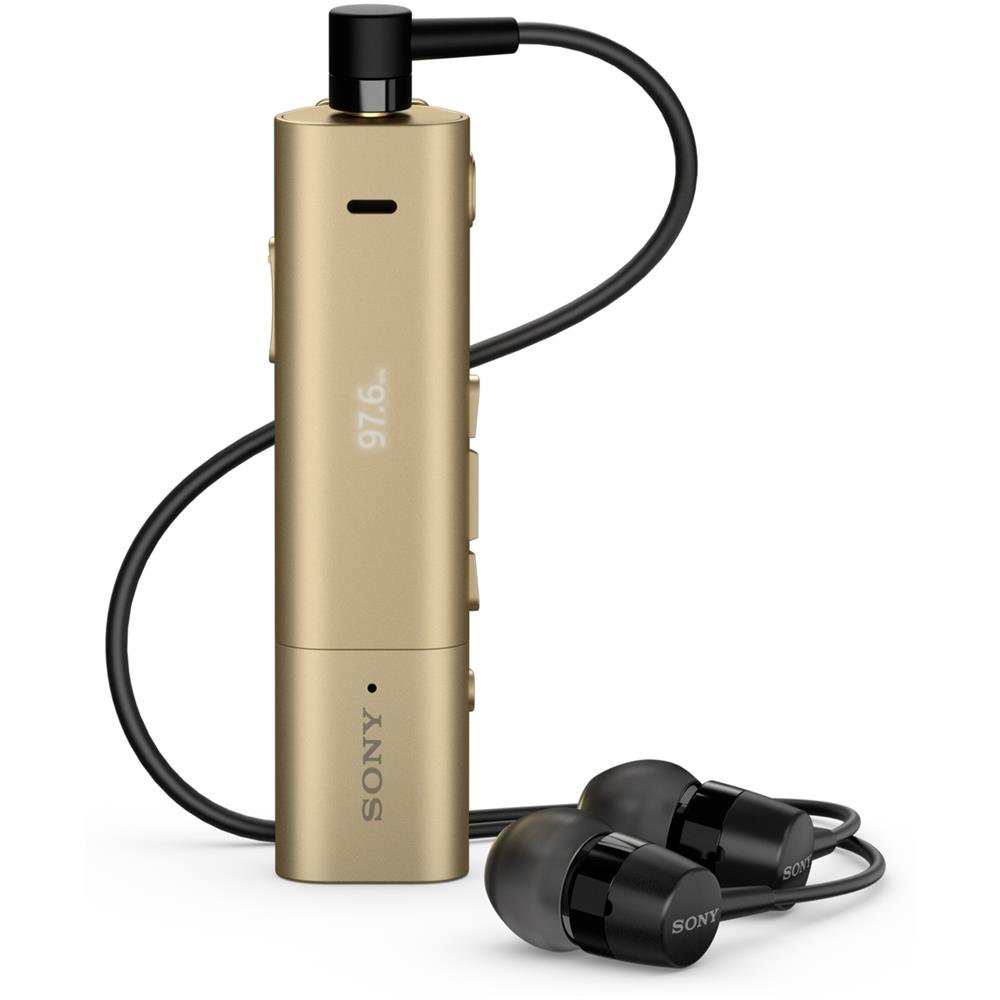
Image: Sony SBH54 Gold Stereo Bluetooth Headset. This image displays the compact, gold-colored headset with its integrated clip and display screen.
Kontrolak eta adierazleak:
- OLED pantaila: Shows caller ID, messages, music track information, and FM radio frequency.
- Funtzio anitzeko botoia: For call answering/ending, play/pause music.
- Bolumen-botoiak: Doitu audioaren bolumena.
- Nabigazio botoiak: For menu navigation and track skipping.
- Mikrofonoa: Integrated for voice calls.
- Aurikularrak Jack: 3.5mm port for connecting the included premium headphones.
- Kargatzeko ataka: Mikro USB ataka gailua kargatzeko.
3. Konfigurazioa
3.1 Entzungailuak kargatzea
- Connect the supplied USB cable to the headset's charging port and to a USB power adapter or a computer's USB port.
- Pantailan dagoen bateriaren adierazleak kargatze-egoera erakutsiko du.
- Kargatu entzungailuak guztiz lehen erabili aurretik.
3.2 Pairing with a Device (Bluetooth)
- Ziurtatu entzungailuak kargatuta eta itzalita daudela.
- Press and hold the power button until the headset enters pairing mode (indicated by a specific light pattern or message on the display).
- Zure telefonoan edo Bluetooth gaitutako beste gailu batean, gaitu Bluetooth eta bilatu eskuragarri dauden gailuak.
- Select "SBH54" from the list of found devices.
- Eskatzen bazaizu, idatzi "0000" pasahitza (lau zero).
- Behin parekatuta, entzungailuak konexio arrakastatsua adieraziko du.
3.3 Pairing with a Device (NFC)
For devices with NFC (Near Field Communication):
- Ensure NFC is enabled on your smartphone and the screen is unlocked.
- Touch the NFC detection area of your smartphone to the NFC detection area on the SBH54 headset.
- Jarraitu pantailako edozein gomendio parekatzeko prozesua amaitzeko.
4. Entzungailuak erabiltzea
4.1 Piztu/Itzali
- Pizteko: Eduki sakatuta pizteko botoia pantaila piztu arte.
- Itzaltzeko: Sakatu eta eutsi pizteko botoia pantaila itzali arte.
4.2 Deiak egitea eta jasotzea
- Dei bati erantzutea: When a call comes in, press the multi-function button.
- Dei bat amaitzea: During a call, press the multi-function button.
- Dei bat ukatzea: Press and hold the multi-function button when a call comes in.
- Dei bat egitea: Dial the number on your phone. The call will automatically route to the headset. You can also use voice commands if supported by your phone.
- Handset Function: The compact SBH54 can be used as an unobtrusive handset for calls.
- Zarata baliogabetzea: The headset features echo, wind, and noise cancellation for clear voice transmission.
- HD ahotsa: Enhances voice clarity for both parties during a call.
4.3 Musika erreproduzitzea
- Erreproduzitu/Pausatu: Sakatu funtzio anitzeko botoia.
- Hurrengo ibilbidea: Press the forward navigation button.
- Aurreko pista: Press the backward navigation button.
- Bolumen kontrola: Erabili bolumena igotzeko/jaisteko botoiak.
4.4 FM Irratia
- Aktibatu FM irratia: Navigate through the headset menu to select the FM Radio function.
- Sintonizazio estazioak: Use the navigation buttons to scan or manually tune to FM frequencies.
- Gorde aurrezarpenak: The headset may allow saving favorite stations (refer to on-screen prompts).
5. Mantentzea
- Garbiketa: Garbitu entzungailuak oihal leun eta lehor batekin. Saihestu produktu kimiko gogorrak edo material urratzaileak erabiltzea.
- Uraren erresistentzia: The SBH54 has a splash-proof design. This means it can withstand light splashes of water but should not be submerged or exposed to heavy rain. Ensure the charging port cover is securely closed.
- Biltegiratzea: Gorde entzungailuak leku fresko eta lehor batean, eguzki-argitik eta muturreko tenperaturetatik babestuta.
- Bateria zaintzea: Bateriaren iraupena luzatzeko, saihestu bateria maiz erabat deskargatzea. Kargatu aldizka.
6. Arazoak
Ohiko arazoak eta irtenbideak:
- Headset does not power on: Ziurtatu bateria kargatuta dagoela. Konektatu energia-iturri batera eta saiatu berriro.
- Cannot pair with a device:
- Ziurtatu entzungailuak parekatze moduan daudela.
- Ziurtatu Bluetootha gaituta dagoela zure gailuan.
- Hurbildu entzungailuak gailura.
- Berrabiarazi entzungailuak eta gailua.
- Garbitu aurreko Bluetooth konexioak zure gailuan eta saiatu berriro parekatzen.
- Ez dago audiorik edo audioaren kalitate eskasa:
- Egiaztatu entzungailuen eta konektatutako gailuaren bolumen mailak.
- Ensure the headset is within range of your device.
- Deskonektatu eta berriro konektatu Bluetooth konexioa.
- Ensure the headphones are properly plugged into the 3.5mm jack.
- FM irratia ez dabil: Ziurtatu FM seinale ona duen eremu batean zaudela.
7. Zehaztapenak
| Ezaugarri | Xehetasuna |
|---|---|
| Marka | Sony |
| Modelo zenbakia | SBH54GD |
| Kolorea | Urrea |
| Belarrien Kokatzea | Belarrian |
| Forma-faktorea | Belarrian |
| Zarata Kontrola | Zarata Deuseztatze Aktiboa |
| Elementuaren pisua | 0.1 kilogramo |
| Audio kontrolatzaile mota | Gidari dinamikoa |
| Maiztasun barrutia | 20 Hz - 20,000 Hz |
| Itxituraren Materiala | Metala |
| Gailu bateragarriak | Smartphones, Laptops, Tablets, Bluetooth-enabled Devices |
| Uraren Erresistentzia Maila | Water Resistant (Splash-proof) |
| Konektibitate Teknologia | Bluetootha, NFC |
| Haririk gabeko Teknologia | Bluetootha, NFC |
| Bluetooth bertsioa | 3.0 |
| Kontrol mota | Komunikabideen kontrola |
| Kontrol-metodoa | Urrunekoa |
8. Bermea eta Laguntza
For warranty information and customer support, please refer to the documentation included with your purchase or visit the official Sony support webgunea. Berme-baldintza espezifikoak eskualdearen eta saltzailearen arabera alda daitezke.
Lineako laguntza: www.sony.com/electronics/support