
Sarrera
This manual provides detailed instructions for the setup, operation, and maintenance of your Homtime C12PRO Docking Station Speaker. The C12PRO integrates a Bluetooth speaker, FM radio, alarm clock, and dual USB charging capabilities, designed for convenient everyday use.
Paketearen edukia
Mesedez, egiaztatu behean zerrendatutako elementu guztiak zure paketean sartuta daudela:
- 1 x Homtime C12PRO Speaker Unit
- 1 x korronte egokitzailea
- 1 x Erabiltzailearen eskuliburua
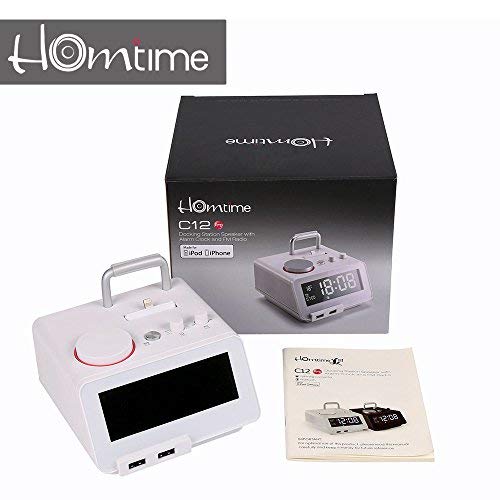
Irudia: Contents of the Homtime C12PRO package, showing the main speaker unit, power adapter, and the user manual.
Produktua amaituview
Familiarize yourself with the various components and controls of your C12PRO unit.

Irudia: Aurrealdea view of the Homtime C12PRO with an iPhone docked. The large digital display shows time and temperature, and the front features dual USB charging ports.

Irudia: Aurrealdea view of the Homtime C12PRO without a phone docked. This image clearly shows the digital display, the docking connector, and the control buttons on the top surface.
Aurrealdeko panela eta pantaila
- Large 4.2-inch LCD Display: Shows time, alarm status, and room temperature (Celsius or Fahrenheit). Brightness is adjustable.
- USB bikoitza kargatzeko ataka: Located at the front base for convenient charging of external devices.
Goiko paneleko kontrolak
- Docking Connector: Apple Certified Lightning connector for iPod/iPhone.
- Control Buttons/Knobs: For setting time, alarm, volume, mode selection, and FM radio tuning.
Atzeko panelaren konexioak
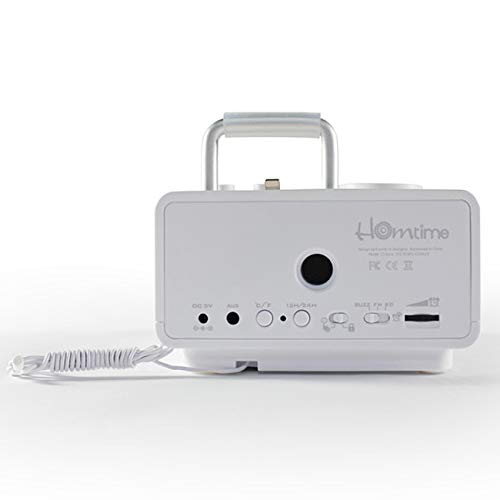
Irudia: Atzekoa view of the Homtime C12PRO. This image displays the DC 9V power input, AUX-in port, 12H/24H time format button, and other rear controls.
- DC 9V potentzia sarrera: Konektatu hemen emandako energia-egokigailua.
- AUX sarrerako ataka: 3.5 mm-ko jack-a kanpoko audio iturriak konektatzeko.
- 12H/24H Button: Toggles between 12-hour and 24-hour time display formats.
- Beste kontrolak: May include snooze/dimmer, alarm on/off, and FM antenna connection.
Konfigurazioa
- Deskonprimitu unitatea: Carefully remove the C12PRO speaker and all accessories from the packaging.
- Konektatu energia: Insert the DC plug of the power adapter into the DC 9V input port on the rear of the unit. Plug the power adapter into a standard wall outlet. The display will illuminate.
- Hasierako orduaren ezarpena:
- Eduki sakatuta ORDUA button (location may vary, typically on top or rear).
- Erabili +/- buttons or rotary knob to adjust the hour. Press ORDUA berriro baieztatzeko.
- Adjust the minute using the +/- buttons or rotary knob. Press ORDUA to confirm and exit time setting mode.
- 12 orduko eta 24 orduko formatuaren artean aldatzeko, sakatu 12H/24H atzeko paneleko botoia.
- Doitu pantailaren distira: Sakatu SNOOZE / DIMMER button (often combined) repeatedly to cycle through brightness levels.
- Ezarri Tenperatura Unitatea: Hala badagokio, sakatu ° C / ° F button to switch between Celsius and Fahrenheit display for room temperature.
Funtzionamendu-argibideak
Piztu/Itzali
Sakatu BOTEREA button to turn the unit on or off. When off, the clock display remains active.
Alarma ezartzea
- Eduki sakatuta ALARMA MULTZOA button. The alarm hour will flash.
- Erabili +/- buttons or rotary knob to adjust the alarm hour. Press ALARMA MULTZOA baieztatzeko.
- Adjust the alarm minute. Press ALARMA MULTZOA baieztatzeko.
- Select the alarm source (Buzzer, FM Radio, or Docked Device). Use +/- or rotary knob and press ALARMA MULTZOA baieztatzeko.
- Alarma aktibatzeko/desaktibatzeko, sakatu ALARMA ON / OFF botoia. Alarma ikono bat agertuko da pantailan aktibo dagoenean.
- Alarmak jotzen duenean, sakatu SNOOZE button to temporarily silence it for a few minutes. Press BOTEREA egunerako alarma itzaltzeko.
FM Irratiaren funtzionamendua
- Sakatu MODUA botoia sakatu pantailan "FM" agertu arte.
- For automatic station scanning, press and hold the JOLASTU/PAUSTU botoia (edo dedikatu bat) ESKANETATU button). The radio will scan and save available stations.
- Eskuz sintonizatzeko, erabili AURREAN / HURRENEAN buttons or rotary knob to adjust the frequency.
- To select a saved station, press the PRESET botoia eta gero erabili AURREAN / HURRENEAN nabigatzeko.
- Doitu bolumena BOLUMENA botoia edo heldulekua.
Bluetooth parekatzea
- Sakatu MODUA button until "BT" or "Bluetooth" appears on the display. The Bluetooth indicator will flash, indicating pairing mode.
- Zure gailu mugikorrean, gaitu Bluetooth-a eta bilatu gailu berriak.
- Select "Homtime C12PRO" from the list of available devices.
- Once paired, the Bluetooth indicator on the C12PRO will stop flashing and remain solid. You can now play audio wirelessly from your device.
- Adjust volume on both the C12PRO and your connected device.
Docking Station erabiliz
The C12PRO features an Apple Certified Lightning connector for compatible iPod/iPhone devices.
- Carefully align your iPhone/iPod with the Lightning connector on the top of the unit.
- Gently push down until the device is securely seated.
- The C12PRO will automatically charge your device and can play audio from it.
- Sakatu MODUA button to select the docking station as the audio source.
USB kargatzea
The unit includes dual USB ports for charging other devices.
- Connect your USB charging cable to one of the USB ports on the front of the C12PRO.
- Connect the other end of the cable to your device (e.g., Android phone, tablet).
- The C12PRO will provide power to charge your device.
AUX-in Connection
Connect external audio players via the 3.5mm AUX-in port.
- Connect a 3.5mm audio cable (not included) from your external audio device's headphone jack to the AUX-in port on the rear of the C12PRO.
- Sakatu MODUA botoia sakatu pantailan "AUX" agertu arte.
- Play audio from your external device. Adjust volume on both the C12PRO and the external device.
Mantentzea
- Garbiketa: Disconnect the power adapter before cleaning. Use a soft, dry cloth to wipe the exterior surfaces. Do not use abrasive cleaners, waxes, or solvents.
- Biltegiratzea: Unitatea denbora luzez gordetzen baduzu, deskonektatu korrontetik eta gorde leku fresko eta lehor batean, eguzki-argitik eta tenperatura altuetatik babestuta.
- Bateria: The unit contains a CR2 battery (included) for clock memory backup. This battery is not user-replaceable for general operation and should only be replaced by qualified service personnel if necessary.
Arazoak konpontzea
| Arazoa | Kausa posiblea | Irtenbidea |
|---|---|---|
| Argirik ez / Pantaila itzalita | Korronte-egokitzailea ez dago konektatuta edo entxufea akastuna da. | Ziurtatu korronte-egokitzailea ondo konektatuta dagoela unitatean eta funtzionatzen duen hormako entxufe batean. |
| Bozgorailutik soinurik ez | Volume too low; incorrect source selected; device not connected properly. | Igo bolumena. Sakatu MODUA to select the correct audio source (BT, FM, Dock, AUX). Reconnect Bluetooth device or docked phone. |
| Bluetooth parekatzeak huts egin du | C12PRO not in pairing mode; device too far; interference. | Ensure C12PRO is in BT mode and flashing. Move device closer. Turn off other Bluetooth devices. |
| FM irrati estatikoa/harrera txarra | Seinale ahula; antena ez dago luzatuta. | Extend the FM antenna fully. Reposition the unit for better reception. Perform auto-scan again. |
| Alarma ez da jotzen | Alarm not activated; alarm volume too low. | Ensure the alarm icon is visible on the display. Check alarm volume settings. |
| Device not charging via USB/Dock | Kable arazoa; gailua ez da bateragarria; unitatea ez dago elikatuta. | Try a different USB cable. Ensure the C12PRO is powered on. Verify device compatibility with the Lightning dock. |
Zehaztapenak

Irudia: A table detailing the specifications of the Homtime C12PRO, including driver units, S/N ratio, Bluetooth version, range, radio frequency, power, and dimensions.
| Eredua | C12 Pro |
| Gidari Unitateak | 2x40mm |
| S/N erlazioa | > 70 dB |
| Bluetooth bertsioa | 2.1 + EDR |
| Bluetooth barrutia | 10M |
| Irrati-maiztasunen tartea | 87.5MHz - 108MHz |
| Gailu bateragarriak | iPad, iPhone, Android, Windows Phone, Computer |
| Elikatze-moldagailua | AC100-240V, 50/60Hz, DC 5V 3A |
| Irteera Potentzia | 3W + 3W (6 Watts total) |
| Neurriak (LxWxH) | 12.8 x 12.9 x 10.7 cm |
| Elementuaren pisua | 800 g |
| Audio iturriak | Apple Lightning, USB, Bluetooth, Aux-in |
| Bistaratzeko mota | Digital LCD (4.2 inches) |
| Pilak | 1 CR2 battery required (included for clock memory) |
Bermea eta Laguntza
Bermearen informazioa
The Homtime C12PRO comes with a 1 urteko berme mugatua from the date of purchase. This warranty covers manufacturing defects in materials and workmanship under normal use. It does not cover damage caused by misuse, accidents, unauthorized modifications, or external causes.
Mesedez, gorde zure erosketa-froga berme-erreklamazioetarako.
Bezeroarentzako Arreta
For technical assistance, troubleshooting not covered in this manual, or warranty inquiries, please contact Homtime customer support. Refer to the contact information provided with your product packaging or visit the official Homtime webwebgunea laguntza-xehetasun eguneratuenak lortzeko.