
1. Sarrera
This manual provides instructions for the Reizen 4.3 inch Handheld Video Magnifier. This device is designed to assist individuals with low vision by magnifying text and images, offering clear visual enjoyment through its various functions.
Ezaugarri nagusiak hauek dira:
- 3x - 20x Continuous Zoom
- Auto-focus capability
- TV Out function for external display
- Energia aurrezteko modua
- Irudiak izozteko funtzioa
- Kolore anitz viewmoduak
- Integrated writing stand

Figure 1: The Reizen 4.3 inch Handheld Video Magnifier, showing its compact design and screen.
2. Paketearen edukia
Please ensure all the following items are present in your package:
- Reizen 4.3 inch Handheld Video Magnifier unit
- Erabiltzailearen eskuliburua (dokumentu hau)
- AC Potentzia Egokitzailea
- Uhala motza
- Babes-zorroa
- Bideo Irteerako Kablea
3. Konfigurazioa
3.1 Gailua kargatzea
The magnifier is powered by a rechargeable lithium battery. Before first use, or when the battery level indicator shows low charge, connect the AC power adapter to the device's DC input port and then to a power outlet. A full charge takes approximately 4.5 hours and provides up to 4 hours of continuous use.
3.2 Connecting to a TV (TV Out Function)
To view magnified content on a larger screen, use the provided video output cable. Connect one end to the TV Out port on the magnifier and the other end to the corresponding video input port on your television. Select the correct input source on your TV to display the magnifier's output.
4. Funtzionamendu-argibideak
4.1 Piztu/Itzali
Locate the ON/OFF switch on the device. Slide the switch to the 'ON' position to power on the magnifier. To power off, slide the switch to the 'OFF' position.
4.2 Magnification (Zoom In/Out)
The device offers a continuous zoom range from 3x to 20x. Use the '+' and '-' buttons, typically located on the side or front panel, to adjust the magnification level. The device features auto-focus to maintain clarity at different zoom levels.

Figure 2: The magnifier in use, demonstrating its ability to enlarge text for easier reading.
4.3 Kolore Modu
The magnifier provides 10 high-contrast color viewing modes to enhance readability based on user preference and text background. Press the 'Color Mode' button (often labeled with a palette icon or similar) to cycle through the available modes. You can select and save up to 3 favorite color modes for quick access.
4.4 Freeze Image Function
To temporarily capture and hold an image on the screen, press the 'Freeze Image' button (often indicated by a camera icon). This allows for closer inspection without needing to keep the device perfectly still over the source material. Press the button again to return to live view.
4.5 Using the Writing Stand
The device includes a foldable writing stand. Extend the stand to position the magnifier at an optimal angle for writing, signing documents, or other tasks that require both hands. This feature provides stability and comfort during use.
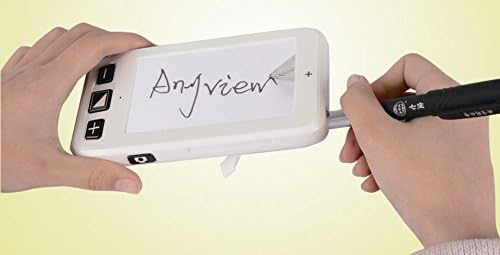
Figure 3: The magnifier positioned on its writing stand, facilitating writing tasks.
4.6 Energia aurrezteko modua
To conserve battery life, the unit is equipped with a power saving mode. If no activity is detected for approximately 3 minutes, the device will automatically power off. Settings are saved after power-off.
5. Mantentzea
5.1 Garbiketa
To clean the screen and body of the magnifier, use a soft, lint-free cloth. For stubborn marks, slightly dampen the cloth with water or a mild, non-abrasive screen cleaner. Avoid using harsh chemicals or abrasive materials, as these can damage the device.
5.2 Bateria zaintzea
The device uses a lithium battery. For optimal battery life, avoid fully discharging the battery frequently. Store the device in a cool, dry place when not in use for extended periods. If the device will not be used for a long time, charge it periodically to maintain battery health.
6. Arazoak
If you encounter issues with your Reizen Handheld Video Magnifier, please refer to the following common solutions:
- Gailua ez da pizten: Ensure the battery is charged. Connect the AC adapter and try again. Check the ON/OFF switch position.
- Irudia lausoa da: The device has auto-focus. Ensure the lens is clean and there are no obstructions. Adjust the distance to the reading material.
- No image on TV: Verify the video output cable is securely connected to both the magnifier and the TV. Ensure the correct input source is selected on your television.
- Bateriaren iraupen laburra: Ensure the device is fully charged (approx. 4.5 hours). Reduce screen brightness if possible.
Arazoak jarraitzen badute, jarri harremanetan bezeroarentzako arreta-zerbitzuarekin.
7. Zehaztapenak
| Ezaugarri | Xehetasuna |
|---|---|
| Handitzea | 3x - 20x Continuous Zoom |
| Fokua | Foku automatikoa |
| Bistaratzeko tamaina | 4.3 hazbetekoa |
| Kolore moduak | 10 high-contrast modes (3 favorite modes) |
| Bateria mota | Litiozko bateria kargagarria |
| Kargatzeko Denbora | 4.5 ordu gutxi gorabehera |
| Erabilera Etengabeko Denbora | Gehienez 4 ordu |
| Pisua | 160 g |
| Energia aurreztea | Automatic shut-off after 3 minutes of inactivity |
| Modelo zenbakia (ASIN) | B017RYZOZM |
| UPC | 612750082436 |
8. Bermearen informazioa
Specific warranty details for the Reizen 4.3 inch Handheld Video Magnifier are not provided in this manual. For information regarding warranty coverage, terms, and conditions, please refer to the documentation included with your purchase or contact the retailer or manufacturer directly.
9. Laguntza
If you require further assistance or have questions not covered in this manual, please contact the retailer from whom you purchased the device or visit the official Reizen webbezeroarentzako arreta-zerbitzuko harremanetarako informazioa lortzeko gunea.