
Sarrera
This manual provides comprehensive instructions for the setup, operation, and maintenance of your Zelotes T90 Professional 9200 DPI High Precision USB Wired Gaming Mouse. Please read this manual thoroughly before using the product to ensure optimal performance and longevity.

Figure 1: Zelotes T90 Professional Gaming Mouse, showcasing its ergonomic design and LED lighting.
Paketearen edukia
- 1 x Zelotes T90 Gaming Mouse
- 1 x Argibide eskuliburua (dokumentu hau)
Konfigurazioa
Sistemaren eskakizunak
- Operating System: Windows 98/ 2000/ ME/ NT / XP/ win 7/ win 8/ win 10/ Mac OS and other OS
- Interfazea: USB ataka
Instalazioa
- Sagua deskonprimitu: Carefully remove the Zelotes T90 Gaming Mouse from its packaging.
- Kendu film babeslea: Before use, please remove the foot pad protective film located on the underside of the mouse.
- Konektatu ordenagailura: Plug the USB connector of the mouse into an available USB port on your computer. The mouse is plug-and-play and does not require additional driver installation for basic functionality.
Funtzionamendu-argibideak
Botoiaren funtzioak
The Zelotes T90 mouse features 8 programmable buttons designed for enhanced gaming and productivity.
- Ezkerreko botoia
- Egin klik eskuineko botoian
- Middle Button / Scroll Wheel
- Aurrera egiteko botoia: Quick forward function when browsing the web or navigating folders.
- Atzera botoia: Quick backward function when browsing the web or navigating folders.
- DPI botoia: Saguaren sentikortasuna (DPI) doitzen du.
- Suaren giltza: Configurable for rapid actions.
- Argi-moduaren etengailua: Controls the LED lighting effects.
DPI doitzea (Sentsibilitatea)
The mouse supports 6-speed DPI adjustment, allowing you to customize sensitivity for different tasks or games. Press the DPI botoia to cycle through the following settings:
- 1000 DPI: Indicated by red light flashing 3 times.
- 1600 DPI: Indicated by orange light.
- 2400 DPI: Indicated by green light.
- 3200 DPI: Indicated by light blue light.
- 5500 DPI: Indicated by blue light.
- 9200 DPI: Indicated by purple light.

Figure 2: Location of DPI and Fire Key buttons on the Zelotes T90 mouse.
Fire Key Function
- Prentsa laburra: Performs a double click.
- Sakatuta luze (2 segundo baino gehiago): Switches to triple click mode. The light will flash 3 times to confirm the successful switch.
Argiaren Modua Aldatzeko
The Zelotes T90 features various LED lighting modes:
- Prentsa laburra: Cycles through 7-color breathing, 6 single-color breathing, and 6 single-color constant light modes (13 modes total).
- Sakatuta luze (2 segundo baino gehiago): Turns off the LED lights.

Figure 3: The Zelotes T90 mouse showcasing its 7-color cycle breathing and single-color lighting options.
Pisua sintonizatzeko sistema
The mouse includes 8 removable 2.5-gram weights, allowing you to customize the mouse's weight and balance for improved stability and control, especially during fast movements.
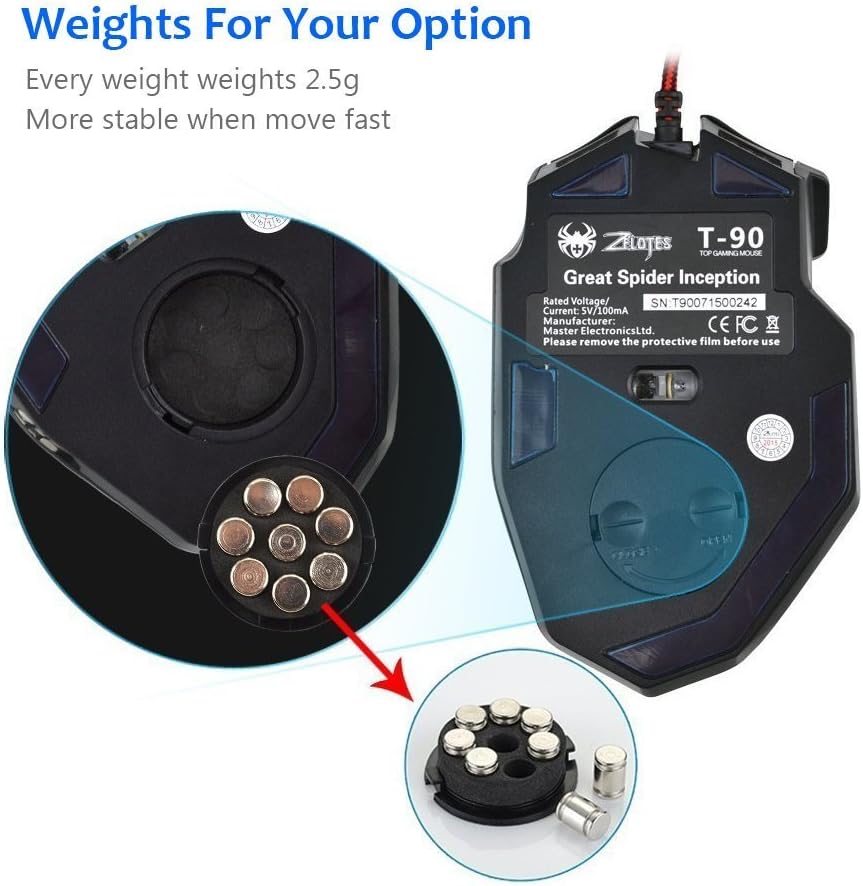
Figure 4: Location of the weight tuning system on the underside of the Zelotes T90 mouse.
Mantentzea
Garbiketa
- Erabili zapi leun eta lehor bat saguaren gainazala garbitzeko.
- Zikinkeria egoskorrerako, apur bat lehortuampGarbitu zapi bat urarekin edo garbiketa-soluzio leun batekin. Saihestu produktu kimiko gogorrak.
- Ez murgildu sagua uretan edo beste likido batean.
Biltegiratzea
Denbora luzez erabiltzen ez duzunean, gorde sagua leku fresko eta lehor batean, eguzki-argitik eta muturreko tenperaturetatik babestuta.
Arazoak konpontzea
| Arazoa | Kausa posiblea | Irtenbidea |
|---|---|---|
| Sagua ez du erantzuten | USB konexio askea, USB ataka akastuna, sistemaren errorea. | Ensure the USB cable is securely plugged into the computer. Try a different USB port. Restart your computer. |
| LED argiek ez dute funtzionatzen | Lights turned off, software issue. | Short press the Light Mode Switch button to cycle through modes. Long press the Light Mode Switch button for more than 2 seconds to turn lights on if they were off. |
| DPI ezarpena ez da aldatzen | DPI botoia ez da behar bezala sakatu. | Ensure you are pressing the dedicated DPI button. Observe the light flashes to confirm DPI changes. |
| Saguaren kurtsorea irregularra edo jauzilaria | Sentsore optiko zikina, sagu-oihalaren gainazal desegokia. | Clean the optical sensor on the underside of the mouse. Use a clean, uniform mouse pad surface. |
| Mouse settings reset | Accidental factory reset. | Press the left and right buttons simultaneously for more than 2 seconds to restore factory settings. If settings are reset, reconfigure them as desired. |
Zehaztapenak
| Eredua | T90 |
| Neurriak (LxWxH) | 130 mm x 81 mm x 40 mm (5.12 x 3.19 x 1.57 hazbete) |
| Pisua | 145g ± 5g (excluding cable) |
| Kontrapisua | 8 x 2.5 Gram tuning weights |
| DPI ezarpenak | 1000/1600/2400/3200/5500/9200 DPI |
| FPS | 6666 |
| Azelerazioa | 23G |
| Bozketa-tasa | 500Hz |
| Aldatu bizitza | 800 milioi aldiz |
| Botoiak | 8 |
| USB kablearen luzera | 1.8M braided-fiber cable |
| Interfazea | USBa |
| Optical Type | Red wave |
| Bateragarritasuna | Windows 98/ 2000/ ME/ NT / XP/ win 7/ win 8/ win 10/ Mac OS and other OS |
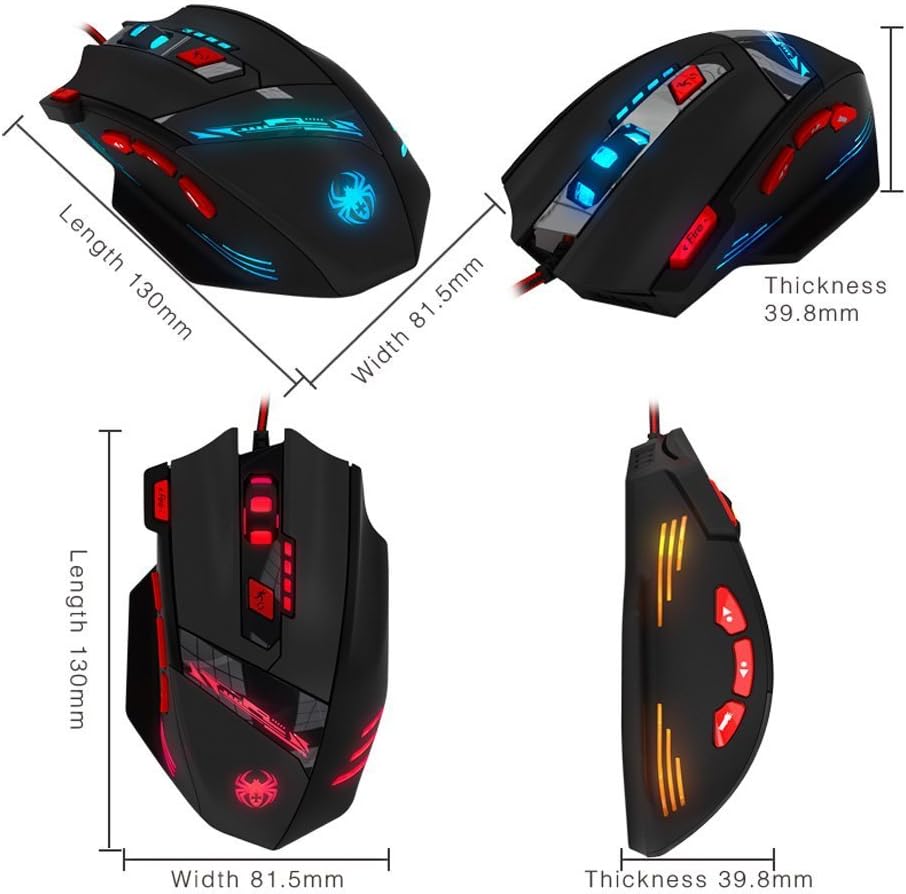
Figure 5: Detailed dimensions of the Zelotes T90 Professional Gaming Mouse.
Diseinu Ergonomikoa
The Zelotes T90 mouse is designed with ergonomics in mind, providing a comfortable fit for both fingertip and claw-style grips. This design aims to reduce fatigue during long periods of use.

Figure 6: Ergonomic design of the Zelotes T90 mouse, showing a comfortable hand grip.
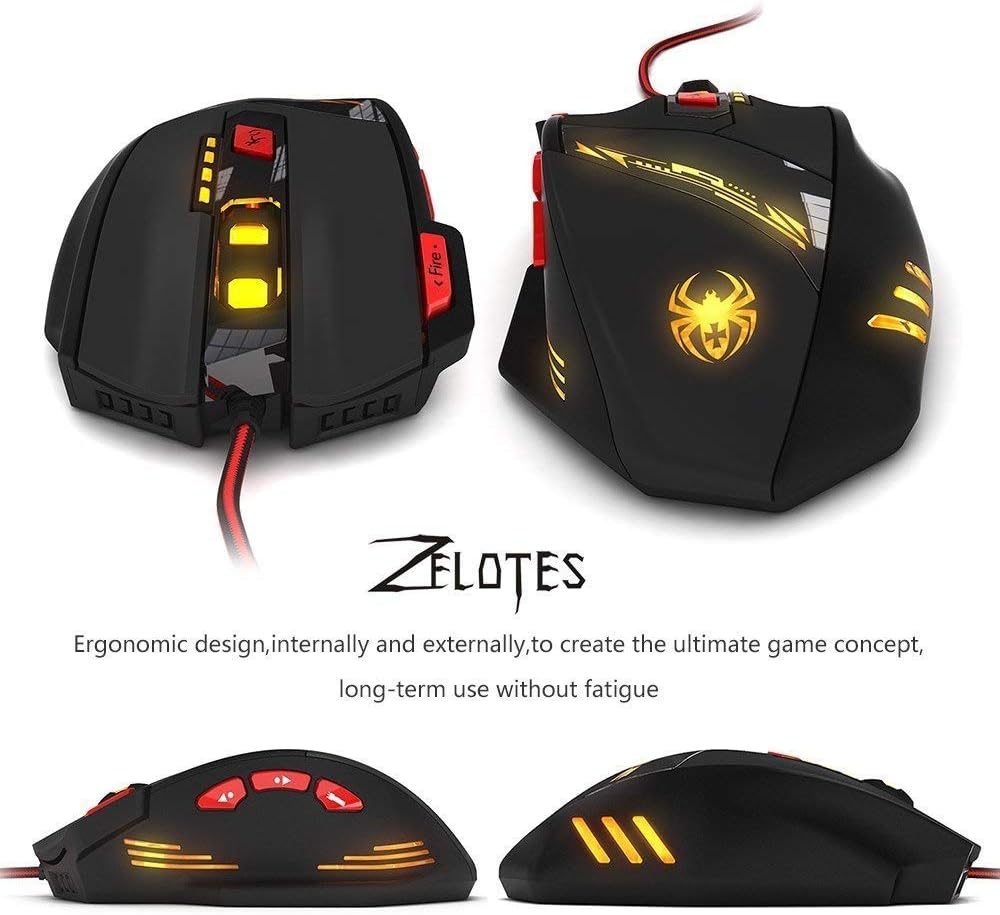
7. irudia: Hainbat views highlighting the ergonomic contours of the Zelotes T90 mouse.
Ohar garrantzitsuak
- Always remove the foot pad protective film before using the mouse.
- To restore the mouse to factory settings, press and hold the left and right mouse buttons simultaneously for more than 2 seconds.