
1. Sarrera
This manual provides essential instructions for the installation, operation, maintenance, and troubleshooting of the APC Smart-UPS SRT3000RMXLT 3kVA 208V Rackmount Uninterruptible Power Supply (UPS). Please read this manual thoroughly before installing or operating the equipment to ensure proper usage and safety.
2. Segurtasun informazioa
Jarraitu eskuliburu honetako abisu eta funtzionamendu-argibide guztiak. Hori egiten ez baduzu, lesioak edo ekipamendua kaltetu daiteke.
- Segurtasun elektrikoa: Unitate honek bolumen arriskutsuak ditutages. Do not attempt to disassemble the UPS. Servicing should only be performed by qualified personnel.
- Bateriaren segurtasuna: Batteries can present a risk of electrical shock and high short-circuit current. Remove watches, rings, or other metal objects before handling batteries. Use tools with insulated handles.
- Pisua: UPSa astuna da. Erabili altxatzeko teknika egokiak eta ziurtatu euskarri egokia instalazioan zehar.
- Ingurumena: Install the UPS indoors in a controlled environment, free from excessive dust, moisture, and extreme temperatures.
3. Paketearen edukia
Carefully unpack the UPS and inspect for shipping damage. The package should contain the following items:
- APC Smart-UPS SRT3000RMXLT Unit
- Power Supply (Built-In)
- Rack muntatzeko hardwarea
- Dokumentazio CDa
- USB kablea
- Serie kablea
4. Konfigurazioa
4.1 Instalazio fisikoa
The SRT3000RMXLT is designed for rack installation. Ensure the rack is stable and capable of supporting the UPS weight (approximately 69 pounds).
- Mount the UPS into a standard 19-inch rack using the provided rack-mounting hardware.
- Ziurtatu aireztapen-fluxu egokia unitatearen inguruan. Ez blokeatu aireztapen-irekidurak.

4.1. irudia: Aurrealdea view of the APC Smart-UPS SRT3000RMXLT. This image shows the front panel with the display and ventilation grille.
4.2 Connecting the UPS
Connect the UPS to the utility power and your equipment.
- Connect the UPS input power cord to a dedicated 208V AC outlet. The UPS uses a Type B - 3 pin (North American) power plug.
- Connect your equipment to the output receptacles on the rear of the UPS. The unit provides 12 IEC 320 C13/C14 outlets.
- For communication, connect the USB cable or serial cable from the UPS to your computer or network management card.
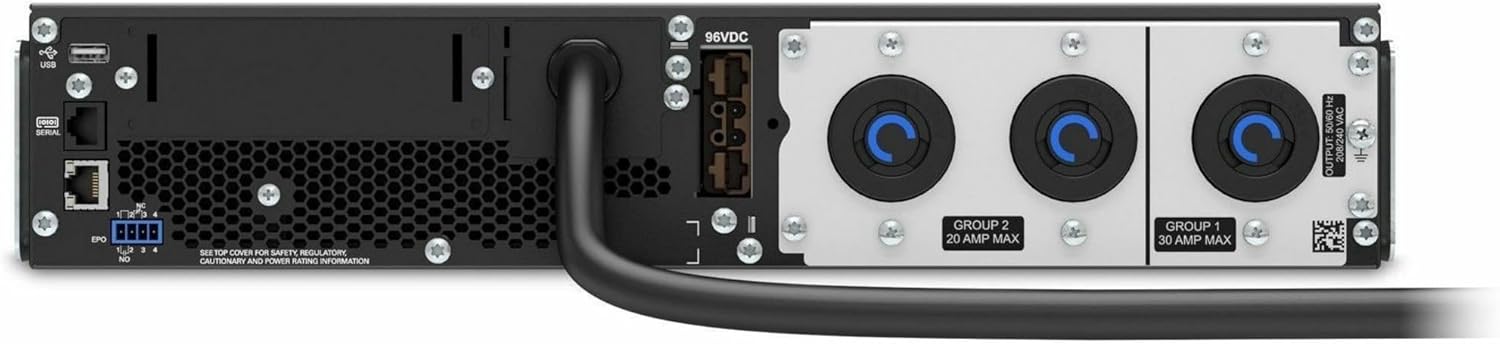
4.2. Irudia: Atzealdea view of the APC Smart-UPS SRT3000RMXLT. This image displays the various input and output ports, including USB, serial, EPO, and the 12 output receptacles, along with the main power input.
4.3 Hasierako piztea
After all connections are secure:
- Press the power button on the front panel to turn on the UPS.
- The UPS will perform a self-test and the display will show the current status.
- Allow the batteries to charge for at least 6 hours before relying on them for extended backup time.
5. UPSaren funtzionamendua
5.1 Aurreko panelaren pantaila eta kontrolak
The front panel features an LCD display and control buttons for monitoring and configuring the UPS.
- LCD pantaila: Shows real-time status, load, battery charge, input/output voltage, and event logs.
- ESC botoia: Exits the current menu or cancels an operation.
- Ados botoia: Hautaketa bat berresten du edo menu batean sartzen du.
- Gora/Behera geziak: Nabigatu menu aukeren artean edo doitu ezarpenak.
5.2 Oinarrizko funtzionamendua
- Piztea: Sakatu eta eutsi pizteko botoia pantaila piztu arte.
- Itzaltzea: Press and hold the power button until the UPS powers down. Ensure all connected equipment is safely shut down first.
- Bateria modua: Potentzia bat gertatuz gerotage, the UPS will automatically switch to battery power. The display will indicate 'On Battery'.
- Auto-proba: Initiate a manual self-test through the front panel menu to verify battery and UPS functionality.
6. Mantentzea
6.1 Bateria ordezkatzea
The UPS uses sealed lead-acid batteries. Battery life is typically 3-5 years, depending on environmental conditions and usage. Replace batteries when the UPS indicates a 'Battery Fault' or 'Replace Battery' warning.
- Contact APC support or a certified service technician for battery replacement.
- Always use genuine APC replacement battery cartridges (RBCs) to ensure compatibility and optimal performance.
- Recycle old batteries responsibly.
6.2 Garbiketa
Keep the UPS free from dust and debris to ensure proper ventilation.
- Use a soft, dry cloth to clean the exterior of the UPS.
- Ez erabili garbitzaile likidorik edo disolbatzailerik.
- Ziurtatu aireztapen-zuloak oztoporik gabe daudela.
7. Arazoak
This section provides solutions to common issues. For more complex problems, contact technical support.
| Arazoa | Kausa posiblea | Irtenbidea |
|---|---|---|
| UPS-a ez da pizten | No input power; Battery disconnected or discharged | Check power cord connection; Ensure utility power is present; Allow batteries to charge. |
| UPSak etengabe bip egiten du | On battery power; Overload condition | Check utility power; Reduce connected load. |
| 'Bateria ordezkatu' adierazlea | Bateria bizitza amaitzear dago | Order and replace the battery cartridge. |
| UPS not providing power to outlets | Output circuit breaker tripped; UPS in fault mode | Reset circuit breaker; Check display for fault codes and consult manual. |
8. Zehaztapenak
Key technical specifications for the APC Smart-UPS SRT3000RMXLT.
| Ezaugarri | Zehaztapena |
|---|---|
| Modelo zenbakia | SRT3000RMXLT |
| Marka | APC |
| Irteerako potentzia-ahalmena | 3000 VA / 2700 Watt |
| Irteera nominala boltage | 208 V AC |
| Sarrera nominala boltage | 208V AC / 230V AC |
| Sarrerako maiztasuna | 60 Hz |
| Irteerako konexioak | 12 x IEC 320 C13/C14 |
| Bateria mota | Berun Azidoa |
| Kargatzeko denbora tipikoa | 6 ordu |
| Ohiko babeskopia-denbora (karga osoa) | 4 minutu |
| Forma-faktorea | Rack |
| Neurriak (H x W x D) | 9 x 23 x 34 hazbete |
| Pisua | 69 kilo |
| Funtzionamendu-tenperatura | 0 - 40 °C (32 - 104 °F) |
9. Bermea eta Laguntza
9.1 Bermearen informazioa
APC provides a standard warranty for this product. Please refer to the warranty card included with your product or visit the official APC webzure eskualdeko berme-baldintza zehatzak ikusteko, bisitatu webgunea.
9.2 Laguntza Teknikoa
For technical assistance, product information, or troubleshooting beyond the scope of this manual, please contact APC customer support. Have your model number (SRT3000RMXLT) and serial number ready when contacting support.
- Visit the official APC weblaguntza baliabideetarako, maiz egiten diren galderetarako eta harremanetarako informaziorako gunea.
- Online resources often include updated manuals, firmware, and diagnostic tools.