
1. Sarrera
This manual provides essential information for the safe installation, operation, and maintenance of your CCEI Piccolo PIMT series power supply for pool projectors. The Piccolo PIMT series includes models such as PIMT31 (100W), PIMT33 (300W), and PIMT37 (600W), all operating at 230/12V. This device is designed to power pool projectors safely and efficiently.
Please read this manual thoroughly before installation and use to ensure proper function and to prevent potential hazards.
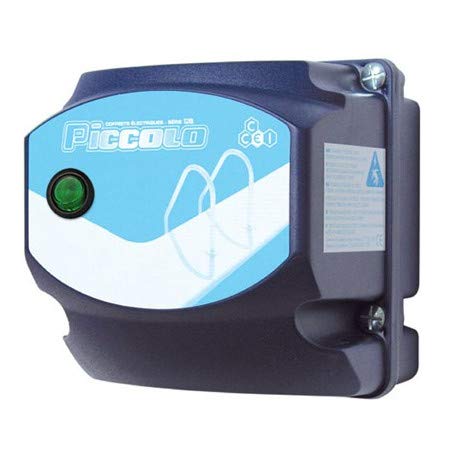
Figure 1: CCEI Piccolo PIMT Power Supply Unit, top view. This image shows the compact design and the rotary switch for operation.
2. Segurtasun-argibideak
OHARRA: Electrical installation must be performed by a qualified electrician in accordance with all local and national electrical codes.
- Deskonektatu beti korrontea edozein instalazio, mantentze-lan edo arazo-konponketa egin aurretik.
- Ensure the power supply is installed in a dry, well-ventilated area, away from direct sunlight and excessive heat.
- The device is equipped with a waterproof on/off switch, but the main unit should not be submerged or exposed to direct water spray.
- The safety transformer complies with the NF EN61558 standard, ensuring safe operation when installed correctly.
- Ez gainditu gehienezko wat-atage rating of the specific model (e.g., 100W for PIMT31, 300W for PIMT33, 600W for PIMT37).
- Use only original CCEI parts and accessories for replacement or repair.
3. Konfigurazioa eta instalazioa
The CCEI Piccolo PIMT power supply is designed for easy installation. Follow these steps carefully:
- Muntaketa: Select a suitable location for mounting the power supply unit. Use the provided mounting screws and plugs to securely attach the unit to a vertical surface. Ensure the location allows for adequate ventilation and access for wiring.
- Power Connection (230V AC Input):
- Ensure the main power supply is OFF at the circuit breaker.
- Connect the 230V AC input power cable to the designated terminals on the power supply unit. Refer to the wiring diagram inside the unit cover for correct polarity.
- Lotu konexio guztiak ondo.
- Projector Connection (12V AC Output):
- Connect the 12V AC output cables from the power supply to your pool projector(s).
- Utilize the provided cable glands to ensure a watertight seal where cables enter and exit the unit.
- Egiaztatu wat totala delatage of all connected projectors does not exceed the maximum capacity of your Piccolo PIMT model.
- Azken egiaztapenak: Double-check all wiring connections for security and correctness. Ensure all covers are properly closed and sealed.

Figure 2: CCEI Piccolo PIMT Power Supply, showing connection points. This view highlights the input/output terminals and the waterproof switch.
4. Funtzionamendu-argibideak
Once the power supply is correctly installed and wired, operating it is straightforward:
- Piztu: Restore power to the unit at the main circuit breaker.
- Activate Projectors: Use the waterproof on/off switch located on the unit to turn your pool projectors ON or OFF. Rotate the switch to the 'ON' position to activate the projectors.
- Itzali: To turn off the projectors, rotate the switch to the 'OFF' position. For extended periods of non-use or maintenance, it is recommended to disconnect power at the main circuit breaker.
5. Mantentzea
Regular maintenance ensures the longevity and safe operation of your CCEI Piccolo PIMT power supply.
- Garbiketa: Garbitu unitatearen kanpoaldea aldian-aldian zapi leun eta lehor batekinamp oihalik. Ez erabili garbitzaile edo disolbatzaile urratzailerik. Ziurtatu unitatea itzalita dagoela garbitu aurretik.
- Ikuskapenak: Annually inspect all wiring connections for tightness and signs of corrosion or damage. Check cable glands for proper sealing.
- Aireztapena: Ensure that the ventilation openings (if any) are clear of debris to prevent overheating.
- Egiaztapen profesionala: It is recommended to have a qualified electrician inspect the unit and its connections every few years.
6. Arazoak
If you encounter issues with your CCEI Piccolo PIMT power supply, refer to the following table:
| Arazoa | Kausa posiblea | Irtenbidea |
|---|---|---|
| Projectors do not turn ON. |
|
|
| Unitateak zarata ezohikoa egiten du edo erre usaina du. |
|
|
| Intermittent projector operation. |
|
|
If the problem persists after attempting these solutions, contact CCEI customer support or a qualified electrician.
7. Zehaztapenak
| Ezaugarri | Xehetasuna |
|---|---|
| Fabrikatzailea | CCEI |
| Eredu seriea | Piccolo PIMT (PIMT31, PIMT33, PIMT37) |
| Sarrera boltage | 230 V AC |
| Irteera boltage | 12 V AC |
| Power Output (PIMT31) | 100W |
| Power Output (PIMT33) | 300W |
| Power Output (PIMT37) | 600W |
| Segurtasun Araua | NF EN61558 |
| Ezaugarriak | Waterproof On/Off Switch, Cable Glands, Mounting Screws |
| Elementuaren pisua | 1.5 kg |
| ASIN | B019YDRZ38 |
| Eskuragarri dagoen lehen data | 21ko otsailaren 2020a |
8. Bermea eta Laguntza
CCEI products are manufactured to high-quality standards. For specific warranty information, please refer to the warranty card included with your product or visit the official CCEI webgunea. Gorde erosketaren egiaztagiria bermearen erreklamazioetarako.
For technical support, spare parts, or service inquiries, please contact your authorized CCEI dealer or visit the CCEI official webharremanetarako datuak lortzeko gunea.