
NETGEAR PLW1000-100NAS
NETGEAR Powerline Adapter + Wireless Access Point Kit (PLW1000-100NAS) User Manual
Model: PLW1000-100NAS
Sarrera
The NETGEAR Powerline Adapter + Wireless Access Point Kit (PLW1000-100NAS) provides a simple and effective solution for extending your home network using your existing electrical wiring. This kit enables Gigabit PowerLINE WiFi speeds up to 1000 Mbps, leveraging Homeplug AV2 technology for improved coverage and performance through electrical outlets. It is designed for quick setup, requiring no software installation, and is ideal for high-bandwidth activities like HD streaming and lag-free gaming.

Figure 1: The NETGEAR PLW1000-100NAS kit, showing both the Powerline adapter and the Wireless Access Point.
Paketearen edukia
- One (1) Powerline 1000 Adapter (PL1000)
- One (1) Powerline WiFi 1000 Access Point (PLW1000)
- Two (2) Ethernet cables
- Hasiera Azkarreko Gida (ez dago eskuliburu honetan sartuta)

Figure 2: Retail packaging of the NETGEAR Powerline WiFi 1000 Kit, illustrating the contents.
Konfigurazioa
Setting up your NETGEAR Powerline Kit is a straightforward process that typically takes only a few minutes. No software installation is required.
- Connect the Powerline Adapter (PL1000): Plug the PL1000 adapter directly into a wall electrical outlet near your internet router. Connect one end of an Ethernet cable to the PL1000's Ethernet port and the other end to an available LAN port on your router.
- Connect the Powerline WiFi Access Point (PLW1000): Plug the PLW1000 access point directly into a wall electrical outlet in the room where you need extended network coverage. Ensure it is not plugged into a power strip or surge protector, as this can degrade performance.
- Konexioaren zain: The Powerline LED on both devices should turn solid green, indicating a successful Powerline connection. The WiFi LED on the PLW1000 should also turn solid green.
- Secure the Network (Optional but Recommended): To secure your Powerline network, press the Security button on the PL1000 for two seconds. Within two minutes, press the Security button on the PLW1000 for two seconds. The Powerline LEDs on both devices will blink and then turn solid green, indicating a secure connection.
- Konektatu WiFira: On your wireless device (laptop, smartphone, tablet), search for available WiFi networks. Select the network name (SSID) printed on the label of your PLW1000 and enter the password (Network Key/Passphrase) provided on the same label.

Figure 3: The PLW1000 Powerline WiFi Access Point plugged directly into a wall outlet, ready for use.
Gailuaren funtzionamendua
Once set up, your NETGEAR Powerline Kit operates automatically to provide network connectivity. Here are key operational aspects:
- Network Extension: The Powerline adapters extend your internet connection to areas of your home where WiFi signals might be weak or inconsistent, using your home's electrical wiring.
- Gigabit abiadura: The Homeplug AV2 support ensures Gigabit speeds, making it suitable for demanding applications like 4K video streaming and online gaming.
- Energia aurreztea: The devices are designed to power down when not connected, contributing to energy efficiency.
- LED adierazleak:
- Power LED: Indicates power status. Solid green means power is on.
- Sare elektrikoaren LEDa: Indicates Powerline connection status. Solid green means a good connection. Blinking indicates data transfer.
- Ethernet LEDa: Indicates Ethernet port connection. Solid green means a device is connected. Blinking indicates data transfer.
- WiFi On/Off LED (PLW1000 only): Indicates WiFi status. Solid green means WiFi is enabled.
- Push-and-Secure Button: This button is used to establish a secure, encrypted connection between Powerline devices.
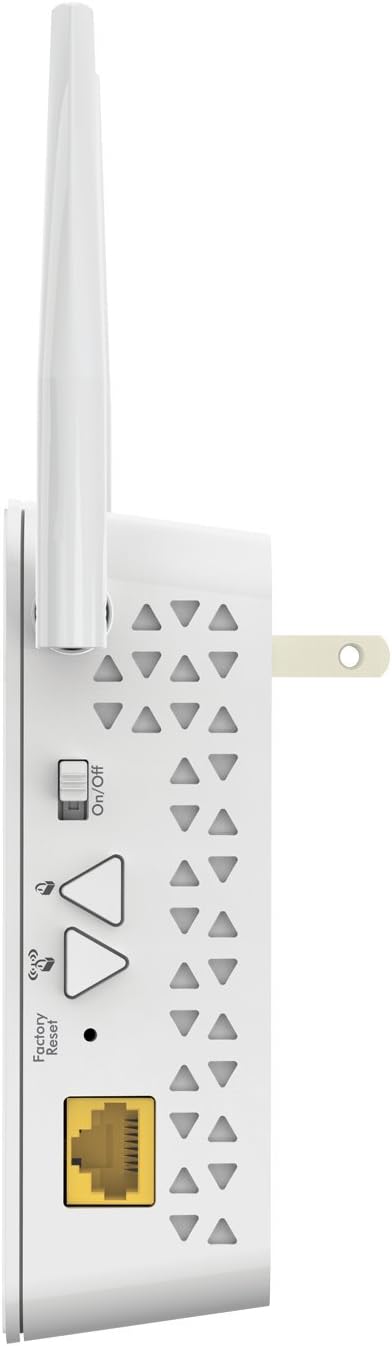
4. irudia: Aldea view of the PLW1000, highlighting the Ethernet port, Factory Reset button, and On/Off switch for WiFi.
Mantentzea
The NETGEAR Powerline Kit requires minimal maintenance to ensure optimal performance.
- Direct Wall Connection: Always plug the Powerline devices directly into a wall electrical outlet. Avoid using power strips, surge protectors, or extension cords, as these can significantly reduce performance or cause connectivity issues.
- Mantendu garbi: Ensure the ventilation holes on the devices are not obstructed to prevent overheating.
- Garbiketa: Use a soft, dry cloth to clean the exterior of the devices. Do not use liquid cleaners or aerosols.
- Firmware eguneraketak: Aldian-aldian egiaztatu NETGEAR laguntza webwebgunea zure modeloarentzako firmware eguneratze eskuragarri dauden ikusteko. Firmware eguneratzeek errendimendua hobetu, funtzioak gehitu edo akatsak konpondu ditzakete.
Arazoak konpontzea
If you encounter issues with your NETGEAR Powerline Kit, refer to the following common troubleshooting steps:
- No Powerline Connection (Powerline LED Off):
- Ensure both Powerline devices are plugged directly into wall outlets and are powered on.
- Try plugging the devices into different outlets. Powerline performance can vary significantly between electrical circuits.
- Avoid outlets controlled by a wall switch or connected to a power strip/surge protector.
- Abiadura motela edo konexio etengabea:
- Relocate the Powerline WiFi Access Point (PLW1000) to an outlet closer to the Powerline Adapter (PL1000) or on the same electrical circuit if possible.
- Ensure no high-power electrical appliances (e.g., washing machines, refrigerators) are on the same circuit as the Powerline devices, as they can cause interference.
- Verify that the Powerline LED on both devices is solid green, indicating a good connection. If it's amber or red, the connection quality is lower.
- Cannot Connect to WiFi (PLW1000):
- Ensure the WiFi On/Off LED on the PLW1000 is solid green. If not, press the WiFi On/Off button.
- Double-check the WiFi network name (SSID) and password.
- Try resetting the PLW1000 to factory defaults by pressing the Factory Reset button for 7 seconds with a paperclip. You will then need to reconfigure the WiFi settings.
- Security Pairing Issues:
- Ensure you press the Security button on the first device, then within two minutes, press the Security button on the second device.
- If pairing fails, try resetting both devices to factory defaults and then attempt the pairing process again.
Zehaztapenak
| Ezaugarri | Xehetasuna |
|---|---|
| Modelo zenbakia | PLW1000-100NAS |
| Datuen transferentzia-tasa | Gehienez 1000 Mbps (Powerline) |
| Linea elektrikoaren estandarra | Homeplug AV2 |
| WiFi estandarra | 802.11ac (PLW1000) |
| Ethernet Portuak | 1 Gigabit Ethernet Port per device |
| Dimensions (PLW1000) | Gutxi gorabehera. 7.8 x 5.7 x 3.6 hazbete |
| Elementuaren pisua | Gutxi gorabehera. 1.45 kilo |
| AC Sarrera | 100–240V, 0.2A (max.) |
| Funtzionamendu-tenperatura | 32 eta 140 gradu F (0 eta 60 gradu C) |
| UPC | 606449109856 |
Laguntza
For further assistance, product registration, or to access the latest firmware and support resources, please visit the official NETGEAR support website or the NETGEAR store.
- Visit the Official NETGEAR Store on Amazon
- Refer to the full Erabiltzailearen eskuliburua (PDF) xehetasun osoak lortzeko.