
Sarrera
This manual provides instructions for the safe and effective use of your Clatronic AT 3605 Alcohol Tester. Please read this manual thoroughly before operating the device and keep it for future reference. This device is designed for personal use as a preliminary indicator of alcohol presence and should not be used as a basis for legal decisions or official measurements.
Segurtasun informazio garrantzitsua
- This device is intended for personal use as a preliminary indicator of alcohol presence. It is not a substitute for official breathalyzer tests or legal evidence.
- Do not operate the device while driving or performing other activities that require full attention.
- Mantendu haurren eskura.
- Ez jarri gailua tenperatura altuen, eguzki-argiaren edo hezetasunaren eraginpean.
- Erabili zehaztutako bateria mota soilik (2 x AAA).
- Tokiko araudien arabera bota bateriak eta gailua.
- Wait at least 20 minutes after consuming alcohol before performing a test to ensure accurate readings.
Produktua amaituview
The Clatronic AT 3605 is a compact alcohol tester designed for personal use. It features a dual LCD display and provides optical warnings at specific alcohol levels.
Gailuaren osagaiak
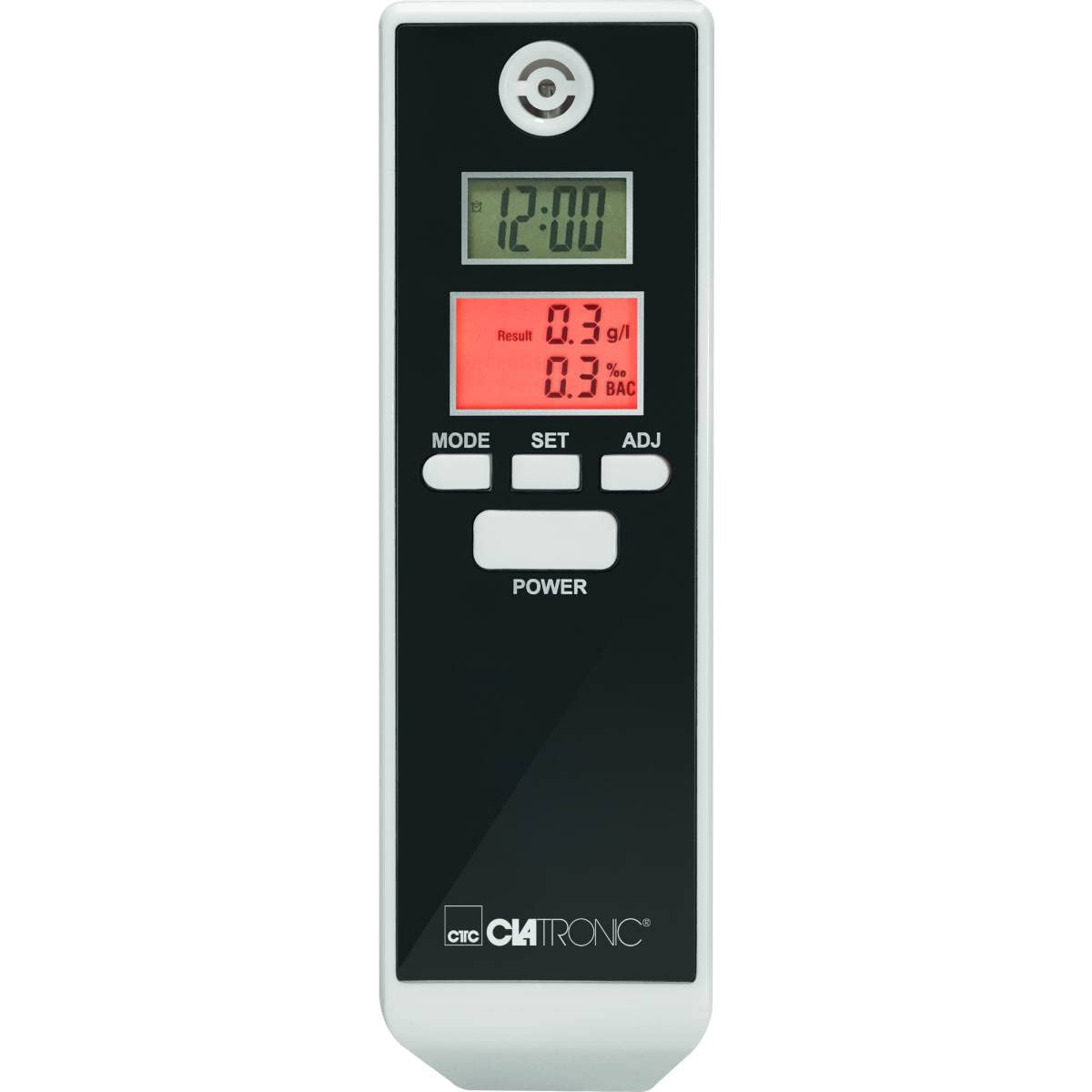
1. irudia: Aurrealdea view of the Clatronic AT 3605 Alcohol Tester. The device features a black face with a white casing. It has two digital LCD screens, one for time (12:00) and another for alcohol test results (e.g., 0.3 g/l and 0.3% BAC). Below the screens are three control buttons: MODE, SET, and ADJ. A larger POWER button is located further down. The Clatronic logo is visible at the bottom.
Kontrolak eta pantaila
- POWER botoia: Gailua pizten edo itzaltzen du.
- MODE botoia: Switches between different display modes (e.g., time display, alarm setting).
- SET botoia: Confirms selections or enters setting modes.
- ADJ botoia: Adjusts values during settings.
- Upper LCD Display: Shows current time (12/24 hour format).
- Lower LCD Display: Shows alcohol test results in g/l and % BAC. Features red backlighting for results and optical warnings.
- Mouthpiece Opening: Located at the top for breath sampling.
Konfigurazioa
Bateriaren instalazioa
- Bilatu bateriaren konpartimentuaren estalkia gailuaren atzealdean.
- Irristatu edo ireki estalkia.
- Sartu 2 AAA pila, polaritate zuzena ziurtatuz (+/-).
- Itxi bateriaren konpartimenduaren estalkia ondo.
Oharra: The device requires 2 AAA batteries. Ensure fresh batteries are used for accurate readings.
Hasierako orduaren ezarpena
Upon first use or after battery replacement, you may need to set the time. Refer to the 'Operating Instructions' for time adjustment.
Funtzionamendu-argibideak
Performing an Alcohol Test
- Sakatu BOTEREA button to turn on the device. The device will perform a brief self-check.
- Wait for the device to display "WAIT" or a similar indicator, followed by "BLOW" or a countdown.
- When prompted, take a deep breath and blow steadily into the mouthpiece opening for approximately 5 seconds. Ensure a continuous breath sample.
- The device will process the sample and display the results on the lower LCD screen in g/l and % BAC. The display will be red.
- Optical Warning: The device provides an optical warning at 0.2‰ and 0.5‰. If your result is at or above these levels, the display will flash.
- The device will automatically shut off after a period of inactivity to conserve battery life.
Setting Time and Alarm (if applicable)
- Gailua piztuta duzula, sakatu botoia MODUA button to cycle through display modes until the time setting mode is reached.
- Sakatu EZARTU button to enter the time adjustment. The hour digit will flash.
- Erabili ADJ button to change the hour.
- Sakatu EZARTU again to move to the minute digit and adjust with ADJ.
- Continue this process for 12/24 hour format or alarm settings if available.
- Sakatu MODUA ezarpen modutik irteteko.
Mantentzea
Garbiketa
- Garbitu gailuaren kanpoaldea zapi leun eta lehor batekin.
- Ez erabili garbitzaile edo disolbatzaile urratzailerik.
- Ez sartu gailua uretan edo beste likido batean.
Biltegiratzea
- Gorde gailua leku fresko eta lehor batean, eguzki-argitik urrun.
- Denbora luzez gordetzen baduzu, kendu bateriak isuriak saihesteko.
Arazoak konpontzea
| Arazoa | Kausa posiblea | Irtenbidea |
|---|---|---|
| Gailua ez da pizten. | Pila hilak edo gaizki sartutakoak. | Ordeztu bateriak AAA bateria berriekin, polaritate zuzena ziurtatuz. |
| Irakurketa zehaztugabeak edo koherenteak ez direnak. | arnasa eskasa sample; device not calibrated; recent alcohol consumption. | Ensure a strong, continuous breath sample. Wait at least 20 minutes after consuming alcohol before testing. If issues persist, contact customer support. |
| Pantailak errore-mezua erakusten du. | Device malfunction or sensor issue. | Itzali gailua eta piztu berriro. Errorea jarraitzen badu, jarri harremanetan bezeroarentzako arreta-zerbitzuarekin. |
| Orduaren bistaratzea okerra da. | Time not set or batteries removed. | Refer to "Setting Time and Alarm" section to adjust the time. |
Zehaztapenak
| Ezaugarri | Xehetasuna |
|---|---|
| Modelo zenbakia | AT 3605 (Article Model: 271704) |
| Energia iturria | 2 x AAA bateria |
| Neurketa-eremua | 0.0 to 1.9‰ (g/l) / 0.0 to 1.9% BAC |
| Bistaratzea | 2 Digital LCDs (one with red backlight for results) |
| Ezaugarri bereziak | Time display (12/24 hours), Automatic shut-off, Optical warning at 0.2‰ and 0.5‰ |
| Neurriak (L x W x H) | 30L x 40W x 120H mm |
| Materiala | Plastikoa |
| Kolorea | Beltza/Zuria |
Bermea eta Laguntza
For warranty information or technical support, please refer to the warranty card included with your product or visit the official Clatronic website. Keep your purchase receipt as proof of purchase. Spare parts availability is typically 1 year from purchase date.


