1. Sarrera
The Brydge 7.9 Keyboard is designed to enhance the functionality of your iPad Mini (2019) or iPad Mini 4, transforming it into a versatile laptop-like device. This keyboard features a full QWERTY layout with backlit keys and dedicated iOS function keys, providing a comfortable and efficient typing experience. Constructed from 100% high-grade aluminum, it offers durability and a premium aesthetic that complements your iPad.
The patented hinges allow for a 180-degree viewing angle, securing your iPad in various positions. The keyboard connects wirelessly via Bluetooth and can be easily detached when not needed. Its slim and lightweight design ensures portability without compromising on build quality.

This manual provides detailed instructions for setting up, operating, and maintaining your Brydge 7.9 Keyboard.
2. Segurtasun informazioa
- Ez jarri teklatua likidoen edo tenperatura altuen eraginpean.
- Avoid dropping or subjecting the keyboard to severe impacts.
- Mantendu haurren eskura.
- Erabili emandako kargatzeko kablea edo baliokide ziurtatu bat soilik.
- Do not attempt to disassemble or repair the keyboard yourself. This may void the warranty.
3. Zer dago kutxan
- Brydge 7.9 Keyboard
- USB kargatzeko kablea
- Erabiltzailearen eskuliburua (dokumentu hau)
4. Konfigurazioa
4.1 Zure iPad-a konektatzea
- Ensure your iPad Mini (2019) or iPad Mini 4 is clean and free of debris.
- Gently align the iPad with the hinges of the Brydge keyboard.
- Carefully slide the iPad into the hinges until it is securely seated. The hinges are designed to hold the iPad firmly.

4.2 Teklatua kargatzea
Before initial use, fully charge your Brydge keyboard. Connect the provided USB charging cable to the charging port on the keyboard and the other end to a USB power adapter (not included) or a computer's USB port. The charging indicator light will show the charging status.
4.3 Bluetooth parekatzea
- Turn on the Brydge keyboard by pressing the power button.
- Zure iPad-ean, joan honera: Ezarpenak > Bluetootha.
- Ziurtatu Bluetooth gaituta dagoela zure iPad-ean.
- On the Brydge keyboard, press and hold the Bluetooth key (often indicated by a Bluetooth symbol) for a few seconds until the Bluetooth indicator light flashes.
- On your iPad, select 'Brydge Keyboard' from the list of available devices.
- Follow any on-screen prompts to complete the pairing process. The indicator light on the keyboard will turn solid to confirm a successful connection.
5. Teklatua erabiltzea
5.1 Idazketa Orokorra
The Brydge 7.9 Keyboard provides a full QWERTY layout for comfortable and efficient typing. Keys offer a responsive tactile feedback.
5.2 Atzeko argiztatutako teklak
The keyboard features backlit keys with three adjustable brightness levels. To adjust the backlight, press the dedicated backlight key (often indicated by a sun or light bulb icon) repeatedly to cycle through the brightness settings or turn the backlight off.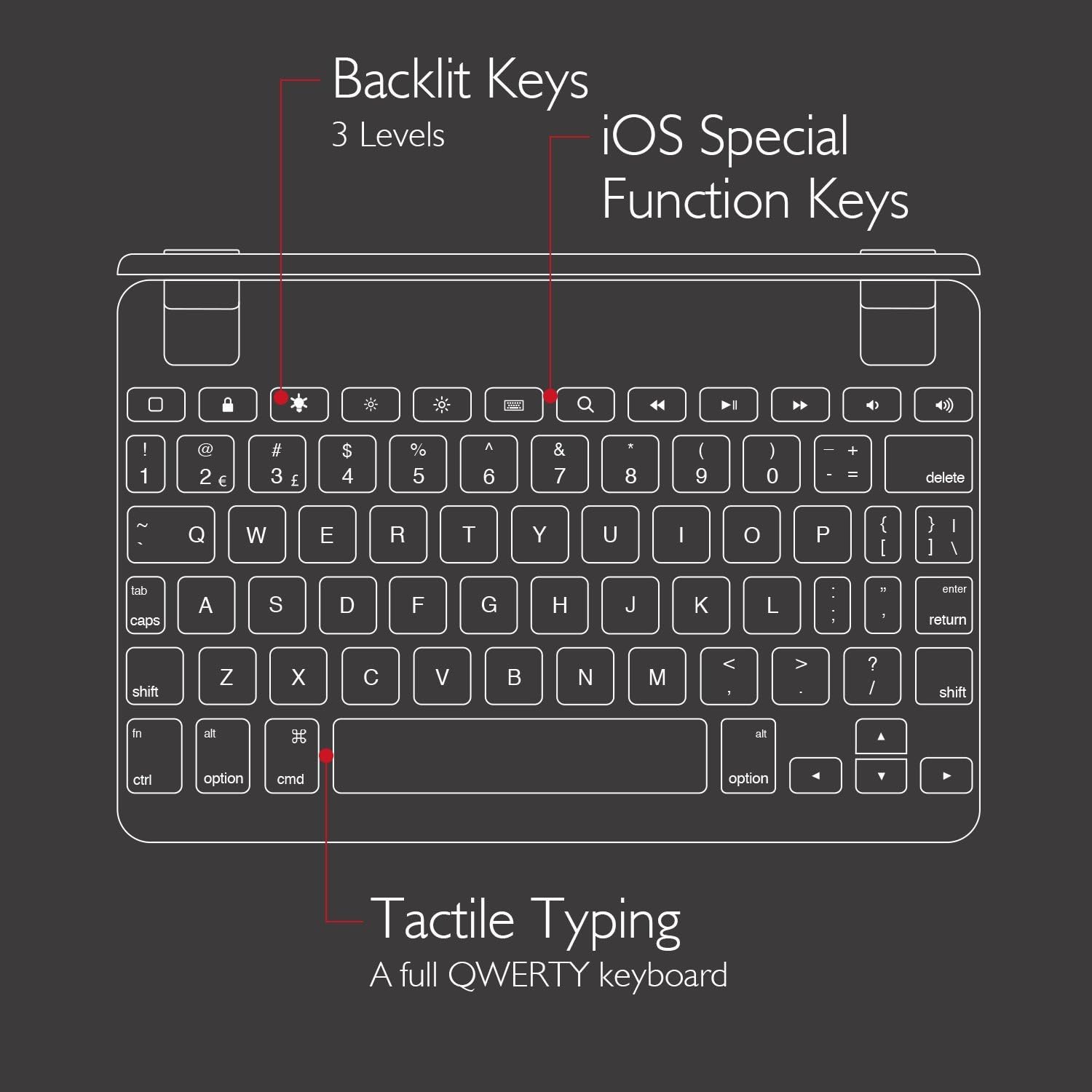
5.3 iOS Special Function Keys
The top row of the keyboard includes dedicated iOS special function keys for quick access to common iPad features, such as:
- Hasierako pantaila
- Pantailaren distira doitzea
- Search
- Multimedia erreprodukzio-kontrolak (erreproduzitu/pausatu, hurrengo/aurreko pista)
- Bolumenaren kontrola
- Blokeatu pantaila

5.4 180-Degree Viewing and Detachable Design
The keyboard's patented hinges allow the iPad to rotate up to 180 degrees, offering various viewing angles for typing, watching media, or presenting. The iPad can also be easily removed from the hinges if you prefer to use it as a standalone tablet.
6. Mantentzea
6.1 Garbiketa
- Teklatua garbitzeko, erabili zapi leun eta lihorik gabeko bat.
- Marka egoskorretarako, apur bat dampeu zapi urarekin edo garbitzaile leun eta ez urratzaile batekin.
- Saihestu garbitzaileak zuzenean teklatuan ihinztatzea.
- Ensure the keyboard is completely dry before use or charging.
6.2 Biltegiratzea
When not in use, store the keyboard in a cool, dry place away from direct sunlight and extreme temperatures. If storing for an extended period, ensure the keyboard has a partial charge (around 50%) to preserve battery health.
7. Arazoak
7.1 Teklatua ez da Bluetooth bidez konektatzen
- Ziurtatu teklatua piztuta eta guztiz kargatuta dagoela.
- Egiaztatu Bluetooth gaituta dagoela zure iPad-ean.
- Saiatu teklatua desparekatzen eta berriro parekatzen zure iPad-aren Bluetooth ezarpenetatik.
- Restart both your iPad and the Brydge keyboard.
- Move the keyboard closer to your iPad to rule out interference.
7.2 Teklek ez dute erantzuten
- Check if the keyboard is properly connected via Bluetooth.
- Ziurtatu teklatua kargatuta dagoela.
- If specific keys are not working, try cleaning around the keys to remove any debris.
- Perform a hard reset on the keyboard (refer to manufacturer's website for specific instructions if needed, as this model may not have a dedicated reset button).
7.3 Atzeko argia ez dabil
- Ziurtatu teklatua behar bezala kargatuta dagoela, bateria baxuak atzeko argiztapena desgaitu baitezake.
- Press the backlight key to cycle through brightness levels.
8. Zehaztapenak
| Marka | Brydge |
| Modelo zenbakia | BRY5103 |
| Gailu bateragarriak | iPad Mini (2019), iPad Mini 4 |
| Konektibitate Teknologia | Bluetootha |
| Teklatuaren deskribapena | Haririk gabekoa |
| Ezaugarri bereziak | Backlit, Rechargeable, 180-degree rotating hinges, Detachable |
| Materiala | 100% High-Grade Aluminum |
| Kolorea | Gold (as per product listing, other colors may vary) |
| Elementuaren pisua | Gutxi gorabehera 11 ontza (312 gramo) |
| Produktuaren neurriak (LxWxH) | 7.9 x 5.3 x 0.3 hazbete (20.07 x 13.46 x 0.76 cm) |
| Energia iturria | Bateriaren funtzionamendua (litio-ioizko bateria 1 barne) |

9. Bermea eta Laguntza
9.1 Bermearen informazioa
Specific warranty details for your Brydge 7.9 Keyboard may vary by region and retailer. Please refer to the warranty card included with your product or visit the official Brydge webgunea bermearen informazio eguneratuena lortzeko.
9.2 Bezeroarentzako laguntza
For technical assistance, troubleshooting, or general inquiries, please contact Brydge customer support through their official website. You may also find additional resources, FAQs, and support articles online.