
Sarrera
Thank you for choosing the OldShark Dash Cam. This 1080P Full HD dashboard camera is designed to provide reliable and high-quality video recording of your journeys, enhancing driving safety and providing crucial evidence in case of incidents. Equipped with a 3-inch display, 170° wide-angle lens, G-Sensor, and loop recording, it's an essential companion for every driver.
Please read this manual thoroughly before operating the device to ensure proper usage and to maximize its performance and lifespan.
Paketearen edukia
Paketea despaketatzean, egiaztatu honako elementu guztiak paketean daudela:
- OldShark Dash Cam Unit
- Kotxe kargagailua
- Xurgapen Mendia
- 32GB Mikro SD txartela
- USB datu-kablea
- Erabiltzailearen eskuliburua (dokumentu hau)

Image: All components included in the OldShark Dash Cam package, neatly laid out.
Produktuaren Ezaugarriak
- Ultra HD Video Recording: Captures clear 1080P Full HD video, ensuring detailed footage even in challenging light conditions.
- 170° Super Wide Angle Lens: Provides an expansive field of view, minimizing blind spots and capturing more of the road.
- Built-in G-Sensor: Automatically detects sudden impacts or collisions and locks the current video footage to prevent overwriting, serving as crucial accident evidence.
- Etengabeko Loop Grabaketa: Overwrites the oldest unlocked footagmemoria txartela beteta dagoenean, eskuzko esku-hartzerik gabeko grabazio jarraitua bermatuz.
- 24 orduko aparkaleku-monitorea: Records short video clips when vibrations are detected while the vehicle is parked, offering surveillance even when you're away.
- Super gaueko ikuspegia: Equipped with F1.6 large aperture, WDR (Wide Dynamic Range), and HDR (High Dynamic Range) technology for enhanced clarity in low-light conditions.
- Instalazio erraza: Simple plug-and-play setup with included suction mount and car charger.
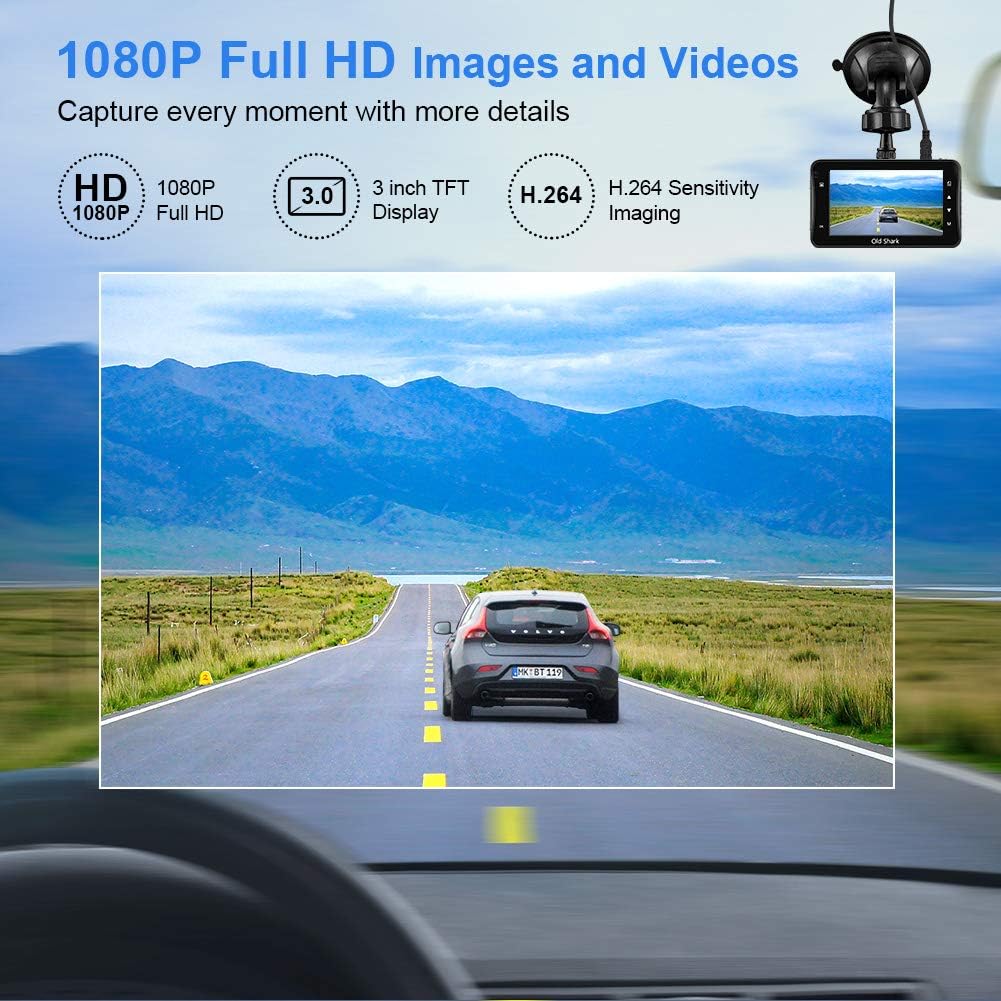
Image: Visual representation of the dash cam's 1080P Full HD video capabilities and display features.

Image: The G-Sensor feature, which automatically locks video footage during an impact to secure accident evidence.

Image: The 24-Hour Parking Monitor feature, which activates recording upon detecting vibrations while parked.

Image: The Super Night Vision capability, demonstrating improved low-light performance with its F1.6 aperture.

Image: The 170° wide-angle lens providing a broad view, adibamples of recorded footage during day and night.
Konfigurazio Gida
1. Dash Cam-aren muntaketa
- Garbitu kamera muntatu nahi duzun haizetakoaren eremua. Ziurtatu hautsik eta koiperik gabe dagoela.
- Lotu bentosa-euskarria aginte-kameraren unitateari.
- Sakatu bentosa sendo haizetakoaren kontra eta biratu palanka finkatzeko. Kokatu kamera argi ikusteko moduan. view errepidetik gidatzeko ikusmena oztopatu gabe.
2. Mikro SD txartela sartzea
- Bilatu mikro SD txartelaren zirrikitua auto-kameraren alboan.
- Insert the provided 32GB Micro SD card into the slot until it clicks into place. Ensure the card is inserted correctly with the gold contacts facing the back of the camera.
- For optimal performance, it is recommended to format the SD card within the dash cam's settings before first use and periodically thereafter.
3. Piztea
- Konektatu autoko kargagailua kameraren elikatze-sarrera atakara.
- Konektatu autoko kargagailuaren beste muturra zure ibilgailuaren zigarro-pizgailuaren entxufean.
- The dash cam will automatically power on and begin recording when your vehicle's ignition is turned on. It will also power off automatically when the ignition is turned off.

Image: The OldShark Dash Cam, showing its compact design, the included suction mount for windshield attachment, and the 32GB Micro SD card for storage.
Funtzionamendu-argibideak
Oinarrizko Funtzionamendua
- Piztu/Itzali: The camera powers on/off automatically with the car ignition. You can also manually power it on/off by pressing and holding the Power button.
- Grabaketa: Once powered on, the dash cam automatically starts loop recording. A red flashing dot or similar indicator on the screen confirms recording is active.
- Gelditu grabaketa: Press the OK button to stop recording. Press it again to resume.
- Modu aldaketa: Use the Mode button to switch between Video Recording, Still Photo, and Playback modes.
- Erreprodukzioa: In Playback mode, use the Up/Down buttons to navigate through recorded files. Press OK to play a selected video.
Menu Nabigazioa
- Press the Menu button to access settings.
- Use the Up/Down buttons to scroll through menu options.
- Press OK to select an option or confirm a setting.
- Press Menu again to exit the menu.
Funtzio giltzarriak
- Loop grabaketa: Set the duration for video segments (e.g., 1, 3, 5 minutes). When the card is full, the oldest unlocked file gainidatzi egingo da.
- G-sentsorearen sentsibilitatea: Adjust the sensitivity of the G-Sensor (Low, Medium, High). A higher sensitivity means the camera will lock footage more easily upon detecting bumps or impacts.
- Aparkaleku monitorea: Enable this feature to allow the dash cam to automatically record a short video when it detects a vibration while the car is parked and turned off.
- Mugimendu-detekzioa: When enabled, the camera will start recording automatically if it detects movement in front of the lens while parked.
- Data/Ordua Stamp: Ensure the correct date and time are set in the menu for accurate timestampzure grabazioetan.
Mantentzea
- Garbiketa: Erabili zapi leun eta lehor bat kameraren lentea eta pantaila garbitzeko. Saihestu garbitzaile edo disolbatzaile urratzaileak erabiltzea.
- SD txartelaren zainketa: Regularly format the Micro SD card (at least once a month) within the dash cam's settings to maintain optimal recording performance and prevent data corruption. Use only high-quality Class 10 or higher Micro SD cards.
- Tenperatura: Avoid exposing the dash cam to extreme temperatures (very hot or very cold) for extended periods, as this can affect battery life and component integrity.
- Firmware eguneraketak: Check the official OldShark website periodically for any available firmware updates to ensure your dash cam has the latest features and bug fixes.
Arazoak konpontzea
| Arazoa | Irtenbidea |
|---|---|
| Auto-kamerak ez du pizten. | Ensure the car charger is securely connected to both the dash cam and the vehicle's cigarette lighter. Check if the vehicle's cigarette lighter is receiving power. Try a different power source if available. |
| Grabaketa ustekabean gelditu da. | Check if the Micro SD card is full. Format the SD card. Ensure you are using a Class 10 or higher SD card. Reduce G-Sensor sensitivity if it's triggering too often. |
| Bideoa footage lausoa edo argi ez dagoena. | Clean the camera lens and your car's windshield. Ensure the protective film has been removed from the lens. Check video resolution settings. |
| Auto-kamerak blokeatu egiten du edo ez du erantzuten. | Press the reset button (if available, usually a small pinhole) or disconnect and reconnect the power. Format the Micro SD card. |
| Data eta ordua okerrak dira. | Go to the system settings menu and manually set the correct date and time. Save the settings. |
Zehaztapenak
| Ezaugarri | Xehetasuna |
|---|---|
| Ereduaren izena | GS505 |
| Elementuaren eredu-zenbakia | A1OS-GS505-T032 |
| Bideo Harrapaketa Ebazpena | 1080p full HD |
| Lentearen angelua | 170°-ko angelu zabala |
| Bistaratzeko tamaina | 3 hazbeteko |
| Ezaugarri bereziak | G-Sensor, Loop Recording, Parking Guard, Motion Detection, Auto On/Off, Time Stamp, Screensaver, Night Vision (F1.6 Aperture) |
| Konektibitate Teknologia | USBa |
| Muntatze Mota | Xurgapen Mendia |
| Produktuaren neurriak | 3.46 x 1 x 0.59 hazbete |
| Elementuaren pisua | 4.4 ontza |
| Fabrikatzailea | Old Shark |
Bermearen informazioa
OldShark products are manufactured with high-quality standards. For specific warranty terms and conditions, please refer to the warranty card included in your product packaging or contact OldShark customer support. The warranty typically covers manufacturing defects for a specified period from the date of purchase.
Gorde erosketa-agiria erosketaren frogagiri gisa, berme-erreklamazioetarako.
Bezeroarentzako Arreta
If you encounter any issues or have questions regarding your OldShark Dash Cam that are not covered in this manual, please do not hesitate to contact our customer support team.
For the most up-to-date contact information and support resources, please visit the official OldShark store on Amazon or their official webgunea.
Sareko baliabideak:
- OldShark Amazon Store: Bisitatu denda