
1. Sarrera
This manual provides detailed instructions for the operation and maintenance of your Supersonic SC-1495BT Bluetooth AM/FM Boombox. Please read this manual thoroughly before using the device to ensure proper function and to maximize your listening experience.
2. Segurtasun informazioa
- Ez jarri unitatea euripean edo hezetasunean, suteak edo deskarga elektrikoak saihesteko.
- Ez blokeatu aireztapen-irekidurak. Ziurtatu nahikoa leku dagoela unitatearen inguruan aire-fluxu egokia izan dadin.
- Saihestu unitatea bero-iturrien ondoan jartzea, hala nola erradiadoreen, bero-erregistroen, sukaldeen edo beste aparatu batzuen ondoan (adibidez, bero-iturriak). ampberoa sortzen duten argitzaileak).
- Erabili fabrikatzaileak zehaztutako eranskinak/osagarriak soilik.
- Deskonektatu aparatu hau tximista-ekaitzetan edo denbora luzez erabiltzen ez zarenean.
- Bidali zerbitzu guztiak zerbitzu kualifikatuko langileengana. Aparatuak edozein modutan hondatu direnean mantenimendua egin behar da.
3. Paketearen edukia
Despaketatzean, ziurtatu behean zerrendatutako elementu guztiak daudela:
- Supersonic SC-1495BT Bluetooth AM/FM Boombox
- AC korronte kablea
4. Produktuaren ezaugarriak
The Supersonic SC-1495BT Boombox offers a variety of features for versatile audio playback:
- Bluetooth Version 3.0 for wireless music streaming
- Built-in USB input for media playback
- Built-in SD card and Micro SD card slot for media playback
- 3.5 mm Line-in (AUX) jack for external audio devices
- Four-band radio: AM, FM, SW1, SW2
- Integrated rechargeable battery for portable use
- LCD pantaila garbia
- Fast forward and rewind functions for media playback
- 360-degree rod antenna for enhanced radio reception
- Bolumen birakariaren kontrola
- Aurikularretarako konektorea entzuteko modu pribatuan
- AC/DC operation for flexible power options
5. Kontrolak eta konexioak
Familiarize yourself with the various controls and connection ports on your boombox.
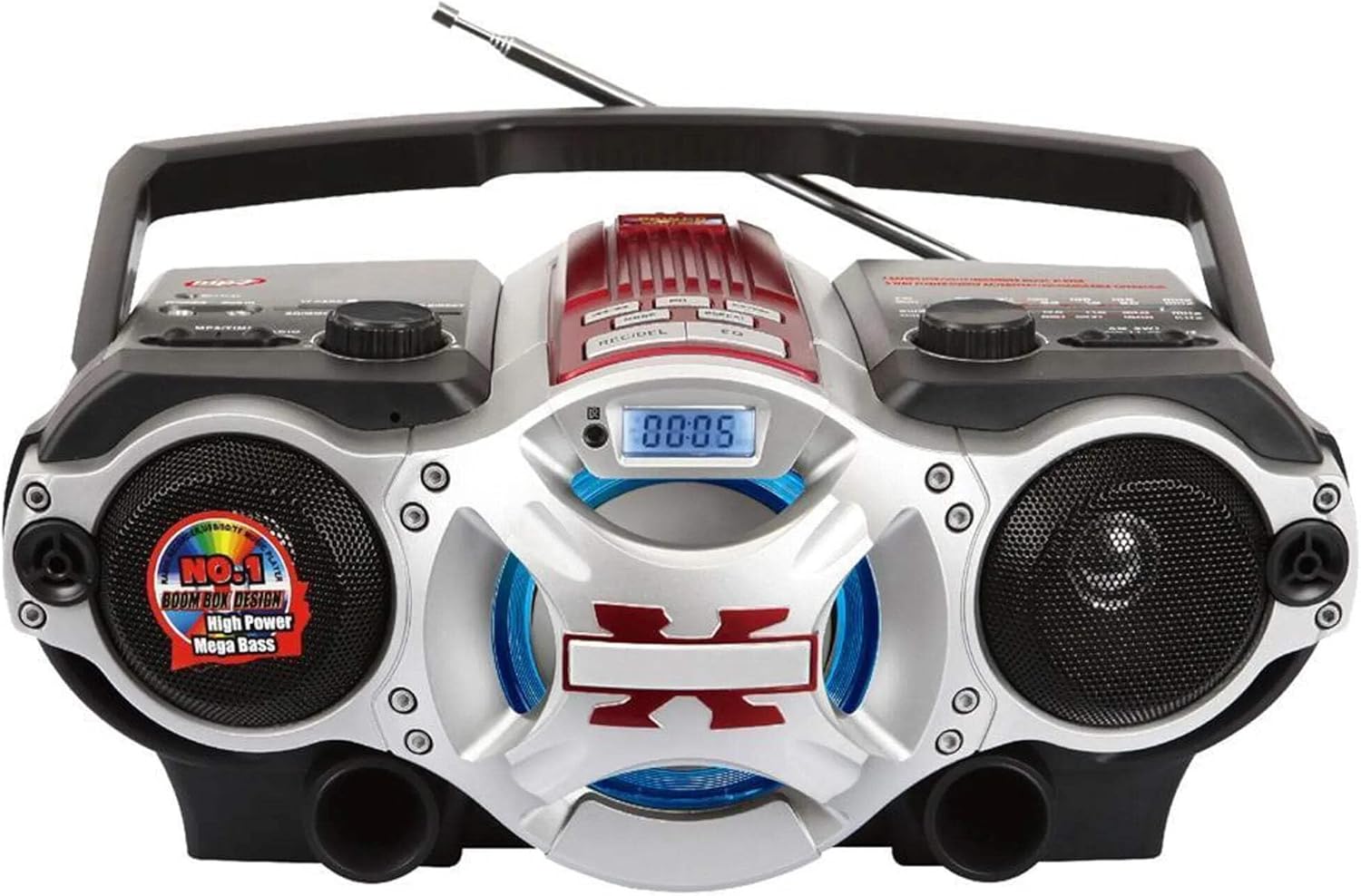
1. irudia: Aurrealdea view of the Supersonic SC-1495BT Boombox, showing the speakers, central display, and main control area.

2. irudia: Left side controls, including USB input, SD/Micro SD card slot, AUX IN, PHONES jack, BT/MP3/RADIO mode switch, and Rotary Volume control.

3. irudia: Right side controls, featuring the AM/FM/SW1/SW2 band selector, TUNING knob, and playback control buttons (Play/Pause, Skip, Mode, Clock, EQ).
6. Konfigurazioa
6.1 Energia-konexioa
- AC potentzia: Connect the included AC power cord to the AC input on the back of the boombox and then plug it into a standard wall outlet. The internal rechargeable battery will begin charging.
- DC Power (Battery): The boombox has a built-in rechargeable battery. Ensure it is charged before portable use. The unit can also operate on DC power from the internal battery when not connected to AC.
6.2 Antenaren doikuntza
Extend the 360-degree rod antenna for optimal radio reception, especially for FM and SW bands. Adjust its position for the clearest signal.
7. Funtzionamendu-argibideak
7.1 Piztea/Itzaltzea eta Moduaren Hautaketa
- To power on the unit, slide the BT/MP3/RADIO switch to the desired mode (BT, MP3, or RADIO).
- Itzaltzeko, irristatu etengailua OFF posiziora.
7.2 Bluetooth funtzionamendua
- Lerratu modu etengailua BT (Bluetooth). The LCD display will indicate Bluetooth mode, and the unit will enter pairing mode.
- Bluetooth gaitutako gailuan (smartphone-a, tableta, etab.), gaitu Bluetooth eta bilatu eskuragarri dauden gailuak.
- Select "SC-1495BT" from the list of devices. Once paired, the unit will emit a confirmation sound.
- You can now play audio from your device through the boombox. Use your device or the boombox's playback controls (Play/Pause, Skip) to manage music.
7.3 Radio Operation (AM/FM/SW1/SW2)
- Lerratu modu etengailua IRRATIA.
- Hautatu nahi duzun banda (AM, FM, SW1 edo SW2) banda hautatzaile etengailua erabiliz.
- Extend and adjust the rod antenna for optimal reception.
- Biratu TUNING knob to scan for radio stations. The frequency will be displayed on the LCD.
7.4 USB/SD txartelaren erreprodukzioa
- Lerratu modu etengailua MP3.
- Insert a USB flash drive into the USB input or an SD/Micro SD card into the corresponding slot. Ensure the card is inserted correctly.
- The unit will automatically detect and begin playing MP3 audio files sartutako euskarritik.
- Use the playback control buttons (Play/Pause, Skip, Fast Forward, Rewind) to navigate tracks.
7.5 Sarrera laguntzailea (AUX)
- Lerratu modu etengailua MP3.
- Konektatu kanpoko audio gailu bat (adibidez, MP3 erreproduzitzailea, telefono adimenduna) AUX konektore bat 3.5 mm-ko audio kable bat erabiliz (ez dago barne).
- Play audio from your external device. The sound will be routed through the boombox speakers. Control playback from your external device.
7.6 Bolumen kontrola
Biratu BOLUMENA botoia erlojuaren orratzen noranzkoan bolumena igotzeko eta erlojuaren orratzen kontrako noranzkoan jaisteko.
7.7 Aurikularretarako konektua
For private listening, plug standard 3.5mm earphones (not included) into the TELEFONOAK jack. The main speakers will be muted.
8. Mantentzea
- Garbiketa: Erabili zapi leun eta lehor bat unitatearen kanpoaldea garbitzeko. Ez erabili garbitzaile edo disolbatzaile urratzailerik.
- Biltegiratzea: Denbora luzez erabiltzen ez duzunean, gorde boombox-a leku fresko eta lehor batean, eguzki-argitik eta muturreko tenperaturetatik babestuta.
- Bateria zaintzea: To prolong the life of the built-in rechargeable battery, avoid fully discharging it frequently. Charge the unit regularly, even if not in use.
9. Arazoak
If you encounter issues with your boombox, refer to the following common problems and solutions:
| Arazoa | Kausa posiblea | Irtenbidea |
|---|---|---|
| Botererik ez | AC cord not connected; Battery discharged; Power switch off | Ensure AC cord is securely plugged in; Charge the battery; Slide power switch to ON/BT/MP3/RADIO. |
| Soinurik ez | Volume too low; Mute activated (if applicable); Incorrect mode selected; Earphones connected | Increase volume; Ensure correct mode (BT, MP3, RADIO) is selected; Disconnect earphones. |
| Bluetootha ez da parekatzen | Boombox not in pairing mode; Device Bluetooth off; Too far from boombox | Ensure boombox is in BT mode; Enable Bluetooth on your device; Move device closer (within 30 feet/10 meters); Try re-pairing. |
| Irrati-harrera eskasa | Antenna not extended/adjusted; Weak signal area | Fully extend and adjust the rod antenna; Try moving the unit to a different location. |
| USB/SD txartela ez da erreproduzitzen | Okerra file formatua; Txartela/unitatea ez dago behar bezala sartuta; hondatuta files | Ziurtatu files are MP3 format; Re-insert card/drive; Try a different USB drive or SD card. |
10. Zehaztapenak
- Eredua: SC-1495BT
- Marka: Supersonikoa
- Konektibitatea: Bluetooth (Ver. 3.0), USB, SD/Micro SD, 3.5mm AUX
- Irrati Taldeak: AM, FM, SW1, SW2
- Onartutako audio formatuak: MP3
- Energia iturria: AC 110-220V, Built-in Rechargeable Battery
- Hizlariak: 2 (estereoa)
- Neurriak (L x W x H): 15 x 10 x 12 hazbete
- Pisua: 4.3 kilo
- Fabrikatzailea: Capitol Sales Company
- UPC: 639131814950
11. Bermea
This product comes with a 1-year limited warranty. Please retain your proof of purchase for warranty claims. For specific warranty terms and conditions, refer to the documentation included with your purchase or contact Supersonic customer support.
12. Laguntza
For further assistance, technical support, or inquiries regarding your Supersonic SC-1495BT Boombox, please visit the official Supersonic webwebgunera edo jarri harremanetan bezeroarentzako arreta-zerbitzuarekin. Harremanetarako informazioa normalean fabrikatzailearen webgunean aurki daiteke. webgunea edo produktuaren ontziak.