
Pioneer DJ DM40
Pioneer DJ DM-40 Active Monitor Speakers User Manual
Model: DM40 | Brand: Pioneer DJ
Sarrera
The Pioneer DJ DM-40 desktop monitors are designed to bring excellent audio quality to your home setup. These compact 4-inch active monitor speakers incorporate advanced technology from Pioneer DJ's professional S-DJX series and Pro Audio speakers, ensuring a rich, tight bass response and a wide sweet spot. They are ideal for DJing, music production, and general music enjoyment, offering a balanced sound experience across all frequencies.
Kutxan dagoena
- DM-40 Active Monitor Speakers (Pair)
- Elikatze kablea
- 2 m Speaker Cable (for left/right channel connection)
- Audio Converter Cable (3.5 mm stereo mini plug to RCA)
- Bottom Cushion x 8
- Funtzionamendu-argibideak
Ezaugarri nagusiak
High-Quality Audio Components
The DM-40 speakers inherit audio components from Pioneer DJ's professional S-DJX series, ensuring superior sound reproduction. This includes 4-inch fiberglass woofers for tight, punchy bass and ¾-inch soft dome tweeters.

Aurrealdea view of the Pioneer DJ DM-40 active monitor speakers, showcasinhaien diseinu trinkoa dela eta.
Front-Loaded Bass Reflex System
A front-loaded bass reflex system with grooved ducts reduces air friction, delivering clear and powerful bass even when the speakers are placed close to a wall. This design ensures a robust low-end response without unwanted resonance.

Xehetasuna view of the grooved bass reflex port, designed to optimize bass response.
DECO Convex Diffusers for Wide Sweet Spot
Pioneer DJ's DECO (Diffusion Effectual Convexity by Olson) technology is integrated into the tweeters. These convex diffusers channel high frequencies left, right, and up, creating a wider sweet spot and a 3D stereo sound experience, ensuring optimal sound quality regardless of your listening position.
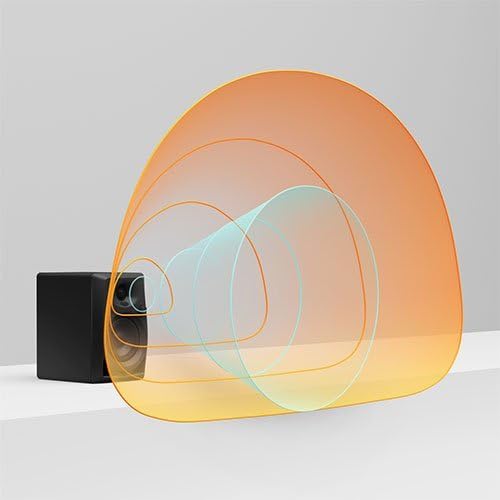
Visual representation of sound dispersion created by DECO convex diffusers.
Balanced Sound and Reduced Resonance
The tweeter and woofer positions are carefully aligned to eliminate crossover and ensure a balanced sound across all frequencies. Curved front edges of the cabinet further reduce resonance, contributing to a clean and clear audio output.

Angelukoa view highlighting the speaker design and curved edges.
Produktu Ofiziala Amaitu daview
Bideo honek informazio ofiziala eskaintzen duview of the Pioneer DJ DM-40 Active Monitor Speakers, detailing their features and benefits for DJing and music production.
Konfigurazio Gida
Follow these steps to set up your Pioneer DJ DM-40 active monitor speakers:
- Lekua: Place the speakers on a stable, flat surface. For optimal sound, position them at ear level and equidistant from your listening position. Use the included bottom cushions to minimize vibrations.
- Konektatu bozgorailuak: The DM-40 comes as a pair, with one active (left) speaker and one passive (right) speaker. Use the provided 2m speaker cable to connect the 'OUTPUT TO RIGHT SPEAKER' terminals on the active (LEFT) speaker to the input terminals on the passive (RIGHT) speaker. Ensure correct polarity (red to red, black to black).
- Konektatu audio iturria: Connect your audio source (e.g., DJ controller, computer, smartphone) to the active (LEFT) speaker using either the RCA inputs or the 3.5mm stereo mini-jack input. An audio converter cable (3.5mm stereo mini plug to RCA) is included for convenience.
- Potentzia-konexioa: Connect the power cord to the active (LEFT) speaker's 'AC IN' port, then plug it into a suitable power outlet.
- Piztu: Locate the 'POWER' switch on the rear of the active (LEFT) speaker and switch it to the 'ON' position. The power indicator LED on the front of the active speaker will illuminate.

Rear panel of the DM-40 speakers, illustrating the various input and output connections.
Funtzionamendu-argibideak
- Bolumen kontrola: Adjust the overall volume using the volume control dial located on the front of the active (LEFT) speaker. Turn clockwise to increase volume and counter-clockwise to decrease.
- Aurikularretarako irteera: For private listening, plug your headphones into the 3.5mm HEADPHONE MONITOR output jack located on the front of the active (LEFT) speaker. Plugging in headphones will mute the speaker output.
- Erreserba automatikoa: The DM-40 speakers feature an auto-standby function. If no audio signal is detected for a certain period, the speakers will automatically enter standby mode to conserve power. They will automatically resume operation when an audio signal is detected again.
Mantentzea
To ensure the longevity and optimal performance of your DM-40 speakers, follow these maintenance guidelines:
- Garbiketa: Regularly wipe the speaker cabinets with a soft, dry cloth. Avoid using abrasive cleaners, waxes, or solvents as they may damage the finish.
- Aireztapena: Ensure that the speakers have adequate ventilation. Do not block any ventilation openings.
- Ingurumena: Avoid exposing the speakers to extreme temperatures, humidity, direct sunlight, or excessive dust.
- Manipulazioa: Kontu handiz maneiatu bozgorailuak. Saihestu erortzea edo kolpe bortitzak jasatea.
Arazoak konpontzea
If you encounter issues with your DM-40 speakers, refer to the following common troubleshooting tips:
| Arazoa | Kausa posiblea | Irtenbidea |
|---|---|---|
| Bozgorailuen soinurik ez |
|
|
| Soinu distortsionatua edo lausoa |
|
|
| Bozgorailu bakarra soinua sortzen |
|
|
Zehaztapenak
| Ezaugarri | Xehetasuna |
|---|---|
| Ereduaren izena | DM-40 Desktop Monitor Speakers |
| Hizlari mota | 2-way bass reflex, active monitor speakers |
| Woofer-a | 4-inch Fiberglass |
| Txiogailua | ¾-inch Soft Dome |
| Amplifikatzailea Irteera | A/B klasea amp: 2 x 21 W / 4 Ω |
| Maiztasun barrutia | 70 - 30000 Hz |
| Inpedantzia | 10 kΩ |
| Sarrerak | 1 LINE (RCA), 1 LINE (Mini-jack) |
| Irteerak | 1 HEADPHONE MONITOR (Mini-jack) |
| Dimensions (Left Ch) | 146 x 227 x 223 mm (5.7 x 8.9 x 8.7 hazbete) |
| Dimensions (Right Ch) | 146 x 227 x 210 mm (5.7 x 8.9 x 8.3 hazbete) |
| Weight (Left Ch) | 2.7 kg (6 lb) |
| Weight (Right Ch) | 2.2 kg (4.8 lb) |
| Kolorea | Beltza |
Bermea eta Laguntza
The Pioneer DJ DM-40 Active Monitor Speakers come with a Limited Warranty. For detailed information regarding warranty terms, conditions, and duration, please refer to the official User Guide PDF provided with your product or visit the Pioneer DJ official webgunea.
For further assistance, technical support, or service inquiries, please contact Pioneer DJ customer support or visit their official support channels.
You can access the official User Guide PDF hemen.
Ask a question about this manual
Ask about setup, troubleshooting, compatibility, parts, safety, or missing instructions. Manuals+ will review the question and use this page’s manual context to help answer it.