
Segurtasun-argibide garrantzitsuak
IRAKURRI ARRETAZ ERABILI AURRETIK JARRAIBIDE GUZTIAK.
- Deskonektatu beti haizagailua entxufetik garbitu, konpondu edo mugitu aurretik.
- Ez sartu hatzak edo beste objekturik parrillatik haizagailua martxan dagoenean.
- Ez erabili haizagailurik kablea edo entxufea hondatuta duen. Baztertu haizagailua edo itzuli baimendutako zerbitzu-instalazio batera aztertu eta/edo konpontzera.
- Ez jarri kablea alfonbra azpian. Ez estali kablea alfonbra, lasterkari edo antzeko estalkiekin. Jarri kablea trafiko-eremutik urrun eta estropezu egingo ez den tokitik.
- Ez erabili haizagailua hezeetan edo damp tokiak, hala nola bainugelak edo garbitegiak.
- Haizagailu hau barruko erabilerarako soilik da. Ez erabili kanpoan.
- Keep the fan away from curtains, drapes, or any objects that may get caught in the fan blades.
- Zaindu haurrak haizagailua erabiltzen ari den bitartean.
Produktua amaituview
The Optimus 18-inch High Velocity Industrial Floor Fan is designed to provide powerful air circulation in various indoor environments. Its robust construction and high-velocity motor make it suitable for workshops, garages, and large rooms.
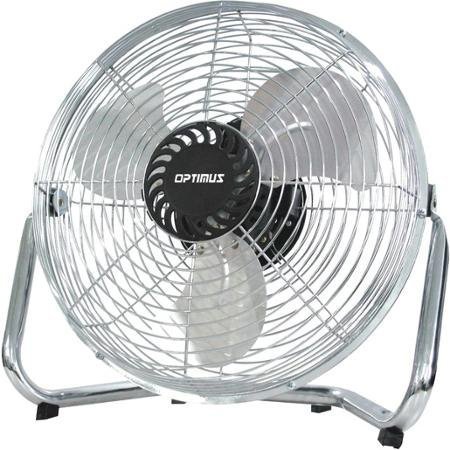
Image: Optimus 18-inch High Velocity Industrial Floor Fan. This image shows the fan with its silver metallic finish and sturdy floor stand.
Ezaugarri nagusiak:
- 18-inch diameter for wide air distribution.
- Industrial-grade high velocity airflow.
- Durable metallic finish.
- Floor standing design for stable placement.
- Multiple power levels for adjustable airflow.
Konfigurazio Argibideak
- Deskonprimitu haizagailua: Kontu handiz atera haizagailua eta osagai guztiak paketetik. Gorde paketea etorkizunean biltegiratzeko edo garraiatzeko.
- Assemble the Floor Stand:
- Attach the fan head to the floor stand using the provided screws and tools. Ensure all connections are secure.
- Verify the fan head can pivot smoothly on the stand.
- Lekua: Place the fan on a firm, level surface. Ensure there is adequate space around the fan for proper air circulation and to prevent obstruction of the air intake/output. Keep the fan at least 3 feet away from walls or furniture.
- Potentzia-konexioa: Ensure the fan is in the "OFF" position before plugging it into a standard 120V AC electrical outlet.
Funtzionamendu-argibideak
This fan features push-button controls for easy operation. A remote control may also be included for convenience.
- Piztu/Itzali: Locate the power button on the control panel. Press the button once to turn the fan ON. Press it again to turn the fan OFF.
- Fan abiadura doitzea: The fan has 4 power levels. After turning the fan ON, repeatedly press the speed control button to cycle through the available speed settings (Low, Medium, High, Max). The fan will operate at the selected speed.
- Aire-fluxuaren norabidea doitzea: The fan head can be tilted manually to direct airflow upwards or downwards. Gently tilt the fan head to the desired angle. Do not force the fan head beyond its intended range of motion.
Mantentzea
Regular cleaning and maintenance will ensure optimal performance and extend the life of your fan.
- Haizagailua garbitzea:
- Always unplug the fan from the power source before cleaning.
- Erabili biguna, damp cloth to wipe the exterior surfaces of the fan. Do not use abrasive cleaners or harsh chemicals, as these may damage the finish.
- To clean the fan blades, carefully remove the front grille (if detachable, refer to assembly instructions for details). Wipe the blades with a soft cloth. Ensure the grille is securely reattached before operating the fan.
- Ziurtatu pieza guztiak guztiz lehor daudela haizagailua berriro konektatu aurretik.
- Biltegiratzea: When not in use for extended periods, store the fan in a cool, dry place. It is recommended to store it in its original packaging to protect it from dust and damage.
Arazoak konpontzea
| Arazoa | Kausa posiblea | Irtenbidea |
|---|---|---|
| Haizagailua ez da pizten. | Ez dago konektatuta; entxufea ez dabil; haizagailuaren etengailua itzalita dago. | Ensure fan is securely plugged into a working outlet. Check household fuse/circuit breaker. Press the power button to turn the fan on. |
| Aire fluxu baxua. | Fan speed set too low; obstructed intake/output; dirty blades. | Increase fan speed. Clear any obstructions. Clean fan blades and grilles as per maintenance instructions. |
| Zarata edo karraska ezohikoa. | Loose parts; fan not on a level surface; foreign object in blades. | Unplug the fan and check for any loose screws or components. Place the fan on a stable, level surface. Carefully inspect for and remove any foreign objects. |
Zehaztapenak
| Ezaugarri | Xehetasuna |
|---|---|
| Marka | Optimus |
| Ereduaren izena | Abiadura Handia |
| Elementuaren eredu-zenbakia | 306c1b92-f36b-4ccc-ac62-2ad33d5c9efb |
| Diametroa | 18 hazbete |
| Kolorea | Zilarrezkoa |
| Estiloa | Industriala |
| Energia iturria | Kable elektrikoa |
| Potentzia-maila kopurua | 4 |
| Kontrol-metodoa | Botoien Kontrola |
| Barruko/Kanpoko erabilera | Barruan |
| Dakarten osagaiak | Floor Stand, Remote Control |
| Zehaztapena Met | OSHA |
Bermea eta Laguntza
Optimus products are manufactured to high-quality standards. This product is covered by a limited warranty against defects in materials and workmanship from the date of purchase. Please refer to the warranty card included with your product for specific terms and conditions.
For technical support, troubleshooting assistance, or warranty claims, please contact Optimus customer service. Contact information can typically be found on the product packaging or the official Optimus webgunea.
Gorde erosketaren egiaztagiria bermearen ondorioetarako.