
1. Produktua amaitu daview
This manual provides essential instructions for the safe and efficient installation, operation, and maintenance of your ZOTAC GeForce GTX 1080 AMP Extreme graphics card. Please read this manual thoroughly before proceeding with installation.
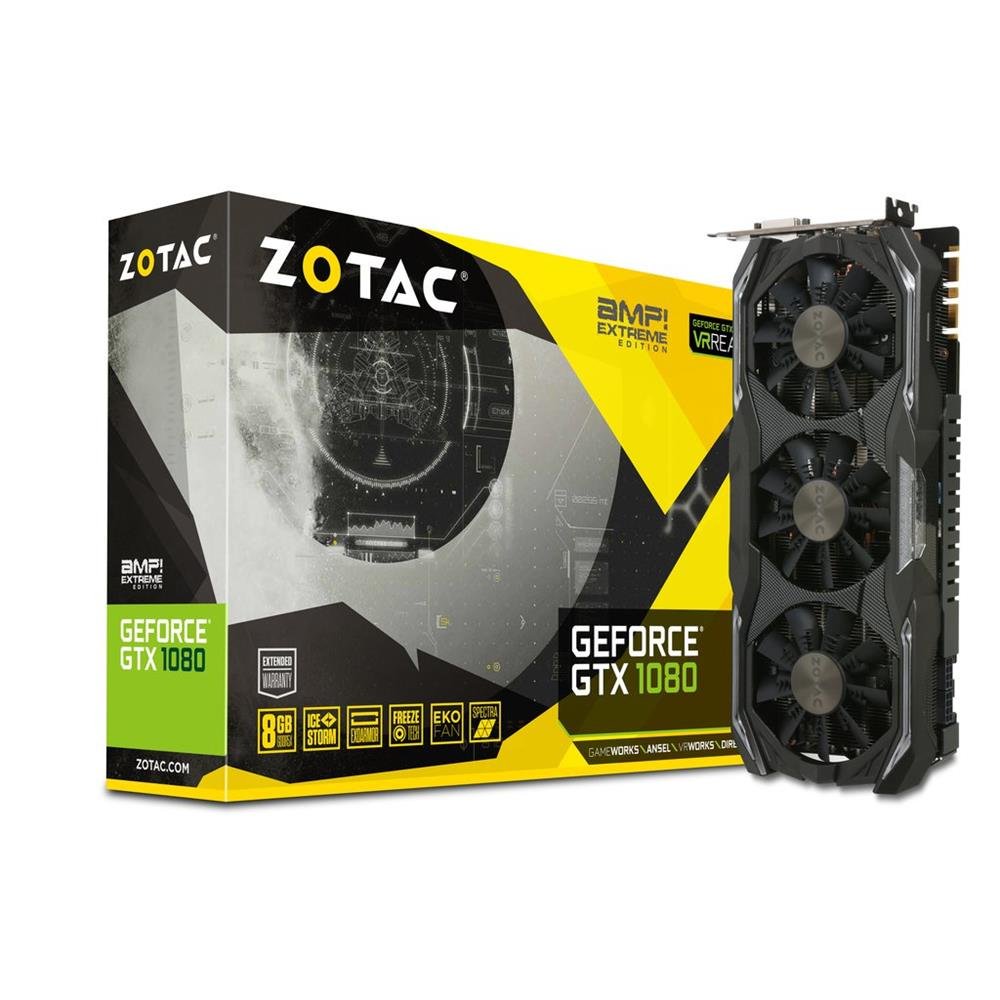
Image 1.1: ZOTAC GeForce GTX 1080 AMP Extreme Graphics Card. This image displays the front view of the graphics card, highlighting its triple-fan cooling system and overall design.
2. Paketearen edukia
Egiaztatu behean zerrendatutako elementu guztiak zure produktuaren paketean daudela:
- ZOTAC GeForce GTX 1080 AMP Extreme Graphics Card
- DVI-VGA egokitzailea
- Dual 6-pin to 4 x 2-pin Power Cable
- Driver CDa
- Argibide eskuliburua (dokumentu hau)
3. Konfigurazioa eta instalazioa
3.1. Sistemaren eskakizunak
- PCI Express x16 slot on a compatible motherboard.
- Minimum 500W power supply with two 8-pin (or 6+2 pin) PCIe power connectors.
- Compatible operating system (e.g., Windows 7/8/10/11).
- At least 4GB of system memory (8GB recommended).
3.2. Instalazio fisikoa
- Itzali: Itzali ordenagailua erabat eta deskonektatu korronte-kablea hormako entxufetik.
- Kasu irekia: Open your computer case to access the motherboard and expansion slots.
- Aurkitu PCIe zirrikitua: Identifikatu zure plaka basean PCI Express x16 zirrikitu libre bat.
- Kendu zirrikituaren estalkia: Kendu aukeratutako PCIe zirrikituaren metalezko zirrikituaren estalkia ordenagailuaren kaxaren atzealdetik.
- Txertatu txartel grafikoa: Carefully align the graphics card with the PCIe slot and press it firmly until it is fully seated. Ensure the retention clip on the slot locks into place.
- Txartel segurua: Lotu txartel grafikoa ordenagailuaren kaxan torloju edo atxikitze-mekanismo batekin.
- Konektatu energia: Connect the required PCIe power cables from your power supply to the graphics card. The ZOTAC GeForce GTX 1080 AMP Extreme typically requires two 8-pin (or 6+2 pin) power connectors. Use the provided dual 6-pin to 4 x 2-pin power cable if your power supply only has 6-pin connectors.
- Itxi kasua: Itxi ordenagailuaren karkasa eta konektatu berriro elikatze-kablea.
3.3. Gidariaren instalazioa
- Abioko sistema: Power on your computer. The system may boot into a basic display mode.
- Instalatu kontrolatzaileak: Insert the provided Driver CD into your optical drive and follow the on-screen instructions to install the NVIDIA graphics drivers. Alternatively, download the latest drivers directly from the official ZOTAC or NVIDIA webgunea errendimendu eta bateragarritasun optimoa lortzeko.
- Berrabiarazi: Berrabiarazi ordenagailua kontrolatzailearen instalazioa amaitutakoan.
3.4. Pantailak konektatzea
Connect your monitor(s) to the appropriate output ports on the graphics card. This model supports HDMI, DisplayPort, and DVI connections. Use the DVI-VGA adapter if your monitor only supports VGA input.
4. Funtzionamendu-argibideak
4.1. Oinarrizko Funtzionamendua
Once the drivers are installed, your graphics card will automatically manage display output and graphics processing. You can adjust display settings, resolution, and refresh rates through your operating system's display settings or the NVIDIA Control Panel.
4.2. Multi-Monitor Setup
The ZOTAC GeForce GTX 1080 AMP Extreme supports multiple displays. Connect additional monitors to the available video output ports. Use the NVIDIA Control Panel to configure display modes such as extended desktop, duplicate displays, or NVIDIA Surround for an immersive gaming experience.
5. Mantentzea
Regular maintenance helps ensure optimal performance and longevity of your graphics card.
- Garbiketa: Periodically clean the fans and heatsink to prevent dust buildup, which can impede airflow and lead to overheating. Use compressed air to gently remove dust from the cooling fins and fan blades. Ensure the system is powered off and unplugged before cleaning.
- Aire-fluxua: Ensure your computer case has adequate airflow to dissipate heat generated by the graphics card. Keep the area around your PC clear of obstructions.
- Gidarien eguneraketak: Keep your graphics drivers updated by regularly checking the ZOTAC or NVIDIA webazken bertsioen gunea.
6. Arazoak
Zure txartel grafikoarekin arazoak badituzu, jarraitu arazoak konpontzeko ohiko urrats hauek:
- Ez dago pantaila-irteerarik:
- Ensure the monitor is correctly connected and powered on.
- Egiaztatu txartel grafikoa PCIe zirrikituan guztiz sartuta dagoela.
- Check that all PCIe power cables are securely connected to the graphics card.
- Try connecting the monitor to a different video output port on the card or to the motherboard's integrated graphics (if available) to isolate the issue.
- Gidariaren arazoak:
- If you experience crashes, artifacts, or poor performance, try reinstalling the graphics drivers. Use a driver uninstaller utility to completely remove old drivers before installing new ones.
- Ensure you are installing the correct drivers for your operating system and graphics card model.
- Errendimendu arazoak:
- Check system temperatures using monitoring software. Overheating can lead to performance throttling.
- Ziurtatu zure energia-iturriak gutxieneko potentzia betetzen duelatage requirements for the graphics card and other system components.
- Verify that your system's BIOS/UEFI settings are configured correctly for a discrete graphics card.
7. Zehaztapenak
| Ezaugarri | Xehetasuna |
|---|---|
| Marka | ZOTAC |
| Ereduaren izena | GTX 1080 |
| Modelo zenbakia | ZT-P10800B-10P |
| Koprozesadore grafikoa | NVIDIA GeForce GTX 1080 |
| Grafikoen RAM tamaina | 8 GB GDDR5X |
| Memoria Erlojuaren Abiadura | 10800 MHz |
| Engine Clock Speed | 1771 MHz (Base), 1911 MHz (Boost) |
| Bideo Irteerako Interfazea | HDMI, DisplayPort, DVI |
| Bideo interfazea | PCI Express |
| Gehienezko pantailaren bereizmena | 7680x4320 |
| Zale kopurua | 3 |
| Erabilera gomendatua | Jolasa |
| Elementuaren pisua | 1.6 kilogramo |
| UPC | 816264016721 |
8. Bermea eta Laguntza
8.1. Produktuen bermea
This ZOTAC graphics card comes with a 24 hilabeteko bermea from the date of purchase. Please retain your proof of purchase for warranty claims. The warranty covers manufacturing defects and malfunctions under normal use. It does not cover damage caused by misuse, accidents, unauthorized modifications, or improper installation.
8.2. Laguntza Teknikoa
For technical assistance, driver downloads, or further information, please visit the official ZOTAC webgunea:
You may also refer to the FAQ section on the ZOTAC website for solutions to common issues.