
LyxPro SPA-5.5
LyxPro SPA-5.5 Small PA Speaker Monitor Instruction Manual
Model: SPA-5.5
1. Sarrera
This manual provides detailed instructions for the proper setup, operation, and maintenance of your LyxPro SPA-5.5 Small PA Speaker Monitor. Please read this manual thoroughly before using the device to ensure optimal performance and safety.
The LyxPro SPA-5.5 is a compact and powerful active speaker system featuring a Class-D amplifier, a 3-channel mixer, and a 3-band equalizer. It is designed for various applications including vocal and instrument monitoring, public address, and as a guitar amplifier or karaoke system.
2. Segurtasun-argibideak
- Energia iturria: Connect the unit only to the specified power supply (100V – 240V AC). Ensure the power cord is not damaged or pinched.
- Aireztapena: Ez blokeatu aireztapen-irekidurak. Ziurtatu aire-fluxu egokia dagoela unitatearen inguruan gehiegi berotzea saihesteko.
- Ura eta hezetasuna: Ez jarri unitatea euripean, hezetasunean edo beste likidoren baten eraginpean. Ez jarri likidoz betetako objekturik unitatearen gainean.
- Bero iturriak: Mantendu unitatea bero-iturrietatik urrun, hala nola erradiadoreetatik, bero-erregistroetatik, sukaldeetatik edo beste beroa sortzen duten gailuetatik.
- Garbiketa: Oihal lehor batekin bakarrik garbitu. Deskonektatu korrontetik garbitu aurretik.
- Zerbitzua: Ez saiatu produktu hau zuk zeuk ematen. Bidali zerbitzu guztiak zerbitzu kualifikatuko langileengana.
- Lekua: Place the unit on a stable surface. If mounting on a microphone stand, ensure the stand is stable and capable of supporting the unit's weight.
3. Paketearen edukia
Egiaztatu elementu guztiak paketean daudela:
- LyxPro SPA-5.5 Speaker Monitor
- Elikatze-kablea
- Microphone Stand Mounting Hardware
- Erabiltzailearen eskuliburua (dokumentu hau)
4. Produktuaren ezaugarriak
- 125W RMS / 150W Peak Class-D Ampbiziagoa
- Integrated 3-Channel Mixer
- 3-Band Equalizer (Bass, Mid, Treble)
- +48V Phantom Power Supply for Condenser Microphones
- Multiple Inputs: XLR, 1/4" (6.35mm), RCA, and 3.5mm (1/8") Aux
- Instrument Switch for Direct Instrument Connection
- XLR Thru Connection for Daisy-Chaining
- Oihartzunaren kontrola
- Bluetooth konexio integratua
- SD txartelaren bateragarritasuna
- Mounts on Standard Microphone Stands
- Durable and Compact Design
5. Kontrolak eta konexioak
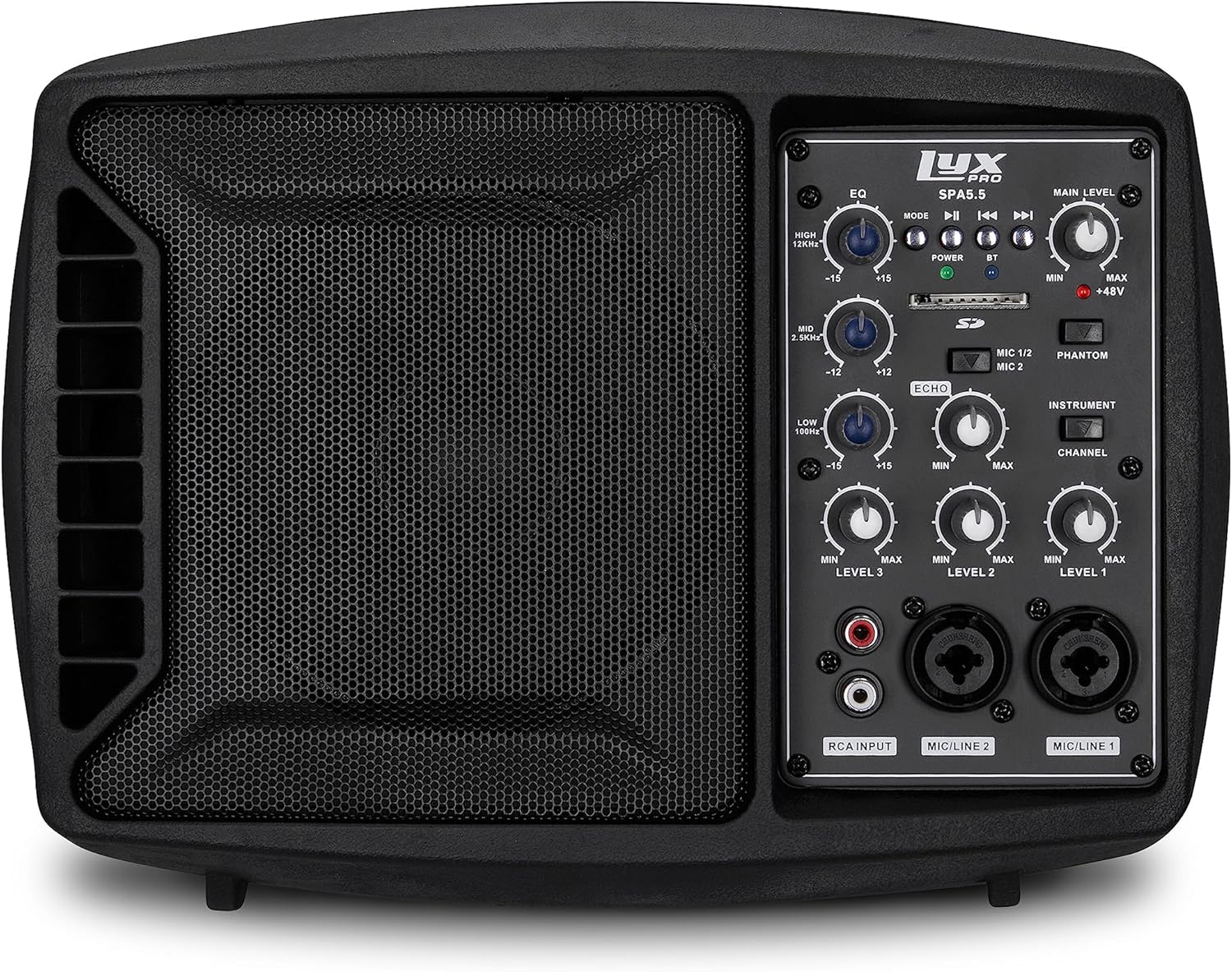
5.1. irudia: Aurrealdea view of the LyxPro SPA-5.5 speaker monitor, showing the speaker grille and control panel.
5.1 Aurrealdeko panelaren kontrolak

Figure 5.2: Detailed diagram of the LyxPro SPA-5.5 front control panel with labeled components.
- Berdinketa (EQ):
- HIGH (12kHz): Adjusts high frequencies. Range: ±15dB.
- MID (2.5kHz): Adjusts mid frequencies. Range: ±15dB.
- LOW (80Hz): Adjusts low frequencies. Range: ±15dB.
- Maila Nagusia: Bozgorailuen irteerako bolumen orokorra kontrolatzen du.
- Potentzia Argia: Indicates when the unit is powered on.
- BT (Bluetooth) Light: Bluetooth konexioaren egoera adierazten du.
- SD txartelaren zirrikitua: Audioa erreproduzitzeko. files SD txartel batetik.
- Phantom Power Switch (+48V): Activates +48V phantom power for condenser microphones connected to MIC 1 or MIC 2.
- MIC 1/2 Switch: Selects between MIC 1 and MIC 2 inputs for Channel 1.
- Tresna-etengailua: Optimizes input impedance for direct connection of instruments (e.g., guitar) to Channel 1.
- Oihartzunaren kontrola: Adjusts the level of echo effect applied to microphone inputs.
- Channel Level Controls (LEVEL 1, LEVEL 2, LEVEL 3): Adjusts the individual volume for each input channel.
- RCA Input (LINE 3): Stereo RCA inputs for connecting devices like CD players, MP3 players, or keyboards.
- MIC/LINE 2 Input: Combo XLR/1/4" (6.35mm) input for microphones or line-level devices.
- MIC/LINE 1 Input: Combo XLR/1/4" (6.35mm) input for microphones or line-level devices.
5.2 Atzeko panelaren konexioak

Figure 5.3: Detailed diagram of the LyxPro SPA-5.5 rear panel with labeled connections.
- MAIN IN (XLR): Main input for connecting external audio sources.
- MIC/LINE Level Switch: Selects between microphone or line level for the MAIN IN.
- THRU (XLR): XLR output for daisy-chaining to other speakers or sending the mixed signal to another device.
- Switch potentziala: Unitatea pizten edo itzaltzen du.
- AC SARRERA: Power connector for the included AC power cable (100V – 240V AC).
6. Konfigurazioa
6.1 Hasierako piztea
- Ensure all level controls (Main Level, Channel Levels) are set to minimum.
- Connect the provided AC power cable to the AC INPUT on the rear panel and then to a suitable power outlet.
- Flip the Power Switch on the rear panel to the "ON" position. The Power Light on the front panel will illuminate.
6.2 Muntatzeko aukerak
The SPA-5.5 can be used in various configurations:
- Solairuko monitorea: Place the unit on the floor in front of the performer, angled upwards.
- Mahaigaina: Kokatu gainazal lau eta egonkor batean.
- Microphone Stand Mounting: The unit includes hardware to mount it directly onto a standard microphone stand.

Figure 6.1: The LyxPro SPA-5.5 speaker monitor positioned on a microphone stand, demonstrating its use as a personal monitor for a musician.

Figure 6.2: A band performing outdoors, utilizing the compact LyxPro SPA-5.5 speaker for sound reinforcement.
7. Funtzionamendu-argibideak
7.1 Mikrofonoak eta instrumentuak konektatzea
- Mikrofonoak: Connect dynamic or condenser microphones to the MIC/LINE 1 or MIC/LINE 2 inputs using XLR cables. If using a condenser microphone, activate the +48V Phantom Power Switch. Adjust the corresponding Channel Level control.
- Instrumentuak: Connect instruments (e.g., guitar, bass) directly to MIC/LINE 1 or MIC/LINE 2 using a 1/4" (6.35mm) cable. Engage the Instrument Switch for optimal impedance matching. Adjust the corresponding Channel Level control.
- Lerro mailako gailuak: Connect devices like keyboards or audio interfaces to MIC/LINE 1 or MIC/LINE 2 using 1/4" (6.35mm) cables. Ensure the Instrument Switch is disengaged. Adjust the corresponding Channel Level control.
- Stereo Audio Sources: Connect CD players, MP3 players, or other stereo sources to the RCA Input (LINE 3). Adjust LEVEL 3.
7.2 Soinua doitzea
- Kanal Mailak: Use the LEVEL 1, LEVEL 2, and LEVEL 3 controls to balance the volume of individual inputs.
- Maila Nagusia: Adjust the Main Level knob to control the overall output volume of the speaker.
- Berdinketa (EQ): Use the HIGH, MID, and LOW knobs to shape the tone of your sound.
- Increase HIGH for brighter sound.
- Adjust MID for vocal clarity or instrument presence.
- Increase LOW for more bass.
- Oihartzunaren kontrola: Turn the Echo knob to add a reverberation effect to the microphone inputs.
7.3 Media Playback (SD Card & Bluetooth)

Figure 7.1: Icons indicating SD card compatibility and built-in Bluetooth functionality on the LyxPro SPA-5.5.
- SD txartela: Insert an SD card containing audio files into the SD Card Slot. The unit will automatically detect and begin playback. Use the built-in controls (Mode, Play/Pause, Skip) to manage playback.
- Bluetootha:
- Ziurtatu unitatea piztuta dagoela.
- Aktibatu Bluetootha zure gailu mugikorrean.
- Bilatu "LyxPro SPA-5.5" in your device's Bluetooth settings and pair. The BT light on the unit will indicate a successful connection.
- Play audio from your device. Adjust volume using both your device and the SPA-5.5's Main Level control.

Figure 7.2: A musician utilizing the LyxPro SPA-5.5 as a personal monitor in a studio environment.
8. Mantentzea
- Garbiketa: Erabili zapi leun eta lehor bat unitatearen kanpoaldea garbitzeko. Ez erabili garbitzaile likidorik edo aerosolik.
- Biltegiratzea: Denbora luzez erabiltzen ez baduzu, gorde gailua leku fresko eta lehor batean, eguzki-argitik eta muturreko tenperaturetatik babestuta.
- Fusiblearen ordezkapena: If the unit does not power on, check the fuse located near the AC input. Replace with a fuse of the same type and rating (T 3.15 A H 250V). Refer to qualified personnel if unsure.
9. Arazoak
| Arazoa | Kausa posiblea | Irtenbidea |
|---|---|---|
| Botererik ez | Kable elektrikoa deskonektatuta; Etengailua itzalita; Fusiblea erreta | Check power cable connection; Turn power switch on; Replace fuse (refer to Maintenance section) |
| Ez dago soinu irteerarik | Main Level or Channel Levels too low; Input device not connected or muted; Incorrect input selected | Increase Main Level and Channel Levels; Check input device connection and volume; Verify correct input is used |
| Soinu distortsionatua | Input signal too high; Main Level too high; EQ settings incorrect | Reduce input device volume; Lower Main Level; Adjust EQ settings |
| Microphone not working (condenser mic) | Phantom potentzia ez dago gaituta | Activate the +48V Phantom Power Switch |
| Bluetootha ez da konektatzen | Unit not in pairing mode; Device too far; Incorrect device selected | Ensure Bluetooth is active on SPA-5.5 and device; Move device closer; Select "LyxPro SPA-5.5" from device list |
10. Zehaztapenak

Figure 10.1: Diagram illustrating the compact dimensions of the LyxPro SPA-5.5 speaker monitor.
| Ezaugarri | Xehetasuna |
|---|---|
| Potentzia Irteera | 125W RMS / 150W gailurra |
| Bozgorailuaren tamaina | 5 hazbetekoa |
| Ampbiziagoa Mota | D klasea |
| Maiztasun-erantzuna (-10dB) | 80 Hz - 14 kHz |
| Maiztasun-erantzuna (-3dB) | 100 Hz - 10 kHz |
| Gehienez SPL | 114dB SPL @ 1M |
| potentzia fantasma | +48V |
| Sarrerako inpedantzia | 20 K Ω |
| EQ High (12kHz) | ± 15 dB |
| EQ Mid (2.5kHz) | ± 15 dB |
| EQ Low (80Hz) | ± 15 dB |
| Sarrera boltage | 100V - 240V AC |
| Energia-kontsumoa | 180W gehienez. |
| Neurriak (L x W x H) | 13.5" x 9" x 11.8" (34.3 cm x 22.9 cm x 30 cm) |
| Pisua | 6.1 lb (2.77 kg) |
11. Bermea eta Laguntza
For warranty information and technical support, please refer to the warranty card included with your product or visit the official LyxPro webgunea. Gorde erosketa-agiria erosketaren frogagiri gisa.
For further assistance, contact LyxPro customer support.
Ask a question about this manual
Ask about setup, troubleshooting, compatibility, parts, safety, or missing instructions. Manuals+ will review the question and use this page’s manual context to help answer it.