
DESCO 718
SCS 718 sentsore estatikoen erabiltzailearen eskuliburua
Model: 718 | Brand: DESCO
1. Sarrera
This manual provides essential information for the proper use, setup, operation, and maintenance of the SCS 718 Static Sensor. The SCS 718 is a handheld device designed for measuring electrostatic charge voltage. It features a red LED lamp for accurate measurement distance guidance and can be used with the 718A Charger (Part No: 718CH) to perform ionizer function checks. This sensor is specifically designed for measuring charged potential.
2. Produktua amaitu daview
The SCS 718 Static Sensor is a compact and portable instrument used to detect and measure static electricity. Its primary function is to identify and quantify electrostatic charges on surfaces, which is crucial in environments where static discharge can cause damage or interference.
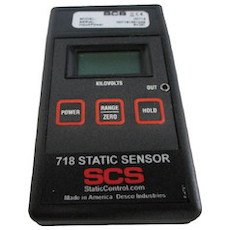
Figure 1: SCS 718 Static Sensor. This image displays the SCS 718 Static Sensor, a handheld device. The front panel features a digital display at the top, below which are three rectangular buttons: 'POWER' on the left, 'RANGE/ZERO' in the center, and 'HOLD' on the right. The device is labeled '718 STATIC SENSOR' with the 'SCS' logo and 'StaticControl.com Made in America Desco Industries' at the bottom.
3. Ezaugarriak
- Electrostatic measurement capability.
- LED gorria lamp for accurate measurement distance guidance.
- Compatibility with 718A Charger (Part No: 718CH) for ionizer function checks.
- Measures charged potential.
4. Segurtasun informazioa
Please read and understand all safety instructions before operating the device. Failure to do so may result in injury or damage to the product.
- Ez jarri gailua muturreko tenperatura, hezetasun edo eguzki-argitara.
- Saihestu gailua erortzea edo kolpe gogorrak jasan.
- Ez saiatu gailua irekitzen edo aldatzen. Mantendu konponketa guztiak langile kualifikatuen esku.
- Mantendu gailua likidoetatik eta material korrosiboetatik urrun.
- Ensure the measurement area is clear of obstructions and potential hazards.
5. Konfigurazioa
The SCS 718 Static Sensor is designed for immediate use. No battery installation is required as the device does not use batteries.
- Despaketatzea: Carefully remove the sensor from its packaging and inspect for any signs of damage.
- Hasierako egiaztapena: Sakatu BOTEREA button to turn on the device. The display should illuminate.
- Zeroratzea: Before each measurement, ensure the device is zeroed. Point the sensor away from any charged objects and press the RANGE/ZERO button to reset the reading to zero.
6. Funtzionamendu-argibideak
Follow these steps to accurately measure electrostatic charges:
- Piztu: Sakatu BOTEREA button to activate the sensor.
- Zero the Sensor: Hold the sensor in free air, away from any charged surfaces. Press the RANGE/ZERO button until the display reads "0.00" or close to zero. This calibrates the sensor for accurate readings.
- Neurketarako kokapena: Point the sensor towards the object or surface you wish to measure. The red LED lamp on the sensor acts as a distance guide. Position the sensor so that the red LED light is focused on the target surface, typically indicating the optimal measurement distance (e.g., 1 inch or 2.5 cm).
- Irakurri pantaila: The display will show the electrostatic charge in kilovolts (kV).
- Hold Reading: Uneko irakurketa pantailan izozteko, sakatu botoia EUTSI button. Press it again to release the hold and resume live readings.
- Ionizer Function Check (with 718A Charger):
- Connect the SCS 718 Static Sensor to the 718A Charger (Part No: 718CH).
- Follow the instructions provided with the 718A Charger to perform ionizer function checks. This typically involves measuring the decay time of a charge.
- Itzali: Sakatu BOTEREA button again to turn off the device when not in use.
7. Mantentzea
Proper maintenance ensures the longevity and accuracy of your SCS 718 Static Sensor.
- Garbiketa: Use a soft, dry, lint-free cloth to clean the exterior of the sensor. Do not use abrasive cleaners, solvents, or liquids.
- Biltegiratzea: Store the sensor in a cool, dry place, away from direct sunlight and extreme temperatures. Keep it in its original packaging or a protective case when not in use to prevent dust accumulation and physical damage.
- Kalibrazioa: Regular calibration is recommended to maintain measurement accuracy. Refer to DESCO's official website or contact their support for calibration services.
8. Arazoak
| Arazoa | Kausa posiblea | Irtenbidea |
|---|---|---|
| Gailua ez da pizten. | Internal power issue. | Ensure the power button is pressed firmly. If still unresponsive, contact customer support. |
| Irakurketa okerrak. | Sensor not zeroed; environmental interference; dirty sensor. | Zero the sensor before each use. Ensure no strong electromagnetic fields are nearby. Clean the sensor surface. Consider professional calibration. |
| Red LED not illuminating. | LED matxura. | Jarri harremanetan bezeroarentzako laguntza-zerbitzuarekin konpontzeko edo ordezkatzeko. |
9. Zehaztapenak
| Atributua | Balioa |
|---|---|
| Fabrikatzailea | DESKOA |
| Zati zenbakia | 718 |
| Produktuaren pisua | 130 g (0.13 kg) |
| Paketearen neurriak | 26 x 19 x 8 cm |
| Bateriaren erabilera | Ez |
| ASIN | B01KMB21LM |
| Eskuragarri dagoen lehen data | 18ko abuztuaren 2016a |
10. Bermea eta Laguntza
For information regarding product warranty, please refer to the warranty card included with your purchase or visit the official DESCO website. For technical support, troubleshooting assistance, or service inquiries, please contact DESCO customer service through their official channels.
Fabrikatzailea: DESKOA
Webgunea: www.desco.com (Adibampesteka, benetako esteka alda daiteke)
Ask a question about this manual
Ask about setup, troubleshooting, compatibility, parts, safety, or missing instructions. Manuals+ will review the question and use this page’s manual context to help answer it.