
1. Sarrera
The Viecar CY300 is a compact and efficient OBDII car diagnostic scanner designed to retrieve vehicle diagnostic information. This tool supports all OBD II protocols, including the Controller Area Network (CAN) protocol, making it compatible with most 1996 and newer vehicles.
This manual provides detailed instructions for the proper use and maintenance of your CY300 diagnostic scanner.
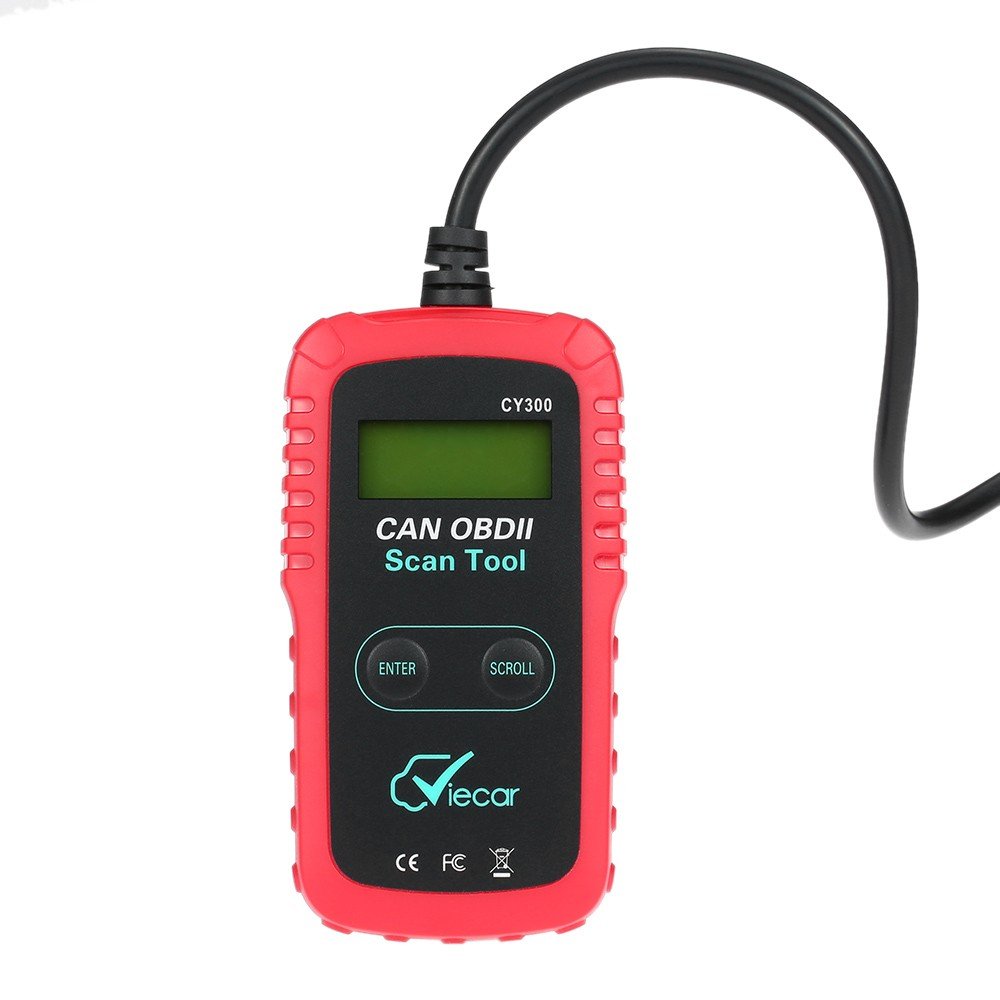
Figure 1.1: Viecar CY300 OBDII Car Diagnostic Scanner. The device is red and black with an integrated cable and OBDII connector.
2. Segurtasun informazioa
- Egin beti automobilen probak ingurune seguru batean.
- Erabili ANSI arauak betetzen dituen begi-babesak.
- Mantendu arropa, ilea, eskuak, tresnak, saiakuntza-ekipoak, etab. mugitzen diren edo berotzen diren motorraren zati guztietatik urrun.
- Ibilgailua ondo aireztatutako lan-eremu batean jardutea; ihes-gasak pozoitsuak dira.
- Jarri blokeak gurpil eragileen aurrean eta ez utzi ibilgailua arretarik gabe probak egiten ari zaren bitartean.
- Kontuz ibili pizte-bobinaren, banatzailearen txanoaren, pizte-kableen eta bujien inguruan lan egiten duzunean. Osagai hauek bolumen arriskutsuak sortzen dituztetages motorra martxan dagoenean.
- Gertu ondoan gasolina/kimiko/elektriko suteetarako egokia den su-itzalgailu bat.
- Ez konektatu edo deskonektatu proba-ekiporik piztea piztuta edo motorra martxan dagoen bitartean.
3. Produktua amaitu daview
The Viecar CY300 is designed for ease of use, featuring a clear display and intuitive buttons for navigation.
3.1 Ezaugarri nagusiak
- Reads and clears generic and manufacturer-specific Diagnostic Trouble Codes (DTCs).
- Motorraren egiaztapen-argia (MIL) itzaltzen du.
- Supports multiple trouble code requests: generic, pending, and manufacturer-specific codes.
- Reviews emission readiness status of OBD monitors.
- Determines Malfunction Indicator Lamp (MIL) status.
- Retrieves Vehicle Identification Number (VIN) on 2002 and newer vehicles that support Mode 9.
- Easy plug-and-play operation.
- No internal batteries required; powered directly via the detachable OBD II cable from the vehicle.
3.2 Gailuaren osagaiak

Figure 3.1: Labeled components of the Viecar CY300. This image highlights the LCD display, Enter button, Scroll button, and the OBD II connector.
- LCD pantaila: Backlit, 2-line, 8-character display for showing diagnostic information.
- Sartu botoia: Hautaketak edo ekintzak berresten ditu.
- Korritzeko botoia: Navigates through menus and data.
- OBD II konektorea: Connects the tool to the vehicle's OBD II port.
4. Konfigurazioa
The Viecar CY300 is designed for simple plug-and-play operation. Follow these steps to set up your device:
- Kokatu OBD II ataka: The OBD II port is typically located under the dashboard on the driver's side of the vehicle. Refer to your vehicle's service manual for the exact location if you cannot find it.
- Konektatu eskanerra: With the vehicle's ignition off, firmly plug the CY300's OBD II connector into the vehicle's OBD II port. Ensure a secure connection.
- Piztea: Turn the vehicle's ignition to the "ON" position (do not start the engine). The scanner will automatically power on, drawing power from the vehicle's battery.
- Sistemaren hasieratzea: The scanner will perform a system initialization and link to the vehicle's onboard computer. This may take a few seconds. Once linked, the main menu or a diagnostic screen will appear.
5. Funtzionamendu-argibideak
Once the scanner is connected and powered on, you can begin diagnostic operations.
5.1 Reading Diagnostic Trouble Codes (DTCs)
- From the main menu, use the Korritu button to navigate to the "Read Codes" option.
- Sakatu Sartu botoia hautatzeko.
- The scanner will display any stored DTCs. Use the Korritu botoia view multiple codes if present.
5.2 Clearing Diagnostic Trouble Codes (DTCs)
Abisua: Clearing DTCs will erase all diagnostic data from the vehicle's computer. Ensure you have recorded any necessary information before proceeding.
- From the main menu, use the Korritu button to navigate to the "Erase Codes" option.
- Sakatu Sartu botoia hautatzeko.
- Confirm your choice when prompted. The Check Engine Light (MIL) should turn off after successful clearing.
5.3 I/M Prestutasun Egoera Egiaztatzea
This function checks the status of the emission-related monitoring systems to determine if they are ready for an emissions test.
- From the main menu, use the Korritu button to navigate to the "I/M Readiness" option.
- Sakatu Sartu botoia hautatzeko.
- The display will show the status of various monitors (e.g., "OK" for complete, "INC" for incomplete).
5.4 Retrieving Vehicle Information (VIN)
This function allows you to retrieve the Vehicle Identification Number (VIN) for vehicles that support Mode 9.
- From the main menu, use the Korritu button to navigate to the "Vehicle Info" option.
- Sakatu Sartu botoia hautatzeko.
- The VIN will be displayed on the screen.
6. Mantentzea
Proper maintenance ensures the longevity and reliable operation of your Viecar CY300 scanner.
- Garbiketa: Use a soft, dry cloth to clean the exterior of the scanner. Do not use abrasive cleaners or solvents.
- Biltegiratzea: Store the device in a clean, dry environment away from direct sunlight, extreme temperatures, and excessive moisture. Keep it in its original packaging or a protective case when not in use.
- Kableen zainketa: Avoid bending or kinking the OBD II cable excessively. Always grasp the connector when plugging or unplugging, not the cable itself.
- Software eguneraketak: Egiaztatu fabrikatzailearena website periodically for any available software updates to ensure optimal performance and compatibility with newer vehicles.
7. Arazoak
If you encounter issues with your Viecar CY300, refer to the following common troubleshooting steps:
- Potentziarik gabe:
- Ensure the OBD II connector is firmly plugged into the vehicle's port.
- Egiaztatu ibilgailuaren piztea "ON" posizioan dagoela.
- Check the vehicle's fuse for the OBD II port (consult your vehicle's manual).
- Link Error / Communication Error:
- Confirm the vehicle is OBD II compliant (generally 1996 and newer).
- Ensure the ignition is on and the engine is off.
- Check for any loose connections at the OBD II port.
- Try connecting the scanner to a different OBD II compliant vehicle to rule out a scanner issue.
- Pantaila izozten da:
- Disconnect the scanner from the vehicle, wait a few seconds, and then reconnect it.
- Ziurtatu ibilgailuaren bateriak nahikoa karga duela.
- Irakurketa okerrak:
- Ensure the scanner's software is up to date.
- Verify the vehicle's information (VIN, year, make, model) is correctly recognized by the scanner.
8. Zehaztapenak
The following table outlines the technical specifications for the Viecar CY300 OBDII Car Diagnostic Scanner:

Figure 8.1: Visual representation of Viecar CY300 dimensions and key specifications.
| Zehaztapena | Xehetasuna |
|---|---|
| Eredua | Viecar CY300 |
| Kolorea | Gorria + Beltza |
| Materiala | Plastikoa |
| Bistaratzea | Backlit LCD, 2-line, 8 characters |
| Funtzionamendu-tenperatura | 0°C eta 50°C (32°F eta 122°F) |
| Biltegiratze Tenperatura | -20 °C eta 70 °C (-4 °F eta 158 °F) |
| Energia iturria | 10 to 15.5 Volts provided via vehicle battery (no internal batteries) |
| Produktuaren neurriak (L x W x H) | 12 cm x 6.5 cm x 2.1 cm (gutxi gorabehera 4.7 x 2.6 x 0.8 hazbete) |
| Paketearen pisua | 260 g (gutxi gorabehera 9 ontza) |
| UPC | 712383577481, 712383583871, 712383579997 |
| ASIN | B01KSV9GDM |
| Eskuragarri dagoen lehen data | 17ko abuztuaren 2016a |
9. Bermea eta Laguntza
Bermeari buruzko informazioa lortzeko, erosketa unean emandako dokumentazioa kontsultatu edo zure saltzailearekin harremanetan jarri. Berme-baldintza espezifikoak eskualdearen eta saltzailearen arabera alda daitezke.
If you require technical support or have questions not covered in this manual, please contact the retailer or manufacturer directly. Keep your purchase receipt and product model number (CY300) available for faster service.