
1. Sarrera
This manual provides essential information for the safe and effective use of your Polaroid iE826 Digital Camera. Please read this manual thoroughly before operating the camera and retain it for future reference. The Polaroid iE826 is an ultracompact digital camera designed for capturing 18-megapixel still images and FHD 1080p video, featuring 8x optical zoom and Wi-Fi connectivity.
2. Segurtasun informazioa
- Ez jarri kamera uretara edo hezetasunera.
- Saihestu kamera erortzea edo kolpe bortitzak jasatea.
- Mantendu kamera eguzki-argitik eta tenperatura altuetatik urrun.
- Erabili zehaztutako osagarriak eta energia-iturriak soilik.
- Ez saiatu kamera desmuntatzen edo aldatzen.
- Mantendu haurren eskura.
3. Paketearen edukia
Egiaztatu elementu guztiak paketean daudela:
- Polaroid iE826 Digital Camera
- USB kablea
- Litio ioizko bateria
- Erabiltzailearen eskuliburua (dokumentu hau)
4. Kamera amaitu daview
Kameraren osagaiak ezagutu:
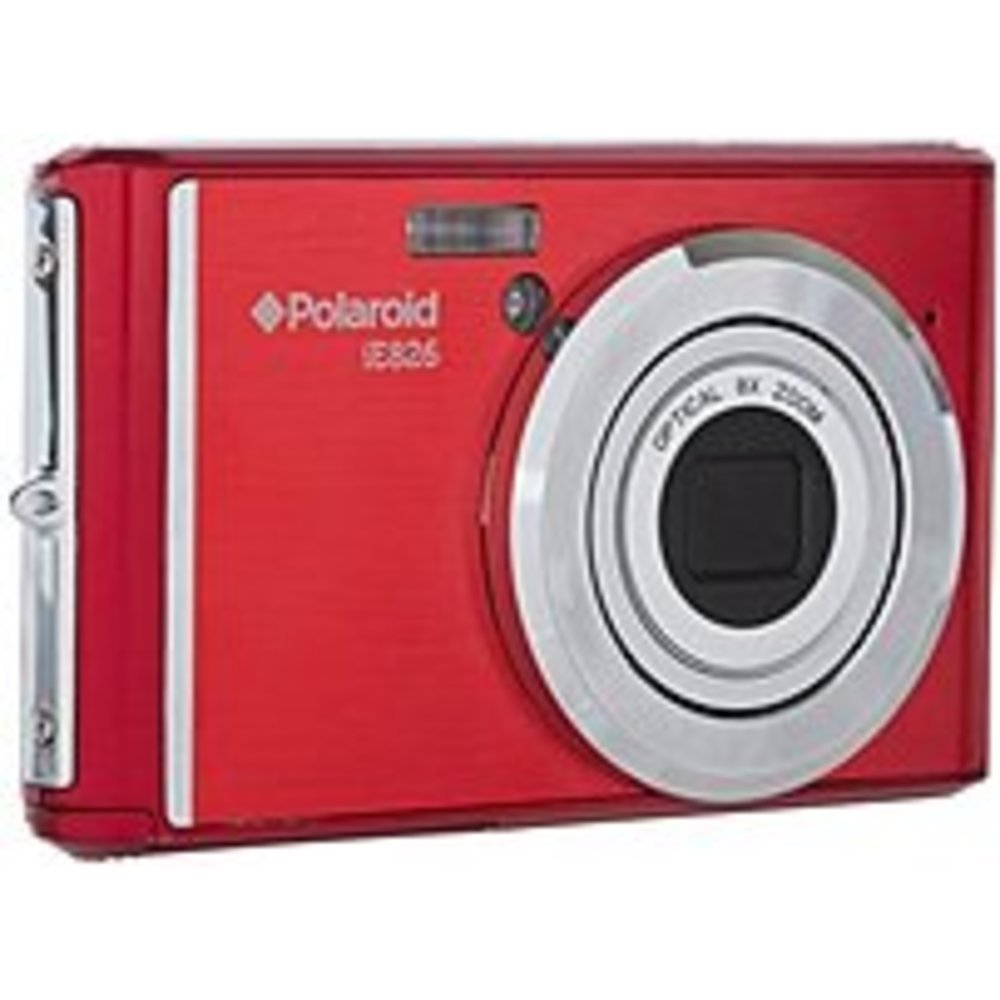
4.1. irudia: Aurrealdea view of the Polaroid iE826 Digital Camera, showing the lens and flash.
4.1 Aurreko panela
- Lentea: Captures images and video. Features 8x optical zoom.
- Built-In Flash: Argiztapena ematen du argi gutxiko baldintzetan.
4.2 Goiko panela
- Pizteko botoia: Kamera piztu edo itzaltzen du.
- Obturadorearen botoia: Sakatu erdiraino fokatzeko, eta guztiz argazkia ateratzeko.
- Zoom palanka: Controls the optical zoom (W for wide, T for telephoto).
4.3 Atzeko panela
- 2 hazbeteko LCD pantaila: Zuzeneko pantailak view, menuak eta erreprodukzioa.
- Menuko botoia: Kameraren ezarpenetara sartzen da.
- Erreproduzitzeko botoia: Erreprodukzio moduan sartzen da view argazkiak eta bideoak.
- Directional Pad/OK Button: Menuetan nabigatzen du eta aukeraketak berresten ditu.
- Grabatu botoia: Bideo-grabazioa abiarazten eta gelditzen du.
4.4 Side/Bottom Panels
- USB ataka: For charging the battery and transferring data.
- Bateriaren konpartimendua: Houses the Lithium Ion battery.
- SD txartelaren zirrikitua: For inserting an SD memory card (not included).
5. Konfigurazioa
5.1 Bateria kargatzea
- Ireki bateriaren konpartimenduaren estalkia.
- Insert the Lithium Ion battery, ensuring correct orientation.
- Itxi bateriaren konpartimenduaren estalkia ondo.
- Connect the camera to a power source using the supplied USB cable. The charging indicator will illuminate.
- Kargatzen amaituko da argia itzaltzen denean.
5.2 SD txartel bat sartzea
An SD memory card (not included) is required to store photos and videos.
- Bilatu SD txartelaren zirrikitua, normalean bateriaren konpartimentuaren ondoan.
- Sartu SD txartela metalezko kontaktuak norabide egokian dituela, klik egin arte.
- Txartela astuna izan dadin, ateratzeko, bultzatu astiro-astiro.
5.3 Hasierako piztea
- Press and hold the Power button until the LCD screen illuminates.
- Jarraitu pantailan agertzen diren argibideei data, ordua eta hizkuntza ezartzeko.
6. Kameraren funtzionamendua
6.1 Argazkiak ateratzea
- Turn on the camera. The camera will enter photo mode by default.
- Markatu zure argazkia 2 hazbeteko LCD pantaila erabiliz.
- Use the Zoom Lever to adjust the 8x optical zoom.
- Press the Shutter button halfway down to allow the camera to focus (Contrast Detection Autofocus).
- Once focused, press the Shutter button fully to capture the 18-megapixel image.
6.2 Bideoak grabatzea
- In photo mode, press the dedicated Record button to start recording FHD 1080p video.
- Grabatu botoia sakatu berriro grabaketa gelditzeko.
6.3 Erreprodukzio modua
- Sakatu Erreproduzitzeko botoia erreprodukzio moduan sartzeko.
- Use the Directional Pad to navigate through your photos and videos.
- Sakatu Ados botoia view a selected item or play a video.
6.4 Menu Nabigazioa
- Press the Menu button to access camera settings.
- Use the Directional Pad to scroll through menu options.
- Press the OK button to select an option or enter a sub-menu.
- Sakatu berriro Menu botoia menutik irteteko.
6.5 Wi-Fi konexioa
The Polaroid iE826 features Wi-Fi for wireless transfer of images and remote control via a compatible smartphone application (application availability may vary).
- Access the Wi-Fi settings through the camera's menu.
- Enable Wi-Fi and follow the on-screen instructions to connect to a network or generate a direct connection.
- Refer to the specific instructions within the camera's Wi-Fi menu for detailed connection steps.
7. Mantentzea
7.1 Kamera garbitzea
- Erabili zapi leun eta lehor bat kameraren gorputza garbitzeko.
- For the lens and LCD screen, use a specialized lens cleaning cloth and solution.
- Ez erabili garbitzaile edo disolbatzaile urratzailerik.
7.2 Biltegiratzea
- Store the camera in a cool, dry place away from direct sunlight.
- Kendu bateria denbora luzez kamera erabiliko ez bada.
8. Arazoak
8.1 Kamera ez da pizten
- Ziurtatu bateria guztiz kargatuta eta behar bezala sartuta dagoela.
- Try charging the battery for at least 30 minutes.
8.2 Blurry Images
- Ensure sufficient lighting for your subject.
- Hold the camera steady when pressing the shutter button.
- Allow the camera to focus by pressing the shutter button halfway before fully pressing.
- Egiaztatu lentea garbi eta orbanik gabe dagoen.
8.3 Memoria txartelaren errorea
- Ziurtatu SD txartela behar bezala sartuta dagoela.
- Saiatu SD txartela formateatzen (horrek datu guztiak ezabatuko ditu).
- Test with a different, compatible SD card.
8.4 Wi-Fi konexio arazoak
- Ziurtatu Wi-Fia gaituta dagoela bai kameran bai zure gailu adimendunean.
- Verify that the correct network and password are being used.
- Move closer to the Wi-Fi access point or camera.
9. Zehaztapenak
| Ezaugarri | Zehaztapena |
|---|---|
| Ereduaren izena | iE826 |
| Argazki sentsorearen bereizmena | 18 MP |
| Zoom optikoa | 8 x |
| Bideo Ebazpena | FHD 1080p |
| Pantailaren tamaina | 2 hazbeteko (LCD) |
| Irudi Egonkortzea | Digitala |
| Flash memoria mota | SD |
| Konektibitate Teknologia | USB, Wi-Fi |
| Bateria zelula mota | Litio ioia |
| Esposizio Kontrola | Automatikoa |
| Foku automatikoa | Kontraste-hautematea |
| Elementuaren pisua | 8 ontza |
10. Bermea eta Laguntza
For warranty information and technical support, please refer to the warranty card included with your product or visit the official Polaroid webgunea. Gorde erosketa-agiria erosketaren frogagiri gisa.