
1. Sarrera
This manual provides essential information for the safe and effective use of your Panasonic AG-AC30 Full-HD AVCCAM Handheld Camera. Please read this manual thoroughly before using the product and retain it for future reference. The AG-AC30 is designed for high-quality video recording with advanced features for professional and enthusiast users.
2. Segurtasun informazioa
- Do not expose the camera to rain, moisture, or extreme temperatures.
- Saihestu kamera erortzea edo kolpe gogorren eraginpean jartzea.
- Erabili Panasonicek onartutako osagarriak eta energia-egokigailuak soilik.
- Mantendu kamera eremu magnetiko indartsuetatik urrun.
- Disconnect the power supply before cleaning or when not in use for extended periods.
3. Paketearen edukia
Egiaztatu elementu guztiak paketean daudela:
- Kamerara
- (Other accessories such as power adapter, battery, lens hood, microphone, and cables may be included depending on the specific package.)
4. Kamera amaitu daview
Familiarize yourself with the main components of your AG-AC30 camcorder.

4.1. irudia: Aurrealdea eta albokoa view of the Panasonic AG-AC30 camcorder. This image illustrates the ergonomic design for handheld operation, highlighting the lens, handle, and primary controls accessible during use.

4.2. irudia: Aurrealdeko angelua view of the Panasonic AG-AC30 camcorder, showcasing the attached microphone, lens hood, and audio input ports. This view emphasizes the camera's readiness for professional audio and video capture.
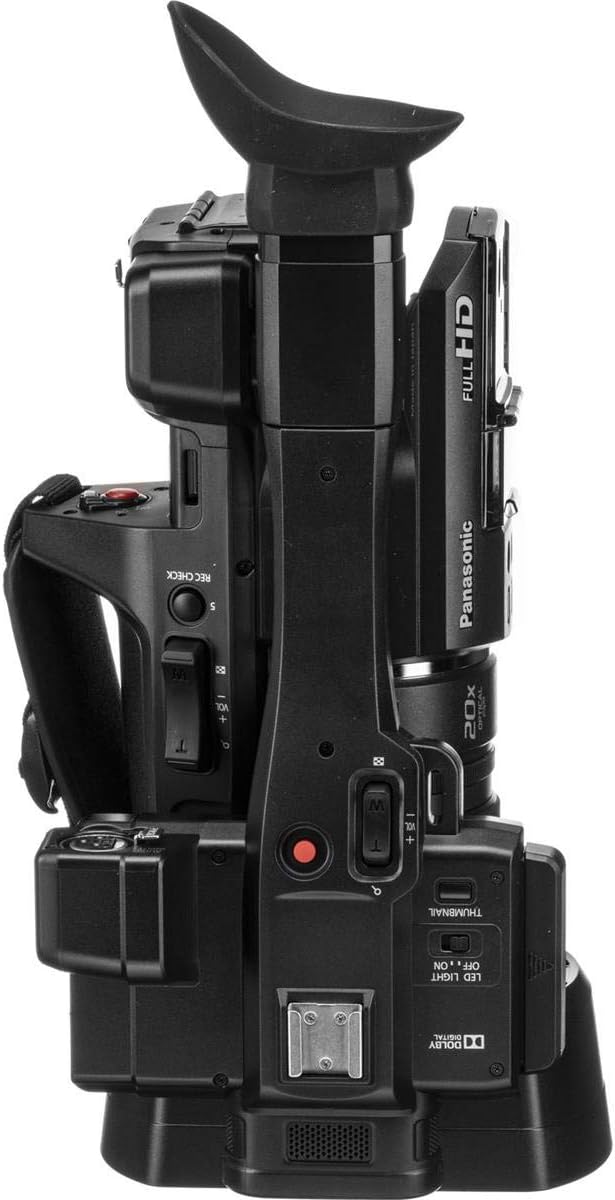
4.3. irudia: Goiena view of the Panasonic AG-AC30 camcorder. This perspective highlights the integrated handle, electronic viewfinder (EVF), and various control buttons for recording, zoom, and menu navigation.

4.4. irudia: Behean view of the Panasonic AG-AC30 camcorder. This image displays the standard tripod mounting screw hole and the location of the battery compartment, essential for stable shooting and power management.
5. Konfigurazioa
5.1. Bateriaren instalazioa
- Ziurtatu kamera itzalita dagoela.
- Open the battery compartment cover, typically located at the rear or bottom of the camera.
- Insert the battery pack, aligning it with the terminals, until it clicks into place.
- Itxi bateriaren konpartimenduaren estalkia ondo.
5.2. SDXC Card Insertion
The AG-AC30 features dual SDXC card slots for extended recording and backup.
- Locate the SD card slot cover, usually on the side of the camera.
- Open the cover and gently insert an SDXC card into the slot with the label facing the correct direction until it locks.
- Close the SD card slot cover. Repeat for the second slot if using two cards.
5.3. Osagarriak jartzea
- Lens Hood: Lotu lentearen estalkia lentearen aurrealdean, markak lerrokatuz eta blokeatu arte biratuz.
- Mikrofonoa: Secure the external microphone to the cold shoe mount on the handle and connect it to the audio input port (XLR inputs are available).
- Sorbalda uhala: Attach the shoulder strap to the designated loops for comfortable carrying.
6. Kameraren funtzionamendua
6.1. Piztu/Itzali
Slide the POWER switch to the ON position to turn on the camera. To power off, slide the switch to OFF.
6.2. Oinarrizko grabaketa
- Set the camera to recording mode using the mode dial.
- Frame your shot using the 0.24" EVF or the 3" LCD Touch Screen.
- Sakatu REC START/STOP botoia grabatzen hasteko. Sakatu berriro gelditzeko.
- The camera records Full HD (1920 x 1080) video at up to 59.94p.
6.3. Zoomaren funtzionamendua
The AG-AC30 features a 20x optical zoom lens. Use the zoom rocker on the handle or the individual zoom ring on the lens for precise control.
6.4. Focus, Iris, and Gain Control
Adjust focus, iris (aperture), and gain using the dedicated rings on the lens and control buttons on the camera body. The individual focus, zoom, and iris lens rings allow for manual adjustments.
6.5. Using the Built-in LED Light
Activate the built-in LED light for illumination in low-light conditions. The control for the LED light is typically located near the light unit.
6.6. Irudi Egonkortzea
The 5-Axis Hybrid O.I.S. (Optical Image Stabilization) helps to reduce camera shake during handheld shooting. Ensure this feature is enabled in the camera settings for smoother footage.
7. Mantentzea
7.1. Garbiketa
- Kameraren gorputza: Erabili zapi leun eta lehor bat kameraren gorputza garbitzeko. Zikinkeria egoskorra bada, garbitu pixka batampBusti oihal bat urarekin eta gero lehortu.
- Lentea: Use a lens brush or blower to remove dust. For smudges, use a specialized lens cleaning solution and a microfiber cloth.
- LCD pantaila: Gently wipe the LCD screen with a soft, lint-free cloth. Avoid pressing too hard.
7.2. Biltegiratzea
When not in use, store the camera in a cool, dry place, away from direct sunlight and excessive humidity. Remove the battery if storing for an extended period.
8. Arazoak
| Arazoa | Kausa posiblea | Irtenbidea |
|---|---|---|
| Kamera ez da pizten | Battery depleted or incorrectly inserted; Power adapter not connected | Charge battery or insert correctly; Connect power adapter |
| Cannot record video | SDXC card full or not inserted; Write protection enabled on card | Insert new card or delete files; Disable write protection; Format card (data will be lost) |
| Irudia lausoa da | Out of focus; Lens dirty; Image stabilization off | Adjust focus; Clean lens; Enable 5-Axis Hybrid O.I.S. |
| Ez dago audio grabaziorik | Microphone not connected or muted; Audio settings incorrect | Check microphone connection and volume; Adjust audio input settings |
9. Zehaztapenak
| Ezaugarri | Xehetasuna |
|---|---|
| Modelo zenbakia | AG-AC30PJ |
| Produktuaren neurriak | 7.87 x 7.87 x 7.87 hazbete |
| Elementuaren pisua | 5.5 kilo |
| Argazki sentsoreen teknologia | BSI MOS |
| Bideo Harrapaketa Ebazpena | 1080p |
| Fokuaren Gehienezko Luzera | 29 mm |
| Gehieneko irekiera | 1.8 f |
| Flash memoria mota | SDXC |
| Bideo Harrapaketa formatua | MPEG-4 |
| Onartutako audio formatua | AAC |
| Pantailaren tamaina | 30 hazbeteko (LCD ukipen-pantaila) |
| Konektibitate Teknologia | USBa |
| Zoom optikoa | 20x |
| Irudi Egonkortzea | 5-Axis Hybrid O.I.S. |
10. Bermea eta Laguntza
Bermeari buruzko informazioa eta bezeroarentzako laguntza lortzeko, kontsultatu zure produktuarekin batera datorren berme-txartela edo bisitatu Panasonic-en webgune ofiziala. webgunea. Gorde erosketa-agiria erosketaren frogagiri gisa berme-erreklamazioetarako.
Panasonic Bezeroarentzako Arreta: https://na.panasonic.com/us/support