
1. Sarrera
Thank you for choosing the Baseus Encok S16 Neck Hung Bluetooth Wireless In-Ear Earphone. This manual provides detailed instructions for setup, operation, and maintenance to ensure optimal performance and longevity of your device. Please read this manual thoroughly before use.
2. Paketearen edukia
Egiaztatu elementu guztiak paketean daudela:
- 1 x Baseus Encok S16 Wireless Earphone
- 1 x Kargatzeko kablea
- 1 x Erabiltzailearen eskuliburua
- 1 x Berme Txartela

Image: Contents of the Baseus Encok S16 earphone package, showing the earphones, charging cable, user manual, and warranty card.
3. Produktua amaitu daview
The Baseus Encok S16 earphones feature a neck-hung design for comfortable and secure wear. Key features include:
- Finkapen magnetikoa: Earbuds can be magnetically joined when not in use, preventing tangling and loss.
- Adjustable Coils: The earphone line length can be adjusted by sliding for a customized fit.
- Fideltasun handiko soinua: Equipped with a dynamic speaker unit, composite diaphragm, and independent tune trope structure for clear audio.
- Efficient Power: Utilizes a British CSR chip and 120mAh battery for low power consumption and extended battery life.
- Bateragarritasun Unibertsala: Smartly matches with smartphones and tablet PCs, compatible with all Bluetooth 4.0 enabled devices.

Image: Close-up of the Baseus Encok S16 earbuds demonstrating their magnetic connection capability.
4. Konfigurazioa
4.1 Entzungailuak kargatzea
- Connect the provided charging cable to the charging port on the earphone's control unit.
- Konektatu kargatzeko kablearen beste muturra USB elikatze iturri batera (adibidez, ordenagailuko USB ataka, USB hormako egokitzailea).
- Adierazle-argia piztuko da kargatzen ari den bitartean eta itzali edo kolorez aldatuko da guztiz kargatzen denean.
- Karga oso batek normalean 1.5 eta 2 ordu artean irauten du.
4.2 Bluetooth parekatzea
- Ziurtatu entzungailuak guztiz kargatuta daudela.
- Press and hold the Power button on the control unit until the indicator light flashes red and blue alternately, indicating pairing mode.
- Zure telefonoan edo Bluetooth gaitutako gailuan, joan Bluetooth ezarpenetara.
- Bilatu available devices and select "Baseus Encok S16" from the list.
- Once connected, the indicator light will flash blue slowly or turn solid blue.
- Pasahitza eskatzen badizute, idatzi "0000".
5. Funtzionamendu-argibideak
5.1 Oinarrizko kontrolak
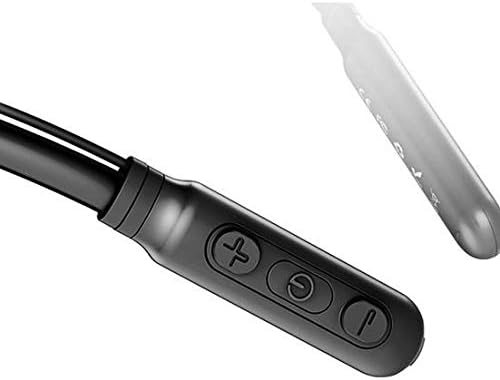
Image: Close-up of the Baseus Encok S16 earphone's inline control unit, showing the power/multi-function button, volume up, and volume down buttons.
| Botoia | Funtzioa |
|---|---|
| Pizteko botoia (erdikoa) |
|
| Bolumena igo (+) |
|
| Bolumena jaitsi (-) |
|
5.2 Entzungailuak janztea
Place the neckband around your neck, ensuring the control unit is easily accessible. Insert the earbuds comfortably into your ears. Adjust the earphone line length using the sliding coils for a secure and comfortable fit.
6. Mantentzea
- Clean the earbuds and control unit regularly with a soft, dry cloth.
- Avoid exposing the earphones to extreme temperatures, humidity, or corrosive liquids.
- Store the earphones in a cool, dry place when not in use. The magnetic earbuds can help prevent tangling during storage.
- Do not attempt to disassemble or repair the earphones yourself, as this will void the warranty.
7. Arazoak
| Arazoa | Irtenbidea |
|---|---|
| Ezin da piztu | Ensure the earphones are fully charged. Press and hold the Power button for 3 seconds. |
| Ezin da gailuarekin parekatu |
|
| Soinurik ez edo bolumen txikia |
|
| Etengabeko konexioa |
|
8. Zehaztapenak
| Ezaugarri | Xehetasuna |
|---|---|
| Marka | Baseus |
| Modelo zenbakia | FWP-E-S16 |
| Konektibitate Teknologia | Bluetootha |
| Bluetooth bertsioa | 4.0 (compatible with devices enabling Bluetooth 4.0) |
| Forma-faktorea | In Ear, Neck Hung |
| Kontrol mota | Voice Control, Touch (via buttons) |
| Bateria Edukiera | 120mAh |
| Pisua | 30 gramo |
| Dakarten osagaiak | Wireless Earphone, Charging Cable, User Manual, Warranty Card |
9. Bermea eta Laguntza
This product comes with a Limited Warranty. Please refer to the included Warranty Card for detailed terms and conditions regarding coverage and duration.
For technical support or warranty claims, please contact your retailer or visit the official Baseus webbezeroarentzako arreta-zerbitzuari buruzko informazioa lortzeko gunea.
Merkataritza Globalaren Identifikazio Zenbakia (GTIN): 06953156264489