
Mindeo MD61XX MD6100AT
Mindeo MD61XX MD6100AT 2D Camera Barcode Scanner User Manual
Model: MD61XX MD6100AT
1. Sarrera
The Mindeo MD61XX MD6100AT is a high-performance 2D camera barcode scanner designed for versatile data capture. This device is capable of reading all major 1D and 2D barcode symbols, including those displayed on electronic screens, and offers flexible scanning modes.
This manual provides essential information for setting up, operating, maintaining, and troubleshooting your Mindeo MD61XX MD6100AT barcode scanner.
2. Konfigurazioa
2.1 Kutxatik ateratzea eta hasierako ikuskapena
Carefully remove all components from the packaging. Verify that all items are present and undamaged. The package should typically include the Mindeo MD61XX MD6100AT scanner and its connecting cable.
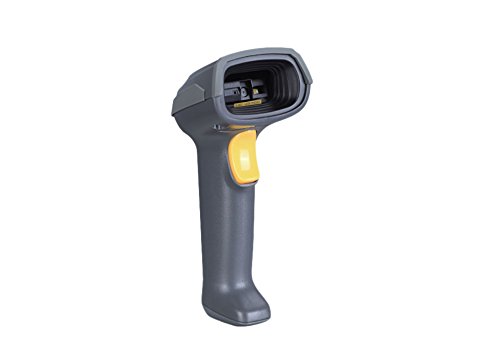
Figure 2.1: Mindeo MD61XX MD6100AT Handheld Barcode Scanner. This image shows the ergonomic design of the scanner with its trigger button.
2.2 Eskanerra konektatzea
The MD61XX MD6100AT scanner typically connects via USB. Locate the USB cable provided with your scanner. Insert the smaller end of the cable into the port at the base of the scanner handle. Insert the larger USB-A end into an available USB port on your computer or POS system.
The scanner is designed for plug-and-play operation, meaning drivers are usually installed automatically by your operating system. A successful connection is often indicated by a short beep from the scanner and/or an indicator light turning on.
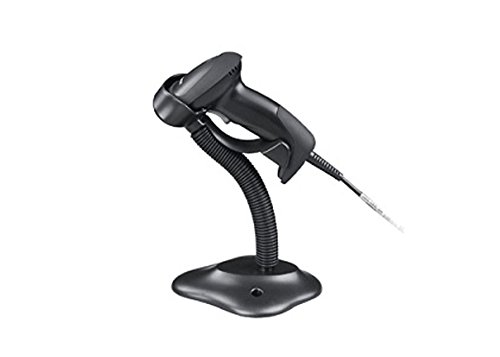
Figure 2.2: Mindeo MD61XX MD6100AT Barcode Scanner with its optional stand. The stand allows for hands-free operation in presentation mode.
3. Funtzionamendu-argibideak
3.1 Eskaneatze moduak
The Mindeo MD61XX MD6100AT supports two primary scanning modes:
- Eskuko modua: Press and hold the trigger button to activate the scanner. Release the button to stop scanning. This mode is ideal for scanning individual items.
- Presentation Mode (Automatic): When placed in its stand (if applicable) or positioned for continuous scanning, the scanner can automatically detect and scan barcodes presented within its field of view without needing to press the trigger.
3.2 Barra-kodeak eskaneatzea
Barra-kode bat eskaneatzeko:
- Ziurtatu eskanerra konektatuta eta piztuta dagoela.
- Zuzendu eskaneraren leihoa eskaneatu nahi duzun barra-koderantz.
- In handheld mode, press the trigger button. In presentation mode, simply present the barcode to the scanner.
- Position the barcode within the scanner's aiming pattern. The scanner features omnidirectional scanning, allowing it to read barcodes from various angles.
- A successful scan is typically indicated by a short beep and/or a green indicator light. The scanned data will be transmitted to your connected device.
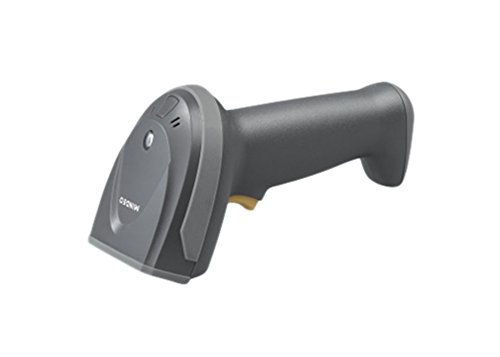
3.1. irudia: Aldea view of the Mindeo MD61XX MD6100AT Barcode Scanner, highlighting its ergonomic grip.
3.2. irudia: Aurrealdea view of the Mindeo MD61XX MD6100AT Barcode Scanner, showing the scanning window.
3.3 Scanning from Electronic Screens
The MD61XX MD6100AT is capable of reading barcodes directly from smartphone screens, tablet displays, and computer monitors. Ensure the screen brightness is sufficient and avoid glare for optimal scanning performance.
4. Mantentzea
4.1 Eskanerra garbitzea
To maintain optimal scanning performance, keep the scanner's window clean. Use a soft, lint-free cloth lightly dampened with water or a mild, non-abrasive cleaning solution. Do not use harsh chemicals or abrasive materials, as these can damage the scanning window.
4.2 Biltegiratzea
When not in use, store the scanner in a clean, dry environment away from extreme temperatures, direct sunlight, and corrosive materials. If using a stand, ensure the scanner is securely placed.
4.3 Firmware berritzea
The Mindeo MD61XX MD6100AT supports easy firmware upgrades to ensure compatibility with future systems and to enhance performance. Refer to the official Mindeo website or contact technical support for instructions and available firmware updates.
5. Arazoak
| Arazoa | Kausa posiblea | Irtenbidea |
|---|---|---|
| Eskanerra ez da pizten. | Cable not properly connected; USB port issue; power supply issue. | Ensure USB cable is securely connected to both scanner and host device. Try a different USB port or host device. |
| Eskanerrak ez ditu barra-kodeak irakurtzen. | Barcode damaged or poorly printed; scanner window dirty; incorrect symbology settings; insufficient lighting. | Clean the scanning window. Ensure the barcode is clear and well-lit. Check if the barcode type is supported. Refer to the programming manual for symbology settings. |
| Eskaneatutako datuak okerrak edo osatugabeak dira. | Partial scan; incorrect data formatting settings. | Ensure the entire barcode is within the scanning area. Check data formatting settings in the scanner's programming manual. |
| Eskanerrak etengabe bip egiten du. | Error condition; configuration issue. | Consult the scanner's programming manual for error code interpretations. Disconnect and reconnect the scanner. |
If the problem persists after attempting these solutions, please contact Mindeo technical support for further assistance.
6. Zehaztapenak
| Ezaugarri | Xehetasuna |
|---|---|
| Eredua | MD61XX MD6100AT |
| Marka | Mindeo |
| Eskaneatzeko gaitasuna | 1D and 2D barcodes, including those on electronic screens |
| Eskaneatzeko moduak | Handheld, Presentation (Image auto-detection) |
| Konektibitatea | USB (RS-232 also mentioned in marketing image, but USB is primary for general use) |
| Omnidirectional Scanning | Bai |
| Elementuaren pisua | 220 g |
| Eskuragarri dagoen lehen data | 21ko irailaren 2016a |
| Ziurtagiriak | FC, CE, RoHS, IP52, GS1 (based on marketing image) |
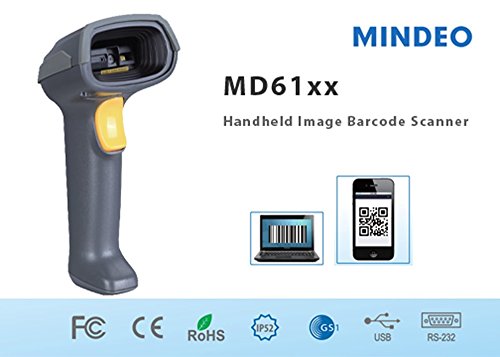
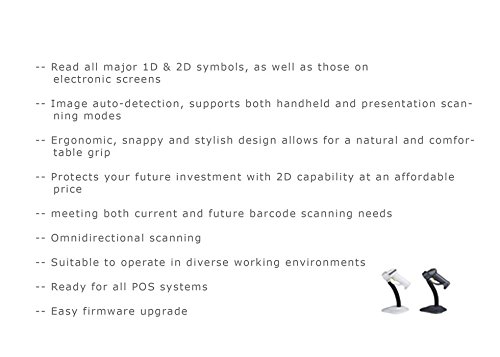
Figure 6.1: Marketing image highlighting key features and certifications (FC, CE, RoHS, IP52, GS1, USB, RS-232) for the Mindeo MD61XX MD6100AT scanner.
7. Bermea eta Laguntza
For information regarding product warranty, please refer to the warranty card included with your product or visit the official Mindeo webgunea. Bermearen baldintzak eta zehaztapenak eskualdearen arabera alda daitezke.
For technical support, troubleshooting beyond this manual, or inquiries about firmware updates and accessories, please contact Mindeo customer service or your local distributor. Contact information can typically be found on the Mindeo official webgunea.
Mindeo Official Webgunea: www.mindeo.cn (Adibampesteka, benetako esteka alda daiteke)
Ask a question about this manual
Ask about setup, troubleshooting, compatibility, parts, safety, or missing instructions. Manuals+ will review the question and use this page’s manual context to help answer it.