
1. Sarrera
This manual provides comprehensive instructions for the XTRONS DWH005 Infrared Wireless Dual Channel Headphones. Designed for in-car entertainment systems, these headphones offer a private and high-quality audio experience for passengers. Please read this manual thoroughly before use to ensure proper operation and maintenance.
2. Ezaugarri nagusiak
- Dual Channel IR Frequencies: Supports two distinct infrared channels for simultaneous audio streams.
- Diseinu tolesgarria: Biltegiratze trinkoa eta eramangarritasuna ahalbidetzen ditu.
- Eraikuntza arina: Ensures comfort during extended wear.
- Adjustable Headband and Cushions: Provides a secure and comfortable fit for various head sizes.
- Noise Reduction System: Delivers clear audio by minimizing ambient noise.
- Itzali automatikoa: Conserves battery life by turning off when no IR signal is detected.
- Ukipen-kontrolak: Intuitive controls for power, channel selection, and volume.
3. Produktua amaitu daview
Familiarize yourself with the components and controls of your XTRONS DWH005 headphones.

1. irudia: Entzungailuen kontrolak eta funtzioak
This image displays the XTRONS DWH005 headphones with key components labeled for easy identification. These include the Infrared Light Sensor, Battery Cover, Channel A/B ON/OFF switch, Power LED Indicator, and Volume Up & Down controls.
- Infrared Light Sensor: Receives the IR audio signal from the transmitter.
- Bateriaren estalkia: Access point for AAA battery installation.
- Channel A/B ON/OFF Switch: Toggles power and selects between Channel A and Channel B.
- Power LED adierazlea: Piztu egiten da energia-egoera erakusteko.
- Bolumena igo eta jaitsi: Audio irteera-maila doitzen du.

Figure 2: Comfortable Ear Cushions
Gertu bat view of the soft, cushioned earpads designed for maximum comfort during prolonged use.

Figure 3: Folding Design for Easy Storage
This image demonstrates the headphones' folding capability, allowing for convenient storage and portability when not in use.
4. Konfiguratzeko argibideak
4.1 Bateriaren instalazioa
The XTRONS DWH005 headphones require 2 x AAA Alkaline batteries (not included) for operation.
- Locate the battery cover on one of the earcups (refer to Figure 1, item 2).
- Gently slide or open the battery cover.
- Sartu bi AAA pila, polaritate zuzena ziurtatuz (+/-).
- Itxi bateriaren estalkia ongi.
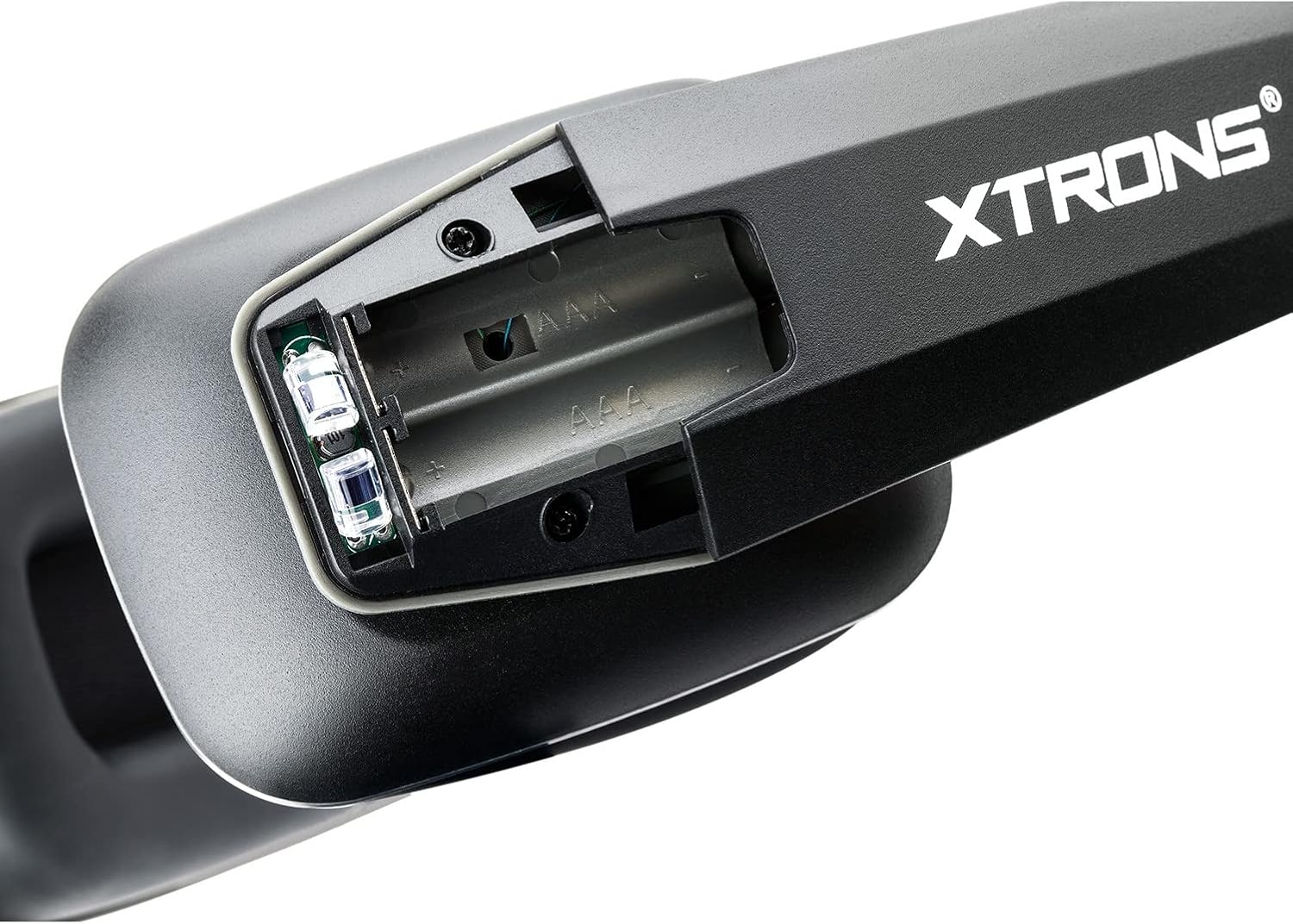
4. irudia: Baterien konpartimendua
Xehetasun bat view of the battery compartment, showing where to insert the two AAA batteries.
4.2 Connecting to an IR Transmitter
These headphones are designed to work with audio devices that have a built-in infrared (IR) transmitter, commonly found in car entertainment systems.
- Ensure your audio source (e.g., car DVD player) has its IR transmitter enabled.
- Turn on the headphones using the Channel A/B ON/OFF switch (refer to Figure 1, item 3).
- Select the appropriate channel (A or B) on the headphones to match the transmitting channel of your audio source.
- The Power LED Indicator (Figure 1, item 4) will illuminate when a signal is received.
5. Funtzionamendu-argibideak
5.1 Piztu/Itzali
- To turn on the headphones, slide the Channel A/B ON/OFF switch to either 'A' or 'B'.
- To turn off the headphones, slide the switch to the 'OFF' position.
- The headphones feature an automatic power-off function to save battery life if no IR signal is detected for a period.
5.2 Kanalaren hautaketa
The headphones support two IR channels (A and B), allowing multiple users to listen to different audio sources simultaneously if your car system transmits on both channels.
- Slide the Channel A/B ON/OFF switch to 'A' for Channel A or 'B' for Channel B.
- Ensure the selected channel matches the output channel of your IR audio transmitter.
5.3 Bolumenaren doikuntza
- Use the Volume Up & Down controls (refer to Figure 1, item 5) to adjust the listening volume to a comfortable level.
6. Mantentzea eta Zainketa
- Garbiketa: Wipe the headphones with a soft, dry cloth. Do not use liquid cleaners or solvents.
- Biltegiratzea: When not in use, fold the headphones for compact storage (refer to Figure 3) and keep them in a dry, cool place away from direct sunlight.
- Bateria ordezkatzea: Replace batteries promptly when audio quality degrades or the power indicator light dims. Remove batteries if storing for extended periods to prevent leakage.
- Saihestu kalteak: Do not expose headphones to extreme temperatures, moisture, or strong impacts.
7. Arazoak
| Arazoa | Kausa posiblea | Irtenbidea |
|---|---|---|
| Soinurik ez edo bolumen oso baxua. |
|
|
| Soinua distortsionatua edo tarteka egiten du. |
|
|
| Headphones do not turn off automatically. |
|
|
8. Zehaztapenak
| Ezaugarri | Xehetasuna |
|---|---|
| Ereduaren izena | DWH005 |
| Konektibitate Teknologia | Haririk gabekoa (Infragorria) |
| Haririk gabeko Komunikazio Teknologia | Infragorriak |
| Sistema | Infrared Light (850nm) |
| Carrier Frequency (Channel A) | Left: 2.3 MHz / Right: 2.8 MHz |
| Carrier Frequency (Channel B) | Left: 3.2 MHz / Right: 3.8 MHz |
| Hizlaria | 40 mm-ko Mylar |
| S/N erlazioa | > 60 dB |
| Maiztasun Erantzuna | 20-15000Hz |
| Inpedantzia | 32 ohm |
| Kanalen Bereizketa | > 40 dB |
| Distortsioa | <2% |
| Working Distance from Sender | <1M |
| Elikatze Hornidura | 2 x AAA alkalinoak |
| Adin tartea (Deskribapena) | Haurra |
| Materiala | Plastikoa |
| Gailu bateragarriak | Audio Devices with Built-in IR Transmitter |
| Kable Ezaugarri | Retractable, Without Cable |
| Kontrol-metodoa | Ukitu |
| Zarata Kontrol Ezaugarriak | Zarata Murriztea |
| Ezaugarri Berezia | Dual Channel, wireless IR headphone |
| Produktuaren neurriak | 7.6 x 5.16 x 2.44 hazbete |
| Elementuaren pisua | 9.2 ontza |
9. Bateragarritasuna
The XTRONS DWH005 headphones are designed for universal compatibility with most audio devices featuring a built-in infrared (IR) transmitter. This typically includes:
- In-car DVD players with IR transmission capabilities.
- Overhead monitors with integrated IR transmitters.
- Other audio systems that broadcast sound via analog IR signals.
Oharra: These headphones are specifically designed for analog IR systems and are not compatible with digital IR systems or portable DVD players that do not have a built-in IR transmitter.
10. Bermea eta Laguntza
For warranty information, technical support, or any inquiries regarding your XTRONS DWH005 headphones, please refer to the official XTRONS webwebgunera edo jarri harremanetan bezeroarentzako arreta-zerbitzura zuzenean. Gorde erosketa-agiria erosketaren frogagiri gisa berme-erreklamazioetarako.