
Sarrera
Thank you for choosing the KINGONE K5 Portable Wireless Bluetooth Speaker. This manual provides essential information for the proper setup, operation, and maintenance of your device. Please read it thoroughly before use to ensure optimal performance and longevity of your speaker.
Segurtasun Informazioa
- Ez jarri bozgorailua tenperatura altuen, eguzki-argiaren eraginpean edo hezetasun handiaren eraginpean.
- Saihestu bozgorailua kolpe gogorrak erortzea edo jasaten.
- Ez desmuntatu edo konpontzen saiatu bozgorailua zeuk. Honek bermea baliogabetuko du.
- Keep the speaker away from water and liquids. While it is waterproof, prolonged submersion or exposure to high-pressure water jets should be avoided.
- Erabili zehaztutako karga-bolumena bakarriktage (5V korronte zuzena).
Paketearen edukia
- KINGONE K5 Portable Wireless Bluetooth Speaker
- USB kargatzeko kablea
- Erabiltzailearen eskuliburua
Produktua amaituview
Familiarize yourself with the speaker's controls and ports.
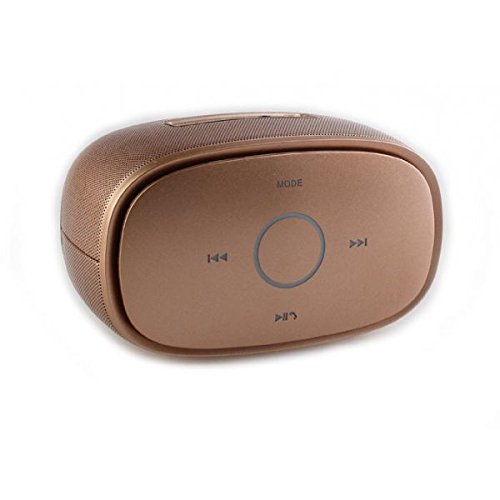
Irudia: Goiena view of the KINGONE K5 Portable Wireless Bluetooth Speaker. The image displays the speaker's top panel, which features a central circular play/pause button, surrounded by four other buttons: 'MODE' at the top, 'previous track' (left), 'next track' (right), and 'volume down/call answer' (bottom). The speaker has a metallic brown finish with a textured grille on the sides.
Kontrol-botoiak:
- JARRAIBIDEAK: Press to switch between Bluetooth, AUX, and other available modes.
- Previous Track (<<): Sakatu labur aurreko pistara joateko.
- Next Track (>>): Sakatu labur hurrengo pistara joateko.
- Erreproduzitu/Pausatu (►▮▮): Press to play or pause music. Long press for power on/off.
- Volume Down/Call Answer (▼): Short press to decrease volume. During an incoming call, press to answer.
- Volume Up/Call End (▲): Short press to increase volume. During a call, press to end. (Note: Volume Up button is not explicitly visible in the provided image but is a standard function for such devices, assuming it's paired with Volume Down or integrated.)
Portuak:
- Mikro USB kargatzeko ataka: Bozgorailua kargatzeko.
- AUX sarrerako ataka: Kable bidezko audio konexiorako.
Konfigurazioa
1. Bozgorailua kargatzea
- Konektatu USB kargatzeko kablearen mutur txikia bozgorailuaren mikro USB atakara.
- Connect the larger end of the USB cable to a USB power adapter (DC 5V, not included) or a computer's USB port.
- Kargatzeko adierazlearen argia piztuko da. Erabat kargatu ondoren itzali edo kolorez aldatuko da.
- A full charge typically takes approximately 3-4 hours and provides up to 7 hours of playback.
2. Piztu/Itzaltzea
- Pizteko: Long press the Play/Pause button until you hear an audible prompt or see an indicator light.
- Itzaltzeko: Long press the Play/Pause button again until you hear an audible prompt or the indicator light turns off.
3. Bluetooth parekatzea
- Ensure the speaker is powered on and in Bluetooth mode. If not, press the 'MODE' button to switch to Bluetooth mode. The indicator light will flash, indicating it's ready for pairing.
- Gaitu Bluetooth-a zure telefonoan, tabletan edo beste Bluetooth gaitutako gailu batean.
- Bilatu available Bluetooth devices. You should see "KINGONE K5" in the list.
- Select "KINGONE K5" to connect. Once paired, you will hear a confirmation sound, and the indicator light will stop flashing and remain solid.
- Bozgorailuak automatikoki saiatuko da azken parekatutako gailura berriro konektatzen pizten denean.
4. Connecting via AUX (Audio Input)
- Konektatu 3.5 mm-ko audio-kable baten mutur bat (ez dago barne) bozgorailuaren AUX sarrera-atakara.
- Connect the other end of the audio cable to the headphone jack of your audio device.
- The speaker will automatically switch to AUX mode, or you may need to press the 'MODE' button to select AUX.
Funtzionamendua
Musika jotzen
- Erreproduzitu/Pausatu: Sakatu Erreproduzitu/Pausa botoia erreprodukzioa hasteko edo eteteko.
- Hurrengo ibilbidea: Press the Next Track (>>) button to skip to the next song.
- Aurreko pista: Press the Previous Track (<<) button to go back to the beginning of the current song or to the previous song.
- Bolumen kontrola: Use the Volume Down (▼) and Volume Up (▲) buttons on the speaker to adjust the volume. You can also control the volume from your connected device.
Esku libreko deiak
When connected via Bluetooth, the speaker can be used for hands-free calls.
- Erantzun deia: Press the Volume Down (▼) button once to answer an incoming call.
- Amaitu deia: Press the Volume Up (▲) button once to end an ongoing call.
- Deia baztertu: Long press the Volume Down (▼) button to reject an incoming call.
Mantentzea
Garbiketa
- Garbitu bozgorailua zapi leun, lehor edo apur bat lehor batekin.amp oihal.
- Ez erabili garbitzaile urratzailerik, alkoholik edo disolbatzaile kimikorik.
Biltegiratzea
- Gorde bozgorailua leku fresko eta lehor batean, eguzki-argitik eta muturreko tenperaturetatik babestuta.
- Denbora luzez gordetzen baduzu, kargatu bateria aldian-aldian (adibidez, 3 hilabetero) bateriaren osasuna mantentzeko.
Bateria zaintzea
- Saihestu bateria maiz erabat deskargatzea.
- Do not leave the speaker connected to a charger for excessively long periods after it is fully charged.
Arazoak konpontzea
| Arazoa | Kausa posiblea | Irtenbidea |
|---|---|---|
| Bozgorailuak ez du pizten. | Bateria baxua edo agortuta dago. | Kargatu bozgorailua gutxienez 30 minutuz. |
| Ezin da Bluetooth gailuarekin parekatu. | Speaker is not in pairing mode. Bluetooth is off on your device. Speaker is already connected to another device. | Ensure speaker is in Bluetooth pairing mode (flashing indicator). Turn on Bluetooth on your device. Disconnect from other devices or restart the speaker. |
| Soinurik ez edo bolumen baxua. | Volume is too low on speaker or device. Incorrect mode selected. | Increase volume on both the speaker and your connected device. Press the 'MODE' button to select the correct input (Bluetooth/AUX). |
| Soinu distortsioa. | Volume too high. Device too far from speaker. | Reduce volume on speaker and/or device. Move the device closer to the speaker (within 10 meters). |
Zehaztapenak
- Ereduaren izena: KINGONE K5
- Elementuaren eredu-zenbakia: KNG006
- Haririk gabeko komunikazio teknologia: Bluetootha
- Bluetooth bertsioa: V2.0 (as per product title)
- Hizlari mota: Apalategia (eramangarria)
- Bozgorailuaren tamaina: 2 hazbetekoa
- Audio irteera modua: Estereoa (2.0 kanala)
- Energia iturria: Battery Powered (Built-in Li-ion battery)
- Balorazio baloratuatage: DC 5V
- Maiztasun-erantzuna: 3 dB
- Frequency Scope: 170-15KHz
- Kontrol-metodoa: Ukitu
- Iragazgaitza: Bai
- Bateriaren iraupena: Gehienez 7 ordu (gutxi gorabehera)
- Gailu bateragarriak: Smartphone, Tablet
Bermea eta Laguntza
For warranty information or technical support, please refer to the documentation provided at the time of purchase or contact your retailer. Keep your proof of purchase for warranty claims.