
Instapark PWT-07
Instapark PWT-07 Digital Programmable Water Timer User Manual
Model: PWT-07
Sarrera
This manual provides detailed instructions for the setup, operation, maintenance, and troubleshooting of your Instapark PWT-07 Digital Programmable Water Timer. Please read this manual thoroughly before using the device to ensure proper function and longevity.
Segurtasun Informazioa
- Use only 1.5V AA alkaline batteries. Do not mix old and new batteries, or different battery types.
- Ensure the battery compartment is securely closed to maintain the IP66 waterproof rating.
- Do not expose the timer to extreme temperatures or direct sunlight for prolonged periods, which may affect battery life and device performance.
- Disconnect the timer from the faucet and drain it before freezing temperatures to prevent damage.
- This device is designed for outdoor use with standard ¾” (GHS) threaded faucets.
Paketearen edukia
Egiaztatu elementu guztiak paketean daudela:
- Instapark PWT-07 Water Timer
- Erabiltzailearen eskuliburua (dokumentu hau)
- Berme Txartela
Note: 2 AA alkaline batteries are required and not included.
Produktuaren Ezaugarriak
- Single-station digital programmable faucet water timer.
- Impulse solenoid valve for reliable operation.
- Compatible with standard ¾” (GHS) threaded outdoor hose faucets.
- User-friendly interface with a single oversized rotary dial and 4 pushbuttons.
- Large, easy-to-read LCD display (2.1” x 1”).
- Iragazgaitza den balorazioa: IP66.
- Built-in rain delay function (24, 48, or 72 hours).
- Manual watering option without interrupting programmed schedules.
- Detachable battery compartment for easy battery replacement.
- Low power consumption, up to 4,000 on/off cycles per battery set.
Konfigurazioa
1. Bateriaren instalazioa
The Instapark PWT-07 requires two (2) 1.5V AA alkaline batteries (not included).
- Aurkitu bateriaren konpartimentua tenporizadorearen atzealdean.
- Irristatu bateriaren konpartimentuaren estalkia behera irekitzeko.
- Sartu bi AA pila alkalino berri, polaritate zuzena ziurtatuz (+/-).
- Irristatu bateriaren konpartimentuaren estalkia berriro bere lekuan klik egin arte.
- The LCD display should illuminate, indicating successful battery installation. If the display shows a low battery indicator, remove the batteries, wait for the screen to go completely dark, then reinsert them.
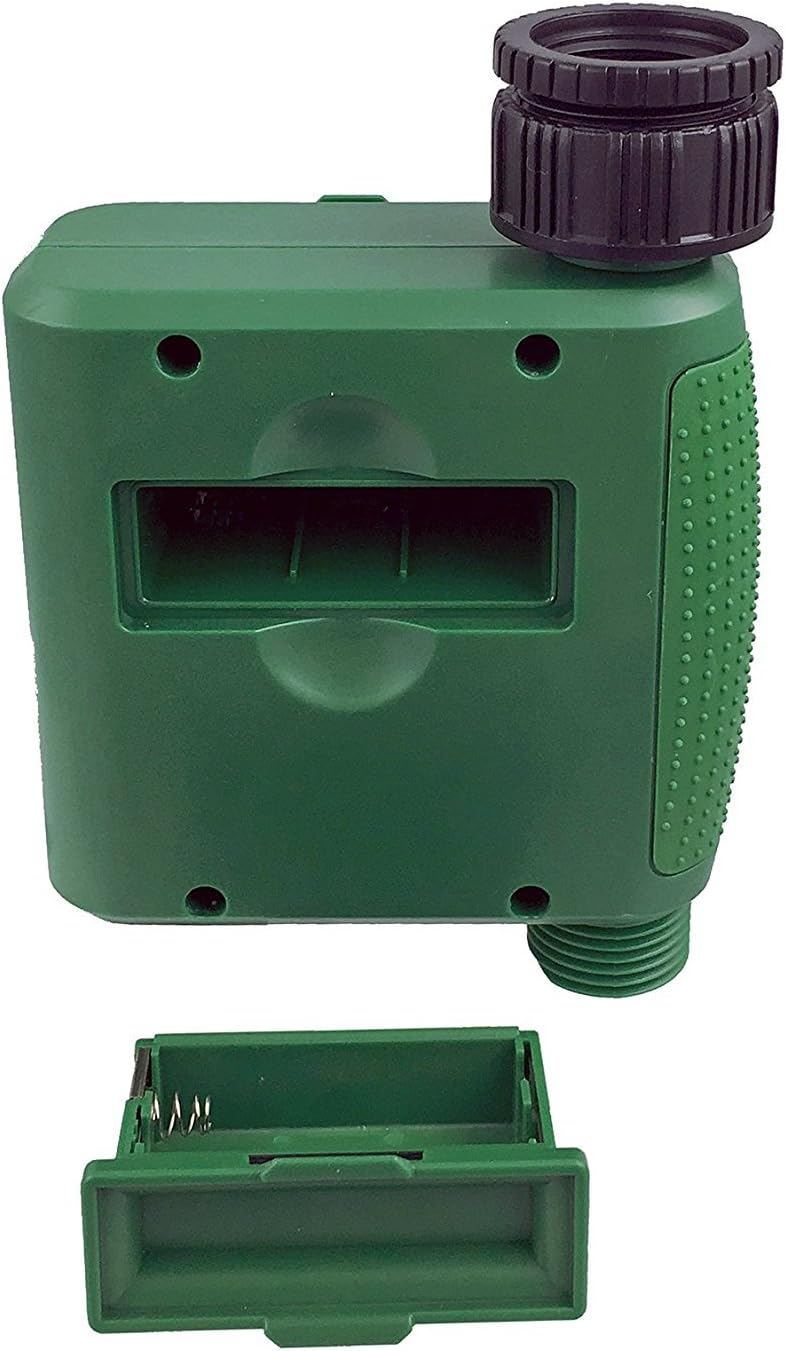
1. irudia: Bateriaren konpartimentua estalkia kenduta.
2. Tenporizadorea muntatzea
Attach the timer to your outdoor faucet:
- Ensure the faucet is clean and free of debris.
- Screw the timer's inlet (top connector) onto a standard ¾” (GHS) outdoor hose faucet. Hand-tighten only to prevent damage. Do not overtighten.
- Connect your garden hose or irrigation system to the timer's outlet (bottom connector). Hand-tighten securely.
- Turn on the faucet fully. The timer is designed to operate under pressure.

Figure 2: Instapark PWT-07 mounted on a faucet.
Funtzionamendu-argibideak
The timer features a large rotary dial and four buttons: EZARTU, +, -, eta ESKULIBURUA.

3 irudia: Kontrol-panela eta LCD pantaila.
1. Uneko ordua ezartzea
- Biratu dial birakaria EZARRI ERLOUA.
- Erabili + eta - buttons to adjust the current hour. Press EZARTU baieztatzeko.
- Erabili + eta - buttons to adjust the current minute. Press EZARTU baieztatzeko.
2. Programming Watering Schedule
The timer allows you to set a start time, duration, and frequency for watering.
Ezarri hasiera-ordua:
- Biratu dial birakaria HASIERA ORDUA.
- Erabili + eta - buttons to set the desired watering start hour. Press EZARTU baieztatzeko.
- Erabili + eta - buttons to set the desired watering start minute. Press EZARTU baieztatzeko.
Set How Long (Duration):
- Biratu dial birakaria ZENBAT LUZE.
- Erabili + eta - buttons to set the watering duration (from 5 seconds to 360 minutes). Press EZARTU baieztatzeko.
Set How Often (Frequency):
- Biratu dial birakaria ZENBAT MAIZ.
- Erabili + eta - buttons to select the watering frequency (e.g., every 10 seconds, 30 seconds, 1 minute, 3 minutes, 5 minutes, 1 hour, 2 hours, 4 hours, 12 hours, 1 day, 2 days, 3 days, 4 days, 5 days, 6 days, 7 days). Press EZARTU baieztatzeko.
After setting all parameters, turn the rotary dial to KORRIKA to activate the programmed schedule.
3. Eskuzko ureztatzea
To water manually without affecting your programmed schedule:
- Ensure the dial is set to KORRIKA or OFF.
- Sakatu ESKULIBURUA botoia. Pantailak eskuzko ureztatze-iraupen lehenetsia erakutsiko du.
- Erabili + eta - buttons to adjust the desired manual watering duration.
- Sakatu EZARTU to start manual watering. The timer will run for the selected duration and then automatically shut off.
- To stop manual watering prematurely, press the ESKULIBURUA botoia berriro.
4. Euri-atzerapen funtzioa
The rain delay function allows you to pause your watering schedule for a set period without losing your program settings.
- Ensure the dial is set to KORRIKA.
- Eduki sakatuta - button for 3 seconds. The display will show "DELAY" and a default delay duration.
- Erabili + eta - buttons to select a delay duration of 24, 48, or 72 hours.
- Sakatu EZARTU to activate the rain delay. The timer will resume its programmed schedule after the delay period ends.
- To cancel the rain delay, press and hold the - botoia berriro 3 segundoz.
Mantentzea
- Bateria ordezkatzea: Replace batteries when the low battery indicator appears on the LCD. Always use new AA alkaline batteries.
- Garbiketa: Garbitu tenporizadorea iragarkiarekinamp oihal. Ez erabili garbitzaile edo disolbatzaile urratzailerik.
- Neguan egitea: Before the first frost, disconnect the timer from the faucet. Remove the batteries and store the timer indoors in a dry, frost-free location. Failure to do so may result in damage from freezing water.
- Iragazki pantaila: Periodically check the filter screen inside the inlet connector for debris. Clean if necessary to ensure proper water flow.
Arazoak konpontzea
| Arazoa | Kausa posiblea | Irtenbidea |
|---|---|---|
| Timer does not turn on / LCD is blank. | Bateriak hilda edo gaizki instalatuta. | Replace with new AA alkaline batteries, ensuring correct polarity. If still blank, remove batteries, wait for screen to fully clear, then reinsert. |
| Water does not turn on at scheduled time. |
|
|
| Water does not turn off. |
|
|
| Ura konexioetatik isurtzen. |
|
|
| Low battery indicator flashes even with new batteries. | Firmware not booting correctly after battery change. | Remove batteries, wait for the LCD screen to go completely dark (may take a few minutes), then reinsert new batteries. |
Zehaztapenak
| Eredua | PWT-07 |
| Energia iturria | 2 x 1.5V AA bateria alkalino (ez dira barne hartzen) |
| Balbula Mota | Bulkada Solenoide Balbula |
| Laneko uraren presioa | 14.5 eta 116 psi |
| Egoneko korrontea | <100 µA |
| Watering Frequency Settings | 10s, 30s, 1m, 3m, 5m, 1h, 2h, 4h, 12h, 1d, 2d, 3d, 4d, 5d, 6d, 7d (16 settings) |
| Watering Duration Settings | 5s, 10s, 15s, 20s, 25s, 30s, 35s, 40s, 45s, 50s, 55s, 1-360m |
| Ordua Bistaratzeko Formatua | 24 ordukoa |
| Iragazgaitzaren balorazioa | IP66 |
| Materiala | ABS plastikoa |
| Produktuaren neurriak | 4.25" L x 6" W x 2.6" H |
| Elementuaren pisua | 14.2 ontza |
Bermea eta Laguntza
The Instapark PWT-07 Digital Programmable Water Timer is backed by a standard 1-year manufacturer's warranty from the date of purchase. This warranty covers defects in materials and workmanship under normal use.
For warranty claims, technical support, or any questions regarding your product, please contact Instapark customer service. Please have your purchase receipt and product model number (PWT-07) available when contacting support.
Contact information for Instapark customer service can typically be found on the manufacturer's webgunea edo zure erosketa-dokumentazioa.
Ask a question about this manual
Ask about setup, troubleshooting, compatibility, parts, safety, or missing instructions. Manuals+ will review the question and use this page’s manual context to help answer it.