
1. Sarrera
Thank you for choosing the Comelit Classic Monitor, Model 6101N. This manual provides essential information for the correct installation, operation, and maintenance of your video intercom monitor. Please read these instructions carefully before using the device to ensure safe and efficient operation.
The Comelit Classic Monitor is designed to provide reliable video and audio communication for door entry systems, enhancing security and convenience for your home or office.
2. Segurtasun informazioa
- Segurtasun elektrikoa: Installation and maintenance should only be performed by qualified personnel. Disconnect power before performing any wiring or service.
- Ingurumena: Do not expose the monitor to extreme temperatures, humidity, direct sunlight, or corrosive substances.
- Garbiketa: Erabili zapi leun eta lehor bat garbitzeko. Ez erabili garbitzaile edo disolbatzaile urratzailerik.
- Aldaketak: Do not attempt to modify or repair the device yourself. Unauthorized modifications may void the warranty and pose safety risks.
3. Paketearen edukia
Please check that all components are present in the package:
- Comelit Classic Monitor (Model 6101N)
- Muntatzeko tarte
- Muntatzeko torlojuak eta tapoiak
- Argibide eskuliburua (dokumentu hau)
4. Produktua amaitu daview
The Comelit Classic Monitor features a sleek design and intuitive controls for managing your door entry system. Below is an image of the monitor, highlighting its key features.
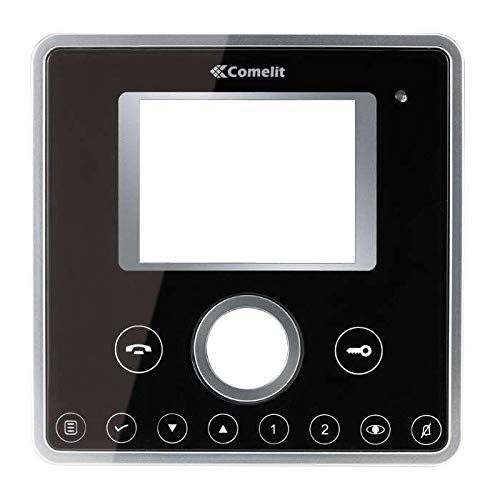
1. irudia: Aurrealdea view of the Comelit Classic Monitor (Model 6101N). This image shows the monitor's display screen, handset, and control buttons. The monitor is black with a minimalist design.
Osagai nagusien artean hauek daude normalean:
- Bistaratzeko pantaila: Shows video feed from the outdoor unit.
- Teléfono: Audio bidezko komunikaziorako.
- Atea askatzeko botoia: Activates the electric lock to open the door.
- Auxiliary Button: May control additional functions (e.g., secondary door, stair light).
- Bolumen kontrola: Adjusts ringtone and communication volume.
5. Konfigurazioa eta instalazioa
Installation of the Comelit Classic Monitor requires electrical wiring and should ideally be performed by a qualified technician. Incorrect installation can lead to device malfunction or safety hazards.
5.1 Monitorearen muntaketa
- Choose a suitable location on an interior wall, away from direct heat sources or moisture.
- Secure the mounting bracket to the wall using the provided screws and wall plugs. Ensure the bracket is level.
- Refer to the system wiring diagram (provided with your outdoor unit or system documentation) for correct cable connections.
- Connect the system cables to the monitor's terminals as indicated in the wiring diagram. Ensure all connections are secure.
- Carefully attach the monitor to the mounting bracket, ensuring it clicks securely into place.
5.2 Hasierako piztea
Once installed, restore power to the system. The monitor should power on and display a standby screen or indicator light. Perform a test call from the outdoor unit to verify proper operation.
6. Funtzionamendu-argibideak
6.1 Dei bati erantzutea
- When someone calls from the outdoor unit, the monitor will ring and display the video feed.
- Lift the handset to answer the call and begin two-way audio communication.
- To end the call, replace the handset.
6.2 Atea irekitzea
During a call, or when the monitor is active, press the Atea askatzeko botoia (often marked with a key symbol) to activate the electric lock and open the door.
6.3 Ezarpenak doitzea
- Bolumena: Use the volume control (usually a rotary dial or buttons on the side/bottom) to adjust the ringtone and communication volume.
- Distira/Kontrastea: Some models may have controls for adjusting screen brightness or contrast. Refer to specific model features if available.
7. Mantentzea
- Garbiketa: Regularly wipe the monitor's surface and screen with a soft, dry, anti-static cloth. Do not use liquid cleaners directly on the screen or device.
- Ikuskapena: Aldian-aldian egiaztatu konexio solterik edo kalterik dagoen. Arazoren bat aurkitzen baduzu, jarri harremanetan teknikari kualifikatu batekin.
- Software eguneraketak: If your system supports firmware updates, follow the manufacturer's instructions for applying them to ensure optimal performance and security.
8. Arazoak
| Arazoa | Kausa posiblea | Irtenbidea |
|---|---|---|
| Ez dago bideo/audiorik kanpoko unitatetik. | Loose wiring, power issue, outdoor unit malfunction. | Check all connections. Ensure system has power. Contact technician if problem persists. |
| Monitorea ez da pizten. | No power supply, faulty wiring, monitor malfunction. | Verify power supply to the system. Check wiring. Contact technician. |
| Atearen irekigailuak ez du funtzionatzen. | Wiring issue to electric lock, faulty lock, monitor button malfunction. | Check wiring to the lock. Test the lock independently if possible. Contact technician. |
| Bideoaren kalitate eskasa. | Dirty camera lens (outdoor unit), poor wiring, interference. | Clean outdoor camera lens. Check wiring for damage or interference. |
9. Zehaztapenak
Below are the technical specifications for the Comelit Classic Monitor, Model 6101N:
- Modelo zenbakia: 6101N
- Fabrikatzailea: Comelit
- Produktu mota: Bideo Interfono Monitorea
- ASIN: B01MSE76EO
- Produktu kopurua: 1
- Lehenengo data eskuragarri: 2ko otsailaren 2017a
- Note: Specific electrical and display specifications may vary by system configuration. Refer to your system's main documentation for full details.
10. Bermea eta Laguntza
Comelit products are covered by a manufacturer's warranty. For specific warranty terms and conditions, please refer to the warranty card included with your product or visit the official Comelit webgunea. Gorde erosketaren egiaztagiria bermearen erreklamazioetarako.
For technical support, service, or further assistance, please contact your authorized Comelit dealer or visit the official Comelit support page:
Official Comelit Webgunea: www.comelitgroup.com
Please have your model number (6101N) and purchase details ready when contacting support.