
Sarrera
The Audeze iSINE10 In-Ear Semi-Open Headphones deliver a unique audio experience through advanced planar magnetic technology. Designed for clarity and wide soundstage, these headphones are lightweight and offer versatile connectivity options for various devices. This manual provides essential information for setting up, operating, maintaining, and troubleshooting your iSINE10 headphones.

Image: Audeze iSINE10 headphones showcasing their semi-open design.
Konfigurazioa
1. Kutxatik ateratzea eta osagaiak
Your Audeze iSINE10 headphones typically include:
- Audeze iSINE10 In-Ear Headphones
- Cipher Lightning Cable (with in-line amplifier and DAC)
- Standard 3.5mm Audio Cable
- Various Eartips for optimal fit
- Ear Hooks for secure placement
- Nylon Carrying Case
2. Fitting the Headphones
The iSINE10 offers two primary methods for secure and comfortable wear:
- Ear Clips: These hooks fit over your ear, similar to sunglasses, providing stability.
- Rubber Pieces: These inserts fit inside the ear, resting at the entrance of the ear canal, without deep insertion.
Experiment with the included eartips and ear hooks to find the most comfortable and secure fit for extended listening. Proper fit is crucial for both comfort and sound quality.
3. Gailuetara konektatzea
The iSINE10 headphones offer versatile connectivity:
- iOS Devices (Lightning Port): Use the included Cipher Lightning Cable. This cable features a built-in amplifier and 24-bit Digital-to-Analog Converter (DAC) for enhanced audio performance and allows access to the Audeze iOS app for customization.
- Standard Devices (3.5mm Audio Jack): Use the included 3.5mm audio cable to connect to any device with a standard headphone jack. Note that the sound characteristics may differ without the Cipher cable's built-in DSP/EQ.
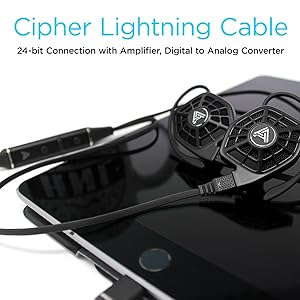
Image: iSINE10 headphones connected to an iPhone, demonstrating Lightning cable use.
Funtzionamendu-argibideak
1. Oinarrizko audio erreprodukzioa
Once connected, simply play audio from your device. Adjust the volume using your device's controls or the in-line controls on the Cipher Lightning Cable.
2. Using the Cipher Lightning Cable (for iOS Devices)
The Cipher Lightning Cable is designed to optimize the iSINE10's performance with iOS devices. It includes:
- Ilaran Amplifier and DAC: Provides high-quality digital-to-analog conversion and amplifikazioa.
- DSP (Seinale Digitalaren Prozesamendua): Applies an automatic, built-in frequency response correction for a balanced sound profile.
- Siri-Compatible Microphone: Allows for voice commands and hands-free communication.
- Lineako kontrolak: Manage playback, volume, and calls.
Ohar garrantzitsua:
- When using the Cipher Lightning Cable, you cannot charge your iOS device simultaneously through the same Lightning port.
- Some users may experience a faint noise with the V1 Lightning cable when no audio is playing. This typically disappears once audio playback begins.
3. Audeze iOS App for Customization
Download the official Audeze iOS app to unlock advanced audio customization features:
- 10 bandako berdinketa: Fine-tune the sound profile zure hobespenera.
- Saveable EQ Presets: Store up to two custom equalizer settings for quick access.
Android erabiltzaileentzako oharra:
Currently, there is no official Android app available for firmware updates or EQ customization. These features require an iOS device.
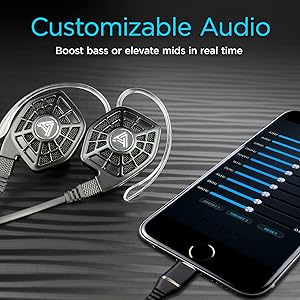
Image: iPhone screen showing the Audeze EQ app interface for audio customization.
4. Optional Bluetooth Cable
An optional Bluetooth cable is available directly from Audeze, allowing wireless connectivity to various devices while maintaining the intended sound profile (with appropriate DSP/EQ).
Bideoa: Amaiera batview of the Audeze iSINE10 In-Ear Semi-Open Headphones, highlighting key features and design elements.
Mantentzea
1. Garbiketa
- Gently wipe the headphone bodies and cables with a soft, dry, lint-free cloth.
- Remove eartips and clean them with mild soap and water if necessary. Ensure they are completely dry before reattaching.
- Saihestu produktu kimiko gogorrak, disolbatzaileak edo material urratzaileak erabiltzea.
2. Kableen zaintza
- Saihestu kableei tolestura zorrotzak edo gehiegi tiratzea barneko kalteak saihesteko.
- Store cables neatly to prevent tangling.
3. Biltegiratzea
When not in use, store your iSINE10 headphones in the provided nylon carrying case to protect them from dust, moisture, and physical damage.
4. Belarrientzako kakoak
The plastic ear hooks, while designed for comfort, may not be highly durable. Handle them with care during attachment and removal to prolong their lifespan.
Arazoak konpontzea
Ez dago soinurik edo bolumen baxurik
- Ensure the cable is securely connected to both the headphones and your audio source.
- Check the volume levels on your device and any in-line controls.
- Test with a different audio source or cable if possible to isolate the issue.
Audio distortsionatua
- If using the 3.5mm cable, ensure your audio source is providing a clean signal. The iSINE10 is designed to benefit from the DSP/EQ of the Cipher cable.
- Reduce the volume on your device to check if distortion is due to overdriving the headphones.
- If using the Cipher cable, check the Audeze iOS app for any extreme EQ settings that might cause distortion.
Discomfort During Wear
- Experiment with different sizes and types of eartips. Foam tips, if available, can sometimes improve comfort by distributing pressure more evenly.
- Adjust the ear hooks or rubber pieces to find a less intrusive position.
- Hartu atsedenaldiak entzuteko saio luzeetan.
iOS App Issues
- Ensure your iOS device is running a compatible version of iOS.
- Restart the app or your iOS device.
- Ensure the Cipher Lightning Cable is properly connected.
Zehaztapenak
| Ezaugarri | Xehetasuna |
|---|---|
| Modelo zenbakia | 110-IE-1000-00 |
| Audio kontrolatzaile mota | Gidari magnetiko planarra |
| Audio kontrolatzailearen tamaina | 30 milimetro |
| Maiztasun Erantzuna | 10Hz - 50kHz |
| Inpedantzia | 16 ohmio |
| Sentikortasuna | 110 dB/1mW |
| Gehienezko potentzia manipulatzea | 500 mW RMS |
| Konektibitate Teknologia | Wired (Lightning, 3.5mm Audio) |
| Haririk gabeko komunikazioa | Bluetooth (via optional cable) |
| Kontrol mota | Multimedia Kontrola, Aplikazioa |
| Mikrofonoa | Siri-compatible (on Cipher cable) |
| Materiala | Plastikoa |
| Elementuaren pisua | 20 Grams (per pair) / 0.705 ounces |
| Produktuaren neurriak | 1.38 x 0.79 x 1.22 hazbete |
| Uraren Erresistentzia Maila | Ez Urarekiko Erresistentea |
| Eramateko zorroaren materiala | Nylona |
Bermearen informazioa
Audeze products are covered by a manufacturer's warranty. For detailed information regarding the warranty period, coverage, and terms and conditions, please refer to the official Audeze webwebgunean edo produktuarekin batera datorren berme-txartelean. Gorde erosketaren frogagiria berme-erreklamazioetarako.
Laguntza
For technical assistance, product inquiries, or customer service, please visit the official Audeze support page on their website. You can typically find FAQs, troubleshooting guides, and contact information for their support team there.
Audeze Official Webgunea: www.audeze.com