
kuman KY68-UK
kuman UPS Battery Pack Expansion Board User Manual
Model: KY68-UK | Brand: kuman
1. Sarrera
The kuman UPS Battery Pack Expansion Board is designed to provide an uninterruptible power supply (UPS) solution for various Raspberry Pi models, including Pi 3 Model B, B+, Pi 2 Model B, and Pi 1 Model B+ A+ A. This board ensures continuous operation of your Raspberry Pi even during power interruptions, offering portability and enhanced reliability. It features a built-in lithium battery, battery detection interface, and convenient power management functions.
2. Segurtasun informazioa
- Ez jarri gailua uraren, hezetasunaren edo muturreko tenperaturen eraginpean.
- Avoid dropping or subjecting the board to severe impacts.
- Ensure correct polarity when connecting batteries or power sources.
- Do not attempt to disassemble or modify the board, as this may void the warranty and pose safety risks.
- Mantendu haurren eskura.
- Erabili zehaztutako karga-bolumena bakarriktage eta korrontea (5V/2A).
3. Paketearen edukia
Mesedez, egiaztatu behean zerrendatutako elementu guztiak zure paketean sartuta daudela:
- 1 x Lithium Battery Expansion Board (with pre-installed lithium battery)
- 4 x Copper Standoffs
- 4 x Torlojuak
- 4 x Nuts
- 1 x Mikro USB kablea

Figure 3.1: Package contents of the kuman UPS Battery Pack.
4. Produktua amaitu daview
The kuman UPS Battery Pack Expansion Board is compact and designed to integrate seamlessly with your Raspberry Pi. It provides reliable power and features for enhanced functionality.
4.1 Ezaugarri nagusiak
- UPSaren funtzionaltasuna: Provides uninterrupted DC 5V output even while charging, ensuring continuous operation of your Raspberry Pi.
- Bateria hautematea: Includes an interface to monitor the battery's power level.
- Automatic Load Detection: Automatically detects load and starts output; turns off output when no load is detected.
- Expandable Battery Capacity: Features two parallel sockets for 3.7V Lithium batteries, allowing for capacity expansion.
- Etengailu integratua: Conveniently power on/off the Raspberry Pi via a dedicated switch.
- Raspberry Pi Fan Interface: Dedicated interface for a Raspberry Pi fan, which does not occupy GPIO pins. Can also serve as a 5V power supply via DuPont line.
- Bateria adierazlea: Four LEDs indicate battery charge status (25%, 50%, 75%, 100%).
4.2 Taularen diseinua eta osagaiak
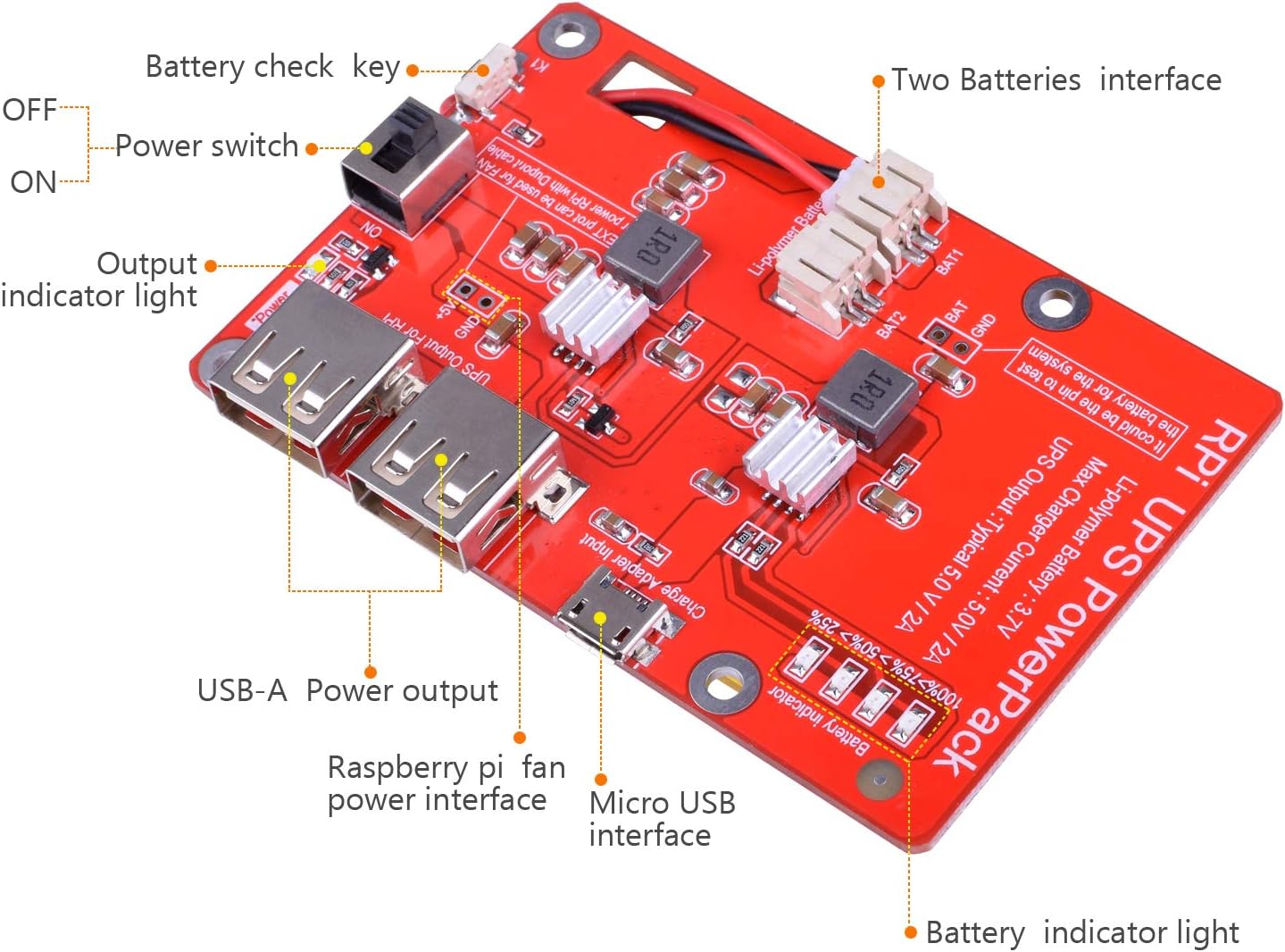
4.1. irudia: Xehetasuna view of the UPS Battery Pack with labeled components.
- Pizteko etengailua (ON/OFF): Controls the power to the connected Raspberry Pi.
- Output Indicator Light: Illuminates when the board is providing power.
- USB-A Power Output: Standard USB port for connecting the Raspberry Pi or other devices.
- Raspberry Pi Fan Power Interface: Dedicated pins for connecting a cooling fan.
- Micro USB Interface (Charge Adapter Input): Used to charge the internal battery and power the board.
- Bateriaren adierazle argiak: Four LEDs showing approximate battery charge level.
- Battery Check Key (K1): Button to momentarily display battery level.
- Two Batteries Interface (BAT1, BAT2): Connectors for additional 3.7V Li-polymer batteries to expand capacity.
5. Konfigurazioa eta instalazioa
Follow these steps to set up your kuman UPS Battery Pack with your Raspberry Pi:
- Kargatu bateria: Before first use, connect the Micro USB cable to the "Charge Adapter Input" port on the UPS board and plug the other end into a 5V/2A USB power adapter. The battery indicator lights will show charging progress. Charge until all four indicator lights are solid.
- Attach Standoffs: Secure the four copper standoffs to the mounting holes on the UPS board using the provided screws.
- Raspberry Pi muntatu: Align the mounting holes of your Raspberry Pi with the standoffs on the UPS board. Carefully place the Raspberry Pi onto the standoffs and secure it with the remaining screws and nuts.
- Connect Raspberry Pi: Use the provided Micro USB cable or another suitable USB cable to connect the "UPS Output For RPI" USB-A port on the UPS board to the Micro USB power input port on your Raspberry Pi.
- Optional: Connect Fan (if applicable): If using a Raspberry Pi cooling fan, connect its power cable to the "Raspberry Pi fan power interface" on the UPS board.
- Optional: Expand Battery Capacity: If you wish to expand the battery capacity, connect additional 3.7V Li-polymer batteries to the BAT1 and BAT2 interfaces. Ensure correct polarity.

5.1. irudia: Adibample of the UPS Battery Pack connected to a Raspberry Pi with a display.

5.2. irudia: Aldea view of the assembled UPS Battery Pack and Raspberry Pi.
6. Funtzionamendu-argibideak
6.1 Piztu/Itzaltzea
To power on your Raspberry Pi using the UPS board, slide the "Power Switch" to the ON position. The output indicator light will illuminate, and your Raspberry Pi will begin to boot. To power off, slide the switch to the OFF position. It is recommended to properly shut down your Raspberry Pi's operating system before cutting power.
6.2 UPS funtzionalitatea
When the UPS board is connected to an external 5V power source via its Micro USB input, it will charge the internal battery while simultaneously powering the connected Raspberry Pi. If the external power source is disconnected (e.g., during a power outage), the UPS board will automatically switch to battery power without interrupting the Raspberry Pi's operation.
6.3 Bateriaren adierazlea
The four LED lights on the board indicate the approximate battery charge level:
- LED bat: %0-25eko karga
- Bi LED: %25-50eko karga
- Hiru LED: %50-75eko karga
- Lau LED: %75-100eko karga
Press the "Battery Check Key" (K1) to momentarily display the current battery level.
7. Mantentzea
- Kargatzen: Regularly charge the battery pack to maintain its health. It is recommended to keep the battery charged when not in use for extended periods.
- Garbiketa: Erabili oihal lehor eta leun bat taula garbitzeko. Ez erabili garbitzaile likidorik edo disolbatzailerik.
- Biltegiratzea: If storing the device for a long time, ensure the battery is charged to about 50-70% and store in a cool, dry place.
- Bateria ordezkatzea: The internal lithium battery is designed for long-term use. If battery performance significantly degrades over time, consult kuman support for replacement options.
8. Arazoak
| Arazoa | Kausa posiblea | Irtenbidea |
|---|---|---|
| Raspberry Pi not powering on. | Power switch is OFF; Battery is depleted; Incorrect connection; Faulty USB cable. | Ensure power switch is ON. Charge the battery pack. Verify all connections are secure. Try a different Micro USB cable. |
| Battery indicator LEDs not lighting up. | Battery is fully charged or completely depleted; Battery Check Key not pressed; Board is off. | Press the Battery Check Key (K1). Ensure the board is powered on. Connect to charger to see if charging indicators appear. |
| Raspberry Pi shows low power warning (lightning bolt icon). | Insufficient current from UPS; High power consumption by Pi/peripherals. | Ensure the UPS is fully charged. Reduce the number of power-hungry peripherals connected to the Raspberry Pi. Note that the maximum output is 2A, which might be insufficient for some Pi models (e.g., Pi 3B+, Pi 4) under heavy load. |
| UPS not charging. | Faulty Micro USB cable or power adapter; Charging port issue. | Try a different Micro USB cable and a known good 5V/2A power adapter. Ensure the cable is fully inserted into the "Charge Adapter Input" port. |
| Bateria azkar agortzen da. | High power consumption; Battery degradation. | Reduce power consumption of connected devices. If the battery is old, its capacity may have diminished. Consider adding an additional battery via the expansion ports if supported. |
9. Zehaztapenak
| Ezaugarri | Zehaztapena |
|---|---|
| Bateria mota | Li-polymer (3.7V) |
| Bateria Edukiera | 3800mAh (ohikoa) |
| Irteerako korronte maximoa | 2A |
| Irteera boltage | 5.1V ± 0.1V |
| Standard Charging Current/Voltage | 2 A / 5.0 V |
| Neurriak (L x W x H) | 3.35 x 2.17 x 0.71 hazbete (8.5 x 5.5 x 1.8 cm) |
| Elementuaren pisua | Libra 1 (gutxi gorabehera 450 g) |
| Modelo zenbakia | KY68-UK |

Figure 9.1: Dimensions of the UPS Battery Pack.
10. Bermea eta Laguntza
kuman products are designed for reliability and performance. For warranty information, technical support, or assistance with your UPS Battery Pack Expansion Board, please contact kuman customer service through their official website or the platform where you purchased the product. Please have your model number (KY68-UK) and purchase details ready when contacting support.
For more information and product updates, visit the official kuman store: kuman Store on Amazon
Ask a question about this manual
Ask about setup, troubleshooting, compatibility, parts, safety, or missing instructions. Manuals+ will review the question and use this page’s manual context to help answer it.