
1. Produktua amaitu daview
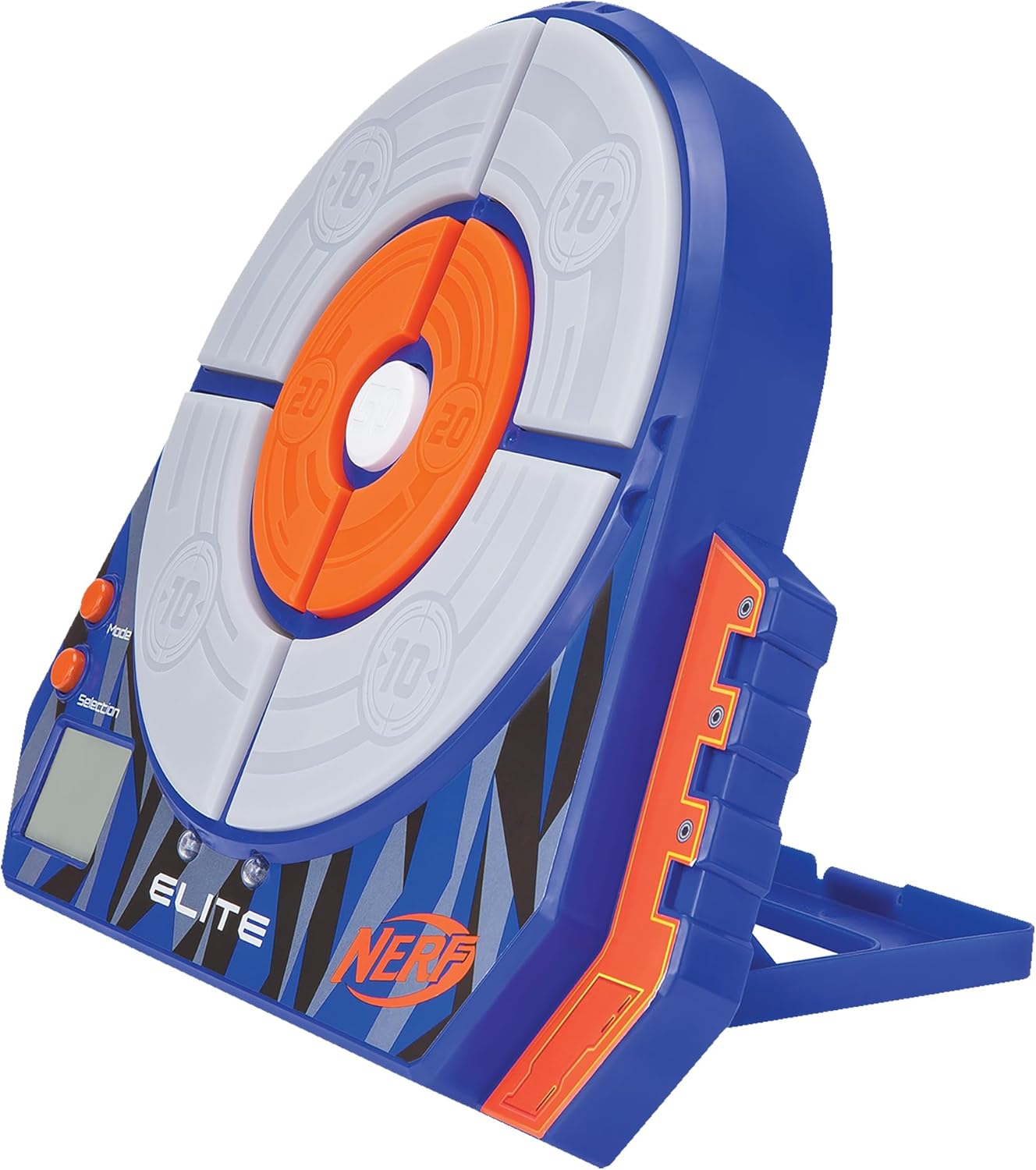
The Nerf Elite Electronic Target by Jazwares is an electronic target shooting game that allows for fun aiming and shooting at targets that react when hit. Designed for children aged 8 and up, this game develops precision, concentration, and motor skills in a playful manner. The principle is simple: just aim at the targets with a Nerf dart blaster and press the trigger to shoot. When a dart hits a target, it reacts thanks to an integrated electronic system. Depending on the area hit, the target can light up, vibrate, count points, or even fall! The target is designed for both wall mounting and tabletop use, making it versatile for various play environments.


2. Segurtasun informazioa
Segurtasun-abisu garrantzitsuak
- OHARRA: Ez da egokia 36 hilabetetik beherako haurrentzat, itotzeko arriskua izan dezaketen pieza txikiak dituelako.
- Ez jarri begietara edo aurpegira.
- Use only official Nerf darts. Other darts may not meet safety standards.
- Jolasaldian helduen gainbegiratzea gomendatzen da.
- Keep away from water and excessive moisture to prevent damage to electronic components.
3. Paketearen edukia
Mesedez, egiaztatu paketearen edukia elementu guztiak daudela ziurtatzeko:
- 1 x Nerf Elite Electronic Target
- 10 x Suction Cup Darts (Note: Blaster and additional ammunition are NOT supplied and must be purchased separately.)

4. Konfigurazioa
4.1 Bateriaren instalazioa
The Nerf Elite Electronic Target requires 1 'A' battery (not included) for operation.
- Locate the battery compartment on the back of the target.
- Phillips bihurkin bat erabiliz (ez dago barne), askatu bateriaren konpartimentuko estalkia.
- Insert 1 'A' battery, ensuring the correct polarity (+/-) as indicated inside the compartment.
- Jarri bateriaren konpartimenduaren estalkia eta lotu torlojuarekin.
4.2 Muntaketa
Assembly of the Nerf Elite Electronic Target is very simple. Just assemble the components together using the integrated stand according to the provided diagrams.
- Unfold the integrated stand located on the back of the target until it clicks into place. This allows the target to stand upright on a flat surface.
- Alternatively, for wall mounting, use appropriate hardware (not included) to hang the target from a wall using the designated mounting points.
5. Funtzionamendu-argibideak
5.1 Piztu/Itzaltzea
- To power on the target, locate the power switch (usually on the side or back) and slide it to the 'ON' position. The target will emit a sound and the display will light up.
- Itzaltzeko, irristatu etengailua 'OFF' posiziora.
5.2 Oinarrizko funtzionamendua
- Once powered on, select your desired game mode using the 'Mode' button (refer to Section 6 for game modes).
- Aim your Nerf blaster at the target's scoring zones.
- Shoot the suction cup darts at the target. The target will react with lights, sounds, and score updates on the LCD display when hit.
- Collect your darts after each round or as needed.
6. Joko moduak
The Nerf Elite Electronic Target offers multiple game modes for single or multi-player fun. Use the 'Mode' and 'Selection' buttons located near the LCD display to navigate and choose your preferred game.
- Jokalari bakarreko modua: Practice your precision and aim to achieve the highest score.
- Jokalari anitzeko modua: Compete with friends to see who can score the most points. The target's electronic system tracks scores for each player.
Refer to the on-screen prompts on the LCD display for specific game rules and objectives within each mode.
7. Mantentzea
- Garbiketa: Wipe the target surface with a soft, dry cloth. Do not use abrasive cleaners or immerse the target in water.
- Biltegiratzea: When not in use, store the target in a cool, dry place away from direct sunlight. If storing for an extended period, remove the battery to prevent leakage.
- Dardoak: Keep darts clean and free of debris to ensure optimal performance and target reaction.
8. Arazoak
- Target not powering on:
- Ziurtatu etengailua 'ON' posizioan dagoela.
- Egiaztatu bateriaren instalazioa eta polaritatea.
- Replace with a fresh 'A' battery.
- Target not reacting to hits:
- Ensure you are using official Nerf suction cup darts.
- Check if darts are clean and not damaged.
- Ensure darts are hitting the designated scoring zones directly.
- Verify battery level. Low battery can affect sensor sensitivity.
- Display not working correctly:
- Turn the target off and then on again to reset.
- Egiaztatu bateriaren maila.
9. Zehaztapenak
| Ezaugarri | Xehetasuna |
|---|---|
| Modelo zenbakia | NER0156 |
| Marka | Nerf |
| Adinaren gomendioa | 6 eta 99 urte bitartekoa |
| Material nagusia | Plastikoa |
| Kolorea | Kolore anitzekoa |
| Neurriak (L x W x H) | 5.08 x 24.77 x 30.48 cm (2 x 9.75 x 12 hazbete) |
| Pisua | 440 gramo (0.97 lb) |
| Beharrezko bateriak | 1 x 'A' battery (not included) |
| Dakarten osagaiak | 1 Electronic Target, 10 Suction Cup Darts |

10. Bermea eta Laguntza
For warranty information or technical support, please refer to the contact details provided on the product packaging or visit the official Nerf webgunea. Gorde erosketa-agiria erosketaren frogagiri gisa, berme-erreklamazioetarako.