
Sarrera
This manual provides comprehensive instructions for the safe and effective use of your Winplus AC55925-80 3-in-1 Emergency Socket Power Bank. This device combines a compact power bank, a USB car charger, and an emergency glass-breaking tool. Please read this manual thoroughly before operation and retain it for future reference.
Produktua amaituview
The Winplus 3-in-1 Emergency Socket Power Bank is designed for convenience and safety, offering multiple functionalities in a compact form factor.

Figure 1: Winplus 3-in-1 Emergency Socket Power Bank with key features highlighted.
Osagaiak:
- Compact Power Bank: Provides portable power for charging devices.
- USB autoaren kargagailua: Plugs into a 12V car socket to charge devices and the power bank.
- Emergency Glass-Breaking Tool: Integrated for emergency situations.
- USB irteerako ataka: For connecting charging cables to devices.
- Mikro USB sarrera ataka: For charging the internal power bank.
- LED adierazlea: Kargatzearen egoera bistaratzen du.

2. irudia: Xehetasuna view of the device's ports.
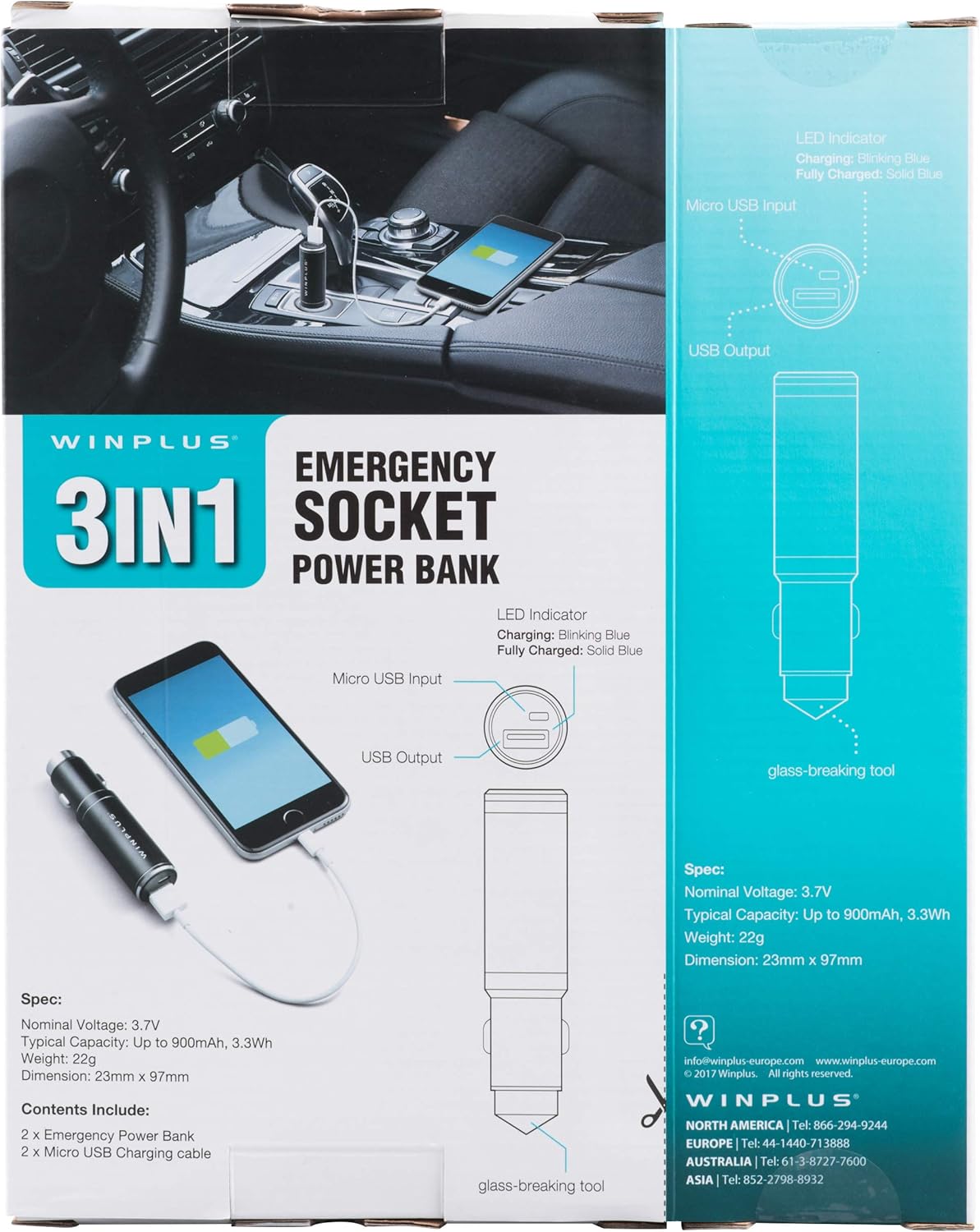
Figure 3: LED indicator status and glass-breaking tool location.
Konfigurazioa
Power Bank-aren hasierako kargatzea:
- Locate the Micro USB Input port on the device.
- Connect the provided Micro USB charging cable to the Micro USB Input port.
- Connect the other end of the USB cable to a standard USB power source (e.g., a computer USB port, a wall adapter, or the car's 12V socket when used as a car charger).
- The LED indicator will blink blue during charging.
- Once fully charged, the LED indicator will turn solid blue.
Oharra: Gomendagarria da bateria eramangarria guztiz kargatzea lehen aldiz erabili aurretik.
Funtzionamendu-argibideak
Power Bank eramangarri gisa erabiltzea:
- Ensure the power bank is charged (solid blue LED indicator).
- Connect your device's charging cable to the USB Output port on the power bank.
- Connect the other end of the cable to your mobile device (smartphone, tablet, etc.).
- Power bank-ak automatikoki hasiko da zure gailua kargatzen.
Using as a USB Car Charger:
- Insert the Winplus 3-in-1 device into your vehicle's 12V accessory socket (cigarette lighter socket).
- Connect your device's charging cable to the USB Output port on the Winplus device.
- Konektatu kablearen beste muturra zure gailu mugikorrera.
- Your device will begin charging. The internal power bank will also charge simultaneously if it is not full.
Using the Emergency Glass-Breaking Tool:
The emergency glass-breaking tool is located at the tip of the device, opposite the USB ports. This tool is intended for emergency use only to break vehicle side windows in situations where occupants are trapped.
- In an emergency, firmly press the tip of the tool against a corner of a side window.
- Apply steady pressure until the spring-loaded mechanism activates and shatters the glass.
- Once the glass is broken, carefully clear any remaining shards before exiting the vehicle.
OHARRA: Use this tool only in genuine emergencies. Misuse can cause serious injury. Keep out of reach of children.
Mantentzea
- Mantendu gailua lehor. Hezetasunak barneko zirkuituak kaltetu ditzake.
- Ez jarri muturreko tenperaturetara (beroa edo hotza).
- Garbitu gailua zapi leun eta lehor batekin. Ez erabili produktu kimiko gogorrik edo garbitzaile urratzailerik.
- Gorde leku fresko eta lehor batean erabiltzen ez duzunean.
- Saihestu gailua kolpe gogorrak erortzea edo jasaten.
Arazoak konpontzea
| Arazoa | Kausa posiblea | Irtenbidea |
|---|---|---|
| Gailua ez da kargatzen. | Power bank is depleted. Cable is faulty. USB port is dirty or damaged. | Kargatu botere bankua. Saiatu beste kargatzeko kable batekin. Clean the USB ports carefully or try another port. |
| LED adierazlea ez da pizten. | Device is not connected to a power source. Device is fully charged (if solid blue). Gailua akatsa da. | Ensure proper connection to a power source. Check if it's already solid blue. Jarri harremanetan bezeroarentzako laguntza-zerbitzuarekin arazoek jarraitzen badute. |
| Karga motela. | Cable is not suitable. Power source is low current. Device being charged has high power requirements. | Erabili kalitate handiko kargatzeko kable bat. Connect to a higher current USB adapter. This device provides 2.1A output, which is standard for fast charging most phones. |
Zehaztapenak
- Eredua: AC55925-80
- Bolumen nominalatage: 3.6V
- Edukiera tipikoa: Up to 2500 mAh, 9 Wh
- Bateriaren zelulen konposizioa: Litio Polimeroa
- USB irteera: 5V / 2.1A
- Mikro USB sarrera: 5V / 0.5A
- Neurriak: 23 mm x 127 mm (gutxi gorabehera)
- Elementuaren pisua: 510 g (for the 2-pack)
- Konektore mota: Micro USB (Input), USB Type-A (Output)
Segurtasun Informazioa
- Ez desmuntatu, ireki edo txikitu bateria-paketea.
- Ez jarri bateria paketea bero edo sutara. Saihestu eguzki-argia zuzenean gordetzea.
- Ez jarri zirkuitulabur bat bateria-pakete bat. Ez gorde bateria-paketeak kasualitatez kaxa edo tiradera batean, non elkarren zirkuitulaburra izan dezaketen edo beste metalezko objektu batzuek zirkuitulaburtu dezaketen.
- Ez jarri bateria-pakete kolpe mekanikorik.
- Bateria batek isuriz gero, ez utzi likidoa azalarekin edo begiekin kontaktuan jartzen. Kontaktua gertatuz gero, garbitu kaltetutako eremua ur ugarirekin eta jo medikuarengana.
- Ez erabili ekipoarekin erabiltzeko berariaz emandakoa ez den kargagailurik.
- Mantendu bateriak haurren eskura.
- Bilatu medikuaren aholkua berehala bateria bat irentsi baduzu.
- Erosi beti ekiporako bateria-pakete egokia.
- Mantendu bateria-paketeak garbi eta lehor.
- Ez utzi bateria luze kargatuta erabiltzen ez duzunean.
- Tokiko araudien arabera, bota bateria-paketeak behar bezala.
Bermea eta Laguntza
For warranty information or technical support, please contact Winplus North America Inc. directly.
- Fabrikatzailea: Winplus North America Inc
- Harremanetarako informazioa: Refer to product packaging or the official Winplus webwebgunean laguntza-xehetasun eguneratuenak lortzeko.
You can also visit the Winplus webMaiz egiten diren galderen eta produktuaren informazio gehigarriaren gunea: www.winplus-europe.com