
1. Sarrera
Eskerrik asko erosketagatik.asing the Kaiser MSA-5708GY Professional 8-inch Amplified Wireless Speaker. This device is designed to provide high-quality audio with versatile connectivity options, including Bluetooth, USB, SD card, and AUX input. It also features a microphone input for public address or karaoke, and dynamic multicolor LED lights. Please read this manual thoroughly before operating the speaker to ensure proper use and to maximize its performance and longevity.
2. Segurtasun informazioa
- Energia iturria: Use only the provided charging cable and adapter. Ensure the power supply matches the speaker's requirements.
- Ura eta hezetasuna: Do not expose the speaker to water, rain, or excessive moisture. Avoid placing liquid-filled objects on or near the speaker.
- Beroa: Keep the speaker away from heat sources such as radiators, heat registers, stoves, or other heat-producing appliances.
- Aireztapena: Do not block any ventilation openings. Ensure adequate airflow around the speaker.
- Garbiketa: Deskonektatu korrontea garbitu aurretik. Erabili zapi lehor eta leun bat. Ez erabili garbitzaile likidorik edo aerosol-garbitzailerik.
- Zerbitzua: Ez saiatu produktu hau zuk zeuk ematen. Bidali zerbitzu guztiak zerbitzu kualifikatuko langileengana.
- Bateria: The speaker contains a rechargeable battery. Do not expose the battery to excessive heat or direct sunlight. Dispose of batteries according to local regulations.
3. Paketearen edukia
Egiaztatu elementu guztiak paketean daudela:
- Kaiser MSA-5708GY Ampharirik gabeko bozgorailua
- Kablezko Mikrofonoa
- Urruneko Kontrola
- Charging Cable / Power Adapter
4. Produktua amaitu daview
Familiarize yourself with the main components and controls of your speaker.
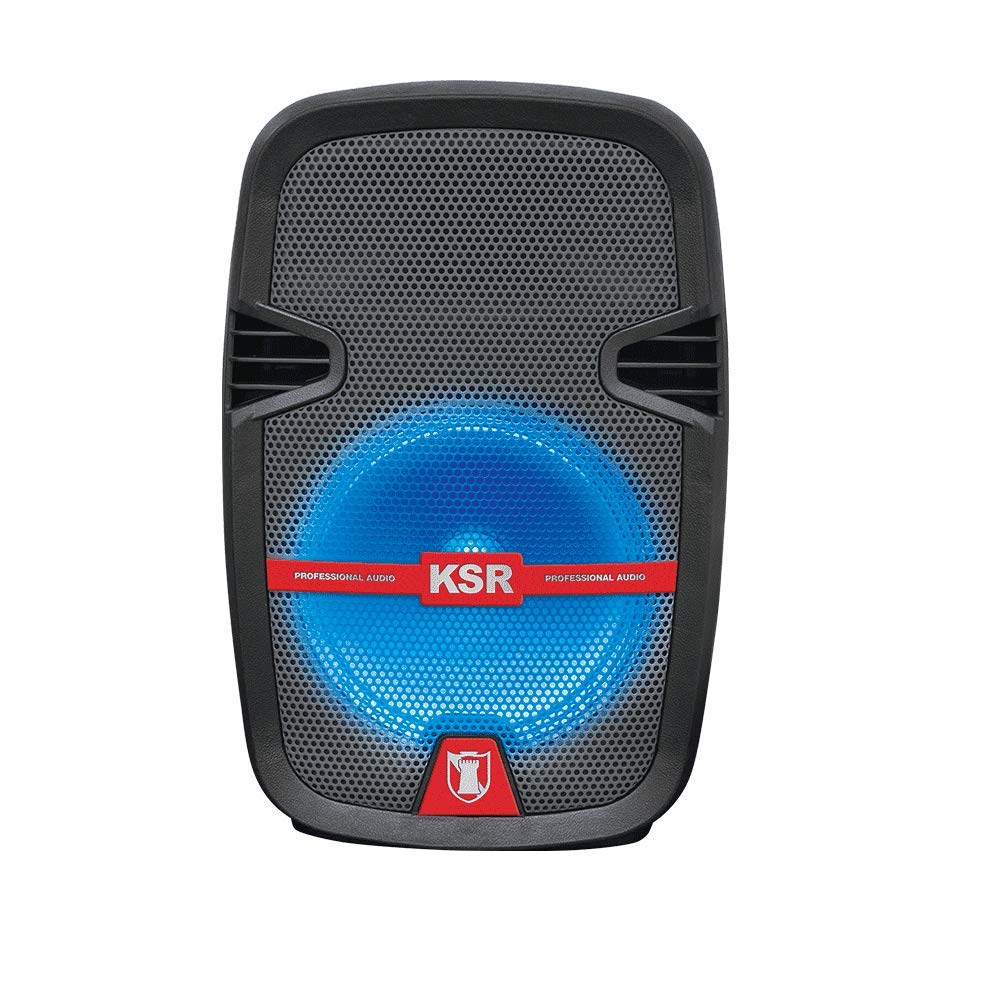
1. irudia: Aurrealdea view of the Kaiser MSA-5708GY speaker, showing the 8-inch woofer with multicolor LED lights and the control panel.
Kontrol panelaren ezaugarriak:
- Pantaila: Uneko modua, pistaren zenbakia edo FM maiztasuna erakusten ditu.
- Modu botoia: Switches between Bluetooth, USB, SD, AUX, and FM Radio modes.
- Erreproduzitu/Pausatu botoia: Erreprodukzioa hasten edo eten egiten du.
- Aurreko/Hurrengo botoiak: Abestiak edo FM irratiak nabigatzen ditu.
- Bolumen-eskulekua: Master bolumena doitzen du.
- Mikrofonoaren bolumen botoia: Mikrofonoaren sarrerako bolumena doitzen du.
- Microphone Bass/Treble Knobs: Adjusts bass and treble for the microphone input.
- LED argiaren etengailua: Toggles the multicolor LED lights on/off.
Rear Panel / Side Connections:
- USB ataka: USB flash unitateetarako.
- SD txartelaren zirrikitua: SD memoria txarteletarako.
- AUX sarrera (3.5 mm): Kanpoko audio gailuetarako.
- Mikrofonoaren sarrera (6.3 mm): Hari bidezko mikrofono bat konektatzeko.
- Kargatzeko ataka: Korronte-egokigailua konektatzeko.
- Switch potentziala: Bozgorailua pizten edo itzaltzen du.
- Stand Mount Socket: For mounting the speaker on a compatible stand.
5. Konfigurazioa
5.1 Bateria kargatzea
- Konektatu emandako kargatzeko kablea bozgorailuaren kargatzeko atakara.
- Kablearen beste muturra entxufe egoki batera konektatu.
- The charging indicator light (if present) will illuminate, indicating that the battery is charging.
- Allow approximately 3-4 hours for a full charge. The indicator light may change or turn off when fully charged.
- Disconnect the charger once fully charged to preserve battery life.
Oharra: For optimal battery performance, fully charge the speaker before first use.
5.2 Piztu/Itzaltzea
- To power on, locate the Power Switch on the speaker and toggle it to the "ON" position.
- To power off, toggle the Power Switch to the "OFF" position.
5.3 Mounting on a Stand
The speaker features a rear knob and a socket for mounting on a compatible speaker stand.
- Ensure the speaker stand is stable and rated for the speaker's weight (4 kg).
- Carefully place the speaker onto the stand's pole, aligning it with the stand mount socket.
- Tighten the rear knob on the speaker to secure it firmly to the stand.
6. Funtzionamendu-argibideak
6.1 Bluetooth konexioa
- Power on the speaker. The speaker will typically enter Bluetooth pairing mode automatically, indicated by a flashing Bluetooth icon or a voice prompt. If not, press the "Mode" button until "Bluetooth" is selected.
- Zure gailu mugikorrean (smartphone-a, tableta, etab.), gaitu Bluetooth-a eta bilatu eskuragarri dauden gailuak.
- Select "MSA-5708GY" from the list of devices.
- Once paired, the speaker will confirm the connection, and the Bluetooth indicator will stop flashing.
- You can now play audio from your device through the speaker. Control playback and volume from your device or the speaker's controls.
Oharra: The Bluetooth range is up to 10 meters (33 feet) in open areas.
6.2 USB/SD txartelaren erreprodukzioa
- Insert a USB flash drive or an SD card (pre-loaded with MP3 audio files) into the respective port/slot on the speaker.
- The speaker should automatically switch to USB or SD mode and begin playing audio. If not, press the "Mode" button to select "USB" or "SD".
- Use the Play/Pause, Previous, and Next buttons on the speaker or remote control to manage playback.
6.3 FM Irratia
- Power on the speaker and press the "Mode" button until "FM" mode is selected.
- Press and hold the Play/Pause button to initiate an automatic scan for FM stations. The speaker will scan and save available stations.
- Use the Previous and Next buttons to navigate through the saved FM stations.
6.4 AUX sarrera
- Konektatu 3.5 mm-ko audio kable baten mutur bat (ez dago barne) bozgorailuaren AUX sarrera atakara.
- Connect the other end of the cable to the headphone jack or audio output of your external audio device (e.g., MP3 player, laptop).
- Press the "Mode" button until "AUX" mode is selected.
- Play audio from your external device. Adjust volume from both the external device and the speaker.
6.5 Mikrofonoaren erabilera
- Connect the wired microphone to the 6.3mm microphone input jack on the speaker.
- Adjust the "MIC VOL" knob to control the microphone's volume.
- Use the "MIC BASS" and "MIC TREBLE" knobs to fine-tune the microphone's sound.
6.6 kolore anitzeko LED argiak
The speaker features integrated multicolor LED lights that illuminate the woofer.
- To activate or deactivate the LED lights, use the dedicated LED Light Switch on the control panel.
6.7 Urruneko kontrolaren funtzionamendua
The included remote control allows for convenient operation from a distance. Ensure the remote control has working batteries and is pointed towards the speaker's IR receiver.
- Pizteko botoia: Turns the speaker on/off (standby).
- Modu botoia: Switches input modes.
- +/- bolumena: Master bolumena doitzen du.
- Erreproduzitu/Pausatu: Erreprodukzioa abiarazten/pausatu.
- Aurrekoa/Hurrengoa: Abestiak edo FM irratiak saltatzen ditu.
- EQ: (If available) Cycles through equalizer presets.
- Zenbaki-botoiak: (If available) Direct track selection in USB/SD mode or FM station input.
7. Mantentzea
7.1 Garbiketa
- Always disconnect the speaker from the power source before cleaning.
- Use a soft, dry, lint-free cloth to wipe the exterior surfaces of the speaker.
- Ez erabili garbitzaile, argizari edo disolbatzaile urratzailerik, akabera kaltetu baitezakete.
- Saihestu hezetasuna irekiduretan sartzea.
7.2 Bateria zaintzea
- Bateriaren iraupena luzatzeko, saihestu bateria maiz erabat hustea.
- If the speaker will not be used for an extended period, charge it to about 50% and store it in a cool, dry place. Recharge every 3-6 months to prevent deep discharge.
- Ez jarri bateria muturreko tenperaturetara.
8. Arazoak
| Arazoa | Kausa posiblea | Irtenbidea |
|---|---|---|
| Botererik ez | Battery is drained; Power switch is off; Charging cable not connected properly. | Charge the battery; Ensure power switch is ON; Check charging cable connection. |
| Soinurik ez | Volume is too low; Incorrect input mode selected; Device not connected properly (Bluetooth, AUX, USB/SD). | Increase master volume; Select correct input mode; Reconnect device or re-pair Bluetooth. |
| Bluetootha ez da konektatzen | Speaker not in pairing mode; Device Bluetooth is off; Speaker is too far from device; Interference. | Ensure speaker is in Bluetooth mode; Enable Bluetooth on device; Move device closer to speaker (within 10m); Avoid obstacles. |
| USB/SD playback not working | Okerra file formatua; USB/SD txartela hondatuta; Modu okerra hautatu da. | Ziurtatu fileMP3 formatua dute; Saiatu beste USB/SD txartel batekin; Hautatu USB/SD modua. |
| Mikrofonoa ez dabil | Microphone not connected; MIC VOL knob is low; Microphone is faulty. | Ensure microphone is securely connected; Increase MIC VOL; Test with another microphone if available. |
9. Zehaztapenak
| Eredua: | MSA-5708GY |
| Marka: | Kaiser |
| Audio potentzia: | 2,500W PMPO / 8W RMS |
| Woofer tamaina: | 8 hazbete (20.32 cm) |
| Konektibitatea: | Bluetooth, USB, SD, AUX (3.5mm), Microphone (6.3mm) |
| Bluetooth barrutia: | Gehienez 10 metro |
| Bateria: | Rechargeable, up to 4 hours continuous music playback |
| Irratia: | FM Irratia |
| Inpedantzia: | 4 ohmio |
| Neurriak (L x W x H): | 30 x 44 x 25 cm |
| Pisua: | 4 kg |
| Gailu bateragarriak: | Ordenagailu eramangarria, Smartphone |
10. Bermearen informazioa
This Kaiser MSA-5708GY speaker comes with a 3 hilabeteko bermea from the date of purchase. This warranty covers manufacturing defects under normal use. It does not cover damage caused by misuse, accidents, unauthorized modifications, or normal wear and tear. Please retain your proof of purchase for warranty claims.
11. Bezeroarentzako arreta
If you encounter any issues or have questions regarding your Kaiser MSA-5708GY speaker that are not addressed in this manual, please contact Kaiser customer support. Refer to the product packaging or the official Kaiser webkontaktu-informazio eguneratuena lortzeko gunea.
When contacting support, please have your product model number (MSA-5708GY) and proof of purchase readily available.