
1. Produktua amaitu daview
This manual provides essential instructions for the safe and efficient use of your Accessory USA AC DC Adapter, specifically designed for Adapter TECH. Model ATS065-A180. Please read this manual thoroughly before use and retain it for future reference.
Produktuaren irudia
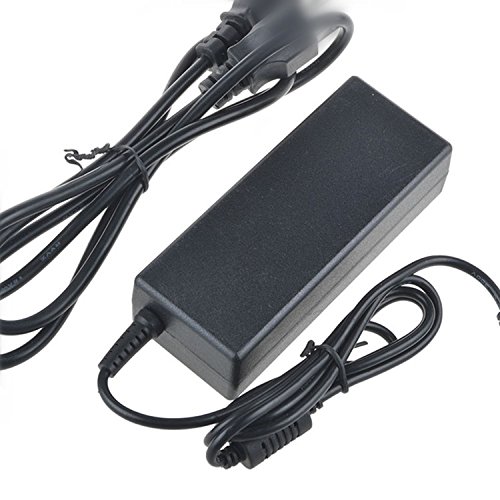
Image: The Accessory USA AC DC Adapter, featuring a compact design with a barrel connector and a standard 2-pin North American power plug.
2. Segurtasun informazioa
Zure segurtasuna da garrantzitsuena. Mesedez, jarraitu neurri hauek:
- Our products are CE / FCC / RoHS certified, ensuring compliance with safety and environmental standards.
- Features OVP (Over Voltage irteeraren babesa), OCP (gehiegizko korrontearen irteeraren babesa) eta SCP (zirkuitu laburreko irteeraren babesa) zure gailuak babesteko.
- Always ensure the adapter's voltage and current ratings match your device's requirements before connecting.
- Ez jarri egokitzailea uraren, hezetasunaren edo muturreko tenperaturen eraginpean.
- Saihestu egokitzailea erortzea edo kolpe gogorren eraginpean jartzea.
- Deskonektatu egokitzailea korronte-hartunetik denbora luzez erabiltzen ez duzunean.
3. Konfiguratzeko argibideak
3.1 Bateragarritasun-egiaztapena
Before connecting, verify that your device requires an AC DC adapter with specifications compatible with the ATS065-A180 model. Refer to your device's manual for its power requirements.
3.2 Egokitzailea konektatzea
- Ensure both the adapter and your device are powered off.
- Connect the barrel connector end of the adapter cable securely into the power input port of your device.
- Plug the 2-pin North American power plug of the adapter into a standard wall outlet (100-240V AC, 60Hz).
- Once connected, you may power on your device.
4. Funtzionamendu-argibideak
The Accessory USA AC DC Adapter is designed for straightforward operation. Once properly connected as described in the 'Setup Instructions' section, the adapter will supply the necessary power to your compatible device. No additional user interaction is typically required during operation.
- Ziurtatu egokitzailea ondo aireztatutako leku batean jartzen dela gehiegi berotzea saihesteko.
- Ez estali egokitzailea funtzionatzen ari den bitartean.
- If the adapter feels excessively hot, disconnect it immediately and check for proper ventilation or potential device issues.
5. Mantentzea
Proper maintenance ensures the longevity and reliable performance of your adapter.
- Garbiketa: Disconnect the adapter from both the power outlet and your device before cleaning. Use a soft, dry cloth to wipe the exterior. Do not use liquid cleaners or solvents.
- Biltegiratzea: When not in use, store the adapter in a cool, dry place, away from direct sunlight and moisture. Avoid tightly winding the cable to prevent damage.
- Ikuskapena: Periodically inspect the adapter cable and connectors for any signs of wear, fraying, or damage. If any damage is observed, discontinue use and replace the adapter.
6. Arazoak
If you encounter issues with your adapter, please refer to the following common troubleshooting steps:
- Gailuak ez du korronterik jasotzen:
- Ziurtatu egokitzailea ondo konektatuta dagoela bai hormako entxufean bai zure gailuan.
- Egiaztatu hormako entxufea funtzionatzen duen beste gailu bat konektatuz.
- Verify that your device's power input requirements match the adapter's output specifications.
- Egokigailua gainberotzea:
- Ziurtatu egokitzailea ondo aireztatutako leku batean dagoela eta ez dagoela estalita.
- Confirm that your device is not drawing more power than the adapter is rated for.
- Konexio soltea:
- Check the barrel connector for a snug fit into your device's power port.
- Ikuskatu elikatze-kablea kalterik ikusten den ikusteko.
Urrats hauek jarraitu ondoren arazoak konpontzen ez badira, jarri harremanetan bezeroarentzako arreta-zerbitzuarekin.
7. Produktuaren zehaztapenak
| Ezaugarri | Zehaztapena |
|---|---|
| Marka | Accessory USA |
| Modelo zenbakia | ATS065-A180 (P/N: ATS065A180418201) |
| Gailu bateragarriak | Adapter TECH. Model: ATS065-A180 |
| Konektore mota | Barrako konektorea |
| Sarrera boltage | 100-240 volt AC |
| Maiztasun barrutia | 60 hertz |
| Energiaren entxufea | Type A - 2 pin (North American) |
| Energia iturria | Kable elektrikoa |
| Zehaztapena Met | CE, RoHS, FCC |
| Ezaugarri Berezia | Travel, Portable |
| Forma-faktorea | Laukizuzena |
| Muntatze Mota | Hormako Muntaia |
| UPC | 707296830020 |
8. Bermea eta Laguntza
8.1 Bermearen informazioa
This product comes with a comprehensive warranty:
- 30 eguneko dirua itzultzeko bermea: If you are not satisfied, you may return the product within 30 days for a full refund.
- 60 Days Free Exchange: Enjoy a free exchange within 60 days with a paid return label.
- 365 Days Worry-Free Warranty: A full year of worry-free warranty coverage for peace of mind.
8.2 Bezeroarentzako laguntza
For any questions, technical assistance, or warranty claims, please contact Accessory USA customer support through the retailer's platform or the official Accessory USA website. Please have your product model number (ATS065-A180) and purchase details ready when contacting support.