
Sarrera
Eskerrik asko Lepro LED Desk L aukeratzeagatik.amp. Hau lamp is designed to provide versatile and comfortable lighting for various tasks, featuring adjustable brightness, multiple color temperatures, a flexible design, and convenient additional functions.

Lepro LED mahaia Lamp provides versatile illumination for your workspace.
- Argiztapen erregulagarria: Choose from 3 color temperatures (3000K Warm White, 4700K Natural White, 6000K Cool White) and stepless dimming from 5% to 100% brightness.
- Diseinu malgua: Lamp features a multi-angle adjustable arm and head, allowing for precise light positioning. The base rotates 90 degrees, and the lamp head adjusts 180 degrees.
- USB ataka integratua: A 5V/1A USB output port is located on the back of the base for convenient charging of your electronic devices.
- Funtzio adimendunak: Includes a memory function to recall your last lighting setting and a 30-second timer for automatic shut-off.
- Eraikuntza iraunkorra: Made with a brushed aluminum alloy stand and shade, ensuring excellent heat dissipation and longevity, with ABS plastic articulations for flexibility.
Konfigurazio Argibideak
- Edukia deskonprimitu: Kontu handiz kendu lamp, power adapter, and cleaning cloth from the packaging.
- Kokatu Lamp: Jarri lamp on a stable, flat surface such as a desk or table.
- Konektatu energia: Insert the power adapter's DC plug into the power input port on the back of the lamp base. Then, plug the power adapter into a standard electrical outlet.
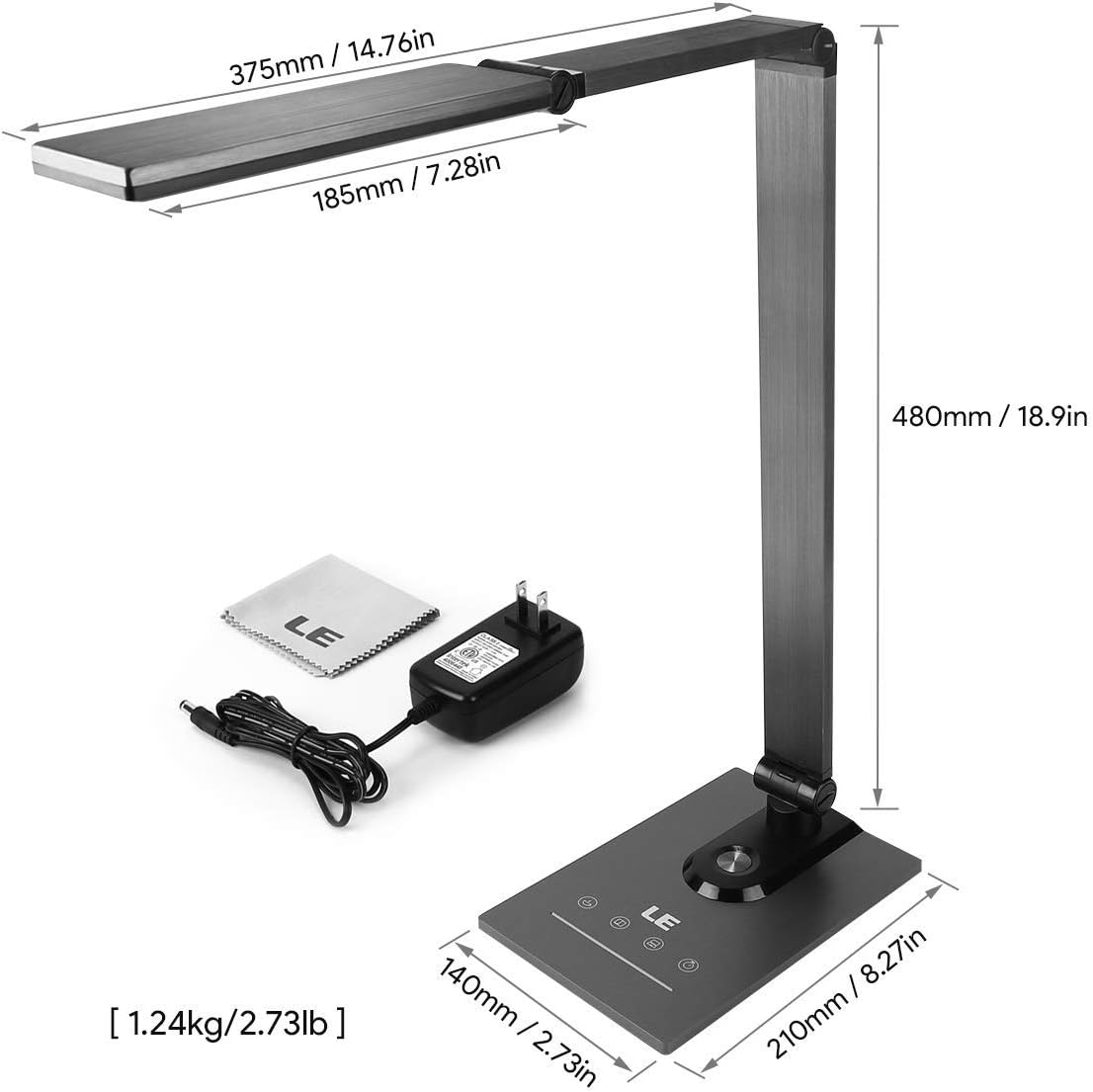
Ensure all components, including the power adapter and cleaning cloth, are present.
Funtzionamendu-argibideak
1. Piztu/Itzali
Gently touch the power symbol (O) l-namp l biratzeko oinarriaamp piztu edo itzali.
2. Distira doitzea
Slide your finger along the touch panel (indicated by a horizontal line with sun icons) on the lamp base to adjust the brightness level from 5% to 100%. The lamp offers stepless dimming for precise control.
3. Changing Color Temperature
Touch the mode symbol (icons resembling a coffee cup, book, and computer) on the lamp base to cycle through the three available color temperature modes:
- 3000K (Zuri epela): Ideal for relaxation or a cozy atmosphere.
- 4700K (Natural White): Suitable for general reading and daily tasks.
- 6000K (Cool White): Best for focused work and concentration.

Easily switch between three color temperatures and adjust brightness with the touch controls.
4. USB kargatzeko ataka
Connect your smartphone, tablet, or other USB-powered devices to the 5V/1A USB output port located on the rear of the lamp kargatzeko oinarria.

Charge your devices efficiently using the integrated 5V/1A USB port.
5. Memoriaren funtzioa
Lamp automatically remembers your last used brightness and color temperature settings. When you turn the lamp on again, it will resume with these previous settings.
6. 30-Second Timer
Touch the clock symbol (ERLOIA) l-namp base to activate the 30-second timer. The lamp will dim to a low light level and automatically turn off after 30 seconds, providing a convenient delay for leaving a room or falling asleep.

Utilize the timer and memory functions for enhanced convenience.
7. Adjusting Lamp Posizioa
Lamp's design allows for extensive adjustment to direct light precisely where needed:
- Oinarrizko biraketa: Lamp base can be rotated up to 90 degrees horizontally.
- Besoaren doikuntza: The main arm of the lamp can be adjusted to various angles.
- Buruaren doikuntza: Lamp head can be tilted and rotated up to 180 degrees vertically.

Egokitu lamp's arm and head to achieve optimal lighting angles.

The flexible design allows for precise light direction, suitable for various scenarios.
Mantentzea
- Garbiketa: Use the provided cleaning cloth or a soft, dry cloth to wipe the lampEz erabili garbitzaile urratzailerik, disolbatzailerik edo produktu kimiko gogorrik, hauek akabera edo osagai elektronikoak kaltetu baitezakete.
- Biltegiratzea: l gordez geroamp Denbora luzez, ziurtatu garbi eta lehor dagoela. Gorde leku fresko eta lehor batean, eguzki-argitik eta muturreko tenperaturetatik babestuta.
- LED: LED argi-iturria integratuta dago eta ezin du erabiltzaileak ordezkatu. Ez saiatu argia desmuntatzen.amp burua.
Arazoak konpontzea
| Arazoa | Kausa posiblea | Irtenbidea |
|---|---|---|
| Lamp ez da pizten. | Ez dago elikadura iturririk edo konexio solterik. | Ziurtatu korronte-moldagailua ondo konektatuta dagoela lamp eta funtzionatzen duen entxufe elektriko bat. |
| Light flickers or brightness is inconsistent. | Unstable power supply or dirty touch panel. | Check the power source. Clean the touch control panel with a dry cloth. |
| USB charging port is not working. | Device incompatibility or faulty cable. | Ensure your device is compatible with 5V/1A USB charging. Try a different USB cable. |
| Lamp does not hold its adjusted position. | Joints may be loose or over-extended. | Gently readjust the lamp to a stable position. Avoid forcing joints beyond their intended range of motion. |
Zehaztapenak
| Ezaugarri | Xehetasuna |
|---|---|
| Modelo zenbakia | 3100030-EB |
| Neurriak (L x W x H) | 14P x 21l x 48H cm (5.5 x 8.3 x 18.9 inches) |
| Pisua | 1450 gramo (3.2 libera) |
| LED Potentzia | 9 Watt |
| USB irteera | 5V/1A (10 Watts) |
| Sarrera boltage | 240 Volt |
| Kolore Tenperaturak | 3000K, 4700K, 6000K |
| Distira doitzea | Stepless Dimming (5%-100%) |
| Kontrol-metodoa | Ukitu Kontrola |
| Materialak | Brushed Metal (Base, Shade), ABS Plastic (Articulations) |
| Dakarten osagaiak | Mahaia Lamp, Power Adapter, Cleaning Cloth |
Bermea eta Laguntza
This product comes with a 1-year availability of spare parts, indicating a commitment to product support.
For any questions, technical assistance, or warranty claims, please contact the retailer where you purchased the product or visit the official Lepro webbezeroarentzako laguntza-informaziorako gunea.
Gorde erosketaren egiaztagiria bermearen ondorioetarako.