
InFocus IN112XV
InFocus IN112XV Aurkezpen Proiektorearen Erabiltzaile Eskuliburua
Model: IN112XV | Brand: InFocus
1. Sarrera
This manual provides essential information for the safe and efficient operation of your InFocus IN112XV Presentation Projector. The IN112XV is designed for business presentations and educational use, offering a long lamp life, high brightness, and clear image quality.
- L hedatuaamp Bizitza: Enjoy over 15,000 hours of viewing.
- Distira handia: 3800 lumens for clear images in various lighting conditions.
- Kontraste-erlazioa: 26000:1 for distinct whites and blacks.
- Malgua Viewesan: Projects images from 28 inches to 300 inches diagonally.
- Konektibitatea: Features HDMI input and SVGA (800 x 600) resolution.
2. Paketearen edukia
Egiaztatu behean zerrendatutako elementu guztiak zure paketean sartuta daudela:
- InFocus IN112XV Projector
- Elikatze kablea
- Urruneko Kontrola
- VGA kablea
- Dokumentazioa (eskuliburu hau eta beste gidak)
3. Produktua amaitu daview
Familiarize yourself with the components and controls of your InFocus IN112XV projector.
3.1 Aurrealdea View
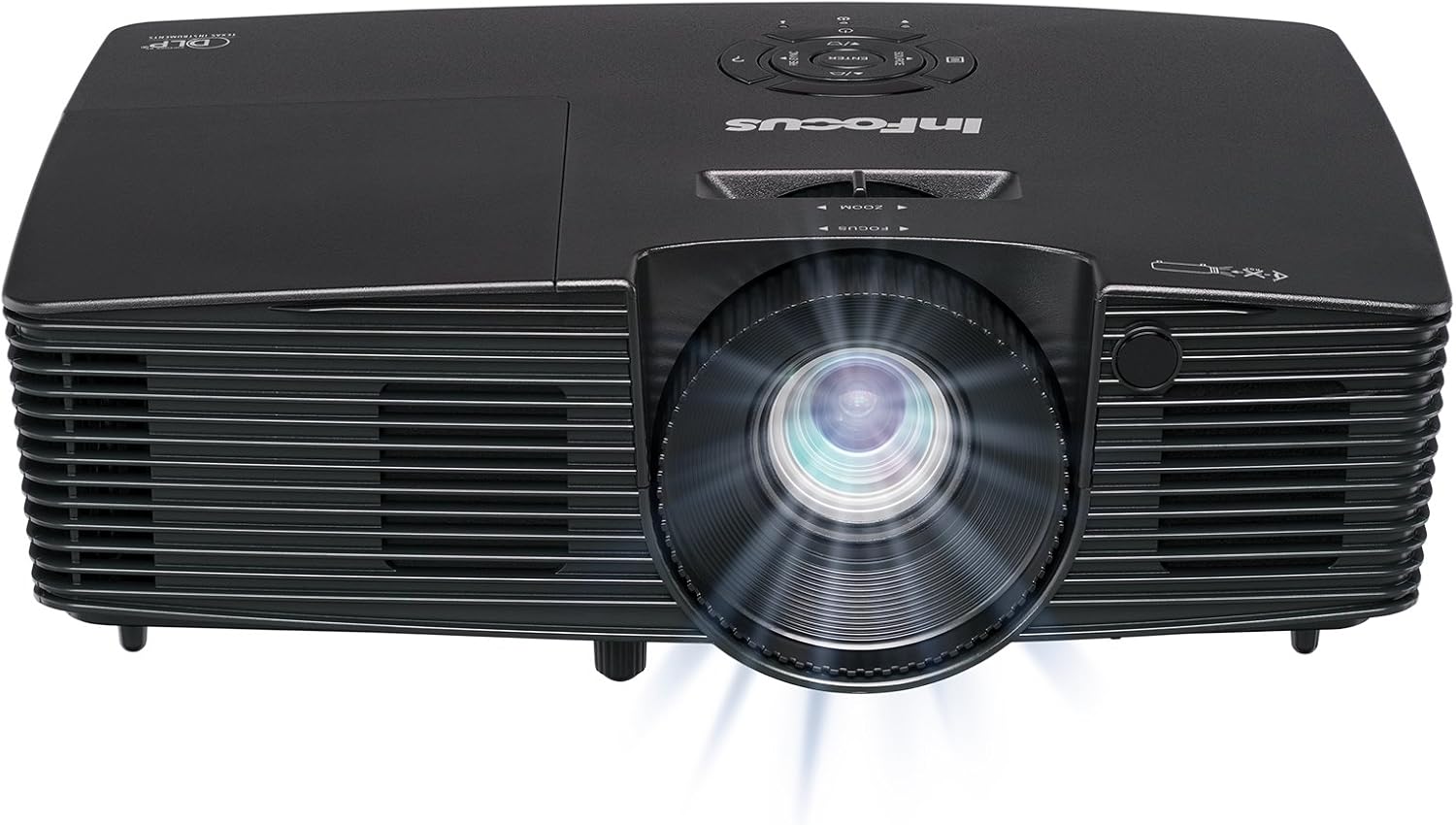
3.1. irudia: Aurrealdea view of the InFocus IN112XV projector. This image highlights the main projection lens and the front ventilation grilles.
3.2 Goia View eta Kontrol Panela

3.2. irudia: Goiena view of the InFocus IN112XV projector. The control panel is visible on the right, featuring buttons for power, source selection, menu navigation, keystone adjustment, and volume. The focus and zoom adjustment rings are located around the lens.
The control panel on the top of the projector allows for basic operation without the remote. Key buttons include:
- Potentzia: Proiektorea pizten edo itzaltzen du.
- Iturria: Eskuragarri dauden sarrera-iturrien artean ziklatzen du.
- Menua: Pantailan bistaratze (OSD) menura sartzen da.
- Sartu: OSD menuko hautaketak berresten ditu.
- Gezi-teklak: Navigate menu options and adjust settings.
- Re-Sync: Synchronizes the image.
3.3 Atzekoa View eta Konexio Portuak

3.3. irudia: Atzekoa view of the InFocus IN112XV projector. This image displays the available connection ports, including Video In, S-Video In, Computer In (VGA), HDMI, and the power input.
The rear panel provides various ports for connecting external devices:
- Bideoa: For composite video sources.
- S-Bideo sarrera: For S-Video sources.
- Ordenagailuaren sarrera (VGA): For connecting to computers via VGA cable.
- HDMI: Bideo eta audio iturri digitaletarako.
- Zerbitzua: For service and maintenance purposes.
- Potentzia sarrera: Connects the power cord to an electrical outlet.
3.4 Urruneko kontrola

3.4. irudia: Remote control for the InFocus IN112XV projector. The remote provides full control over the projector's functions, including power, source selection, menu navigation, keystone correction, and volume.
The remote control offers convenient access to all projector functions. Ensure batteries are correctly installed.
4. Konfigurazioa
4.1 Jartzea
Position the projector on a stable, flat surface or mount it securely. Ensure there is adequate space around the projector for ventilation.
4.2 Energia-konexioa
- Konektatu elikatze-kablea proiektorearen elikatze-sarrera atakara.
- Entxufatu korronte-kablearen beste muturra lurreko hartune elektriko batean.
4.3 Sarrera iturriak konektatzea
The projector supports various input sources. Choose the appropriate cable for your device:
- HDMI: Connect an HDMI cable from your source device (e.g., laptop, media player) to the projector's HDMI port.
- VGA (Ordenagailuaren sarrera): Connect a VGA cable from your computer to the projector's Computer In port. This is a plug-and-play connection.
- Video In / S-Video In: Use composite video or S-Video cables for older video sources.
- Gailu mugikorrak: To connect an iPad or smartphone, a LightCast Key (sold separately) is required.
5. Funtzionamendu-argibideak
5.1 Piztu/Itzaltzea
- Pizteko: Sakatu Boterea button on the projector's control panel or the remote control. The power indicator light will change.
- Itzaltzeko: Sakatu Boterea button again. A confirmation message may appear. Press again to confirm shutdown. Allow the projector to cool down before unplugging.
5.2 Sarrera iturri bat hautatzea
After connecting your source device, select the correct input:
- Sakatu Iturria button on the projector's control panel or the remote control to cycle through available inputs (HDMI, VGA, Video, S-Video).
- Alternatively, use the dedicated input buttons (HDMI, VGA, Video) on the remote control.
5.3 Fokua eta zooma doitzea
For a clear and appropriately sized image, adjust the lens rings:

5.1. irudia: Manual Focus Adjustment. This image illustrates the effect of adjusting the focus ring, transforming a blurry projection into a clear and sharp image.
- Fokua: Biratu Fokua ring on the projector lens until the image appears sharp and clear.
- Zooma: Biratu Zoomatu ring on the projector lens to adjust the size of the projected image.
5.4 Funtsezko zuzenketa
If the projected image appears trapezoidal (wider at the top or bottom), use keystone correction to square it:
- Sakatu Keystone+ or Keystone- buttons on the remote control to adjust the image geometry.
5.5 Menu Nabigazioa
Access the On-Screen Display (OSD) menu for advanced settings:
- Sakatu Menua button on the remote or control panel.
- Erabili gezi-teklak menuko aukeren artean nabigatzeko.
- Sakatu Sartu aukera bat hautatzeko edo ezarpen bat berresteko.
- Sakatu Menua berriro OSDtik irteteko.
6. Mantentzea
6.1 lamp Bizitza
Proiektorea lamp has an estimated life of over 15,000 hours. When the lamp reaches the end of its life, the projector may display a warning message or the image brightness may significantly decrease. Refer to the full service manual for lamp replacement procedures if necessary.
6.2 Garbiketa
- C proiektoreaasing: Erabili oihal leun eta lehor bat proiektorearen kanpoaldea garbitzeko. Ez erabili garbitzaile edo disolbatzaile urratzailerik.
- Lentea: Gently clean the lens with a lens cleaning cloth and specialized lens cleaning solution. Avoid touching the lens surface with your fingers.
- Aireztapen-zuloak: Periodically check and clean the ventilation openings to ensure proper airflow and prevent overheating. Use a soft brush or compressed air to remove dust.
7. Arazoak
Atal honek zure proiektorearekin izan ditzakezun arazo ohikoenei buruzko informazioa ematen du.
| Arazoa | Kausa posiblea | Irtenbidea |
|---|---|---|
| Ez da irudirik bistaratzen |
|
|
| Irudia lausoa da |
|
|
| Irudia trapezoidala da |
|
|
| Projector runs hot or smells of burning plastic |
|
|
| Audiorik ez |
|
|
Ohar garrantzitsua: This projector is not recommended for high-definition movie viewing. While it can accept a 1080p input signal, it projects at its native SVGA (800 x 600) resolution.
8. Zehaztapenak
| Ezaugarri | Xehetasuna |
|---|---|
| Modelo zenbakia | IN112XV |
| Bistaratzeko Teknologia | DLP |
| Berezko Ebazpena | SVGA (800 x 600) |
| Distira | 3800 lumen |
| Kontraste-erlazioa | 26000:1 |
| Lamp Bizitza | Gehienez 15,000 ordu |
| Konektibitatea | HDMI, VGA (Computer In), Video In, S-Video In |
| Ezaugarri Berezia | 3D prest |
| Gomendatutako Erabilerak | Business, Education |
| Produktuaren neurriak | 8.8 x 12.4 x 4 hazbete |
| Elementuaren pisua | 5.5 kilo |
9. Bermea eta Laguntza
9.1 Bermearen informazioa
The InFocus IN112XV projector is backed by a 2 urteko bermeaBerme honek materialen eta fabrikazioaren akatsak estaltzen ditu erabilera normalaren pean. Gorde erosketaren egiaztagiria bermearen erreklamazioak egiteko.
9.2 Bezeroarentzako laguntza
For technical assistance, troubleshooting beyond this manual, or warranty service, please contact InFocus customer support. Contact information can typically be found on the official InFocus webgunean edo zure produktuarekin batera datorren dokumentazioan.
Ask a question about this manual
Ask about setup, troubleshooting, compatibility, parts, safety, or missing instructions. Manuals+ will review the question and use this page’s manual context to help answer it.