
1. Sarrera
This manual provides essential information for the safe and efficient operation of your Rigol DS1104Z-S Plus 100 MHz Digital Oscilloscope. Please read this manual thoroughly before using the instrument to ensure proper functionality and to prevent damage. The Rigol DS1104Z-S Plus is a 4-channel digital storage oscilloscope designed for precise signal analysis with a 100 MHz bandwidth and a 1 GSa/s real-time sample tasa.
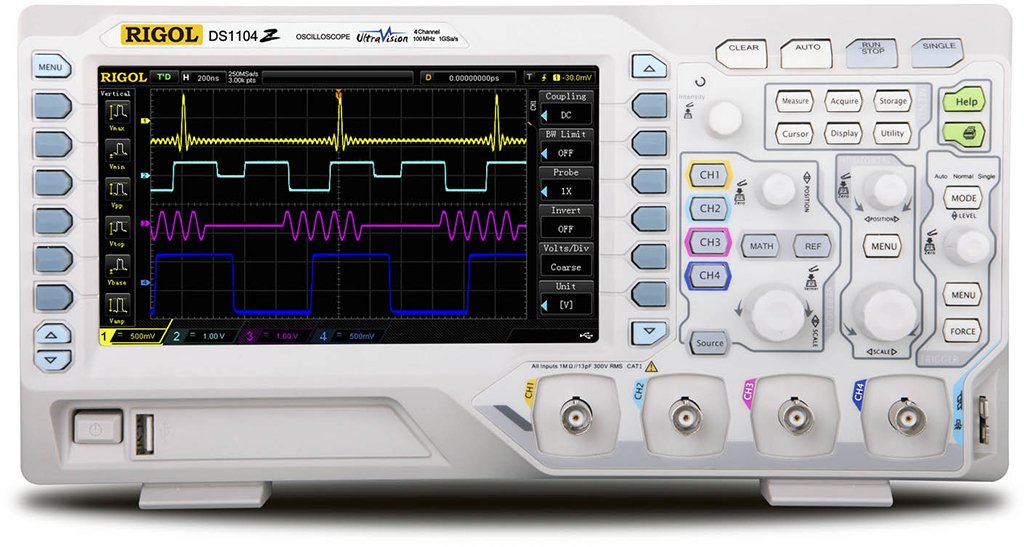
Figure 1: Rigol DS1104Z-S Plus Digital Oscilloscope. This image shows the front panel of the oscilloscope with its display, control knobs, and input channels.
2. Segurtasun informazioa
Beti jarraitu segurtasun neurri hauek tresnari lesioak eta kalteak saihesteko:
- Energia iturria: Konektatu tresna zehaztutako bolumen-iturri batera soilik.tage eta maiztasuna.
- Lurreratzea: Ensure the instrument is properly grounded to prevent electric shock.
- Aireztapena: Ez blokeatu aireztapen-irekidurak. Ziurtatu aire-fluxu egokia dagoela tresnaren inguruan.
- Ingurumena: Operate the oscilloscope in a dry, well-ventilated area, away from direct sunlight, high temperatures, and excessive dust.
- Zundaketak: Use only probes designed for the specified voltage eta maiztasun balorazioa.
- Zerbitzua: Refer all servicing to qualified service personnel. Do not attempt to repair the instrument yourself.
- Garbiketa: Deskonektatu korrontea garbitu aurretik. Erabili eskuila leun eta lehorra.amp oihal. Ez erabili garbitzaile edo disolbatzaile urratzailerik.
3. Paketearen edukia
Egiaztatu zure paketeak elementu hauek dituela:
- Rigol DS1104Z-S Plus Digital Oscilloscope
- Elikatze kablea
- Passive Probes (4 units)
- USB kablea
- Gida Azkarra
- Resource CD (User Manual, Programming Manual, Software)
4. Produktua amaitu daview
The Rigol DS1104Z-S Plus features a user-friendly interface and robust design for various measurement applications.
4.1 Aurreko panela
The front panel includes the display, control knobs, function buttons, and input connectors for channels 1-4.
- Bistaratzeko pantaila: Uhin-formak, neurketa-emaitzak eta menu-aukerak erakusten ditu.
- Kontrol bertikalak: Egokitu boltage per division and position for each channel.
- Kontrol horizontalak: Adjust time per division and horizontal position.
- Abiarazleen kontrolak: Set trigger level, mode, and type.
- Funtzio-botoiak: Access various menus such as Acquire, Measure, Storage, Utility, etc.
- Kanalen sarrerak (CH1-CH4): BNC connectors for probe connection.
4.2 Atzeko panela
The rear panel provides power input, USB host/device ports, and LAN port for connectivity.
- CA potentzia sarrera: Kable elektrikoa konektatzeko.
- USB ostalariaren ataka: USB biltegiratze gailuak konektatzeko.
- USB gailuaren ataka: For connecting to a PC.
- LAN ataka: Sarearen konexiorako eta urrutiko aginterako.
5. Konfigurazioa
5.1 Energia-konexioa
- Ziurtatu atzeko paneleko etengailua OFF posizioan dagoela.
- Connect the provided power cord to the AC power input on the rear panel of the oscilloscope.
- Entxufatu elikatze-kablearen beste muturra lurrera konektatutako korronte alternoko entxufe batera.
5.2 Zundaren konexioa
- Connect the BNC connector of a passive probe to one of the input channels (CH1, CH2, CH3, or CH4) on the front panel.
- Connect the probe's ground clip to the circuit's ground reference.
- Set the attenuation ratio on the probe to match the setting on the oscilloscope (e.g., 1X or 10X).
5.3 Hasierako piztea
- Press the power switch on the rear panel to the ON position.
- The oscilloscope will perform a self-test and display the Rigol logo.
- After startup, the default waveform display will appear.
6. Funtzionamendu-argibideak
This section covers basic operations for acquiring and analyzing waveforms.
6.1 Basic Waveform Display
- Vertical Scale (VOLTS/DIV): Use the vertical scale knob for the active channel to adjust the voltage sentikortasuna.
- Posizio bertikala: Use the vertical position knob to move the waveform up or down on the screen.
- Horizontal Scale (SEC/DIV): Use the horizontal scale knob to adjust the time base.
- Posizio horizontala: Use the horizontal position knob to shift the waveform left or right.
6.2 Aktibatzea
Triggering stabilizes repetitive waveforms and captures single-shot events.
- Trigger maila: Adjust the trigger level knob to set the voltage point at which the trigger occurs.
- Trigger Menu: Sakatu Trigger Menu button to configure trigger type (Edge, Pulse, Video, etc.), source, and slope.
- Trigger modua: Select between Auto, Normal, and Single modes.
6.3 Neurketa funtzioak
Osziloskopioak hainbat neurketa funtzio automatiko eskaintzen ditu.
- Sakatu Neurria button to display the measurement menu.
- Select desired measurements such as Vpp, Vmax, Vmin, Freq, Period, Rise Time, etc.
- The results will be displayed on the screen.
6.4 Saving Data
Waveforms and settings can be saved to internal memory or a USB storage device.
- Sakatu Biltegiratzea botoia.
- Select the storage type (Waveform, Setup, Image) and destination (Internal, USB).
- Follow the on-screen prompts to save the data.
7. Mantentzea
7.1 Garbiketa
To maintain the instrument's appearance and performance:
- Deskonektatu korronte-kablea garbitu aurretik.
- Erabili zapi leun bat dampened with mild detergent and water to clean the exterior.
- Ez erabili garbitzaile urratzailerik, disolbatzailerik edo produktu kimiko gogorrik.
- Ziurtatu likidorik ez dela tresnan sartzen.
7.2 Kalibrazioa
The oscilloscope is factory calibrated. For optimal performance, periodic calibration by qualified service personnel is recommended, typically every 1-2 years, depending on usage.
7.3 Biltegiratzea
When not in use for extended periods, store the oscilloscope in a dry, dust-free environment within the specified operating temperature range.
8. Arazoak
This section lists common problems and their solutions. If the problem persists, contact Rigol customer support.
| Arazoa | Kausa posiblea | Irtenbidea |
|---|---|---|
| Ez dago pantailarik piztu ondoren | Power cord not connected; Power switch off; Faulty power outlet | Check power cord connection; Ensure power switch is ON; Test power outlet with another device |
| Ez da uhin-formarik bistaratzen | Probe not connected; Incorrect channel settings; Trigger level incorrect; Input signal too small/large | Connect probe to active channel; Adjust vertical scale and position; Adjust trigger level; Check input signal source |
| Uhin-forma ezegonkorra | Incorrect trigger settings; Noisy signal | Adjust trigger level and mode; Check signal source for noise; Use averaging acquisition mode |
| Cannot save data to USB | USB drive not formatted correctly; USB drive full; USB drive faulty | Format USB drive to FAT32; Delete unnecessary files; Try a different USB drive |
9. Zehaztapenak
Key technical specifications for the Rigol DS1104Z-S Plus Digital Oscilloscope:
- Banda zabalera: 100 MHz
- Kanalak: 4 kanal analogikoak
- Denbora errealean SampTasa: 1 GSa/s arte
- Memoriaren sakonera: 12 Mpts (Standard), 24 Mpts (Optional)
- Uhin-formaren harrapaketa-tasa: 30,000 wfms/s arte
- Pantaila: 7-inch TFT LCD (800x480 resolution)
- Sentikortasun bertikala: 1 mV/div-tik 10 V/div-ra
- Denbora-oinarri tartea: 2 ns/div to 50 s/div
- Abiarazle motak: Edge, Pulse, Video, Slope, Alternate, Runt, Window, Delay, Setup/Hold, Nth Edge
- Interfazea: USB Host, USB Device, LAN, Pass/Fail, Trigger Out
- Energia iturria: Kable elektrikoa
- Elementuaren pisua: 1 kilogramo
- Betetzea: CE
10. Bermea eta Laguntza
Rigol Technologies provides a standard warranty for its products. For detailed warranty terms and conditions, please refer to the warranty card included with your product or visit the official Rigol website. For technical support, service, or inquiries, please contact your local Rigol distributor or Rigol customer service. Contact information can typically be found on the Rigol website or in the documentation provided with your oscilloscope.
Ofiziala Webgunea: www.rigol.com