
Segurtasun-argibide garrantzitsuak
Read all instructions before using this humidifier. Failure to follow these instructions may result in electric shock, fire, or serious injury.
- Jarri beti hezegailua gainazal sendo, lau eta berdinean.
- Mantendu korronte-kablea gainazal beroetatik urrun.
- Ez erabili hezegailua hondatutako kable edo entxufe batekin.
- Unplug the humidifier before filling, cleaning, or moving.
- Ez blokeatu aire irekidurak.
- Ez erabili kanpoan.
Produktua amaituview
The Honeywell Top Fill Tower Humidifier (HEV620W) is designed to provide cool, invisible moisture to maintain optimal humidity levels in your home. It features a digital humidistat, multiple speed settings, and a convenient top-fill design.

Image: Honeywell Top Fill Tower Humidifier, Model HEV620W, in white.
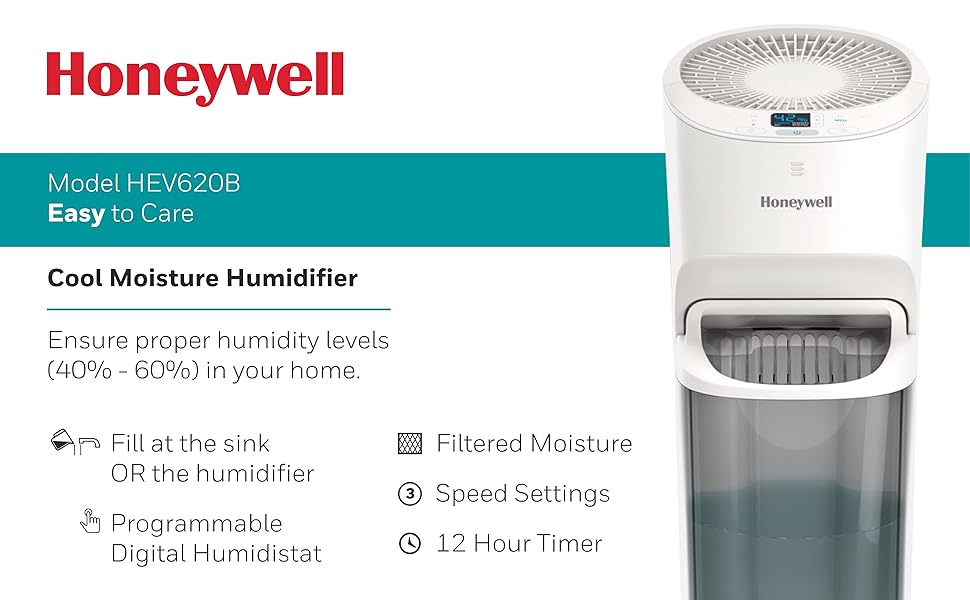
Irudia: Gainetikview of the Honeywell Humidifier's key features including cool invisible moisture, digital humidistat, and 3 speed settings.
Konfigurazioa
- Hezegailua deskonprimitu: Kontu handiz kendu ontziratzeko material guztiak.
- Position the Humidifier: Place the unit on a firm, level, water-resistant surface at least 12 inches away from walls and furniture. Ensure the mist outlet is not directed at walls or furniture.
- Bete Ur depositua:
- Kendu goiko estalkia.
- Pour clean, cool tap water directly into the water tank opening. Do not overfill.
- Jarri goiko estalkia ongi.

Image: Diagram illustrating two methods for filling the humidifier: directly into the unit or by removing the tank and filling at a sink.

Image: Demonstrates pouring water directly into the top of the humidifier for easy refilling.
Funtzionamendu-argibideak
- Piztu/Itzali: Sakatu pizteko botoia (⑁) unitatea pizteko edo itzaltzeko.
- Doitu haizagailuaren abiadura: Sakatu haizagailuaren abiaduraren botoia (☠) to cycle through low, medium, and high settings.
- Ezarri nahi den hezetasuna: Use the humidity control buttons (▲ / ▼) to set your desired humidity level. The unit will automatically turn off when the set level is reached and restart when humidity drops.
- Ezarri tenporizadorea: Sakatu tenporizadorearen botoia (⏱) to set the operating time (e.g., 2, 4, 8, 12 hours). The unit will automatically shut off after the selected time.

Irudia: Xehetasun handikoa view of the digital control panel, showing humidity display and control buttons.
Mantentzea
Regular maintenance is crucial for optimal performance and longevity of your humidifier.
Eguneko mantentze-lanak
- Refill the water tank with fresh, cool water.
Asteroko mantentze-lanak
- Clean the Water Tank and Base:
- Deskonektatu hezegailua.
- Kendu ur depositua eta hustu gainerako ura.
- Clean the tank and base with a mild detergent and rinse thoroughly.
- For mineral buildup, use a descaling solution or white vinegar.
- Check and Replace Filter:
- The "Check Filter" light will illuminate when it's time to inspect the filter.
- Slide out the filter tray from the back of the unit.
- Inspect the wicking filter for discoloration or hardening. Replace if necessary.

Image: Shows how to access and remove the wicking filter from the rear of the humidifier for inspection or replacement.

Image: A close-up of the Honeywell T-Filter, indicating it is a replacement part.
Arazoak konpontzea
| Arazoa | Kausa posiblea | Irtenbidea |
|---|---|---|
| Hezegailua ez da pizten. | No power, unit not plugged in, water tank empty. | Ensure unit is plugged into a working outlet. Check if the water tank is filled. |
| Lainorik ez edo laino-irteera txikia. | Dry or clogged filter, low water level, incorrect humidity setting. | Check water level and refill. Inspect and replace the wicking filter if necessary. Adjust desired humidity setting higher. |
| "Refill" light is on. | Ur-depositua hutsik edo maila baxuan dago. | Bete ur depositua. |
| "Check Filter" light is on. | Filter needs inspection or replacement. | Inspect the wicking filter and replace if it shows signs of wear or mineral buildup. |
| Unitatea zaratatsua da. | Unitatea ez dago gainazal mailakatu batean, haizagailuaren abiadura altuegia da. | Ensure the humidifier is on a stable, level surface. Try a lower fan speed setting. |
Zehaztapenak
| Ezaugarri | Xehetasuna |
|---|---|
| Marka | Honeywell |
| Modelo zenbakia | HEV620W |
| Eragiketa modua | evaporative |
| Edukiera | 1.5 litro |
| Exekuzioa | Gehienez 24 ordu |
| Solairuaren Estaldura | 700 oin karratu |
| Ezaugarri bereziak | Humidistat, Timer |
| Kontrol-metodoa | Ukitu |
| Iragazki mota | Wick |
| Neurriak (L x W x H) | 8.66" L x 9.84" W x 24.72" H |
| Elementuaren pisua | 12.5 kilo |
| Energia iturria | Kable elektrikoa |
| liburukiatage | 120V |

Image: Diagram illustrating the physical dimensions of the humidifier.
Bermea eta Laguntza
For warranty information or technical support, please refer to the warranty card included with your product or contact Honeywell customer service. Honeywell products are manufactured by Kaz, a Helen of Troy company.
You can often find customer service contact details on the product packaging or the official Honeywell webgunea.