
Sarrera
The KLIM Pulse Bluetooth 4.1 In-Ear Earphones are designed to provide a high-quality audio experience with wireless convenience. Featuring Bluetooth 4.1 connectivity, noise insulation, and a comfortable fit, these earphones are suitable for various activities including sports, music listening, and making calls. The magnetic tips offer easy storage, and the included memory foam ear tips ensure a secure and comfortable fit for extended use.

Image: The KLIM Pulse Bluetooth 4.1 In-Ear Earphones, showcasing their sleek black design and magnetic earbud feature.
Paketearen edukia
Upon opening your KLIM Pulse earphone package, you should find the following items:
- KLIM Pulse Bluetooth 4.1 In-Ear Earphones
- USB kargatzeko kablea
- Erabiltzailearen eskuliburua
- Various sizes and types of ear tips (including memory foam), totaling 12 pieces.
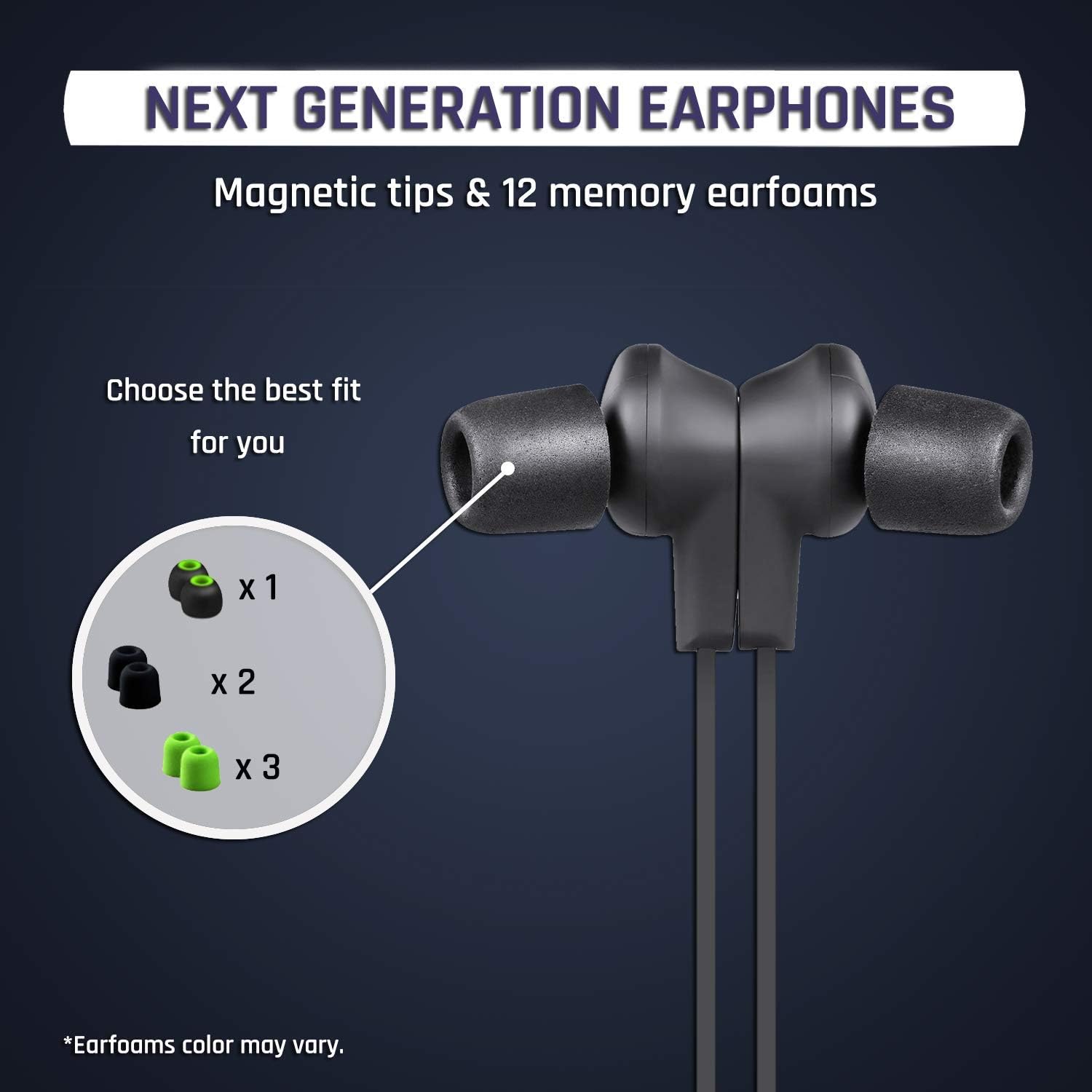
Irudia: Gertutik view of the KLIM Pulse earphones with various ear tip options, highlighting the magnetic tips and different earfoam colors.
Konfigurazioa
1. Entzungailuak kargatzea
Before initial use, fully charge your KLIM Pulse earphones. A full charge typically takes approximately 2 hours and provides up to 6 hours of uninterrupted listening time.
- Connect the micro-USB end of the charging cable to the charging port on the earphone control unit.
- Connect the USB-A end of the charging cable to a compatible USB power source (e.g., computer USB port, USB wall adapter).
- The LED indicator on the control unit will illuminate during charging and change color or turn off when charging is complete.

Image: The KLIM Pulse earphones with glowing blue circles, illustrating the charging process and battery life.
2. Belarri-puntak hautatzea
The KLIM Pulse earphones come with 12 different ear tips, including memory foam options, to ensure a comfortable and secure fit. Experiment with different sizes and materials to find the best fit for your ears. A proper fit is crucial for optimal sound quality and noise insulation.
- Gently remove the pre-installed ear tips.
- Select a pair of ear tips that feel comfortable and create a good seal in your ear canal.
- Attach the chosen ear tips firmly to the earphone nozzles.
3. Bluetooth parekatzea
The KLIM Pulse earphones are compatible with all Bluetooth-enabled devices (phones, laptops, tablets, etc.).
- Ziurtatu entzungailuak kargatuta eta itzalita daudela.
- Press and hold the multi-function button (usually the power button) on the control unit until the LED indicator flashes red and blue, indicating pairing mode.
- Gailuan, gaitu Bluetootha eta bilatu eskuragarri dauden gailuak.
- Select "KLIM Pulse" from the list of found devices.
- Once paired, the LED indicator will typically flash blue slowly or turn solid blue.

Image: The KLIM Pulse earphones alongside icons for a laptop, phone, and tablet, illustrating their broad compatibility with Bluetooth devices.
Funtzionamendu-argibideak
Oinarrizko Kontrolak
The control unit on your KLIM Pulse earphones allows for easy management of audio playback and calls.
| Botoia/Ekintza | Funtzioa |
|---|---|
| Pizteko botoia (funtzio anitzekoa) |
|
| Bolumena igo (+) |
|
| Bolumena jaitsi (-) |
|
Deiak egitea eta jasotzea
- Dei bati erantzutea: Sakatu pizteko botoia behin.
- Dei bat amaitzea: Press the Power Button once during a call.
- Dei bat ukatzea: Eduki sakatuta pizteko botoia 2 segundoz.
- Birmarkatzea: Double-press the Power Button to redial the last number.
Ezaugarri magnetikoa
The KLIM Pulse earphones feature magnetic tips. When not in use, you can snap the earbuds together around your neck to prevent them from falling off and for convenient storage.

Image: A woman wearing KLIM Pulse earphones, demonstrating their comfortable fit and suitability for active use.
Mantentzea
To ensure the longevity and optimal performance of your KLIM Pulse earphones, follow these maintenance guidelines:
- Garbiketa: Regularly wipe the earphones and ear tips with a soft, dry, lint-free cloth. For ear tips, you can gently clean them with a damp oihal eta xaboi leun batekin, guztiz lehor daudela ziurtatuz berriro itsatsi aurretik.
- Biltegiratzea: When not in use, store the earphones in a clean, dry place, away from extreme temperatures and direct sunlight. The magnetic tips help keep them tangle-free.
- Saihestu hezetasuna: While the earphones have some water resistance, avoid submerging them in water or exposing them to heavy rain.
- Kontuz maneiatu: Do not pull on the cable excessively or apply undue force to the earbuds or control unit.
Arazoak konpontzea
If you encounter issues with your KLIM Pulse earphones, refer to the following common solutions:
| Arazoa | Irtenbide posiblea |
|---|---|
| Entzungailuak ez dira pizten. | Ensure the earphones are fully charged. Connect them to a power source and check the charging indicator. |
| Ezin da gailuarekin parekatu. |
|
| Soinurik ez edo soinu kalitate eskasa. |
|
| Earphones keep disconnecting. |
|
Zehaztapenak
| Ezaugarri | Xehetasuna |
|---|---|
| Ereduaren izena | KLPB |
| Marka | Klim |
| Konektibitate Teknologia | Haririk gabekoa (Bluetooth 4.1) |
| Forma-faktorea | Belarrian |
| Kolorea | Beltza |
| Materiala | Memory Foam (ear tips) |
| Elementuaren pisua | 18.1 g (0.04 libera) |
| Produktuaren neurriak | 60 x 1.9 x 2.3 cm |
| Maiztasun barrutia | 20 Hz - 20,000 Hz |
| Bateriaren iraupena | Gehienez 6 ordu (gutxi gorabehera) |
| Kargatzeko Denbora | Gutxi gorabehera. 2 ordu |
| Gailu bateragarriak | Mobile Phones, Laptops, Tablets, Smart Speakers, TVs, Car Audio Systems, Game Consoles, Music Production Equipment, Motorcycles |

Image: An infographic displaying various features of the KLIM Pulse earphones, including Bluetooth dual connectivity, magnetic design, voice calls, Hi-Fi sound quality, and compatibility with multiple operating systems.
Bermearen informazioa
The KLIM Pulse earphones come with a 2 urteko bermea from the date of purchase. This warranty covers manufacturing defects and ensures reliable performance. Please retain your proof of purchase for warranty claims.
For any warranty-related inquiries or issues, please contact KLIM customer support.
Bezeroarentzako Arreta
If you require further assistance or have questions not covered in this manual, please contact KLIM customer support. Our European team aims to provide a response within 24 hours.
- Posta elektronikoa: contact@klimtechs.com
- Webgunea: www.klimtechs.com