
Sarrera
This manual provides detailed instructions for the assembly, operation, and maintenance of your FLEXISPOT E2B-B Height Adjustable Desk Frame. This electric sit-stand desk frame is designed to offer a flexible and ergonomic workspace, allowing seamless transitions between sitting and standing positions. Please read this manual thoroughly before assembly and use to ensure proper function and safety.

Image: The FLEXISPOT E2B-B Height Adjustable Desk Frame in black, shown with a black desktop and two monitors, illustrating a typical setup.
Segurtasun Informazioa
Funtzionamendu segurua bermatzeko eta kalteak saihesteko, jarraitu segurtasun-jarraibide hauek:
- Ensure all cables are properly connected and not pinched during movement.
- Keep hands and fingers clear of moving parts, especially during height adjustments.
- Ez gainkargatu mahaia. Gehienezko pisu-ahalmena 100 kg-koa da.
- Ez eseri edo zutik mahai gainean.
- Only use the desk frame indoors in a dry environment.
- Deskonektatu korronte-kablea garbitu edo mantentze-lanak egin aurretik.
- Children should not operate the desk without adult supervision.
Paketearen edukia
Before beginning assembly, please verify that all components are present:
- 1 x Height Adjustable Desk Frame (Black)
- 1 x Desktop (Black, 55"x 27.5")
- Muntatzeko beharrezko hardware guztia
- 1 x Digital Display Handset
Konfigurazioa eta Muntaketa
Assembly of the FLEXISPOT E2B-B desk frame is required. Please follow the instructions provided in the separate assembly guide included with your package. Ensure you have adequate space and the necessary tools before starting.
Muntaketa-kontu garrantzitsuak:
- The frame width is adjustable from 42" to 63" to accommodate various desktop sizes.
- The desk frame supports desktops ranging from 47.25" to 70.9" in width and 23.6" to 31.5" in depth.
- Ensure all screws are tightened securely after assembly.

Image: An illustration showing various components of the desk frame, including the legs, crossbar, and feet, indicating the assembly process.
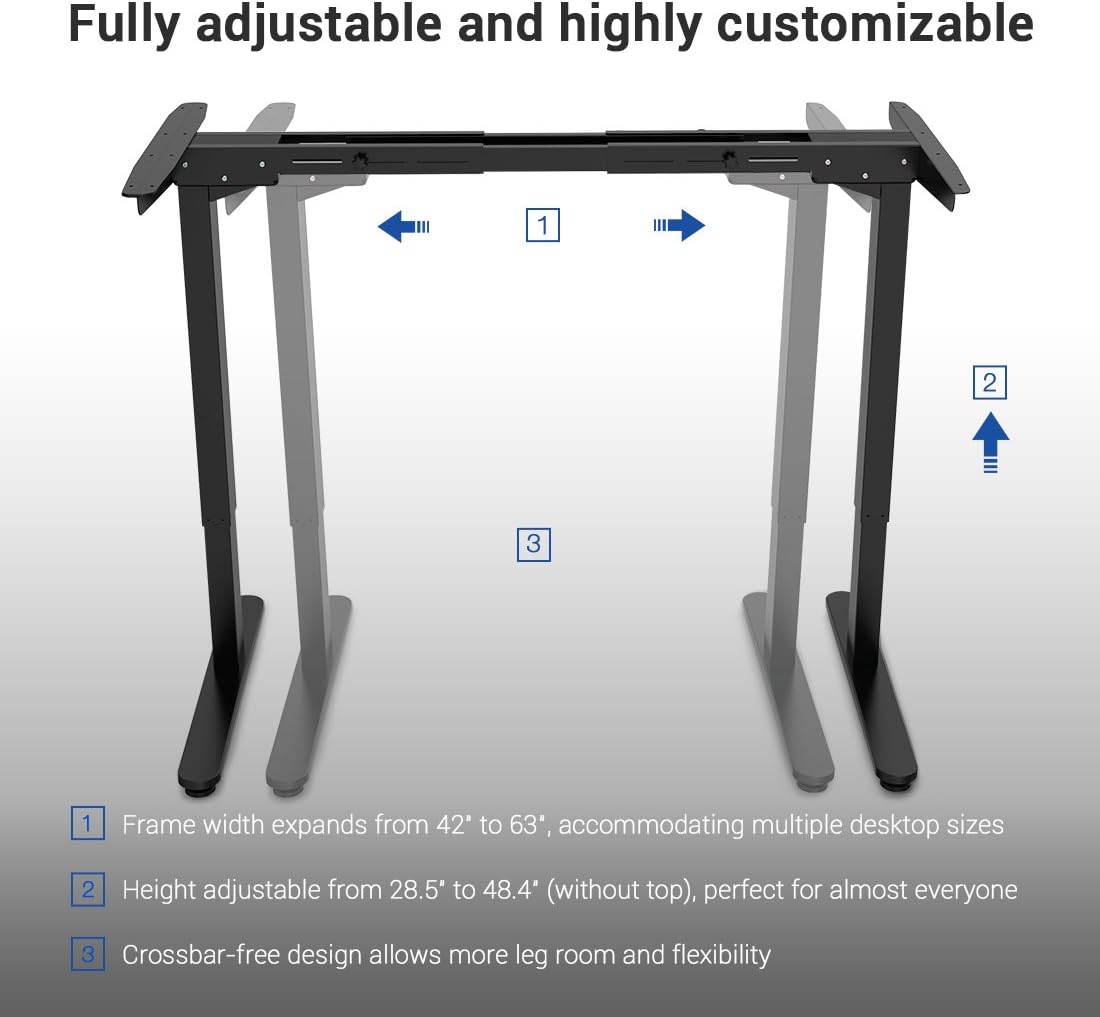
Image: A diagram illustrating the adjustable frame width (42" to 63") and height (28.5" to 48.4") of the FLEXISPOT desk frame, highlighting its customizable nature.
Funtzionamendu-argibideak
The FLEXISPOT E2B-B desk frame features a 7-button digital display handset for easy height adjustment and memory presets.
- Altuera doitzea: Use the up and down arrows on the handset to smoothly adjust the desk height. The desk moves at approximately 0.87 inches per second.
- Memoria aurrezarpenak: The handset includes 3 customizable height preset options (buttons 1, 2, 3). To save a height, adjust the desk to your desired position, then press and hold one of the preset buttons until the display confirms the setting.
- Sit/Stand Reminder: A dedicated button allows you to set a reminder to switch between sitting and standing positions, promoting healthier work habits.
- Bistaratze digitala: The display shows the current height of the desk in inches.

Irudia: Gertutik view of the FLEXISPOT digital control panel, showing the up/down arrows, memory preset buttons (1, 2, 3), and other function buttons.
Mantentzea
Regular maintenance helps ensure the longevity and smooth operation of your desk frame.
- Garbiketa: Wipe the desk frame and desktop with a soft, damp oihal. Saihestu garbitzaile edo disolbatzaile urratzaileak.
- Kableen kudeaketa: Periodically check that all cables are securely connected and not tangled or pinched.
- Loturaren egiaztapena: Every few months, inspect all screws and bolts to ensure they remain tight. Retighten if necessary.
Arazoak konpontzea
Mahaiaren markoarekin arazoak badituzu, jarraitu arazoak konpontzeko ohiko urrats hauek:
| Arazoa | Kausa posiblea | Irtenbidea |
|---|---|---|
| Mahaia ez da mugitzen. | Kable elektrikoa deskonektatuta; Gainkarga; Motorraren errorea. | Check power connection; Reduce weight on desk; Unplug for 10 seconds and plug back in to reset. |
| Mugimendu irregularra. | Unbalanced load; Loose fasteners. | Distribute weight evenly; Check and tighten all assembly fasteners. |
| Errore kodea pantailan. | Sistemaren errore espezifikoa. | Refer to the full troubleshooting guide in your assembly manual or contact customer support. |
Zehaztapenak
Detailed specifications for the FLEXISPOT E2B-B Height Adjustable Desk Frame:
| Ezaugarri | Xehetasuna |
|---|---|
| Marka | FLEXISPOT |
| Eredua | E2B-B |
| Height Adjustment Range (without top) | 28.5" eta 47.4" artean |
| Frame Width Expansion | 42" eta 63" artean |
| Compatible Desktop Sizes | 47.25" to 70.9" (width), 23.6" to 31.5" (depth) |
| Pisu Edukiera | Gehienez 220 lb (100 kg) |
| Motor Mota | Dual Motor Lift Mechanism |
| Zarata Maila | Under 50 dBs |
| Mahaigaineko materiala | MDF (Medium Density Fiberboard) with scratch-resistant high-pressure laminate |
| Desktop Dimensions (Included) | 55" (W) x 27.5" (D) x 1" (Thickness) |
| Kontrol panela | 7-button digital display handset with 3 memory presets and sit/stand reminder |
| Muntaia Beharrezkoa | Bai |
| Kolorea | Marko beltza + Goiko aldea beltza |
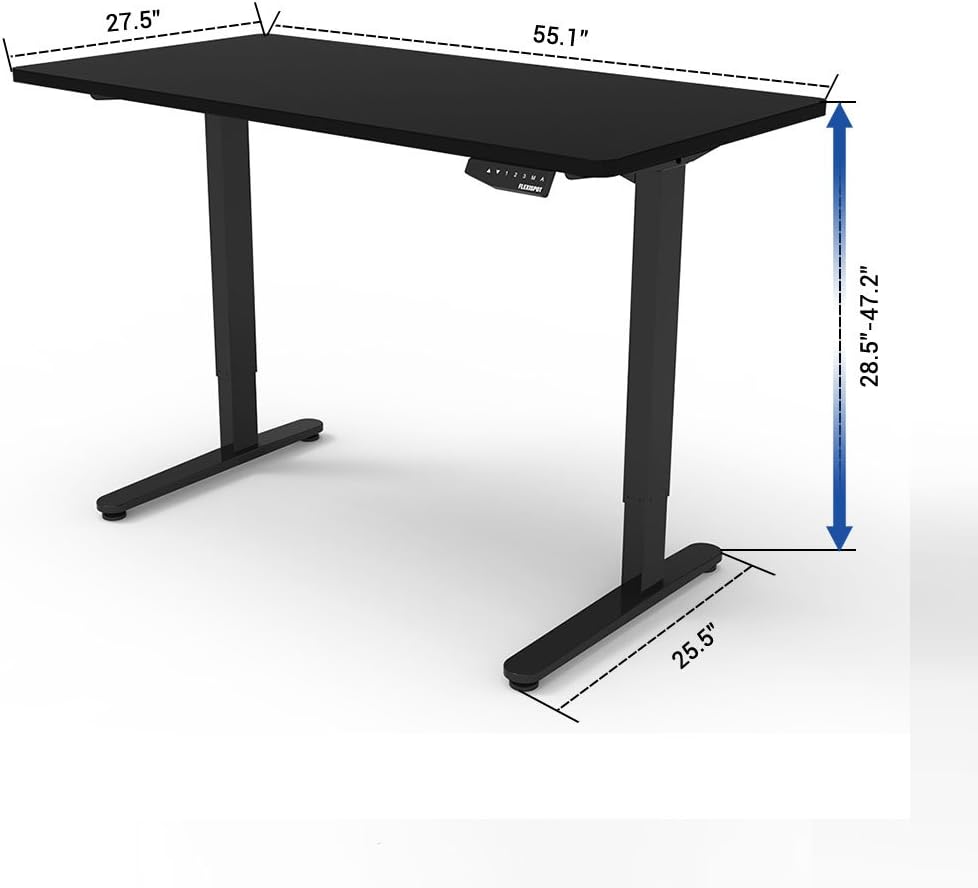
Image: A diagram illustrating the key dimensions of the FLEXISPOT desk, including desktop width (55.1"), depth (27.5"), and height adjustment range (28.5" to 47.2").
Bermea eta Laguntza
The FLEXISPOT E2B-B Height Adjustable Desk Frame comes with a comprehensive warranty:
- Mahaiaren markoa: 5 urteko bermea
- Motorra: 3 urteko bermea
For technical support, warranty claims, or any inquiries, please contact FLEXISPOT customer service. Refer to the contact information provided on the product packaging or the official FLEXISPOT webgunea.
Ziurtagiriak
The FLEXISPOT E2B-B desk frame meets various industry standards for quality and safety.
Image: Logos for FCC, UL, and BIFMA International certifications, indicating compliance with relevant standards for electronic devices, safety, and office furniture.